
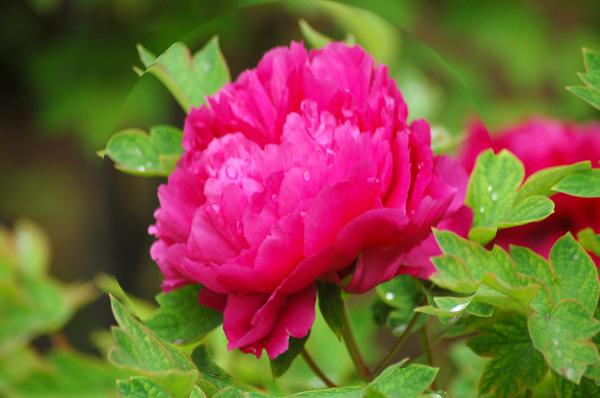
PS 滤镜— —球面化效果
    clc;

    clear all;

    close all;

    addpath('E:\PhotoShop Algortihm\Image Processing\PS Algorithm');

    I=imread('4.jpg');

    I=double(I);

    Image=I/255;

    [height, width, depth]=size(Image);

     a = 200;

     b = 200;

     centreX = 0.5;

     centreY = 0.5;

     refractionIndex = 1.25;  % >1

     icentreX=width * centreX;

     icentreY=height * centreY;

     if (a==0)

         a=width/2;

     end

     if (b==0)

         b=height/2;

     end

     a2=a*a;

     b2=b*b;

     Image_new=Image;

     for ii=1:height

        for jj=1:width

            dx=jj-icentreX;

            dy=ii-icentreY;

            x2=dx*dx;

            y2=dy*dy;

            if (y2 >= (b2 - (b2*x2)/a2))

                x=jj;

                y=ii;

            else

                rRefraction = 1.0/ refractionIndex;

                z=sqrt((1.0 - x2/a2 - y2/b2) * (a*b));

                z2=z*z;

                xAngle = acos(dx /sqrt(x2+z2));

                angle_1=pi/2-xAngle;

                angle_2=asin(sin(angle_1));

                angle_2=pi/2-xAngle - angle_2;

                x=jj - tan(angle_2)*z;

                yAngle = acos(dy /sqrt(y2+z2));

                angle_1=pi/2-yAngle;

                angle_2=asin(sin(angle_1)*rRefraction);

                angle_2=pi/2-yAngle - angle_2;

                y=ii - tan(angle_2)*z;

            end

    % %         if (x<=1)     x=1;  end

    % %         if (x>=width)   x=width-1; end;

    % %         if (y>=height)  y=height-1; end;

    % %         if (y<1)  y=1;     end;

    % %

            if (x<=1)     continue;  end

            if (x>=width)   continue; end;

            if (y>=height)  continue; end;

            if (y<1)  continue;     end;

            x1=floor(x);

            y1=floor(y);

            p=x-x1;

            q=y-y1;

            Image_new(ii,jj,:)=(1-p)*(1-q)*Image(y1,x1,:)+p*(1-q)*Image(y1,x1+1,:)...

                +q*(1-p)*Image(y1+1,x1,:)+p*q*Image(y1+1,x1+1,:);

        end

     end

     imshow(Image_new);

imwrite(Image_new, 'out.jpg');参考来源:http://www.jhlabs.com/index.html
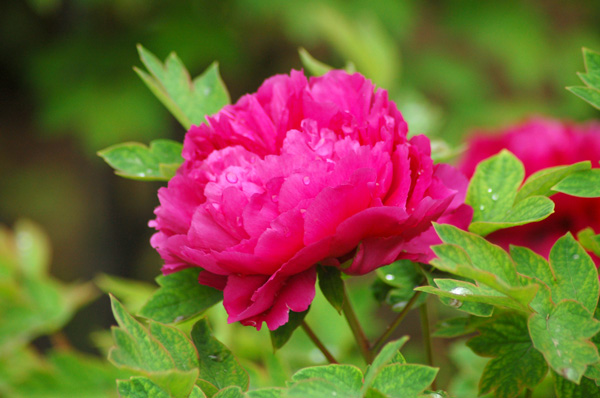
原图:
效果图:
PS 滤镜— —球面化效果的更多相关文章
- Python: PS 滤镜--万花筒效果
本文用 Python 实现 PS 的一种滤镜效果,称为万花筒.也是对图像做各种扭曲变换,最后图像呈现的效果就像从万花筒中看到的一样: 图像的效果可以参考之前的博客: http://blog.csdn. ...
- PS 滤镜— —挤压效果
clc; clear all; close all; addpath('E:\PhotoShop Algortihm\Image Processing\PS Algorithm'); I=imread ...
- PS 滤镜— —Marble 效果
clc; clear all; close all; addpath('E:\PhotoShop Algortihm\Image Processing\PS Algorithm'); I=imread ...
- PS 滤镜— — 万花筒效果
clc; clear all; close all; addpath('E:\PhotoShop Algortihm\Image Processing\PS Algorithm'); I=imread ...
- PS 滤镜— —水波效果
clc; clear all; close all; addpath('E:\PhotoShop Algortihm\Image Processing\PS Algorithm'); I=imread ...
- PS 滤镜— — sparkle 效果
clc; clear all; close all; addpath('E:\PhotoShop Algortihm\Image Processing\PS Algorithm'); I=imread ...
- PS滤镜— —波浪效果
clc; clear all; close all; addpath('E:\PhotoShop Algortihm\Image Processing\PS Algorithm'); I=imread ...
- OpenCV——PS滤镜 水波效果
// define head function #ifndef PS_ALGORITHM_H_INCLUDED #define PS_ALGORITHM_H_INCLUDED #include < ...
- Python: PS 滤镜--旋涡特效
本文用Python 实现 PS 滤镜的旋涡特效,具体的算法原理和效果可以参考之前的博客: http://blog.csdn.net/matrix_space/article/details/42215 ...
随机推荐
- ios 视图的旋转及应用
有时候,需要做出如下图所示的效果,这就需要用到视图的旋转了 1.首先将旋转的值由角度转换为弧度: #define degreesToRadinas(x) (M_PI * (x)/180.0) 注:M_ ...
- Java String 常用函数
1>获取 1.1:字符串中包含的字符数,也就是字符串的长度. int length():获取长度 1.2:根据位置获取位置上某个字符. char charAt(int index) ...
- http url转义字符,特殊字符
空格 - %20 " - %22 # - %23 % - %25 & - %26 ( - %28 ) - %29 + - %2B , - %2C / - %2F : - %3A ; ...
- containsKey使用方法
作用是判断Map中是否有所需要的键值,下面是具体的代码: public static void main(String[] args) { Map<String, String> map ...
- phpQuery—基于jQuery的PHP实现(转)
Query的选择器之强大是有目共睹的,phpQuery 让php也拥有了这样的能力,它就相当于服务端的jQuery. 先来看看官方简介: phpQuery is a server-side, chai ...
- 使用css counter来美化代码片段的样式
博客园默认的代码片段样式不太美观,特别是复制代码时会把前面的行号也复制下来,操作起来比较麻烦.最近看到一种使用CSS计数器来美化代码片段的方法,于是研究了一下计数器的使用,在此做个笔记. 这是官网的例 ...
- android 5.0 默认水波纹背景属性,可设置不论什么View
actionBarItemBackground 5.0以上超出边界圆形水波纹 selectableItemBackground 5.0以上边界内圆形水波纹 这两个属性在5.0下面是默认的灰色效果 ...
- 新手学习JSP+Servlet笔记一
作为一个新手,初次接触jsp,servlet,习惯了后台的开发,前台的知识一窍不通,利用闲暇时间,给自己补补,从MyEclipse开始. 安装好MyEclipse之后,没有安装程序的可以下载 http ...
- SQLite 数据库安装与创建数据库
嵌入式关系数据库 Ubuntu $ sudo apt-get install sqlite3 sqlite3-dev CentOS, or Fedora $ yum install SQLite3 s ...
- alibaba canal安装笔记
canal是alibaba开源的基于mysql binlog解析工具,可利用它实现mysql增量订阅/消费,典型的应用场景如下图: 利用canal,可以将mysql的数据变化,通过解析binlog,投 ...