
PS 滤镜— —Marble 效果
    clc;

    clear all;

    close all;

    addpath('E:\PhotoShop Algortihm\Image Processing\PS Algorithm');

    I=imread('4.jpg');

    I=double(I);

    Image=I/255;

    xScale = 20;

    yScale = 20;

    amount = 1;

    turbulence =0.25;

    Image_new=Image;

    [height, width, depth]=size(Image);

    Index=1:256;

    sin_T=-yScale*sin(2*pi*(Index-1)/256*turbulence);

    cos_T=xScale*cos(2*pi*(Index-1)/256*turbulence);

    [ind, g1, g2, g3]=init_arr();

    for ii=1:height

    % %     [ind, g1, g2, g3]=init_arr();

        for jj=1:width

            dis=min(max( floor(127*(1+Noise2(jj/xScale, ii/yScale, ind, g2))), 1), 256);

            x=jj+sin_T(dis);

            y=ii+cos_T(dis);

    % %         if (x<=1)     x=1;  end

    % %         if (x>=width)   x=width-1; end;

    % %         if (y>=height)  y=height-1; end;

    % %         if (y<1)  y=1;     end;

    % %

            if (x<=1)     continue;  end

            if (x>=width)   continue; end;

            if (y>=height)  continue; end;

            if (y<1)  continue;     end;

            x1=floor(x);

            y1=floor(y);

            p=x-x1;

            q=y-y1;

            Image_new(ii,jj,:)=(1-p)*(1-q)*Image(y1,x1,:)+p*(1-q)*Image(y1,x1+1,:)...

                +q*(1-p)*Image(y1+1,x1,:)+p*q*Image(y1+1,x1+1,:);

        end

    end

    imshow(Image_new)

imwrite(Image_new, 'out.jpg');参考来源:http://www.jhlabs.com/index.html
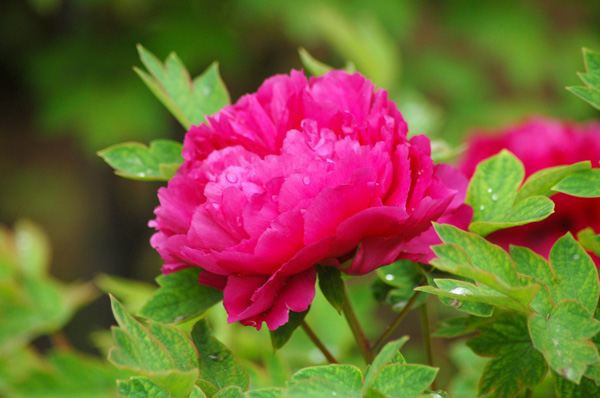
原图:
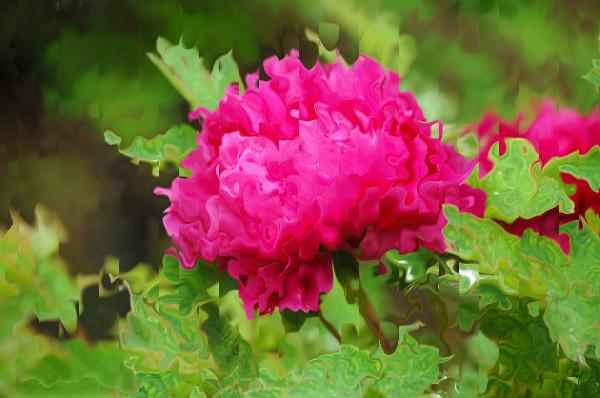
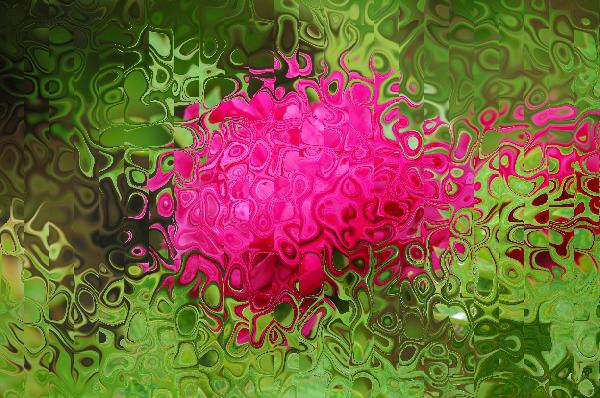
效果图:
PS 滤镜— —Marble 效果的更多相关文章
- Python: PS 滤镜--万花筒效果
本文用 Python 实现 PS 的一种滤镜效果,称为万花筒.也是对图像做各种扭曲变换,最后图像呈现的效果就像从万花筒中看到的一样: 图像的效果可以参考之前的博客: http://blog.csdn. ...
- PS 滤镜— —挤压效果
clc; clear all; close all; addpath('E:\PhotoShop Algortihm\Image Processing\PS Algorithm'); I=imread ...
- PS 滤镜— — 万花筒效果
clc; clear all; close all; addpath('E:\PhotoShop Algortihm\Image Processing\PS Algorithm'); I=imread ...
- PS 滤镜— —水波效果
clc; clear all; close all; addpath('E:\PhotoShop Algortihm\Image Processing\PS Algorithm'); I=imread ...
- PS 滤镜— — sparkle 效果
clc; clear all; close all; addpath('E:\PhotoShop Algortihm\Image Processing\PS Algorithm'); I=imread ...
- PS 滤镜— —球面化效果
clc; clear all; close all; addpath('E:\PhotoShop Algortihm\Image Processing\PS Algorithm'); I=imread ...
- PS滤镜— —波浪效果
clc; clear all; close all; addpath('E:\PhotoShop Algortihm\Image Processing\PS Algorithm'); I=imread ...
- OpenCV——PS滤镜 水波效果
// define head function #ifndef PS_ALGORITHM_H_INCLUDED #define PS_ALGORITHM_H_INCLUDED #include < ...
- Python: PS 滤镜特效 -- Marble Filter
本文用 Python 实现 PS 滤镜特效,Marble Filter, 这种滤镜使图像产生不规则的扭曲,看起来像某种玻璃条纹, 具体的代码如下: import numpy as np import ...
随机推荐
- Binding中使用RelativeSource
问题:当前View有一个DataGrid,其DataGridTemplateColum设置了一个ComboBox. 其对应的VM是local:ViewMode,含有ModelValue和myLIst属 ...
- php 前台post多维数组
post多维数组时,在后台用$_POST接收不正常,应使用$_REQUEST
- urllib.urlencode() 无法encode中文, UnicodeEncodeError
urllib.urlencode() 无法encode中文, UnicodeEncodeError, 具体错误内容如下:File "/System/Library/Frameworks/Py ...
- Django模板系统(非常详细)(后台数据如何展示在前台)
前面的章节我们看到如何在视图中返回HTML,但是HTML是硬编码在Python代码中的这会导致几个问题:1,显然,任何页面的改动会牵扯到Python代码的改动网站的设计改动会比Python代码改动更频 ...
- Pollard-Rho大整数拆分模板
随机拆分,简直机智. 关于过程可以看http://wenku.baidu.com/link?url=JPlP8watmyGVDdjgiLpcytC0lazh4Leg3s53WIx1_Pp_Y6DJTC ...
- Jmeter查看QPS和响应时间随着时间的变化曲线
以下两个插件提供测试结果,扩展图表显示 --- Response Times Over Time --- Transactions per Second 1.打开 https://jmeter-plu ...
- 爬虫入门【2】Requests库简介
发送请求 使用Requests发送网络请求很简单 #首先要导入requests库 import requests #返回一个Response对象 r=requests.get('https://git ...
- F - Monkey Banana Problem
F - Monkey Banana Problem Time Limit:2000MS Memory Limit:32768KB 64bit IO Format:%lld & ...
- spring mvc注解和spring boot注解
1 spring mvc和spring boot之间的关系 spring boot包含spring mvc.所以,spring mvc的注解在spring boot总都是可以用的吗? spring b ...
- phpstorm10激活方法
选择 license server ---> http://idea.lanyus.com/ (末尾的斜杠不能漏了!) 2016-7-5更新 上面的注册方法再试时,已被封杀 2017-9-1 ...