
Linear regression with one variable - Cost function intuition I
摘要: 本文是吴恩达 (Andrew Ng)老师《机器学习》课程,第二章《单变量线性回归》中第8课时《代价函数的直观认识 - 1》的视频原文字幕。为本人在视频学习过程中逐字逐句记录下来以便日后查阅使用。现分享给大家。如有错误,欢迎大家批评指正,在此表示诚挚地感谢!同时希望对大家的学习能有所帮助。
In the previous video (article), we gave the mathematical definition of the cost function. In this video (article), let's look at some examples to get back to intuition about what the cost function is doing, and why we want to use it.

To recap, here's what we had last time. We want to fit a straight line to our data, so we had this formed as a hypothesis with these parameters and
, and with different choices of the parameters, we end up with different straight-line fits. So, the data which are fit like so. And there's a cost function, and that was our optimization objective. For this video (article), in order to better visualize the cost function J, I'm going to work with a simplified hypothesis function, like that shown on the right. So, I'm gonna use my simplified hypothesis which is just
. We can, if you want, think of this as setting the parameter
. So, I have only one parameter
, and my cost function is similar to before except that now
. And I have only one parameter
, and so my optimization objective is to minimize
. In pictures, what this means is that if
that corresponds to choosing only hypothesis functions that pass through the origin, that pass through the point
. Using the simplified definition of hypothesis cost function, let's try to understand the cost function concept better.
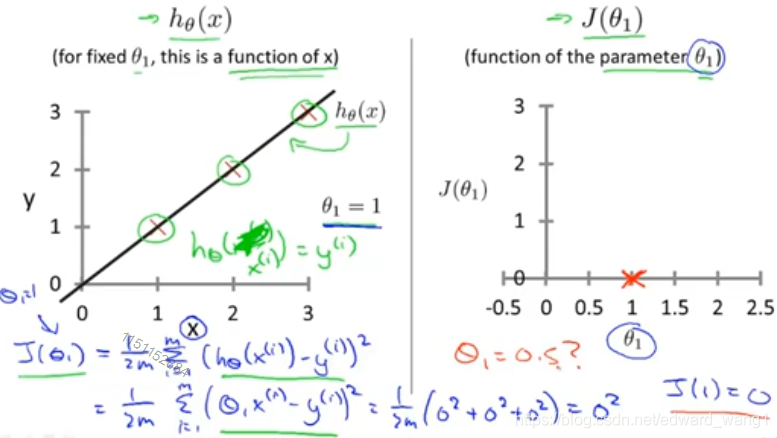
It turns out that two key functions we want to understand. The first is the hypothesis function, and the second is the cost function. So, notice that the hypothesis, right, . For a fixed value of
, this is a function of x. So, the hypothesis is a function of what is the size of the house x. In contrast, the cost function J, that's a function of the parameter
which controls the slope of the straight line. Let's plot these functions and try to understand them both better. Let's start with the hypothesis. On the left, let's say here's my training set with three points at
. Let's pick a value
, so when set
=1, and if that's my choice for
, then my hypothesis is going to look like this straight line over here. And I'm gonna point out when I'm plotting my hypothesis function, my X-axis, my horizontal axis is labeled x, is labeled as you know, size of the house over here. Now, of temporary, set
. What I want to do is figure out what is
when
=1. So, let's go ahead and compute what the cost function has for the value one. Well, as usual, my cost function is defined as follows, right? Sum from some of them are my training set of this usual squared error term. And this is therefore equal to
, and if you simplify, this turns out to be
, which is of course, just equal to 0. Now, inside the cost function, it turns out, each of these terms here is equal to 0. Because for the specific training set I have, for my 3 training examples there,
, if
, then
exactly. And so,
, each of these terms is equal to 0, which is why I find that
. Let's plot that. What I'm gonna do on the right is plot my cost function J. And notice, because my cost function is a function of my parameter
, when I plot my cost function, the horizontal axis is now labeled with
. So, I have
, so let's go ahead and plot that. End up with an X over there. Now let's look at some other examples.
can take on a range of different values. Right? So
can take on the negative values, zero and positive values. So, what if
? Let's go ahead and plot that.
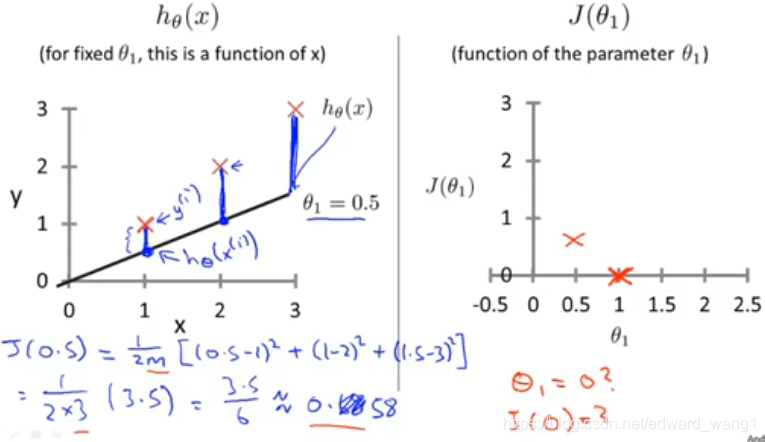
I'm now going to set , and in that case, my hypothesis looks like this. As a line with slope equals to 0.5. And, let's compute
. So, that is going to be
of my usual cost function. It turns out that the cost function is going to be the sum of square values of the height of this line, plus the sum of square of the height of that line, plus the sum of square of the height of that line, right? Because just this vertical distance, that's the difference between
and the predicted value
. So, the first example is going to be
. For my second example, I get
, because my hypothesis predicted one, but the actual housing price was two. And finally, plus
. And so that's equal to
. So now we know
is about 0.58. Let's go and plot that. So, we plot that which is maybe about over there. Now, let's do one more. How about if
, what is
equal to?

It turns out if ,
is just equal to 0, you know, this flat line, that just goes horizontally like his. And so, measuring the errors. We have that just
. So, let's go ahead and plot that as well. So, it ends up with a value around 2.3. And of course, we can keep on doing this for other values of
. It turns out that you can have negative for other values of
as well. So if
is negative, then
would be equal to say
, then
, and so that corresponds to a hypothesis with a slope of -0.5. And you can actually keep on computing these errors. This turns out to be, you know, for -0.5, it turns out to have really high error. It works out to be something, like, 5.25 and so on. And for different values of
, you can compute these things. And it turns out that you computed range of values, you get something like that. And by computing the range of values, you can actually slowly create out what this function
looks like. And that's what
is. To recap, for each value of
, right? Each value of
corresponds to a different hypothesis, or to a different straight line fit on the left. And for each value of
, we could then derive a different a different value of
. And for example,
corresponds to this straight line (in cyan) straight through the data. Whereas
, and this point shown in magenta, corresponded to maybe that line (in magenta). And
, which is shown in blue, that corresponds to this horizontal line (in blue). So, for each value of
, we wound up with a different value of
. And then we could use this to trace out this plot on the right. Now you remember the optimization objective for our learning algorithm is we want to choose the value of
, that minimizes
. This (
) was our objective function for the linear regression. Well, looking at this curve, the value that minimizes
is
. And low and behold, that is indeed the best possible straight line fit throughout data, by setting
. And just for this particular training set, we actually end up fitting it perfectly. And that's why minimizing
corresponds to finding a straight line that fits the data well. So, to wrap up, in this video (article), we looked at some plots to understand the cost function. To do so, we simplified the algorithm, so that it only had one parameter
. And we set the parameter
. In the next video (article), we'll go back to the original problem formulation, and look at some visualizations involving both
and
. That is without setting
. And hopefully that will give you an even better sense of what the cost function J is doing in the original linear regression.
Linear regression with one variable - Cost function intuition I的更多相关文章
- Linear regression with one variable - Cost function
摘要: 本文是吴恩达 (Andrew Ng)老师<机器学习>课程,第二章<单变量线性回归>中第7课时<代价函数>的视频原文字幕.为本人在视频学习过程中逐字逐句记录下 ...
- Lecture0 -- Introduction&&Linear Regression with One Variable
Introduction What is machine learning? Tom Mitchell provides a more modern definition: "A compu ...
- Stanford机器学习---第二讲. 多变量线性回归 Linear Regression with multiple variable
原文:http://blog.csdn.net/abcjennifer/article/details/7700772 本栏目(Machine learning)包括单参数的线性回归.多参数的线性回归 ...
- Stanford机器学习---第一讲. Linear Regression with one variable
原文:http://blog.csdn.net/abcjennifer/article/details/7691571 本栏目(Machine learning)包括单参数的线性回归.多参数的线性回归 ...
- 机器学习笔记1——Linear Regression with One Variable
Linear Regression with One Variable Model Representation Recall that in *regression problems*, we ar ...
- Machine Learning 学习笔记2 - linear regression with one variable(单变量线性回归)
一.Model representation(模型表示) 1.1 训练集 由训练样例(training example)组成的集合就是训练集(training set), 如下图所示, 其中(x,y) ...
- MachineLearning ---- lesson 2 Linear Regression with One Variable
Linear Regression with One Variable model Representation 以上篇博文中的房价预测为例,从图中依次来看,m表示训练集的大小,此处即房价样本数量:x ...
- 机器学习 (一) 单变量线性回归 Linear Regression with One Variable
文章内容均来自斯坦福大学的Andrew Ng教授讲解的Machine Learning课程,本文是针对该课程的个人学习笔记,如有疏漏,请以原课程所讲述内容为准.感谢博主Rachel Zhang的个人笔 ...
- machine learning (2)-linear regression with one variable
machine learning- linear regression with one variable(2) Linear regression with one variable = univa ...
随机推荐
- 关于button的onclientclick事件和onclick事件
利用onclientclick事件在onclick事件之前执行,对用户输入文本进行检查,如果不符合规定则retrun false JS代码 function check() { var aLength ...
- 2、Spring Boot 2.x 快速入门
1.2 Spring Boot 快速入门 1.2.1 开发环境和工具 JDK 1.8+:Spring Boot 2.x 要求 JDK 1.8 环境及以上版本.另外,Spring Boot 2.x 只兼 ...
- P5312 [Ynoi2011]D2T1
思路:01trie 按位维护 提交:5边 错因:爆int + 少处理询问时的右端点 题解: 见代码(已经不想说什么了) 代码 //I have my own flg; #include<bits ...
- 016_linux驱动之_原子操作
1. 原子操作 原子操作指的是在执行过程中不会被别的代码路径所中断的操作. 常用原子操作函数举例: atomic_t v = ATOMIC_INIT(0); //定义原子变量v并初始化为0 a ...
- Oracle 体系结构图
Oracle体系结构图 详细图
- @Async 异步注释 @EnableAsync
@SpringBootApplication @ComponentScan(basePackages = "com.fddsfsg") //@EnableSwagger2 @Ena ...
- CSP-S模拟测试 88 题解
T1 queue: 考场写出dp柿子后觉得很斜率优化,然后因为理解错了题觉得斜率优化完全不可做,只打了暴力. 实际上他是可以乱序的,所以直接sort,正确性比较显然,贪心可证,然后就是个sb斜率优化d ...
- 【luogu1016】旅行家的预算--模拟
题目描述 一个旅行家想驾驶汽车以最少的费用从一个城市到另一个城市(假设出发时油箱是空的).给定两个城市之间的距离D1D1D1.汽车油箱的容量CCC(以升为单位).每升汽油能行驶的距离D2D2D2.出发 ...
- Irrlicht引擎剖析二
- vscode集成eslint
1. 安装 ESLint 扩展 首先,打开 VSCode 扩展面板并搜索 ESLint 扩展,然后点击安装 2. 项目安装eslint yarn add eslint -D 3. 设置eslint配置 ...