
关于 .NET Core 动态链接库的开发
上个月月底,VS2017RC版发布了,一个很大的特点就是将原来的xProj文件又改回了csproj了。
这样一改,其实很多新的问题也暴露出来了,最严重的问题就是Net版本兼容性。
原来的Net体系大致是NetFramework,Net Core这样的,虽然也有Net Standard 这样的概念,但是很少有人会去关注。
但是,现在的VS将这三种体系都结合在一起了,传统的Winform还是NetFramework体系,新的AspNet使用的是NetCore体系,但是动态连接库使用的是NetStandard体系。
这三个体系是可以相互转化的,通过试验证明,在运行的层面,没有什么问题,但是由于MSBuild还没有跟上,所以VS里面报错是密密麻麻,不忍直视。
新建的解决方案,一个是NetFrame的Winform,一个是Standard的动态链接库。
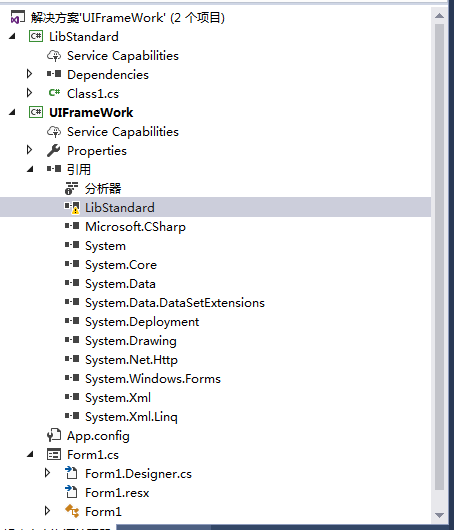
下图中就可以看到,动态链接库是可以引入的(作为解决方案中的项目),但是存在警告。

同时可以看到最大的问题是VS里面,都是错误警告:
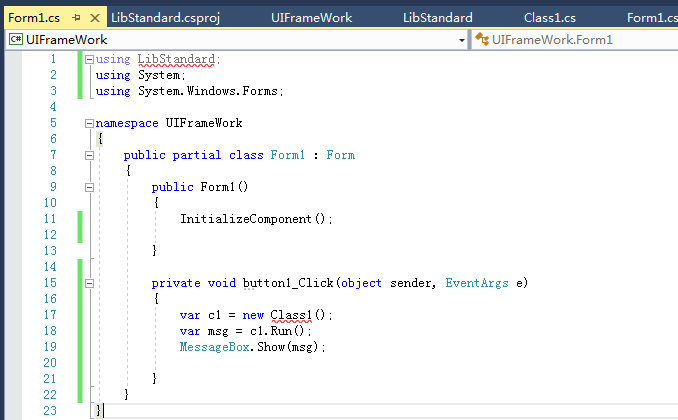
在原来的VS2015,使用project.json的时候,在上图的左上角是可以选择 NetFramework462,NetCore的,现在是无法选择的。
暂时不知道VS2017的后续版本这么处理这个问题。
个人觉得这次NetCore的发展速度很快,但是思路却有些混乱了,现在主要的问题是:
1.原本的库,没有办法完整的移植到跨平台的环境,除了UI的库之外,很多涉及到平台特性的库,都是缺失的。
2.现在微软的方向,即考虑到要通过NetStandard实现来作为标准,又要兼容之前的NetCore的命名方式。估计近期有会出现一股命名潮。
3.VS工具不成熟的前提下,硬推Mac版的VS,其实Mac版的VS没有什么亮点,鸡肋。还不如全力完善Win版的VS。
[更新]
如果编辑了csproj文件
  <PropertyGroup>

    <TargetFramework>netstandard1.6</TargetFramework>

    <TargetFramework>net462</TargetFramework>

  </PropertyGroup>
则发现,项目无法编译成功(单个TargetFramework可以编译成功)
    <PackageReference Include="System.Xml.XmlSerializer">

      <Version>4.3.0</Version>

    </PackageReference>
这个包,在两个Framework的时候无法使用。不知道怎么修改。
在过去project.json的时候如下
{

  "version": "1.0.0-*",

  "dependencies": {

    "mongocsharpdriver": "2.3.0-rc1",

    "MongoDB.Driver": "2.3.0-rc1"

  },

  "frameworks": {

    "netcoreapp1.0": {

      "imports": "netcoreapp1.0",

      "dependencies": {

        "System.Xml.XmlSerializer": "4.0.11"

      }

    },

    "net462": {

      "frameworkAssemblies": {

        "System.Xml": "4.0.0.0",

        "System.Xml.XmlSerializer": "4.0.10"

      }

    }

  }

}
以下问题不知道是不是因为两个Framework产生的。
二义性问题,我看了一下定义,也发现两个一模一样的地方,按照道理来说,应该只有一处才对。不知道谁知道理由吗。
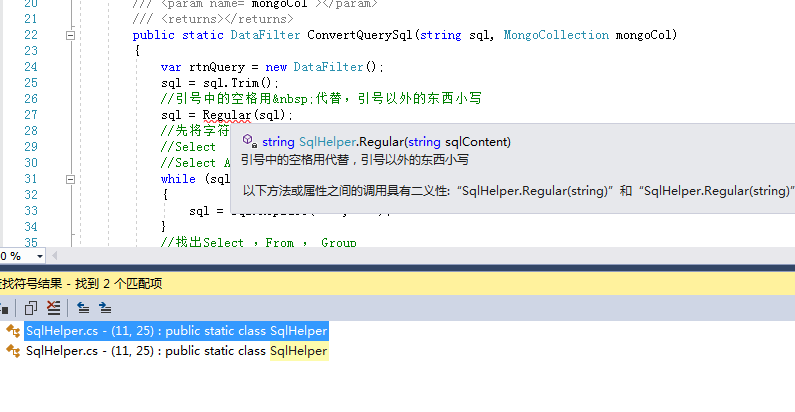
[更新]关于二义性的问题:原来MongoUtilityStandard的工程,为了避免双重管理, 引用的是普通MongoUtility工程的代码,而不是其目录上的代码。
<Compile Include="..\MongoUtility\Aggregation\*.cs" />
现在如果将代码直接复制一份,则该问题消失。
<Compile Include="Aggregation\*.cs" />
该项目在AspNet中发生错误:
netcoreapp1.0 和 netframework462,standard1.6 之间兼容性不知道是否有文档
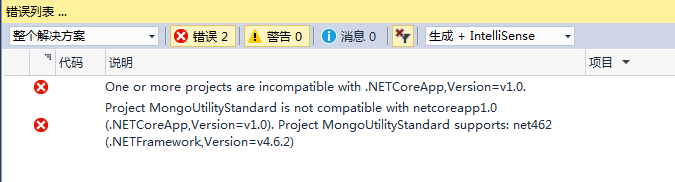
[更新]为了兼容netcoreapp1.0,继续增加条件
<Project ToolsVersion="15.0" xmlns="http://schemas.microsoft.com/developer/msbuild/2003">

  <Import Project="$(MSBuildExtensionsPath)\$(MSBuildToolsVersion)\Microsoft.Common.props" />

  <PropertyGroup Label="Configuration">

    <RootNamespace>MongoUtility</RootNamespace>

  </PropertyGroup>

  <PropertyGroup>

    <TargetFramework>netstandard1.6</TargetFramework>

    <TargetFramework>net462</TargetFramework>

    <TargetFramework>netcoreapp1.0</TargetFramework>

  </PropertyGroup>

  <ItemGroup>

    <Compile Include="..\MongoUtility\Aggregation\*.cs" />

    <Compile Include="..\MongoUtility\Basic\*.cs" />

    <Compile Include="..\MongoUtility\Command\*.cs" />

    <Compile Include="..\MongoUtility\Core\*.cs" />

    <Compile Include="..\MongoUtility\EventArgs\*.cs" />

    <Compile Include="..\MongoUtility\Security\*.cs" />

    <Compile Include="..\MongoUtility\ToolKit\*.cs" />

    <EmbeddedResource Include="**\*.resx" />

  </ItemGroup>

  <ItemGroup>

    <PackageReference Include="mongocsharpdriver">

      <Version>2.4.0-beta1</Version>

    </PackageReference>

    <PackageReference Include="MongoDB.Bson">

      <Version>2.4.0-beta1</Version>

    </PackageReference>

    <PackageReference Include="MongoDB.Driver">

      <Version>2.4.0-beta1</Version>

    </PackageReference>

    <PackageReference Include="MongoDB.Driver.Core">

      <Version>2.4.0-beta1</Version>

    </PackageReference>

    <PackageReference Include="NETStandard.Library">

      <Version>1.6.1</Version>

    </PackageReference>

    <PackageReference Include="Microsoft.NET.Sdk">

      <Version>1.0.0-alpha-20161104-2</Version>

      <PrivateAssets>All</PrivateAssets>

    </PackageReference>

  </ItemGroup>

  <ItemGroup Condition=" '$(TargetFramework)' == 'netstandard1.6' ">

    <PackageReference Include="Microsoft.CSharp">

      <Version>4.3.0</Version>

    </PackageReference>

  </ItemGroup>

  <ItemGroup Condition=" '$(TargetFramework)' == 'net462' ">

    <Reference Include="System.Xml" />

    <Reference Include="System" />

    <Reference Include="Microsoft.CSharp" />

  </ItemGroup>

  <ItemGroup Condition=" '$(TargetFramework)' == 'netcoreapp1.0' ">

    <PackageReference Include="System.Xml.XmlSerializer">

      <Version>4.3.0</Version>

    </PackageReference>

    <PackageReference Include="System.Runtime.Serialization.Formatters">

      <Version>4.3.0</Version>

    </PackageReference>

  </ItemGroup>

  <Import Project="$(MSBuildToolsPath)\Microsoft.CSharp.targets" />

</Project>
这样的代码构成和版本问题,我不知道是我学得不够深入,还是NetCore还处于未完成状态。
既然从project.json换回csproj,那么图形界面也应该准备好,还有就是csproj的兼容性,MSBuild的兼容性。不知道2017正式版能否改掉这些问题。
版本的大坑:
    ResourceLib -> E:\WorkSpace\MongoCola\ResourceLib\bin\Debug\ResourceLib.dll

    Common -> E:\WorkSpace\MongoCola\Common\bin\Debug\Common.dll

E:\WorkSpace\MongoCola\MongoUtility\Core\RuntimeMongoDBContext.cs(26,20,26,49): warning CS0618: “MongoClientExtensions.GetServer(MongoClient)”已过时:“Use the new API instead.”

E:\WorkSpace\MongoCola\MongoUtility\Core\ConnectionInfo.cs(77,27,77,45): warning CS0618: “MongoClientExtensions.GetServer(MongoClient)”已过时:“Use the new API instead.”

E:\WorkSpace\MongoCola\MongoUtility\Core\RuntimeMongoDBContext.cs(646,60,646,78): warning CS0618: “MongoClientExtensions.GetServer(MongoClient)”已过时:“Use the new API instead.”

E:\WorkSpace\MongoCola\MongoUtility\Command\DataBaseCommand.cs(112,37,112,89): warning CS0618: “MongoClientExtensions.GetServer(MongoClient)”已过时:“Use the new API instead.”

E:\WorkSpace\MongoCola\MongoUtility\Command\DataBaseCommand.cs(136,30,136,73): warning CS0618: “MongoClientExtensions.GetServer(MongoClient)”已过时:“Use the new API instead.”

    MongoUtilityStandard -> E:\WorkSpace\MongoCola\MongoUtilityStandard\bin\Debug\netcoreapp1.0\MongoUtilityStandard.dll

E:\WorkSpace\MongoCola\MongoGUICtl\ClientTree\FillDataBaseInfoToTreeNode.cs(45,17,45,35): warning CS0618: “MongoClientExtensions.GetServer(MongoClient)”已过时:“Use the new API instead.”

E:\WorkSpace\MongoCola\MongoGUICtl\ClientTree\FillDataBaseInfoToTreeNode.cs(57,17,57,35): warning CS0618: “MongoClientExtensions.GetServer(MongoClient)”已过时:“Use the new API instead.”

E:\WorkSpace\MongoCola\MongoGUICtl\ClientTree\FillDataBaseInfoToTreeNode.cs(78,17,78,35): warning CS0618: “MongoClientExtensions.GetServer(MongoClient)”已过时:“Use the new API instead.”

E:\WorkSpace\MongoCola\MongoGUICtl\ClientTree\UIHelper.cs(169,21,169,44): warning CS0618: “MongoClientExtensions.GetServer(MongoClient)”已过时:“Use the new API instead.”

E:\WorkSpace\MongoCola\MongoGUICtl\ClientTree\UIHelper.cs(373,17,373,35): warning CS0618: “MongoClientExtensions.GetServer(MongoClient)”已过时:“Use the new API instead.”

E:\WorkSpace\MongoCola\MongoGUICtl\ClientTree\UIHelper.cs(375,43,375,61): warning CS0618: “MongoClientExtensions.GetServer(MongoClient)”已过时:“Use the new API instead.”

E:\WorkSpace\MongoCola\MongoGUICtl\ClientTree\UIHelper.cs(382,25,382,43): warning CS0618: “MongoClientExtensions.GetServer(MongoClient)”已过时:“Use the new API instead.”

    MongoGUICtl -> E:\WorkSpace\MongoCola\MongoGUICtl\bin\Debug\MongoGUICtl.dll

    MongoGUIView -> E:\WorkSpace\MongoCola\MongoGUIView\bin\Debug\MongoGUIView.dll

    FunctionForm -> E:\WorkSpace\MongoCola\FunctionForm\bin\Debug\FunctionForm.dll

    PlugInPrj -> E:\WorkSpace\MongoCola\PlugInPrj\bin\Debug\PlugInPrj.dll

    无法解决“System.Runtime, Version=4.1.0.0, Culture=neutral, PublicKeyToken=b03f5f7f11d50a3a”与“System.Runtime, Version=4.0.20.0, Culture=neutral, PublicKeyToken=b03f5f7f11d50a3a”之间的冲突。正在随意选择“System.Runtime, Version=4.1.0.0, Culture=neutral, PublicKeyToken=b03f5f7f11d50a3a”。

    请考虑使用 app.config 将程序集“System.Runtime, Culture=neutral, PublicKeyToken=b03f5f7f11d50a3a”从版本“4.0.20.0”[C:\Program Files (x86)\Reference Assemblies\Microsoft\Framework\.NETFramework\v4.6.2\Facades\System.Runtime.dll]重新映射到版本“4.1.0.0”[],以解决冲突并消除警告。

D:\Program Files (x86)\Microsoft Visual Studio\2017\Community\MSBuild\15.0\Bin\Microsoft.Common.CurrentVersion.targets(1909,5): warning MSB3276: 发现同一依赖程序集的不同版本间存在冲突。请将项目文件中的“AutoGenerateBindingRedirects”属性设置为 true。有关详细信息,请参阅 http://go.microsoft.com/fwlink/?LinkId=294190。

    MongoCola -> E:\WorkSpace\MongoCola\MongoCola\bin\Debug\MongoCola.exe

========== 全部重新生成: 成功 8 个,失败 0 个,跳过 0 个 ==========
[更新]System.Runtime直接在Nuget包中选择版本 4.1.0.0,保证输出目录包含4.1.0.0的动态链接库
新问题:
System.Linq,一定要 4.1.0.0版本的,但是Nuget上只有 4.1.0 的,死活认为这两个版本不同,我也是醉了。
[更新] 手动将 packages\System.Linq\4.1.0\lib\net463 下面的包放到输出目录下面。。。。。
虽然不能选择463(我不知道哪里可以下载463),但是463下面的直接用就可以了。。。。。
或许Standard1.6 === net463吧。。。。
关于 .NET Core 动态链接库的开发的更多相关文章
- ASP.NET Core 1.0 开发记录
官方资料: https://github.com/dotnet/core https://docs.microsoft.com/en-us/aspnet/core https://docs.micro ...
- 通过几个Hello World感受.NET Core全新的开发体验
2016年6月27日,这是一个特殊的日子,微软全新的.NET开发平台.NET Core的RTM版本正式发布.我个人将.NET Core的核心特性归结为三点,它们的首字母组成一个非常好记的简称——COM ...
- ASP.NET Core Web API 开发-RESTful API实现
ASP.NET Core Web API 开发-RESTful API实现 REST 介绍: 符合REST设计风格的Web API称为RESTful API. 具象状态传输(英文:Representa ...
- 配置visual studio code进行asp.net core rc2的开发
1.安装.net core sdk https://github.com/dotnet/cli#installers-and-binaries,根据你的系统选择下载. 2.下载vscode的C#扩展插 ...
- 配置visual studio code进行asp.net core rc2的开发(转载jeffreywu)
1.安装.net core sdk https://github.com/dotnet/cli#installers-and-binaries,根据你的系统选择下载 2.下载vscode的C#扩展插件 ...
- NET Core全新的开发体验
NET Core全新的开发体验 2016年6月27日,这是一个特殊的日子,微软全新的.NET开发平台.NET Core的RTM版本正式发布.我个人将.NET Core的核心特性归结为三点,它们的首字母 ...
- .NET Core多平台开发体验[1]: Windows
微软在千禧年推出 .NET战略,并在两年后推出第一个版本的.NET Framework和IDE(Visual Studio.NET 2002,后来改名为Visual Studio),如果你是一个资深的 ...
- .NET Core多平台开发体验[2]: Mac OS X
除了微软自家的Windows平台, .NET Core针对Mac OS以及各种Linux(RHEL.Ubuntu.Debian.Fedora.CentOS和SUSE等)都提供了很好的支持,我们先来体验 ...
- .NET Core多平台开发体验[4]: Docker
对于一个 .NET开发人员,你可能没有使用过Docker,但是你不可能没有听说过Docker.Docker是Github上最受欢迎的开源项目之一,它号称要成为所有云应用的基石,并把互联网升级到下一代. ...
随机推荐
- ASP.NET Core 中文文档 第四章 MVC(4.6)Areas(区域)
原文:Areas 作者:Dhananjay Kumar 和 Rick Anderson 翻译:耿晓亮(Blue) 校对:许登洋(Seay) Areas 是 ASP.NET MVC 用来将相关功能组织成 ...
- Visual Studio:error MSB8020(搬运)
状况如下: error MSB8020: The builds tools for v120 (Platform Toolset = 'v120') cannot be found. To build ...
- CommandPattern
/** * 命令模式 * @author TMAC-J * 将调用者和接受者分离 * 可以将一组命令组合在一起,适合很多命令的时候 */ public class CommandPattern { i ...
- date命令
GNU的date提供+%s(小写s), 能打印出自1970-01-01 00:00:00到当前时间的秒数. 这可能大家都不陌生,但有两点需要注意: 1. %s存在于GNU扩展版本.像在solaris等 ...
- MyEclipse对Maven的安装
好记性不如烂笔头,记录一下. 操作系统:windows 7 MyEclipse2015 JDK1.7 maven的下载链接,点这里下载apache-maven-3.0.4-bin.tar.gz. 下载 ...
- Openfire的启动过程与session管理
说明 本文源码基于Openfire4.0.2. Openfire的启动 Openfire的启动过程非常的简单,通过一个入口初始化lib目录下的openfire.jar包,并启动一个 ...
- 镜像切换Logreader Agent报错:分发数据库中可能存在不一致的状态(续)
报错: 分发数据库中可能存在不一致的状态: dist_backup_lsn {00000030:000001ba:0004},dist_last_lsn {00000030:000001cd:0004 ...
- vue-router疑惑点记录
以vue-router2.x讲解. 1.定义路由时,某路由对象里同时有component和redirect重定向参数,会怎样处理? 答: 忽略component,直接用redirect的值重定向到新路 ...
- 搭建一个简单的mybatis框架
一.Mybatis介绍 MyBatis是一个支持普通SQL查询,存储过程和高级映射的优秀持久层框架.MyBatis消除了几乎所有的JDBC代码和参数的手工设置以及对结果集的检索封装.MyBatis可以 ...
- EF Code First Migrations数据库迁移
1.EF Code First创建数据库 新建控制台应用程序Portal,通过程序包管理器控制台添加EntityFramework. 在程序包管理器控制台中执行以下语句,安装EntityFramewo ...