
16.翻译系列:EF 6 Code -First中使用存储过程【EF 6 Code-First系列】
EF 6 Code-First系列文章目录:
- 1 翻译系列:什么是Code First(EF 6 Code First 系列)
- 2.翻译系列:为EF Code-First设置开发环境(EF 6 Code-First系列)
- 3.翻译系列:EF Code-First 示例(EF 6 Code-First系列)
- 4.翻译系列:EF 6 Code-First默认约定(EF 6 Code-First系列)
- 5.翻译系列:EF 6中数据库的初始化(EF 6 Code-First 系列)
- 6.翻译系列:EF 6 Code-First中数据库初始化策略(EF 6 Code-First系列
- 7.翻译系列:EF 6中的继承策略(EF 6 Code-First 系列)
- 8.翻译系列: EF 6中配置领域类(EF 6 Code-First 系列)
- 9.翻译系列:EF 6以及EF Core中的数据注解特性(EF 6 Code-First系列)
- 9.1 翻译系列:数据注解特性之----Table【EF 6 Code-First 系列】
- 9.2 翻译系列:数据注解特性之---Column【EF 6 Code First系列】
- 9.3 翻译系列:数据注解特性之Key【EF 6 Code-First 系列】
- 9.4 翻译系列:EF 6以及 EF Core中的NotMapped特性(EF 6 Code-First系列)
- 9.5 翻译系列:数据注解之ForeignKey特性【EF 6 Code-First系列】
- 9.6 翻译系列:数据注解之Index特性【EF 6 Code-First系列】
- 9.7 翻译系列:EF数据注解特性之--InverseProperty【EF 6 Code-First系列】
- 9.8 翻译系列:数据注解特性之--Required 【EF 6 Code-First系列】
- 9.9 翻译系列:数据注解特性之--MaxLength 【EF 6 Code-First系列】
- 9.10 翻译系列:EF数据注解特性之StringLength【EF 6 Code-First系列】
- 9.11 翻译系列:数据注解特性之--Timestamp【EF 6 Code-First系列】
- 9.12 翻译系列:数据注解特性之ConcurrencyCheck【EF 6 Code-First系列】
- 10.翻译系列:EF 6中的Fluent API配置【EF 6 Code-First系列】
- 10.1.翻译系列:EF 6中的实体映射【EF 6 Code-First系列】
- 10.2.翻译系列:使用Fluent API进行属性映射【EF 6 Code-First】
- 11.翻译系列:在EF 6中配置一对零或者一对一的关系【EF 6 Code-First系列】
- 12.翻译系列:EF 6 中配置一对多的关系【EF 6 Code-First系列】
- 13.翻译系列:Code-First方式配置多对多关系【EF 6 Code-First系列】
- 14.翻译系列:从已经存在的数据库中生成上下文类和实体类【EF 6 Code-First系列】
- 15.翻译系列:EF 6中的级联删除【EF 6 Code-First 系列】
- 16.翻译系列:EF 6 Code -First中使用存储过程【EF 6 Code-First系列】
- 17.翻译系列:将Fluent API的配置迁移到单独的类中【EF 6 Code-First系列】
- 18.翻译系列:EF 6 Code-First 中的Seed Data(种子数据或原始测试数据)【EF 6 Code-First系列】
- 19.翻译系列:EF 6中定义自定义的约定【EF 6 Code-First约定】
- 20.翻译系列:Code-First中的数据库迁移技术【EF 6 Code-First系列】
- 20.1翻译系列:EF 6中自动数据迁移技术【EF 6 Code-First系列】
- 20.2.翻译系列:EF 6中基于代码的数据库迁移技术【EF 6 Code-First系列】
- 21.翻译系列:Entity Framework 6 Power Tools【EF 6 Code-First系列】
当SaveChanges方法被调用的时候,EF 6 可以用来创建并使用增删改存储过程。
我们来为下面的Student实体,创建增删改存储过程。
class Student

{

    public int StudentId { get; set; }

    public string StudentName { get; set; }

    public DateTime DoB { get; set; }

}
使用MapToStoredProcedures()方法,为实体配置默认的存储过程。
public class SchoolContext: DbContext

{

    protected override void OnModelCreating(DbModelBuilder modelBuilder)

    {

        modelBuilder.Entity<Student>()

                    .MapToStoredProcedures();

    }

    public DbSet<Student> Students { get; set; }

}
EF API将会为Student实体创建Student_Insert, Student_Update 和Student_Delete存储过程。
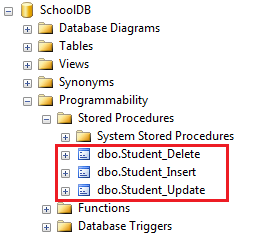
Student_Insert和Student_Update存储过程包含Student实体的所有属性的参数,Student_Delete存储过程仅仅包含Student的主键属性StudentID一个参数:
CREATE PROCEDURE [dbo].[Student_Insert]

    @StudentName [nvarchar](max),

    @DoB [datetime]

AS

BEGIN

    INSERT [dbo].[Students]([StudentName], [DoB])

    VALUES (@StudentName, @DoB)

    DECLARE @StudentId int

    SELECT @StudentId = [StudentId]

    FROM [dbo].[Students]

    WHERE @@ROWCOUNT >  AND [StudentId] = scope_identity()

    SELECT t0.[StudentId]

    FROM [dbo].[Students] AS t0

    WHERE @@ROWCOUNT >  AND t0.[StudentId] = @StudentId

END

CREATE PROCEDURE [dbo].[Student_Update]

    @StudentId [int],

    @StudentName [nvarchar](max),

    @DoB [datetime]

AS

BEGIN

    UPDATE [dbo].[Students]

    SET [StudentName] = @StudentName, [DoB] = @DoB

    WHERE ([StudentId] = @StudentId)

END

CREATE PROCEDURE [dbo].[Student_Delete]

    @StudentId [int]

AS

BEGIN

    DELETE [dbo].[Students]

    WHERE ([StudentId] = @StudentId)

END
为实体映射自定义的存储过程
EF6允许你使用自己的存储过程,你可以像下面这样进行配置,下面的代码为Student实体,映射了一个自定义的存储过程。
protected override void OnModelCreating(DbModelBuilder modelBuilder)

{

    modelBuilder.Entity<Student>()

            .MapToStoredProcedures(p => p.Insert(sp => sp.HasName("sp_InsertStudent").Parameter(pm => pm.StudentName, "name").Result(rs => rs.StudentId, "Id"))

                    .Update(sp => sp.HasName("sp_UpdateStudent").Parameter(pm => pm.StudentName, "name"))

                    .Delete(sp => sp.HasName("sp_DeleteStudent").Parameter(pm => pm.StudentId, "Id"))

            );

}
在上面的例子中,Student实体映射了三个存储过程,sp_InsertStudent、sp_UpdateStudent、以及sp_DeleteStudent.当然同样对存储过程的参数进行了配置。
为所有实体配置存储过程
你可以使用下面的代码,为所有实体配置存储过程。
protected override void OnModelCreating(DbModelBuilder modelBuilder)

{

    modelBuilder.Types().Configure(t => t.MapToStoredProcedures());

}
局限性
- 仅仅只有Fluent API才能被用来映射存储过程。EF 6中的数据注解特性,是不能映射存储过程的。
- 如果你想使用CUD操作,你就必须为实体映射Insert,Update以及Delete存储过程。仅仅是映射其中一个,是不被允许的。
16.翻译系列:EF 6 Code -First中使用存储过程【EF 6 Code-First系列】的更多相关文章
- 9.2 翻译系列:数据注解特性之---Column【EF 6 Code First系列】
原文链接:http://www.entityframeworktutorial.net/code-first/column-dataannotations-attribute-in-code-firs ...
- 21.翻译系列:Entity Framework 6 Power Tools【EF 6 Code-First系列】
原文链接:https://www.entityframeworktutorial.net/code-first/entity-framework-power-tools.aspx 大家好,这里就是EF ...
- 9.10 翻译系列:EF数据注解特性之StringLength【EF 6 Code-First系列】
原文链接:https://www.entityframeworktutorial.net/code-first/stringlength-dataannotations-attribute-in-co ...
- 9.9 翻译系列:数据注解特性之--MaxLength 【EF 6 Code-First系列】
原文链接:https://www.entityframeworktutorial.net/code-first/maxlength-minlength-dataannotations-attribut ...
- 9.7 翻译系列:EF数据注解特性之--InverseProperty【EF 6 Code-First系列】
原文链接:https://www.entityframeworktutorial.net/code-first/inverseproperty-dataannotations-attribute-in ...
- 9.3 翻译系列:数据注解特性之Key【EF 6 Code-First 系列】
原文链接:http://www.entityframeworktutorial.net/code-first/key-dataannotations-attribute-in-code-first.a ...
- 9.1 翻译系列:数据注解特性之----Table【EF 6 Code-First 系列】
原文地址:http://www.entityframeworktutorial.net/code-first/table-dataannotations-attribute-in-code-first ...
- 9.8 翻译系列:数据注解特性之--Required 【EF 6 Code-First系列】
原文链接:https://www.entityframeworktutorial.net/code-first/required-attribute-dataannotations-in-code-f ...
- 9.11 翻译系列:数据注解特性之--Timestamp【EF 6 Code-First系列】
原文链接:https://www.entityframeworktutorial.net/code-first/TimeStamp-dataannotations-attribute-in-code- ...
随机推荐
- Gym 102091K The Stream of Corning 2【线段树】
<题目链接> 题目大意: 进行两种操作:1.给定一个数的出现时间.价值.消失时间: 2.进行一次询问,问你当前时间,第K大的数的价值. 解题分析: 采用离线集中处理,将每个数的出现时间和它 ...
- 大数据小白系列——HDFS(1)
[注1:结尾有大福利!] [注2:想写一个大数据小白系列,介绍大数据生态系统中的主要成员,理解其原理,明白其用途,万一有用呢,对不对.] 大数据是什么?抛开那些高大上但笼统的说法,其实大数据说的是两件 ...
- POJ2386----Lake Counting
/* 利用宽搜将每块积水填满,添加一个计数器,记下填满几块积水即答案 */ #include<iostream> using namespace std; ][]; ][] = {{-,- ...
- Java代码优化小结(三)
(35)对资源的close()建议分开操作虽然有些麻烦,却能避免资源泄露.我们想,如果没有修改过的代码,万一XXX.close()抛异常了,那么就进入了catch块中了,YYY.close()不会执行 ...
- Shell脚本笔记(二)Shell变量
Shell变量 一)全局环境变量 全局变量对于定义它的shell和其子shell都是可见的,但如果生成它的shell被终止,全局变量也就消失了.另外全局变量会被子shell的同名变量覆盖. #定义一个 ...
- Scrapy基础(五) ------css选择器基础
基本语法: * 选择所有节点#container 选择id为container的节点.container 选择所有class包含contai ...
- python基础一 ------Python 的编码
首先了解一下历史,但是本篇文章冗杂,如老太太裹脚布----------又臭又长 编码历史: 1. 计算机只能处理数字,文本文件只有转换为数字 才能处理.8bit==1字节 所以一个字节能表示的最 ...
- linux VPS服务器的一些配置
SSH密钥登录让Linux VPS/服务器更安全 2011年01月10日 上午 | 作者:VPSer 随着PHP越来越流行,Linux VPS/服务器的使用也越来越多,Linux的安全问题也需要日渐加 ...
- MSP430F5529学习记录
个人学习理解,难免有错,望各位大佬指出错误,不胜感激 有些引脚在单片机上没看到,在原理图上可以找得到,说明这些引脚没有引出来 单片机上的引出的引脚是可以外部操作的,有些不必要引出的就直接在单片机内部 ...
- Hadoop2.2.0集群的HA高可靠的最简单配置
HA集群需要使用nameservice ID区分一个HDFS集群.另外,HA中还要使用一个词,叫做NameNode ID.同一个集群中的不同NameNode,使用不同的NameNode ID区分.为了 ...