
路由器逆向分析------binwalk工具的安装
本文博客链接:http://blog.csdn.net/qq1084283172/article/details/65441110
一、binwalk工具运行支持的平台
binwalk工具安装支持的平台的官方参考地址:https://github.com/devttys0/binwalk/wiki/Supported-Platforms
| Operating System | Core Support | Optional Feature Support | Ease of Installation |
|---|---|---|---|
| Linux | Excellent | Excellent | Very easy |
| OSX | Excellent | Good | Very easy |
| FreeBSD | Experimental | Unknown | Very easy |
| Windows | Experimental | Poor | Very easy |
在Linux下使用binwalk工具效果最佳,坑最少;推荐在ubuntu系统下安装和使用binwalk工具。
二、binwalk工具的简单安装
binwalk工具简单安装的官方参考地址:https://github.com/devttys0/binwalk
Installation
Binwalk follows the standard Python installation procedure:
$ sudo python setup.py install
If you're running Python 2.x, you'll also want to install the Python lzma module:
$ sudo apt-get install python-lzma
在binwalk工具的简单安装之前,需要在ubuntu系统上安装好python,binwalk工具简单安装的命令过程如下:
$ sudo apt-get update

$ sudo apt-get install build-essential autoconf git

$ git clone https://github.com/devttys0/binwalk

$ cd binwalk

$ sudo python setup.py install

# 如果安装的是 python 2.x,还需要安装python-lzma模块

$ sudo apt-get install python-lzma
binwalk工具的详细使用帮助说明:
Binwalk v2.1.2b

Craig Heffner, http://www.binwalk.org

Usage: binwalk [OPTIONS] [FILE1] [FILE2] [FILE3] ...

Disassembly Scan Options:

    -Y, --disasm                 Identify the CPU architecture of a file using the capstone disassembler

    -T, --minsn=<int>            Minimum number of consecutive instructions to be considered valid (default: 500)

    -k, --continue               Don't stop at the first match

Signature Scan Options:

    -B, --signature              Scan target file(s) for common file signatures

    -R, --raw=<str>              Scan target file(s) for the specified sequence of bytes

    -A, --opcodes                Scan target file(s) for common executable opcode signatures

    -m, --magic=<file>           Specify a custom magic file to use

    -b, --dumb                   Disable smart signature keywords

    -I, --invalid                Show results marked as invalid

    -x, --exclude=<str>          Exclude results that match <str>

    -y, --include=<str>          Only show results that match <str>

Extraction Options:

    -e, --extract                Automatically extract known file types

    -D, --dd=<type:ext:cmd>      Extract <type> signatures, give the files an extension of <ext>, and execute <cmd>

    -M, --matryoshka             Recursively scan extracted files

    -d, --depth=<int>            Limit matryoshka recursion depth (default: 8 levels deep)

    -C, --directory=<str>        Extract files/folders to a custom directory (default: current working directory)

    -j, --size=<int>             Limit the size of each extracted file

    -n, --count=<int>            Limit the number of extracted files

    -r, --rm                     Delete carved files after extraction

    -z, --carve                  Carve data from files, but don't execute extraction utilities

Entropy Analysis Options:

    -E, --entropy                Calculate file entropy

    -F, --fast                   Use faster, but less detailed, entropy analysis

    -J, --save                   Save plot as a PNG

    -Q, --nlegend                Omit the legend from the entropy plot graph

    -N, --nplot                  Do not generate an entropy plot graph

    -H, --high=<float>           Set the rising edge entropy trigger threshold (default: 0.95)

    -L, --low=<float>            Set the falling edge entropy trigger threshold (default: 0.85)

Raw Compression Options:

    -X, --deflate                Scan for raw deflate compression streams

    -Z, --lzma                   Scan for raw LZMA compression streams

    -P, --partial                Perform a superficial, but faster, scan

    -S, --stop                   Stop after the first result

Binary Diffing Options:

    -W, --hexdump                Perform a hexdump / diff of a file or files

    -G, --green                  Only show lines containing bytes that are the same among all files

    -i, --red                    Only show lines containing bytes that are different among all files

    -U, --blue                   Only show lines containing bytes that are different among some files

    -w, --terse                  Diff all files, but only display a hex dump of the first file

General Options:

    -l, --length=<int>           Number of bytes to scan

    -o, --offset=<int>           Start scan at this file offset

    -O, --base=<int>             Add a base address to all printed offsets

    -K, --block=<int>            Set file block size

    -g, --swap=<int>             Reverse every n bytes before scanning

    -f, --log=<file>             Log results to file

    -c, --csv                    Log results to file in CSV format

    -t, --term                   Format output to fit the terminal window

    -q, --quiet                  Suppress output to stdout

    -v, --verbose                Enable verbose output

    -h, --help                   Show help output

    -a, --finclude=<str>         Only scan files whose names match this regex

    -p, --fexclude=<str>         Do not scan files whose names match this regex

    -s, --status=<int>           Enable the status server on the specified port
binwalk的简单安装功能有限,只能将对设备的固件进行文件组成格式的分析和设备的文件系统进行提取,不能对提取后的设备文件系统进行解压处理。要binwalk工具能对提取后的设备文件系统进行解压还需要安装binwalk工具需要的依赖库和组件工具。
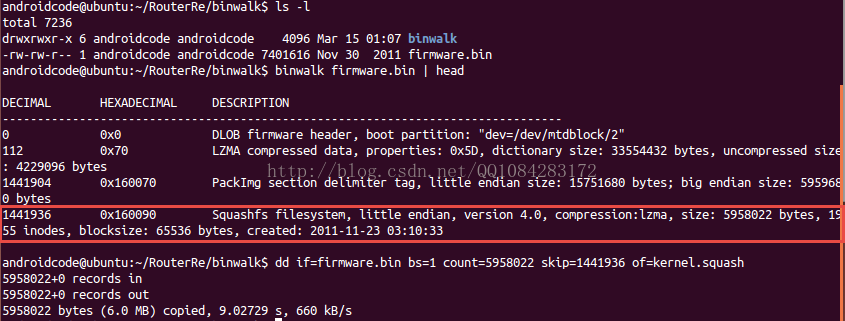
使用binwalk工具对设备的固件进行文件组成格式的分析(以路由器固件的分析为例):
$ binwalk firmware.bin | head分析结果如图:
使用binwalk工具对设备的固件文件系统进行提取(以路由器固件的分析为例):
$ binwalk -e firmware.bin

# 或者

$ binwalk -Me firmware.bin
文件系统的提取结果如图:
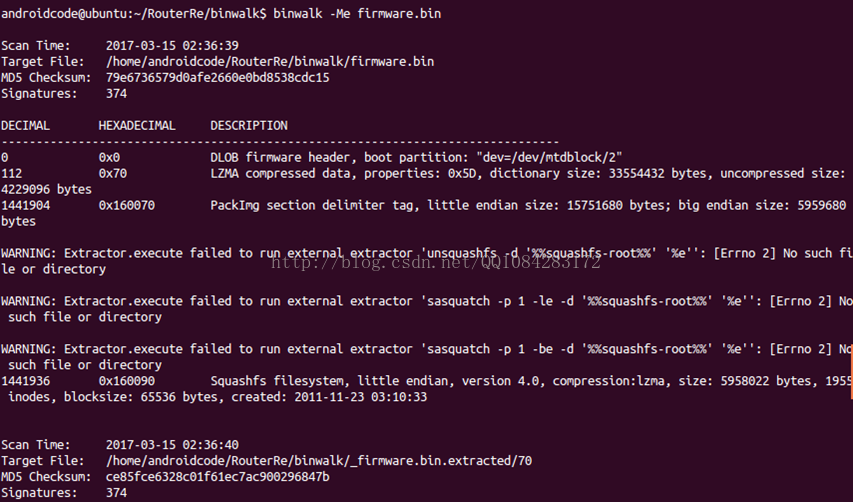
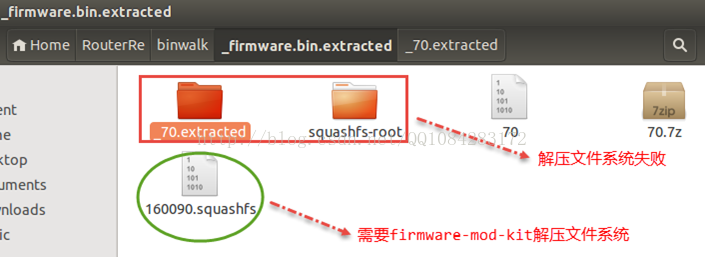
从上面的提取结果来看,binwalk虽然对路由器固件的文件系统squashfs提取成功,但是文件系统squashfs解压却失败,主要的原因是因为binwalk工具的安装不完整,后面会提到binwalk工具的完整安装。
当然了,binwalk还有一种更简单的直接安装方式:
$ sudo apt-get update

$ sudo apt-get install binwalk参考网址:https://www.howtoinstall.co/en/ubuntu/trusty/binwalk
三、binwalk工具的完整安装
binwalk工具的完整安装可以参考官方的网址:https://github.com/devttys0/binwalk/blob/master/INSTALL.md
Before You Start
Binwalk supports Python 2.7 - 3.x. Although most systems have Python2.7 set as their default Python interpreter, binwalk does run faster in Python3. Installation procedures for both are provided below.
Installation
Installation follows the typical Python installation procedure:
# Python2.7

$ sudo python setup.py install
# Python3.x

$ sudo python3 setup.py install
NOTE: Older versions of binwalk (e.g., v1.0) are not compatible with the latest version of binwalk. It is strongly recommended that you uninstall any existing binwalk installations
before installing the latest version in order to avoid API conflicts.
Dependencies
Besides a Python interpreter, there are no installation dependencies for binwalk. All dependencies are optional run-time dependencies, and unless otherwise specified, are available from most Linux package managers.
Although all binwalk run-time dependencies are optional, the python-lzma module is highly recommended for improving the reliability of signature scans.
This module is included by default in Python3, but must be installed separately for Python2.7:
$ sudo apt-get install python-lzma
Binwalk uses the pycrypto library to decrypt some known encrypted firmware images:
# Python2.7

$ sudo apt-get install python-crypto
# Python3.x

$ sudo apt-get install python3-crypto
Binwalk uses pyqtgraph to generate graphs and visualizations,
which requires the following:
# Python2.7

$ sudo apt-get install libqt4-opengl python-opengl python-qt4 python-qt4-gl python-numpy python-scipy python-pip

$ sudo pip install pyqtgraph
# Python3.x

$ sudo apt-get install libqt4-opengl python3-opengl python3-pyqt4 python3-pyqt4.qtopengl python3-numpy python3-scipy python3-pip

$ sudo pip3 install pyqtgraph
Binwalk's --disasm option requires the Capstone disassembly
framework and its corresponding Python bindings:
# Python2.7

$ sudo apt-get install python-pip

$ sudo pip install capstone
# Python3.x

$ sudo apt-get install python3-pip

$ sudo pip3 install capstone
Binwalk relies on multiple external utilties in order to automatically extract/decompress files and data:
# Install standard extraction utilities

$ sudo apt-get install mtd-utils gzip bzip2 tar arj lhasa p7zip p7zip-full cabextract cramfsprogs cramfsswap squashfs-tools
# Install sasquatch to extract non-standard SquashFS images

$ sudo apt-get install zlib1g-dev liblzma-dev liblzo2-dev

$ git clone https://github.com/devttys0/sasquatch

$ (cd sasquatch && ./build.sh)
# Install jefferson to extract JFFS2 file systems

$ sudo pip install cstruct

$ git clone https://github.com/sviehb/jefferson

$ (cd jefferson && sudo python setup.py install)
# Install ubi_reader to extract UBIFS file systems

$ sudo apt-get install liblzo2-dev python-lzo

$ git clone https://github.com/jrspruitt/ubi_reader

$ (cd ubi_reader && sudo python setup.py install)
# Install yaffshiv to extract YAFFS file systems

$ git clone https://github.com/devttys0/yaffshiv

$ (cd yaffshiv && sudo python setup.py install)
# Install unstuff (closed source) to extract StuffIt archive files

$ wget -O - http://my.smithmicro.com/downloads/files/stuffit520.611linux-i386.tar.gz | tar -zxv

$ sudo cp bin/unstuff /usr/local/bin/
Note that for Debian/Ubuntu users, all of the above dependencies can be installed automatically using the included deps.shscript:
$ sudo ./deps.sh
binwalk工具的快速安装和使用方式,参考官方的链接:https://github.com/devttys0/binwalk/wiki/Quick-Start-Guide
Quick Start Guide
revisions
Pages 12
Installation
Download binwalk:
$ wget https://github.com/devttys0/binwalk/archive/master.zip

$ unzip master.zip
Install binwalk; if you have a previously installed version of binwalk, it is suggested that you uninstall it before upgrading:
$ (cd binwalk-master && sudo python setup.py uninstall && sudo python setup.py install)
Debian users can install all optional and suggested extractors/dependencies using the includeddeps.sh script
(recommended):
$ sudo ./binwalk-master/deps.sh
If you are not a Debian user, or if you wish to install only selected dependencies, see the INSTALLdocumentation
for more details.
Scanning
Firmware
The primary - and by far the most popular - feature of binwalk is its signature scanning.
Binwalk can scan a firmware image for many different embedded file types and file systems; just give it a list of files to scan:
$ binwalk firmware.bin

DECIMAL     HEX         DESCRIPTION

-------------------------------------------------------------------------------------------------------------------

0           0x0         DLOB firmware header, boot partition: "dev=/dev/mtdblock/2"

112         0x70        LZMA compressed data, properties: 0x5D, dictionary size: 33554432 bytes, uncompressed size: 3797616 bytes

1310832     0x140070    PackImg section delimiter tag, little endian size: 13644032 bytes; big endian size: 3264512 bytes

1310864     0x140090    Squashfs filesystem, little endian, version 4.0, compression:lzma, size: 3264162 bytes,  1866 inodes, blocksize: 65536 bytes, created: Tue Apr  3 04:12:22 2012
File
Extraction
You can tell binwalk to extract any files that it finds in the firmware image with the -e option:
$ binwalk -e firmware.bin
Binwalk will even recursively scan files as it extracts them if you also specify the -M option:
$ binwalk -Me firmware.bin
And if the -r option is specified, any file signatures that couldn't be extracted - or that resulted
in 0-size files - will be automatically deleted:
$ binwalk -Mre firmware.bin
To extract one specific signature type, specify one or more -D
type options:
$ binwalk -D 'png image:png' firmware.bin
Entropy
Analysis
What happens if binwalk doesn't report any signatures? Or, how do you know binwalk didn't miss anything interesting?
Entropy analysis can help identify interesting sections of data inside a firmware image:
$ binwalk -E firmware.bin
HINT: You can combine other scans with the entropy scan. For example, you can combine a signature scan with an entropy scan:
$ binwalk -B -E firmware.bin

DECIMAL     HEX         DESCRIPTION

-------------------------------------------------------------------------------------------------------------------

36625       0x8F11      Zlib header, default compression
binwalk工具完整安装方式的整理,以python 2.7的安装为例,python 3.x的安装类似。
1.最懒的方式,自动安装依赖库和组件工具。
$ sudo apt-get update

$ sudo apt-get install build-essential autoconf git

$ git clone https://github.com/devttys0/binwalk.git

$ cd binwalk

# python2.7安装

$ sudo python setup.py install

# 自动安装依赖库文件

$ sudo ./deps.sh
2.快速安装方式,自动安装依赖库和组件工具。
$ sudo apt-get update

$ sudo apt-get install build-essential autoconf git

# https://github.com/devttys0/binwalk/wiki/Quick-Start-Guide

$ wget https://github.com/devttys0/binwalk/archive/master.zip

$ unzip master.zip

$ (cd binwalk-master && sudo python setup.py uninstall && sudo python setup.py install)

# 自动安装依赖库文件和工具组件

$ sudo ./binwalk-master/deps.sh
3.有选择性的安装binwalk的依赖库文件和组件工具。
$ sudo apt-get update

$ sudo apt-get install build-essential autoconf git

# https://github.com/devttys0/binwalk/blob/master/INSTALL.md

$ git clone https://github.com/devttys0/binwalk.git

$ cd binwalk

# python2.7安装

$ sudo python setup.py install

# python2.7手动安装依赖库

$ sudo apt-get install python-lzma

$ sudo apt-get install python-crypto

$ sudo apt-get install libqt4-opengl python-opengl python-qt4 python-qt4-gl python-numpy python-scipy python-pip

$ sudo pip install pyqtgraph

$ sudo apt-get install python-pip

$ sudo pip install capstone

# Install standard extraction utilities(必选)

$ sudo apt-get install mtd-utils gzip bzip2 tar arj lhasa p7zip p7zip-full cabextract cramfsprogs cramfsswap squashfs-tools

# Install sasquatch to extract non-standard SquashFS images(必选)

$ sudo apt-get install zlib1g-dev liblzma-dev liblzo2-dev

$ git clone https://github.com/devttys0/sasquatch

$ (cd sasquatch && ./build.sh)

# Install jefferson to extract JFFS2 file systems(可选)

$ sudo pip install cstruct

$ git clone https://github.com/sviehb/jefferson

$ (cd jefferson && sudo python setup.py install)

# Install ubi_reader to extract UBIFS file systems(可选)

$ sudo apt-get install liblzo2-dev python-lzo

$ git clone https://github.com/jrspruitt/ubi_reader

$ (cd ubi_reader && sudo python setup.py install)

# Install yaffshiv to extract YAFFS file systems(可选)

$ git clone https://github.com/devttys0/yaffshiv

$ (cd yaffshiv && sudo python setup.py install)

# Install unstuff (closed source) to extract StuffIt archive files(可选)

$ wget -O - http://my.smithmicro.com/downloads/files/stuffit520.611linux-i386.tar.gz | tar -zxv

$ sudo cp bin/unstuff /usr/local/bin/
四、binwalk IDA plugin插件工具的安装
binwalk IDA plugin插件工具的安装说明可以参考官方网址:https://github.com/devttys0/binwalk/blob/master/INSTALL.md
Installing the IDA Plugin
If IDA is installed on your system, you may optionally install the binwalk IDA plugin:
$ python setup.py idainstall --idadir=/home/user/ida
Likewise, the binwalk IDA plugin can be uninstalled:
$ python setup.py idauninstall --idadir=/home/user/ida
Usage
Once installed, there will be two new menu options in IDA's Search drop-down menu list:
- binwalk signatures - Scans the loaded IDB for file signatures
- binwalk opcodes - Scans the loaded IDB for common opcode signatures
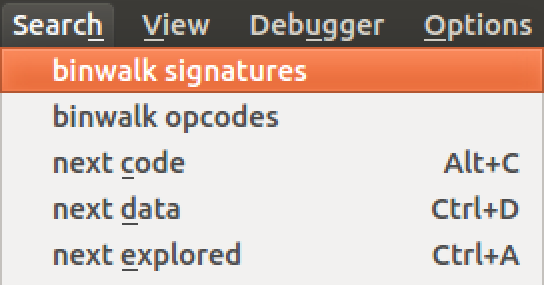
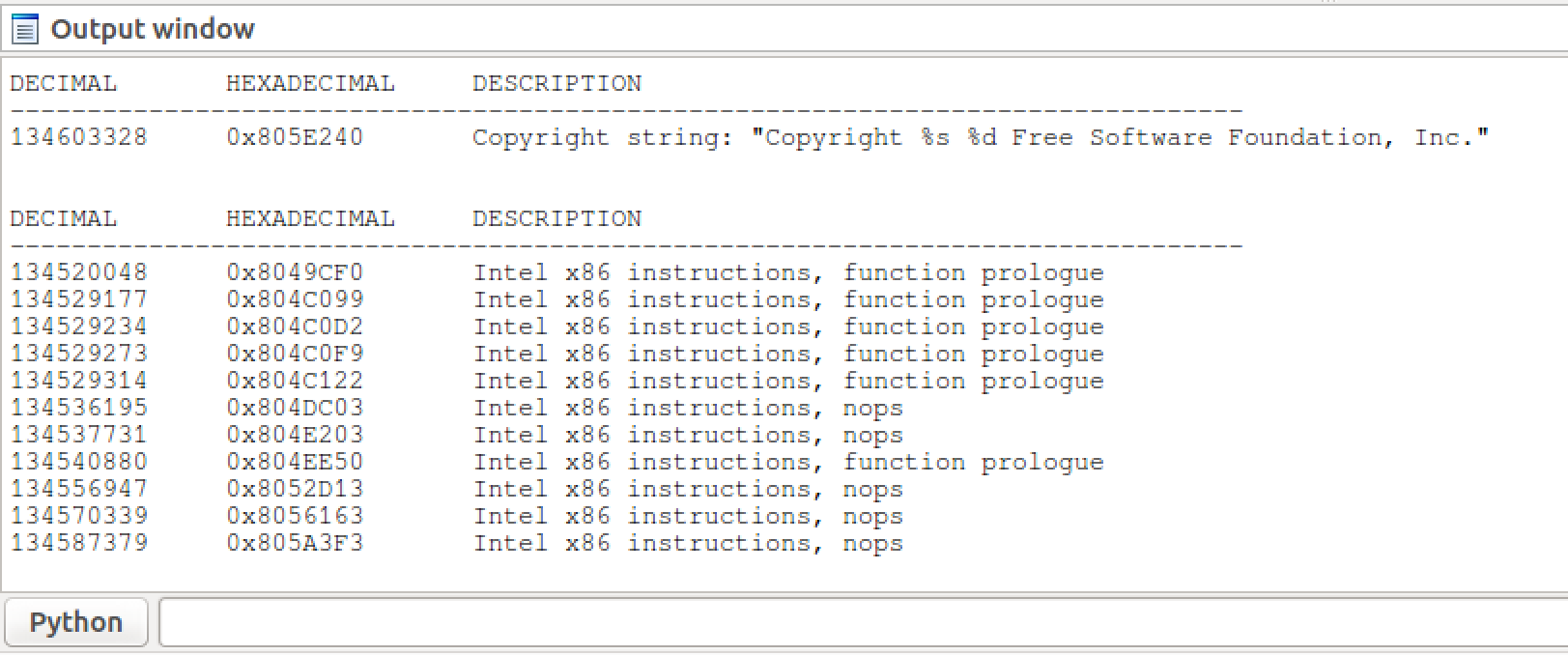
Results are printed to IDA's output window:
五、binwalk工具的卸载
Uninstalling Binwalk
If binwalk has been installed to a standard system location (e.g., via setup.py install), it can be removed by running:
# Python2.7

$ sudo python setup.py uninstall
# Python3

$ sudo python3 setup.py uninstall
Note that this does not remove any of the manually installed dependencies.
路由器逆向分析------binwalk工具的安装的更多相关文章
- 路由器逆向分析------binwalk工具的详细使用说明
本文博客地址:http://blog.csdn.net/qq1084283172/article/details/66971242 一.binwalk工具的基本用法介绍 1.获取帮助信息 $ binw ...
- 路由器逆向分析------firmware-mod-kit工具安装和使用说明
本文博客地址:http://blog.csdn.net/qq1084283172/article/details/68061957 一.firmware-mod-kit工具的安装 firmware-m ...
- 路由器逆向分析------在Linux上安装IDA Pro
本文博客地址:http://blog.csdn.net/qq1084283172/article/details/69665905 01.在Linux系统上安装Linux版本的IDA Pro Linu ...
- 路由器逆向分析------Running Debian MIPS Linux in QEMU
本文博客地址:http://blog.csdn.net/qq1084283172/article/details/70176583 下面的文章内容主要参考英文博客<Running Debian ...
- 路由器逆向分析------在QEMU MIPS虚拟机上运行MIPS程序(ssh方式)
本文博客地址:http://blog.csdn.net/qq1084283172/article/details/69652258 在QEMU MIPS虚拟机上运行MIPS程序--SSH方式 有关在u ...
- 路由器逆向分析------MIPS系统网络的配置(QEMU)
本文博客地址:http://blog.csdn.net/qq1084283172/article/details/69378333 MIPS系统网络的配置 使用QEMU 模拟正在运行的MIPS系统并 ...
- 路由器逆向分析------sasquatch和squashfs-tools工具的安装和使用
本文博客地址:http://blog.csdn.net/qq1084283172/article/details/68942660 一.sasquatch工具的安装和使用 sasquatch工具支持对 ...
- 路由器逆向分析------QEMU的下载和安装(Linux平台)
本文博客地址:http://blog.csdn.net/qq1084283172/article/details/68953160 一.QEMU源码的下载和编译 QEMU源码的github下载地址:h ...
- 路由器逆向分析------MIPS交叉编译环境的搭建(Buildroot)
本文博客地址:http://blog.csdn.net/qq1084283172/article/details/68950682 为了能在我们熟悉的windows或者ubuntu下开发mips架构的 ...
随机推荐
- LanQiao-297(快速排序)
快速排序 LanQiao-297 #include<iostream> #include<cstdio> #include<algorithm> #include& ...
- 【转载】java类加载时机与过程
1 开门见山 以前曾经看到过一个java的面试题,当时觉得此题很简单,可是自己把代码运行起来,可是结果并不是自己想象的那样.题目如下: class SingleTon { private stati ...
- CentOS 7关闭firewalld启用iptables 开放端口
在CentOS7中,有很多CentOS 6中的常用服务发生了变化. 其中iptables是其中比较大的一个.防火墙iptables被firewalld取代. 本文将介绍,如果采用systemctl关闭 ...
- spring 整合kafka监听消费
前言 最近项目里有个需求,要消费kafka里的数据.之前也手动写过代码去消费kafka数据.但是转念一想.既然spring提供了消费kafka的方法.就没必要再去重复造轮子.于是尝试使用spring的 ...
- 学习版pytest内核测试平台开发万字长文入门篇
前言 2021年,测试平台如雨后春笋般冒了出来,我就是其中一员,写了一款pytest内核测试平台,在公司落地.分享出来后,有同学觉得挺不错,希望能开源,本着"公司代码不要传到网上去,以免引起 ...
- beego 框架用的页面样式模板
https://themequarry.com/category/free 页面样式
- 1.认识numpy的数组
认识ndarray --ndarray:用于存储单一数据类型的多维数组 ndarray基础属性的认识 import numpy as np #将numpy简写为np方便调用 1.通过以下实例来认识ar ...
- 跨端开发技术 | 拼团商城项目同时开发app和小程序的要点
此项目为拼团商城类型,主要功能包括商品分类.商品详情.商品搜索.拼团.订单管理等. 项目源码在 https://github.com/apicloudcom/group-ec 仓库的 widget 目 ...
- 13 条高效实用的 JavaScript 单行代码
JavaScript可以实现很多令人惊奇的事! 从复杂的框架到处理API,有太多的东西可以学习. 甚至,仅用一行代码,它也能完成一些很棒的工作. 不信?那么请看这13条JavaScript单行代码,用 ...
- OpenCV图像处理中“找圆技术”的使用
一.为什么"找圆" 圆是基本图形的一种,更为重要的是,自然情况下采集的图像,很少大量存在"圆":但凡存在的,大都是人工的,那么就必然代表特定的意义,从而 ...