
一个简单的springboot+mybatis-plus+thymeleaf的学生管理系统
一、登录功能
1.1登录所涉及的功能主要包括拦截器,过滤器,用户在未登录的时候,访问页面会阻止访问的,如图所示:
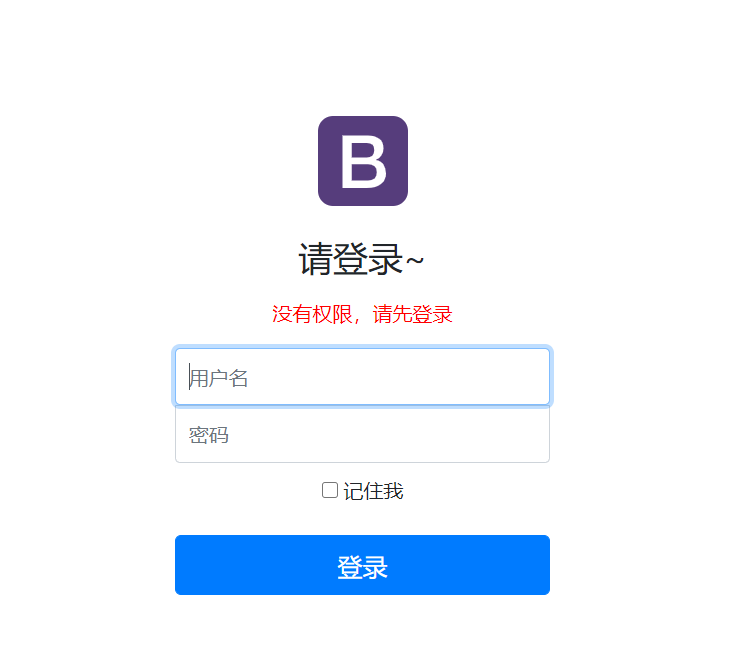
实现这个功能的主要代码如下所示
 1 //拦截器

 2 public class LoginHandlerInterceptor implements HandlerInterceptor {

 3     //执行之前

 4     public boolean preHandle(HttpServletRequest request, HttpServletResponse response, Object handler) throws Exception {

 5         Object username = request.getSession().getAttribute("username");

 6         if(username ==null){

 7             //未登录,返回登录页面

 8             request.setAttribute("msg","没有权限,请先登录");

 9             request.getRequestDispatcher("/index.html").forward(request,response);

10             return false;

11         }

12         return true;

13     }
解释:首先你登录的时候可以将用户名之类的信息封装在session对象里面,在重启项目后,session的生命周期结束,则Object username = request.getSession().getAttribute("username");
获取的username为空将执行为空操作,实现对用户的拦截。 request.getRequestDispatcher("/index.html").forward(request,response);就是重定向到indext页面。
二、国际化(实现中英文切换)
实现这个功能需要我们在resources下面建立国际化包,如下
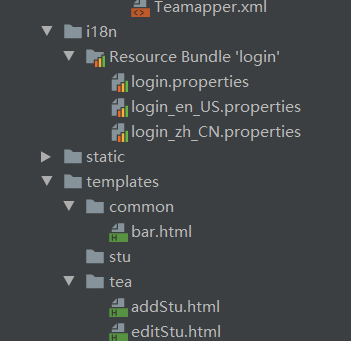
解释:login指默认时的,login_en_US.properties指英文,login_zh_CN指中文,在配置文件中,对需要进行转化的进行书写,如下
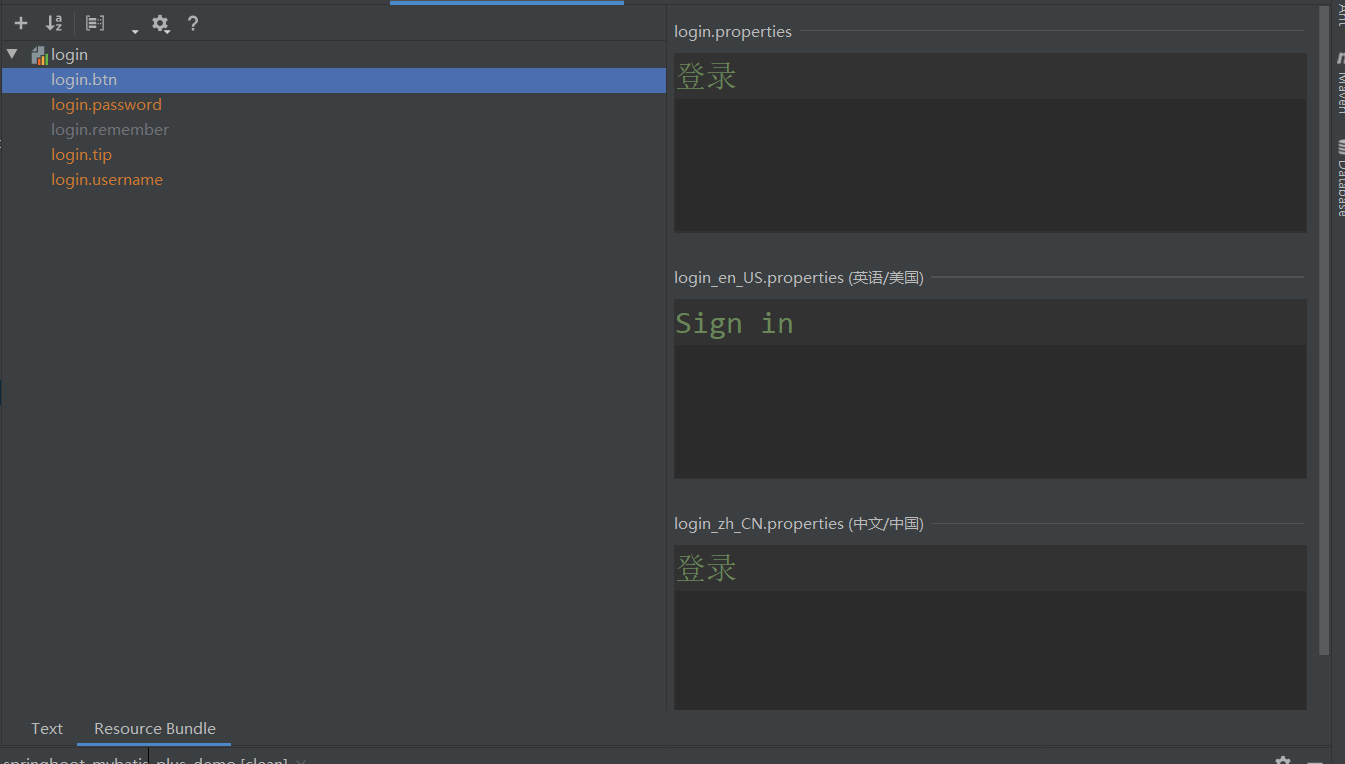
除此之外还需要在application.properties里面配置
1 #国际化

2 spring.messages.basename=i18n.login
配置完之后将可以实现浏览器端的语言切换(大家应该不明白什么是浏览器端吧)接着向下看
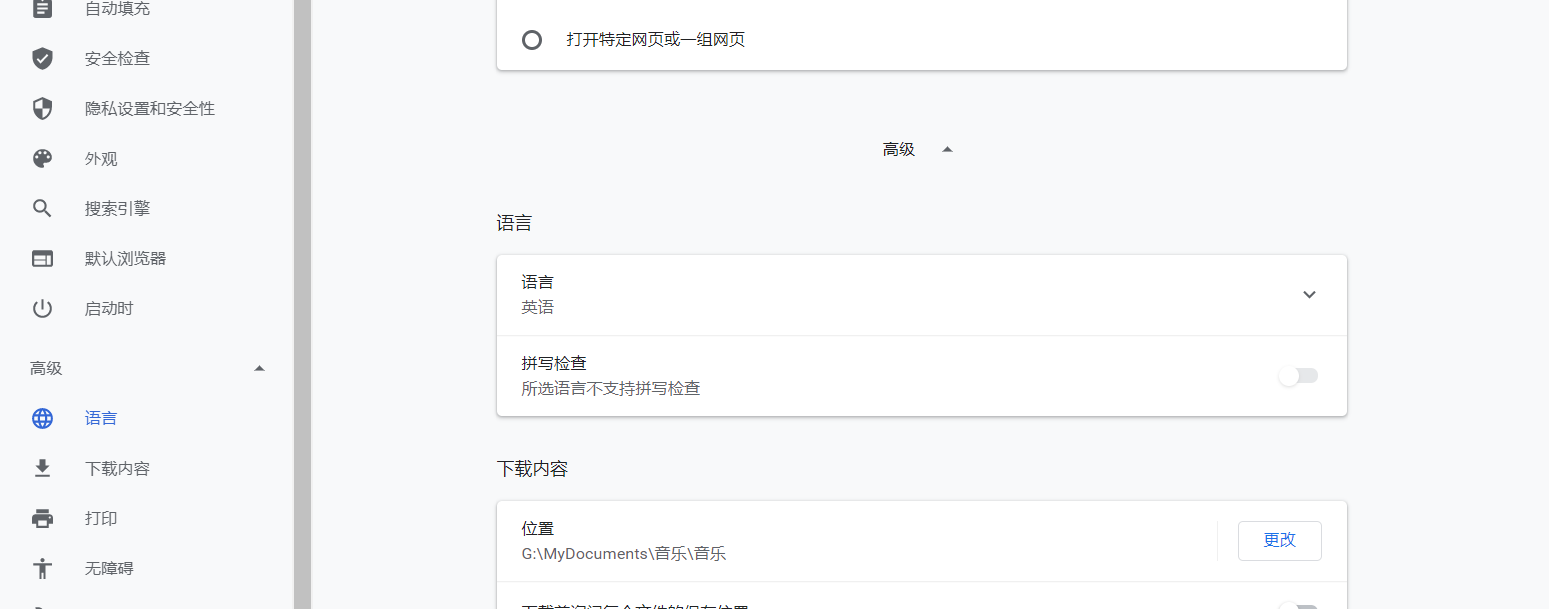
我们在浏览器上可以设置英文还是中文,上面的操作就可以实现中英文切换,但这种方法并不是我们想要的,我们想要的是在登录页面下,点击按钮设置相应的语言,(别着急,向下看) 1
/国际化

 2 public class MyLocaleResolver implements LocaleResolver {

 3     //解析信息

 4     @Override

 5     public Locale resolveLocale(HttpServletRequest request) {

 6         String l = request.getParameter("l");

 7         //默认问英文

 8         Locale locale=Locale.getDefault();

 9         if(!StringUtils.isEmpty(l)){

10             //根据分割线进行分割

11             String[] split = l.split("_");

12             locale = new Locale(split[0], split[1]);

13         }

14         return locale;

15     }

16

17     @Override

18     public void setLocale(HttpServletRequest request, HttpServletResponse response, Locale locale) {

19

20     }

21 }
这个是我们中英文切换按钮
1 <a class="btn btn-sm" th:href="@{/index.html(l='zh_cn')}">中文</a>

2 <a class="btn btn-sm"th:href="@{/index.html(l='en_US')}">English</a>
大体解释一下,我们在点击的时候会携带参数的跳转,英文en_US,中文zh_CN,在MyLocaleResolver方法中我们首先获取到是en_US还是zh_CN,然后通过spit方法进行分割,英文分割成en US 中文 zh CN
它们是以key value的形式存储,在springBoot底层可以自动辨别它是什么语言,在springBoot底层默认如下:
1  private static Locale initDefault() {

2         String language, region, script, country, variant;

3         language = AccessController.doPrivileged(

4             new GetPropertyAction("user.language", "en"));//表示英文

5         // for compatibility, check for old user.region property

6         region = AccessController.doPrivileged(

7             new GetPropertyAction("user.region"));
三、mybatis-plus实现CRUD
配置过程很简单详情请看mybatis-plus官网:https://mp.baomidou.com/guide/
在这里想说的就是我在这个里面遇见的一些问题,因为是第一次使用mybatis-plus,所有对于这些并不是太明白,在自己捣鼓了半天,自己差不多明白了,其实参考内容可以访问
https://blog.csdn.net/weixin_45616483/article/details/106011637
四、RestFul风格提交
GET请求
后端:
1 public User selectUserById(@PathVariable("id") Integer id){

2         return userService.getUserById(id);

3 }
前端:localhost:8989/xxx/id
post请求
后端:
1 public User insert(User user){

2     userService.insert(user);

3     return user;

4 }
前端:
1 <form action="http://localhost:8989/XXX" method="post">

2     <input type="text" name="username" value="zhansan"/>

3     <input type="text" name="password" value="123"/>

4     <input type="submit" value="提交"/>

5

6 </form>
PUT请求:
后端
1 public User update(XXX xxxr){

3         return xxxService.update(xxx);

4 }
前端
1 <form action="http://localhost:8989/xxx" method="post">

2 <input type="hidden" name="_method" value="PUT"/>

3     <input type="text" name="username" value="zhangsan"/>

4     <input type="text" name="password" value="123"/>

5     <input type="submit" value="提交"/>

6

7 </form>
DELETE请求
后端:
1    public String delete(@PathVariable("id") Integer id){

2        xxxService.delete(id);

3

4     }
前端:
<form action="http://localhost:8989/xxx/x" method="post">

    <input type="text "name="_method" value="DELETE"/>

    <input type="submit" value="提交"/>

>
一个简单的springboot+mybatis-plus+thymeleaf的学生管理系统的更多相关文章
- 【SpringBoot】SpringBoot/MyBatis/MySql/thymeleaf/Log4j整合工程
工程下载地址:https://files.cnblogs.com/files/xiandedanteng/MMSpringWeb20191027-1.rar 工程目录结构如图: 1.创建工程 有些网文 ...
- 一个简单的SpringBoot入门程序
1. 使用IDEA构建Maven项目 <?xml version="1.0" encoding="UTF-8"?> <project xmln ...
- Thymeleaf+SpringBoot+Mybatis实现的家庭财务管理系统
项目简介 项目来源于:https://gitee.com/darlingzhangsh/graduation_project 本系统是基于Thymeleaf+SpringBoot+Mybatis.是非 ...
- 7 — 简单了解springboot中的thymeleaf
1.官网学习地址 https://www.thymeleaf.org/doc/tutorials/3.0/usingthymeleaf.html 2.什么是thymeleaf? 一张图看明白: 解读: ...
- idea从零搭建简单的springboot+Mybatis
需用到的sql /* Navicat MySQL Data Transfer Source Server : localhost root Source Server Version : 80012 ...
- IntelliJ IDEA搭建一个简单的springboot项目
一.IDEA 安装包 百度网盘链接:https://pan.baidu.com/s/1MYgZaBVWXgy64KxnoeJSyg 提取码:7dh2 IDEA注册码获取:http://idea.lan ...
- springboot+mybatis+springSecurity+thymeleaf
配置步骤: .pom <dependencies> <dependency> <groupId>org.springframework.security</g ...
- 最简单的 springboot 发送邮件,使用thymeleaf模板
1,导入需要的包 <dependency> <groupId>org.springframework.boot</groupId> <artifactId&g ...
- idea搭建一个简单的springboot项目
1.file->new->project 2.选中Spring Initializr 3.填写项目信息: 4.选中Web -> Spring Web
随机推荐
- java并发编程实战《二十一》无锁工具类
不安全的累加代码,如下 1 public class Test { 2 long count = 0; 3 void add10K() { 4 int idx = 0; 5 while(idx++ & ...
- Python函数的关键字参数
除了位置参数的函数参数使用方式,还有一种在函数调用时指定形参等于指定实参的参数使用模式,该模式称为关键字参数.关键字参数使用可以不按形参的顺序传递实参,系统按形参的名字确认实参传递给哪个参数. 具体内 ...
- 使用pip安装的Python扩展模块是从哪里下载的?
对于初学者才开始使用Python安装扩展模块时,发现只要输入扩展模块名就可以安装,无需先下载再安装,不免疑惑那些要安装的软件是在哪里下载的?是否可以从别的地方下载? 这个问题答案如下: pip安装第三 ...
- web网络漏洞扫描器编写
这两天看了很多web漏洞扫描器编写的文章,比如W12scan以及其前身W8scan,还有猪猪侠的自动化攻击背景下的过去.现在与未来,以及网上很多优秀的扫描器和博客,除了之前写了一部分的静湖ABC段扫描 ...
- 归并排序(c++,递归)
放上c++代码模板(但是该版本中,还可以再进一步优化成原地算法,即不开辟新的空间:本代码中空间复杂度为n,不是1) 1 #include <iostream> 2 #include< ...
- LeetCode初级算法之数组:136 只出现一次的元素
只出现一次的元素 题目地址:https://leetcode-cn.com/problems/single-number/ 给定一个非空整数数组,除了某个元素只出现一次以外,其余每个元素均出现两次.找 ...
- webpack项目如何正确打包引入的自定义字体?
一. 如何在Vue或React项目中使用自定义字体 在开发前端项目时,经常会遇到UI同事希望在项目中使用一个炫酷字体的需求.那么怎么在项目中使用自定义字体呢? 其实实现起来并不复杂,可以借用CSS3 ...
- unity入门—五分钟制作一个理论上的游戏
unity入门 前言:这可不是标题党,虽然都是基础的操作,不过含括了基本的流程,比起脑海中的五花八门的画面,入门还是这个现实一点. 这里插两句,unity国外官网下载会推荐你看一个简短的视频,国内官网 ...
- Acwing 393. 雇佣收银员
算法1: 差分约束 + 枚举 O(Tn2028) 由于牵扯到 \([i - 8 + 1, i]\) 这段区间的和的约束,所以用前缀和更好表达一些. 设 \(num[i]\)表示 \(i\) 时刻有多少 ...
- vscode vue快速新建模板
vscode 文件=>首选项 =>用户代码片段 =>新建全局代码片段 { "Print to console": { " ...