
IdentityServer(三)密码模式
前言
用户名密码模式相较于客户端凭证模式,多了用户。通过用户的用户名和密码向Identity Server申请访问令牌。密码模式有两种实现方式.
1.把用户写进内存Identity从中读取账号密码验证
AddInMemoryUsers(config.GetUsers())
2.通过实现 IResourceOwnerPasswordValidator 接口来验证用户
AddResourceOwnerValidator(ResourcePasswordValidator)
第二种更加实用灵活,这篇笔记也是实现的第二种。
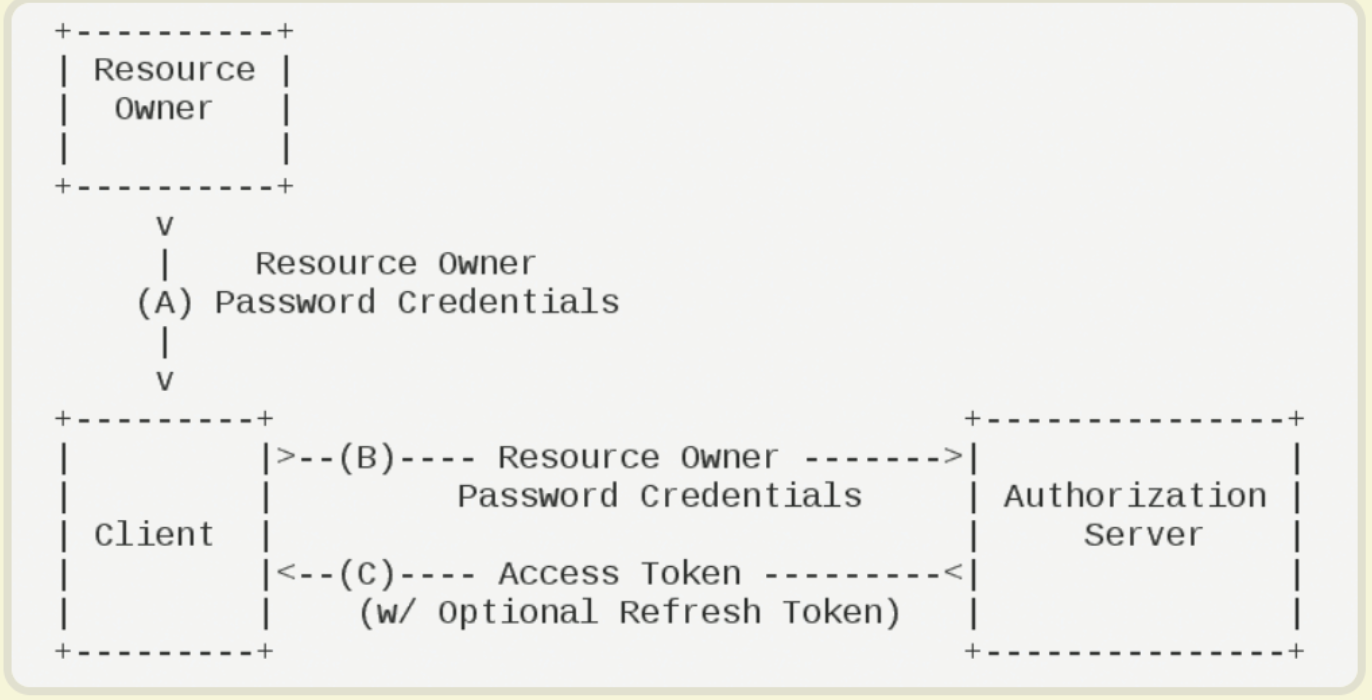
实现用户名密码授权
我们在之前的搭建好的Identity服务上新增一个名为 ResourcePasswordValidator 的类继承 IResourceOwnerPasswordValidator 重写ValidateAsync 方法来验证用户名和密码
using System.Security.Claims;

using System.Threading.Tasks;

using IdentityModel;

using IdentityServer4.Models;

using IdentityServer4.Validation;

namespace IdentityServer

{

    public class ResourcePasswordValidator: IResourceOwnerPasswordValidator

    {

        public async Task ValidateAsync(ResourceOwnerPasswordValidationContext context)

        {

            //判断账号密码是否正确。

            if (context.UserName == "userName" && context.Password == "1234567")

            {

                context.Result = new GrantValidationResult(

                 subject: "userInfo",

                    authenticationMethod: OidcConstants.AuthenticationMethods.Password,

                    claims: GetUserClaims());

            }

            else

            {

                //验证失败

                context.Result = new GrantValidationResult(TokenRequestErrors.InvalidGrant, "invalid custom credential");

            }

        }

        //可以根据需要设置相应的Claim/需要实现IProfileService接口

        private Claim[] GetUserClaims()

        {

            return new Claim[]

            {

            new Claim("userId","110"),

            new Claim(JwtClaimTypes.Name,"林辉"),

            new Claim(JwtClaimTypes.Role,"菜鸡")

            };

        }

    }

}
在 Config.cs 中新增一个客户端
new Client

{

    ClientId = "client_b",

    AllowedGrantTypes = GrantTypes.ResourceOwnerPassword,

    //AccessToken过期时间(秒),默认为3600秒/1小时

    AccessTokenLifetime=3600,

    //RefreshToken的最长生命周期

    //AbsoluteRefreshTokenLifetime = 2592000,

    //RefreshToken生命周期以秒为单位。默认为1296000秒

    SlidingRefreshTokenLifetime = 2592000,//以秒为单位滑动刷新令牌的生命周期。

    //刷新令牌时,将刷新RefreshToken的生命周期。RefreshToken的总生命周期不会超过AbsoluteRefreshTokenLifetime。

    RefreshTokenExpiration = TokenExpiration.Sliding,

    //AllowOfflineAccess 允许使用刷新令牌的方式来获取新的令牌

    AllowOfflineAccess = true,

    ClientSecrets =

    {

        new Secret("secret".Sha256())

    },

    AllowedScopes = { "Api"}

}
新建一个 ProfileService 来实现 IProfileService 接口来扩展自定义Claim
using System;

using System.Linq;

using System.Threading.Tasks;

using IdentityServer4.Models;

using IdentityServer4.Services;

namespace IdentityServer

{

    public class ProfileService : IProfileService

    {

        public async Task GetProfileDataAsync(ProfileDataRequestContext context)

        {

            try

            {

                //depending on the scope accessing the user data.

                var claims = context.Subject.Claims.ToList();

                //set issued claims to return

                context.IssuedClaims = claims.ToList();

            }

            catch (Exception ex)

            {

                //log your error

            }

        }

        public async Task IsActiveAsync(IsActiveContext context)

        {

            context.IsActive = true;

        }

    }

}
修改 Startup
//注入DI

services.AddIdentityServer()

    .AddDeveloperSigningCredential()

    .AddInMemoryIdentityResources(Config.GetIdentityResourceResources())

    .AddInMemoryApiResources(Config.GetApiResources())//Api资源信息

    .AddInMemoryClients(Config.GetClients())//客户端信息

    .AddResourceOwnerValidator<ResourcePasswordValidator>()//用户验证

    .AddProfileService<ProfileService>();//扩展claims
测试效果
通过用户名密码申请令牌
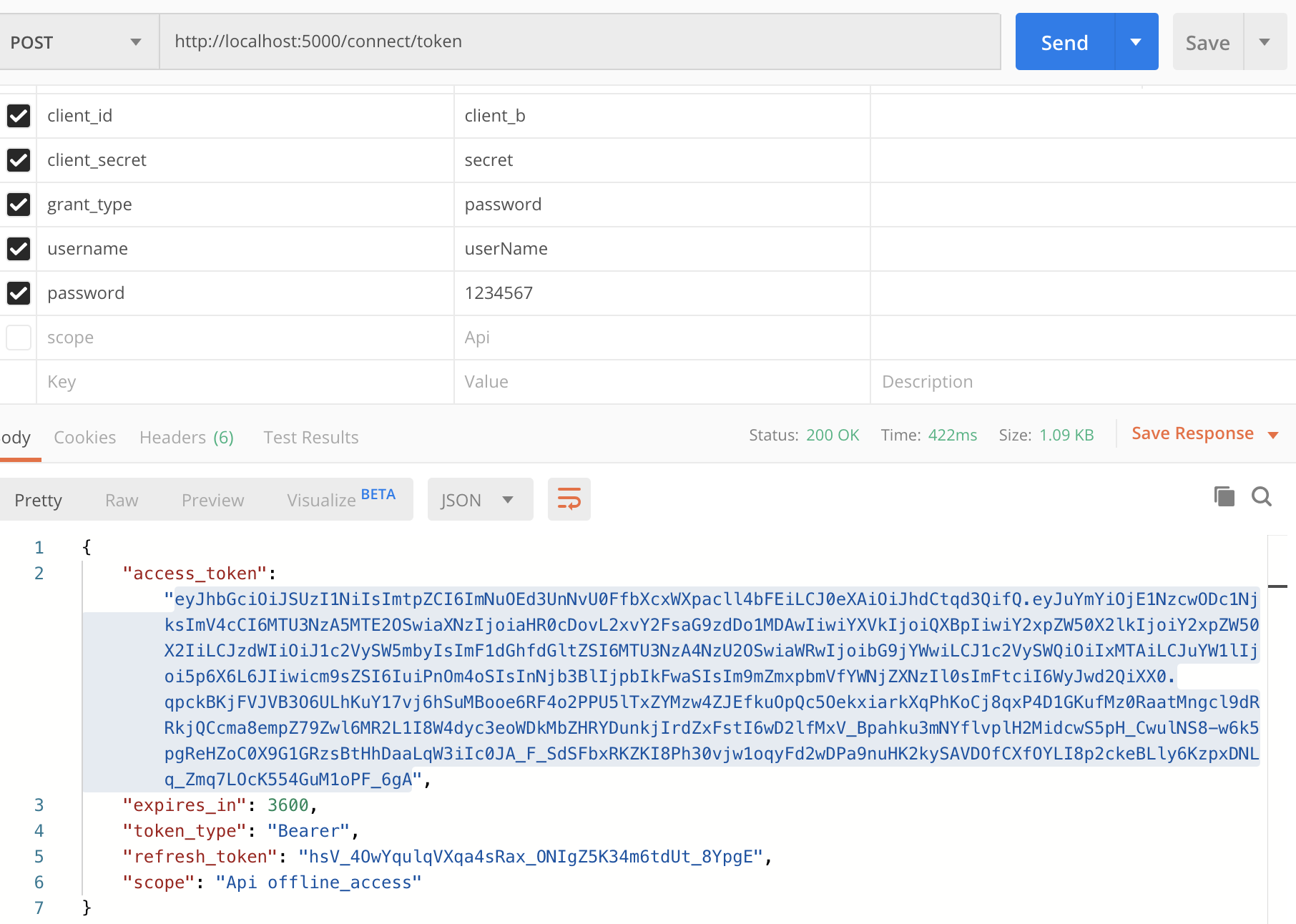
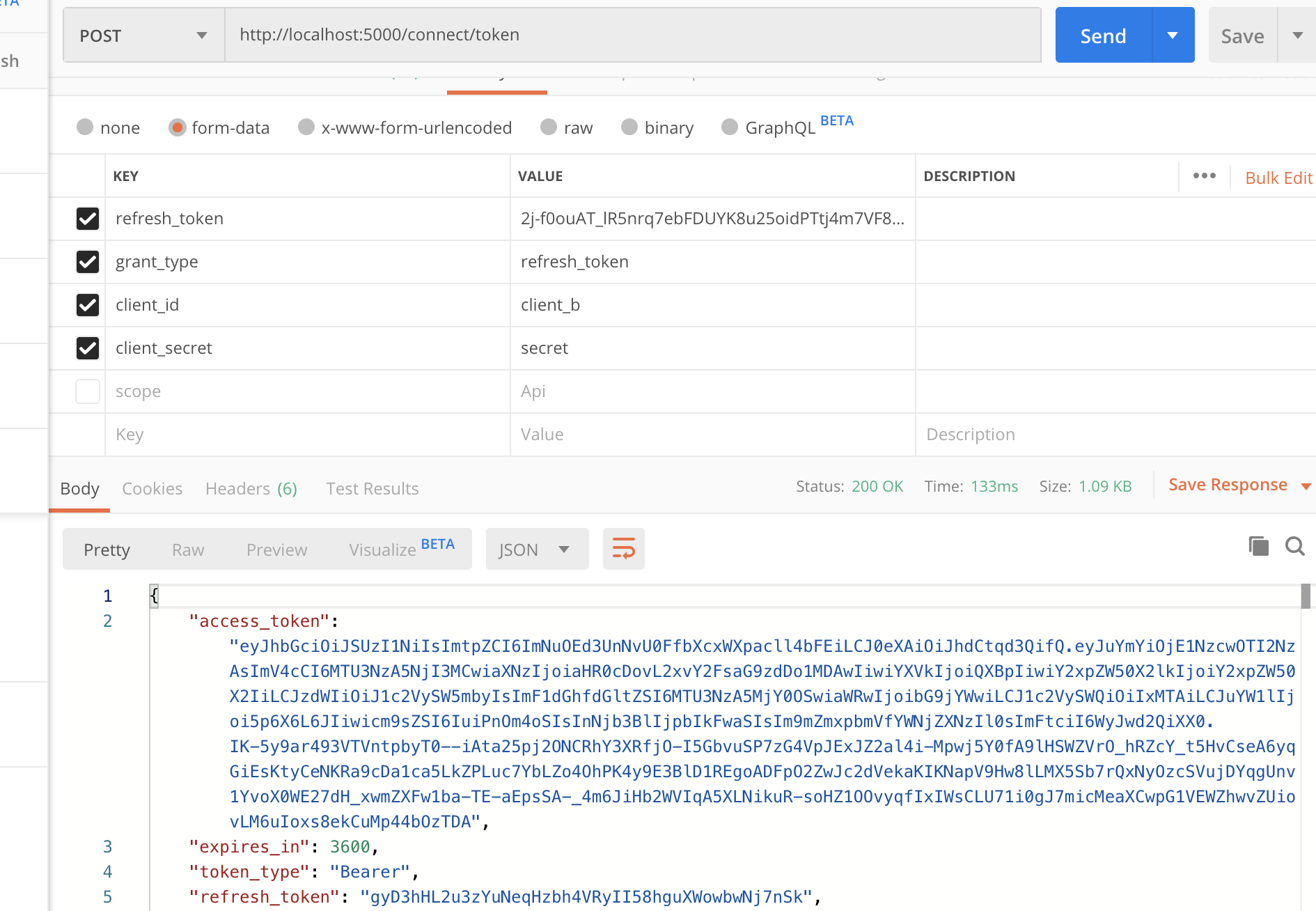
当access_token过期的时候通过refresh_token来刷新access_token,refresh_token只能使用一次,每次刷新后会返给信的refresh_token和access_token
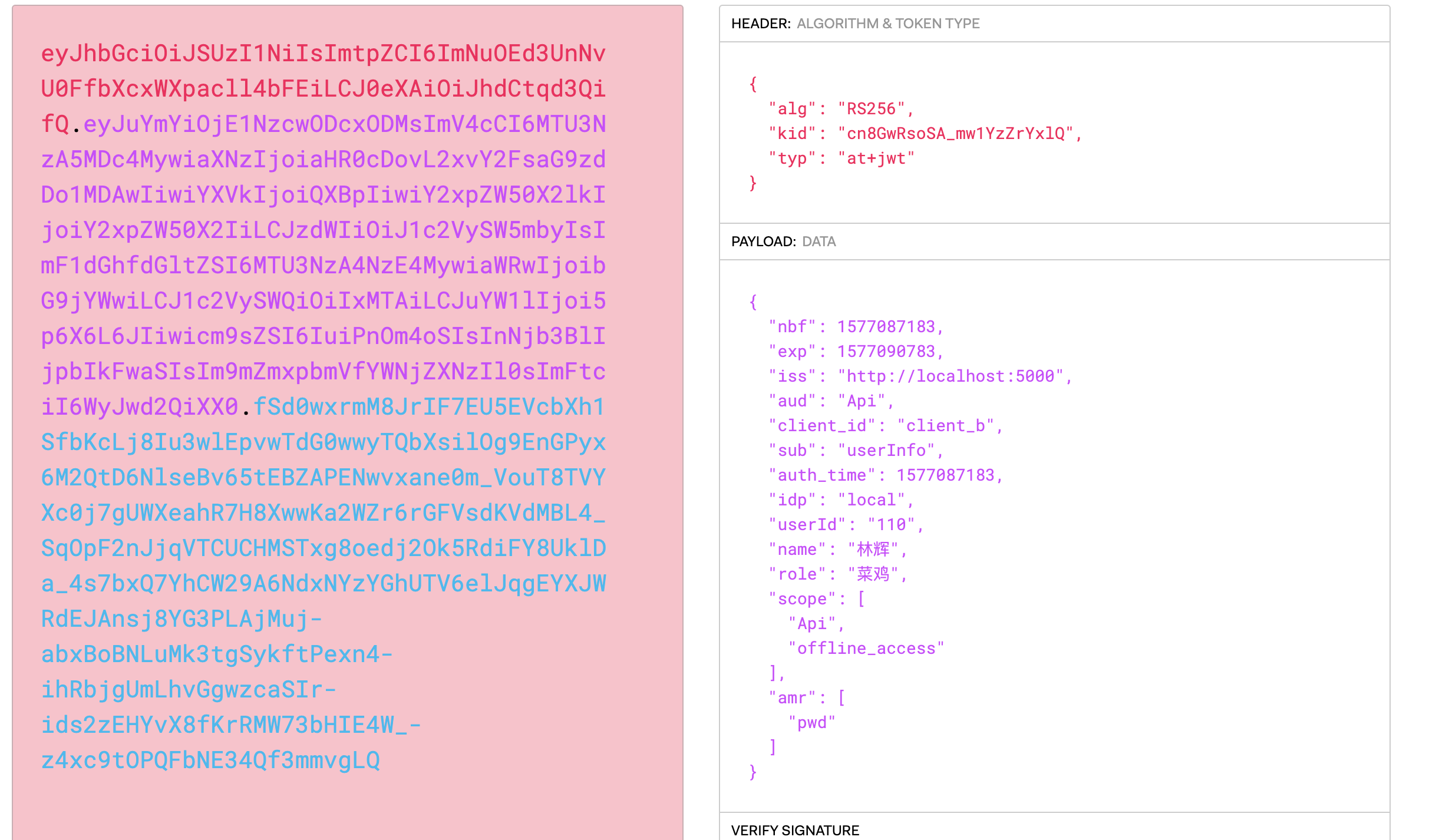
我们通过jwt.io解析出来。可以发现jwt里面包含了我们添加的身份信息,这些信息可以直接在资源服务器中获取使用
修改资源服务器
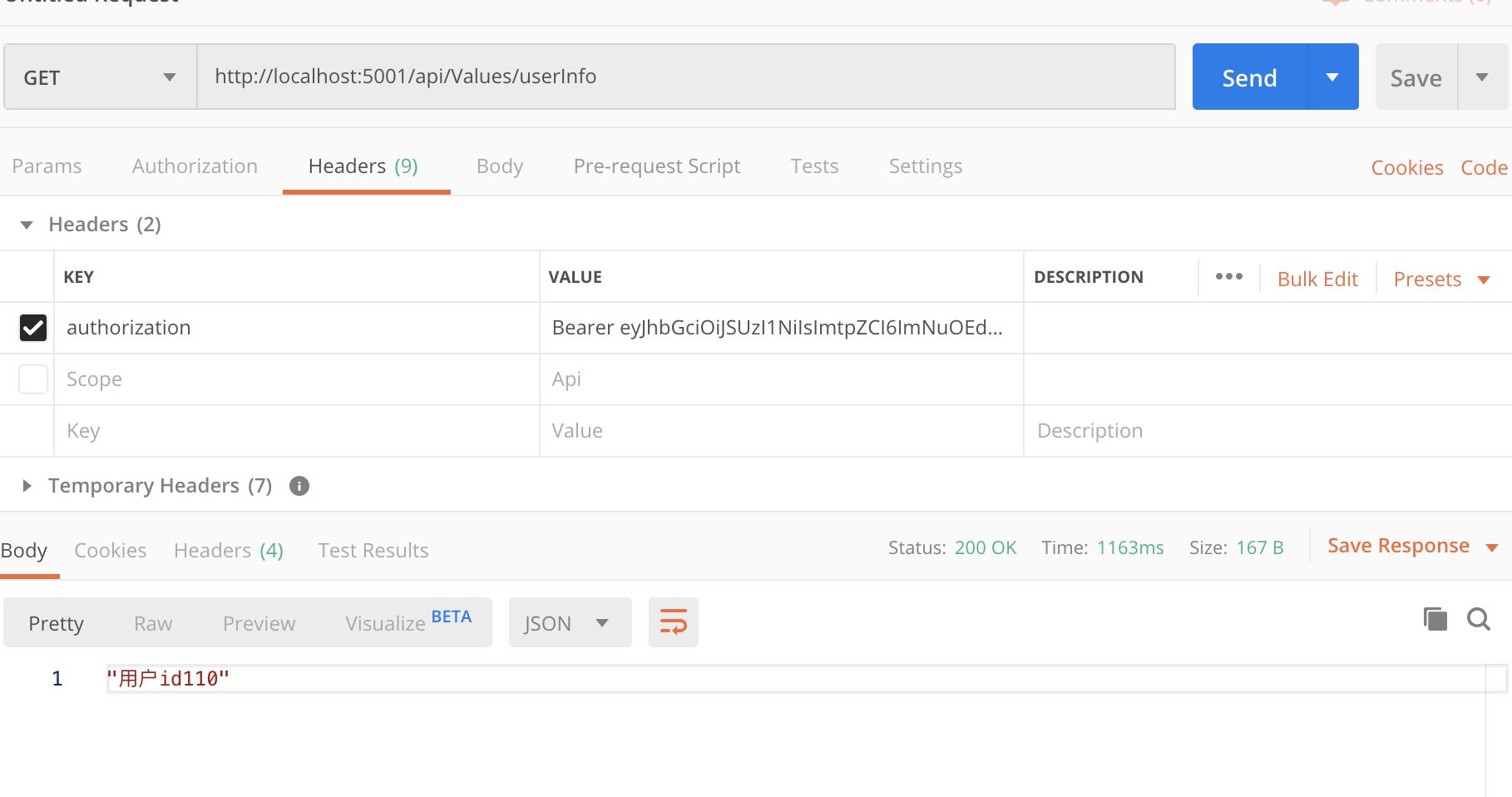
我们在Api中可以通过 User.Claims.FirstOrDefault(m => m.Type == "userId").value; 获取我们用户身份信息。
[HttpGet("userInfo")]

[Authorize]

public ActionResult UserIno()

{

    return new JsonResult($"用户id{User.Claims.FirstOrDefault(m => m.Type == "userId").Value }" );

}
IdentityServer(三)密码模式的更多相关文章
- docker-compose一键部署redis一主二从三哨兵模式(含密码,数据持久化)
本篇基于centos7服务器进行部署开发 一.拉取redis镜像,使用如下命令 docker pull redis 1.查看镜像是否拉取成功,使用如下命令 docker images 显示如下则证明拉 ...
- 【ASP.NET Core分布式项目实战】(一)IdentityServer4登录中心、oauth密码模式identity server4实现
本博客根据http://video.jessetalk.cn/my/course/5视频整理 资料 OAuth2 流程:http://www.ruanyifeng.com/blog/2014/05/o ...
- IdentityServer4 密码模式认证
授权服务器设置 添加用户 添加测试用户,也可以从数据库查 public static List<TestUser> GetTestUser() { return new List< ...
- asp.net core 使用identityServer4的密码模式来进行身份认证(一)
IdentityServer4是ASP.NET Core的一个包含OpenID和OAuth 2.0协议的框架.具体Oauth 2.0和openId请百度. 前言本博文适用于前后端分离或者为移动产品来后 ...
- IdentityServer4 实现OAuth2.0四种模式之密码模式
接上一篇:IdentityServer4 实现OAuth2.0四种模式之客户端模式,这一篇讲IdentityServer4 使用密码模式保护API访问. 一,IdentityServer配置 1,添加 ...
- 基于 IdentityServer3 实现 OAuth 2.0 授权服务【密码模式(Resource Owner Password Credentials)】
密码模式(Resource Owner Password Credentials Grant)中,用户向客户端提供自己的用户名和密码.客户端使用这些信息,向"服务商提供商"索要授权 ...
- 【运维技术】redis(一主两从三哨兵模式搭建)记录
redis(一主两从三哨兵模式搭建)记录 目的: 让看看这篇文章的的人能够知道:软件架构.软件的安装.配置.基本运维的操作.高可用测试.也包含我自己,能够节省对应的时间. 软件架构: 生产环境使用三台 ...
- IdentityServer4:IdentityServer4+API+Client+User实践OAuth2.0密码模式(2)
一.密码模式实操 仍然使用第一节的代码:做如下改动: 1.授权服务端 前面我们使用项目:Practice.IdentityServer作为授权服务器 修改项目的Config.cs类: 添加测试用户,并 ...
- IdentityServer4 密码模式实现
1. 修改 Config.cs using System.Collections; using System.Collections.Generic; using IdentityServer4.M ...
随机推荐
- Linux基础重点习题讲解
第一章 一个EXT4的文件分区,当时使用touch test.file命令创建一个新文件时报错,报错的信息是提示磁盘已满,但是采用df-h命令查看磁盘大小时,只使用了60%的磁盘空间,为什么会出现这 ...
- 封装Json+日志
/** * 输出json * @param $msg * @param int $errno */ public function printOutError($msg = '操作失败', $errn ...
- vue vue-cli3 修改elementui的date-picker源码 引入node_modules里的element-ui后报错exports is not defined
报错说明: 1.复制node_modules/element-ui/packages/date-picker里的文件到自己项目里 --------->>>>>>& ...
- ElasticSearch入门-基本概念介绍以及安装
Elasticsearch基本概念 Elasticsearch是基于Lucene的全文检索库,本质也是存储数据,很多概念与传统关系型数据库类似. 传统关系型数据库与Elasticsearch进行概念对 ...
- laravle6.0-IOC-DI浅谈
1.什么是IOC,DI IOC(Inversion of Control)控制反转:ioc意味着,你将自己设计好的对象交给容器来控制,而不是传统的在你的对象内部直接控制.比如: 人 操控 手机 做一些 ...
- Robot 安装
安装一个测试环境的 下载python27 升级pip E:\Python27\python -m pip install --upgrade pip 安装robotramework E:\Python ...
- SAS学习笔记10 宏变量
一个宏变量存放的值保持不变直到被修改(全局变量) 引用时,变量名前加上"&" 宏变量在引用时放在双引号之间会被解读(单引号不会被解读) 用户定义的宏变量,有三种方式: %l ...
- 一个无法解析的外部命令and无法解析的外部符号
出现错误: 解决: 因为修改了函数定义的参数,但是没有修改函数声明的参数 把参数统一一下就行了
- mysql5.7主主(双主)复制
在server1上操作 vi /etc/my.cnf 修改或添加下面这几行: server-id=1 log-bin=mysql-bin # 启用二进制日志 auto-increment-increm ...
- IntelliJ IDEA 最新版 2019.2.4 激活 (持续更新)(含windows和Mac)
IntelliJ IDEA 最新版 2019.2.4 激活 最新版激活包下载地址: 百度网盘 提取码: i28c 转载: Neo Peng Jetbrains系列产品 激活方式 同下述方式相同,只需要 ...