
Mininet系列实验(四):基于Mininet测量路径的损耗率
1 实验目的
熟悉Mininet自定义拓扑脚本的编写与损耗率的设定;
熟悉编写POX脚本,测量路径损耗速率
2 实验原理
在SDN环境中,控制器可以通过对交换机下发流表操作来控制交换机的转发行为,此外,还可以利用控制器测量路径的损耗率。在本实验中,基于Mininet脚本,设置特定的交换机间的路径损耗速率,然后编写POX脚本,实现对路径的损耗率的测量
3 实验内容
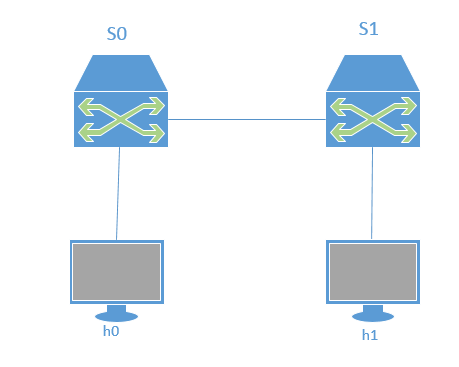
这是本实验的拓扑图,在该环境下,h0向h1发送数据包,由于在mininet脚本中设置了连接损耗率,在传输过程中会丢失一些包,本次实验的目的是展示如何通过控制器计算路径损耗速率(h0-s0-s1-h1)。这里假设控制器预先知道网络拓扑,所以没有显示发现网络的代码以及其他相关代码。控制器将向s0和s1发送flow_stats_request,当控制器接收到来自s0的response时,将特定流的数据包数保存在input_pkts中,当控制器接收到来自s1的response时,将接收到特定流的数据包数保存在output_pkts中,差值就是丢失的数据包数量。
搭建环境:本实验需要安装POX和支持OpenFlow1.3协议的Mininet。POX的安装教程如下:
Https://blog.csdn.net/shallynever/article/details/48522941
关于python中的logging以及相关函数的使用说明:
https://www.jb51.net/article/126681.htm
1.1 在装有mininet的虚拟机上创建脚本mymininet.py
cd mininet

gedit mymininet.py
1.2 编辑脚本(稍微解释了一下)
 #!/usr/bin/python

 #coding:utf-8

 # 调用关于mininet和time的一些模块

 from mininet.net import Mininet

 from mininet.node import Node

 from mininet.link import TCLink

 from mininet.log import setLogLevel, info

 from threading import Timer

 from mininet.util import quietRun

 from time import sleep

 #定义mynet函数

 def myNet(cname='controller', cargs='-v ptcp:'):

 #通过使用OVS抓取来创建网络

 #诊断信息然后开始创建节点,其中有控制器C0和交换机s0,s1,还有主机h0,h1

 info( "*** Creating nodes\n" )

 controller = Node( 'c0', inNamespace=False )

 switch = Node( 's0', inNamespace=False )

 switch1 = Node( 's1', inNamespace=False )

 h0 = Node( 'h0' )

 h1 = Node( 'h1' )

 #诊断以后开始创建链路(这一块不是很懂)

 info( "*** Creating links\n" )

 #这是链路选项设置,丢包以及延迟还有带宽等等

 linkopts0=dict(bw=100, delay='1ms', loss=0)

 linkopts1=dict(bw=100, delay='1ms', loss=10)

 #链路0,1,2分别表示h0和s0,s0和s1,h1和s1的链路并调用以上两行的参数

 link0=TCLink( h0, switch, **linkopts0)

 link1 = TCLink( switch, switch1, **linkopts1)

 link2 = TCLink( h1, switch1, **linkopts0)

 #MAC地址设置:按照拓扑图来设置的,这一块有些不理解,个人理解为,链路0,2只需要设置一个能连上

 #s0/s1的端口就行,而1需要左边的s0端口和右边的s1端口

 link0.intf2.setMAC("0:0:0:0:0:1")

 link1.intf1.setMAC("0:0:0:0:0:2")

 link1.intf2.setMAC("0:1:0:0:0:1")

 link2.intf2.setMAC("0:1:0:0:0:2")

 #诊断后设置主机ip

 info( "*** Configuring hosts\n" )

 h0.setIP( '192.168.123.1/24' )

 h1.setIP( '192.168.123.2/24' )

 #通过使用OVS开始网络连接,然后单引号里的意思是搭建和删除桥梁

 info( "*** Starting network using Open vSwitch\n" )

 switch.cmd( 'ovs-vsctl del-br dp0' )

 switch.cmd( 'ovs-vsctl add-br dp0' )

 switch1.cmd( 'ovs-vsctl del-br dp1' )

 switch1.cmd( 'ovs-vsctl add-br dp1' )

 #控制器的设置不是很懂

 controller.cmd( cname + ' ' + cargs + '&' )

 #打印出每个交换机的链路信息

 for intf in switch.intfs.values():

 print intf

 print switch.cmd( 'ovs-vsctl add-port dp0 %s' % intf )

 for intf in switch1.intfs.values():

 print intf

 print switch1.cmd( 'ovs-vsctl add-port dp1 %s' % intf )

 # 控制器和交换机同属根命名空间所以我们可以通过环回接口连接,对了,10.0.0.13是别的up主的主机

 # ip,需要用自己的,因为控制器是你自己的

 switch.cmd( 'ovs-vsctl set-controller dp0 tcp:10.0.0.13:6633' )

 switch1.cmd( 'ovs-vsctl set-controller dp1 tcp:10.0.0.13:6633' )

 #诊断并等待交换机连接上控制器,在连接完成前会一秒一个点

 info( '*** Waiting for switch to connect to controller' )

 while 'is_connected' not in quietRun( 'ovs-vsctl show' ):

 sleep( 1 )

 info( '.' )

 info( '\n' )

 #运行测试20次h0和h1的传输情况

 #info( "*** Running test\n" )

 h0.cmdPrint( 'ping -Q 0x64 -c 20 ' + h1.IP() )

 #休息一秒后关闭网络:删除“桥梁”

 sleep( 1 )

 info( "*** Stopping network\n" )

 controller.cmd( 'kill %' + cname )

 switch.cmd( 'ovs-vsctl del-br dp0' )

 switch.deleteIntfs()

 switch1.cmd( 'ovs-vsctl del-br dp1' )

 switch1.deleteIntfs()

 info( '\n' )

 #主函数,看不懂,意思应当是如果是个主函数就设定info的等级然后开始获取网络demo然后运行

 #mynet()函数

 if __name__ == '__main__':

 setLogLevel( 'info' )

 info( '*** Scratch network demo (kernel datapath)\n' )

 Mininet.init()

 myNet()
2.1 我们在pox文件里面创建脚本
cd pox

gedit flow_stats.py
2.2 编辑脚本 (中文部分是对程序的解释,未翻译部分是对具体代码的代码解释)
 #!/usr/bin/python

 # Copyright 2012 William Yu

 # wyu@ateneo.edu

 #

 # This file is part of POX.

 #

 # POX is free software: you can redistribute it and/or modify

 # it under the terms of the GNU General Public License as published by

 # the Free Software Foundation, either version 3 of the License, or

 # (at your option) any later version.

 #

 # POX is distributed in the hope that it will be useful,

 # but WITHOUT ANY WARRANTY; without even the implied warranty of

 # MERCHANTABILITY or FITNESS FOR A PARTICULAR PURPOSE. See the

 # GNU General Public License for more details.

 #

 # You should have received a copy of the GNU General Public License

 # along with POX. If not, see <http://www.gnu.org/licenses/>.

 #

 """

 This is a demonstration file created to show how to obtain flow

 and port statistics from OpenFlow 1.0-enabled switches. The flow

 statistics handler contains a summary of web-only traffic.

 """

 # standard includes

 from pox.core import core

 from pox.lib.util import dpidToStr

 import pox.openflow.libopenflow_01 as of

 from pox.lib.addresses import IPAddr, EthAddr

 # include as part of the betta branch

 from pox.openflow.of_json import *

 from pox.lib.recoco import Timer

 import time

 log = core.getLogger()

 #初始化网络的参数0

 src_dpid = 0

 dst_dpid = 0

 input_pkts = 0

 output_pkts = 0

 def getTheTime():

 #设定当地时间的函数

 flock = time.localtime()

 then = "[%s-%s-%s" %(str(flock.tm_year),str(flock.tm_mon),str(flock.tm_mday))

 if int(flock.tm_hour)<10:

 hrs = "0%s" % (str(flock.tm_hour))

 else:

 hrs = str(flock.tm_hour)

 if int(flock.tm_min)<10:

 mins = "0%s" % (str(flock.tm_min))

 else:

 mins = str(flock.tm_min)

 if int(flock.tm_sec)<10:

 secs = "0%s" % (str(flock.tm_sec))

 else:

 secs = str(flock.tm_sec)

 then +="]%s.%s.%s" % (hrs,mins,secs)

 return then

 # 用于将请求发送到连接到控制器的所有交换机的定时器功能的处理程序

 def _timer_func ():

 for connection in core.openflow._connections.values():

 connection.send(of.ofp_stats_request(body=of.ofp_flow_stats_request()))

 connection.send(of.ofp_stats_request(body=of.ofp_port_stats_request()))

 log.debug("Sent %i flow/port stats request(s)", len(core.openflow._connections))

 # 显示在事件的JSON格式结构中接收到的流统计信息的处理程序由ofp_flow_stats()定义

 def _handle_flowstats_received (event):

 #stats = flow_stats_to_list(event.stats)

 #log.debug("FlowStatsReceived from %s: %s", dpidToStr(event.connection.dpid), stats)

 global src_dpid, dst_dpid, input_pkts, output_pkts

 #print "src_dpid=", dpidToStr(src_dpid), "dst_dpid=", dpidToStr(dst_dpid)

 for f in event.stats:

 if f.match.dl_type==0x0800 and f.match.nw_dst==IPAddr("192.168.123.2") and f.match.nw_tos==0x64 and event.connection.dpid==src_dpid:

 #print "input: ", f.byte_count, f.packet_count

 input_pkts = f.packet_count

 if f.match.dl_type==0x0800 and f.match.nw_dst==IPAddr("192.168.123.2") and f.match.nw_tos==0x64 and event.connection.dpid==dst_dpid:

 #print "output: ", f.byte_count, f.packet_count

 output_pkts = f.packet_count

 if input_pkts !=0:

 print getTheTime(), "Path Loss Rate =", (input_pkts-output_pkts)*1.0/input_pkts*100, "%"

 # 处理程序以显示JSON格式接收的端口统计信息

 def _handle_portstats_received (event):

 #print "\n<<<STATS-REPLY: Return PORT stats for Switch", event.connection.dpid,"at ",getTheTime()

 #for f in event.stats:

 #if int(f.port_no)<65534:

 #print " PortNo:", f.port_no, " Fwd's Pkts:", f.tx_packets, " Fwd's Bytes:", f.tx_bytes, " Rc'd Pkts:", f.rx_packets, " Rc's Bytes:", f.rx_bytes

 #print " PortNo:", f.port_no, " TxDrop:", f.tx_dropped, " RxDrop:", f.rx_dropped, " TxErr:", f.tx_errors, " RxErr:", f.rx_errors, " CRC:", f.rx_crc_err, " Coll:", f.collisions

 stats = flow_stats_to_list(event.stats)

 log.debug("PortStatsReceived from %s: %s", dpidToStr(event.connection.dpid), stats)

 def _handle_ConnectionUp (event):

 global src_dpid, dst_dpid

 print "ConnectionUp: ", dpidToStr(event.connection.dpid)

 for m in event.connection.features.ports:

 if m.name == "s0-eth0":

 src_dpid = event.connection.dpid

 elif m.name == "s1-eth0":

 dst_dpid = event.connection.dpid

 #设置网络的参数(优先级,时间,端口号)

 msg = of.ofp_flow_mod()

 msg.priority =1

 msg.idle_timeout = 0

 msg.match.in_port =1

 msg.actions.append(of.ofp_action_output(port = of.OFPP_ALL))

 event.connection.send(msg)

 msg = of.ofp_flow_mod()

 msg.priority =1

 msg.idle_timeout = 0

 msg.match.in_port =2

 msg.actions.append(of.ofp_action_output(port = of.OFPP_ALL))

 event.connection.send(msg)

 msg = of.ofp_flow_mod()

 msg.priority =10

 msg.idle_timeout = 0

 msg.hard_timeout = 0

 msg.match.dl_type = 0x0800

 msg.match.nw_tos = 0x64

 msg.match.in_port=1

 msg.match.nw_dst = "192.168.123.2"

 msg.actions.append(of.ofp_action_output(port = 2))

 event.connection.send(msg)

 msg = of.ofp_flow_mod()

 msg.priority =10

 msg.idle_timeout = 0

 msg.hard_timeout = 0

 msg.match.dl_type = 0x0800

 msg.match.nw_tos = 0x64

 msg.match.nw_dst = "192.168.123.1"

 msg.actions.append(of.ofp_action_output(port = 1))

 event.connection.send(msg)

 # 启动模块的主函数

 def launch ():

 # attach handsers to listners

 core.openflow.addListenerByName("FlowStatsReceived",

 _handle_flowstats_received)

 core.openflow.addListenerByName("PortStatsReceived",

 _handle_portstats_received)

 core.openflow.addListenerByName("ConnectionUp", _handle_ConnectionUp)

 # 定时器每5秒执行一次

 Timer(1, _timer_func, recurring=True)
3 执行两个脚本
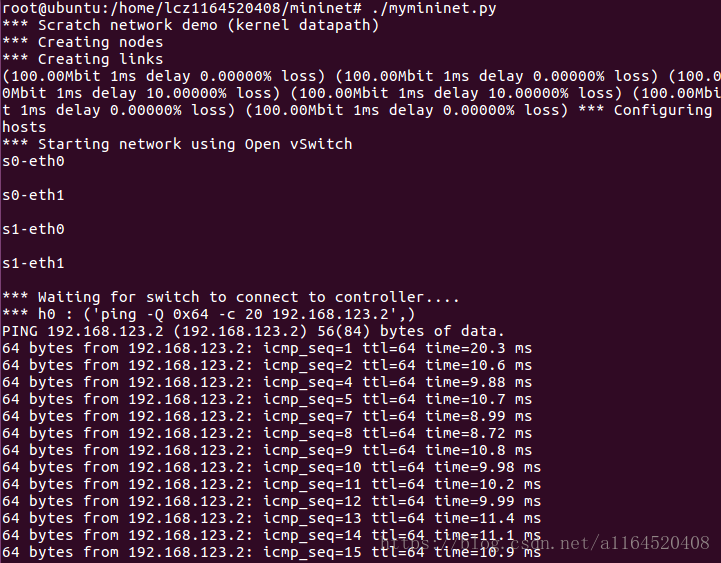
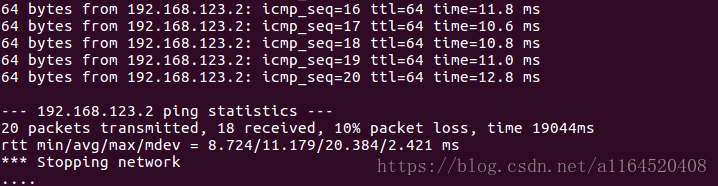
此处为mymininet的脚本
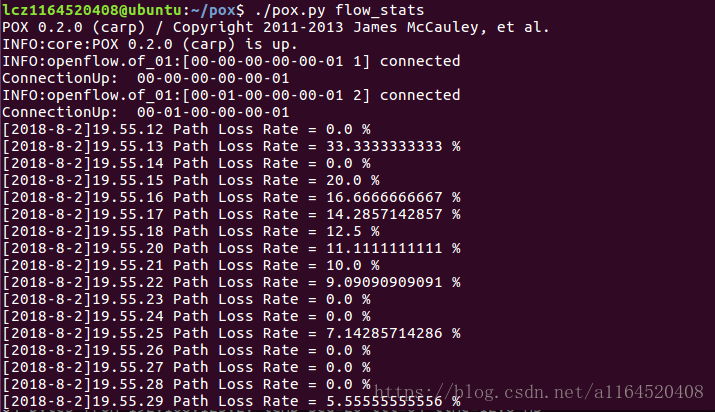
此处为flow_stats脚本

总结:
1.能看懂2/3的脚本内容,以及脚本的程序意义
2.明白了pox的安装
3.对网络的了解还是不够深刻
Mininet系列实验(四):基于Mininet测量路径的损耗率的更多相关文章
- Mininet实验 基于Mininet测量路径的损耗率
实验原理 在SDN环境中,控制器可以通过对交换机下发流表操作来控制交换机的转发行为,此外,还可以利用控制器测量路径的损耗率.在本实验中,基于Mininet脚本,设置特定的交换机间的路径损耗速率,然后编 ...
- SDN实验 3: Mininet 实验——测量路径的损耗率
验 3:Mininet 实验--测量路径的损耗率 一.实验目的 在实验 2 的基础上进一步熟悉 Mininet 自定义拓扑脚本,以及与损耗率相关的设定:初步了解 Mininet 安装时自带的 POX ...
- 实验 3:Mininet 实验——测量路径的损耗率
实验目的 在实验 2 的基础上进一步熟悉 Mininet 自定义拓扑脚本,以及与损耗率相关的设 定:初步了解 Mininet 安装时自带的 POX 控制器脚本编写,测试路径损耗率. 实验任务 h0 向 ...
- 基于Mininet测量路径的损耗率
基于Mininet测量路径的损耗率 控制器采用POX,基于OVS仿真 Mininet脚本 创建Node mininet.node Node 创建链路连接 mininet.link TCLink 设置i ...
- 实验 3:Mininet 实验——测量路径的损耗率
一.实验目的 在实验 2 的基础上进一步熟悉 Mininet 自定义拓扑脚本,以及与损耗率相关的设定;初步了解 Mininet 安装时自带的 POX 控制器脚本编写,测试路径损耗率. 二.实验任务 h ...
- 软件定义网络实验记录③--Mininet 实验——测量路径的损耗率
一.实验目的 在实验 2 的基础上进一步熟悉 Mininet 自定义拓扑脚本,以及与损耗率相关的设定: 初步了解 Mininet 安装时自带的 POX 控制器脚本编写,测试路径损耗率. 二.实验任务 ...
- Mininet 系列实验(四)
实验内容 本次实验拓扑图: 在该环境下,h0 向 h1 发送数据包,由于在 mininet 脚本中设置了连接损耗率,在传输过程中会丢失一些包,本次实验的目的是展示如何通过控制器计算路径损耗速率(h0- ...
- Mininet 系列实验(七)
实验内容 本实验在基于 Mininet 脚本的不同拓扑环境下使用 OpenDaylight 控制交换机行为.任务一:一台交换机两台主机,从1端口进入的数据流转发到 2 端口,从 2 端口进入的数据流转 ...
- Mininet 系列实验(六)
写在前面 这次实验遇到了非常多问题,非常非常多,花了很多时间去解决,还是有一些小问题没有解决,但是基本上能完成实验.建议先看完全文再开始做实验. 实验内容 先看一下本次实验的拓扑图: 在该环境下,假设 ...
随机推荐
- shopxo代码审计
由于工作原因,分析了很多的cms也都写过文章,不过觉得好像没什么骚操作都是网上的基本操作,所以也就没发表在网站上,都保存在本地.最近突然发现自己博客中实战的东西太少了,决定将以前写的一些文章搬过来,由 ...
- 【前端适配】vw单位移动端适配方案
近些年移动端的强势崛起,导致移动端适配越来越重要,个人之前一直使用的是rem进行适配,但是发现并不是非常完美,给力的是大漠老师写了一篇<如何在Vue项目中使用vw实现移动端适配>,比较完美 ...
- Wireshark解密HTTPS数据流
如果是chrome浏览器的数据流 直接配置”SSLKEYLOGFILE“就可以解密了. 实现过程: 1.配置系统环境变量 变量名:SSLKEYLOGFILE 变量值:随意指定一个存储路径,以便chro ...
- cdh的web管理界面503
503 Service Unavailable No server is available to handle this request. 重启 agent 以及 server
- Vue项目打包发布,配置Nginx
#user nobody; worker_processes 1; #error_log logs/error.log; #error_log logs/error.log notice; #erro ...
- Linux网络编程综合运用之MiniFtp实现(八)
上节中实现了"USER"和"PASS"命令,如下: 事实上FTP是有很多命令组成的,如果就采用上面的这种方法来实现的话,就会有很多if...else if语句, ...
- 全球化 System.Globalization.CultureInfo与RegionInfo类
一.CultureInfo类:文化信息 分类: 1.中立文化(Neutral culture): zh-CHS:中文,无区域信息,无格式化信息 2.特定区域文化(Specific culture) z ...
- web-----chrome DevTools工具的常用使用记录
注:1.Chrome浏览器,2.在浏览器页面 右键--->检查,即可看到此页面 跟开发沟通过.他们查看一个页面的性能一般都会使用”检查“来观测.查找对应的数据记录. 设置网络的网速和通过设置某 ...
- H5--性能测试(PageSpeed Insights )
中文网站(不需要翻墙): http://www.googlespeed.cn 主要可实现: 1.测试手机与电脑打开的速度对比. 2.详细的测试结果 3.直观的统计数据,查看页面的共xx个请求.总共大小 ...
- prometheus-alertmanager告警推送到钉钉
1. Prometheus告警简介 告警能力在Prometheus的架构中被划分成两个独立的部分.如下所示,通过在Prometheus中定义AlertRule(告警规则),Prometheus会周期性 ...