
unity 读取灰度图生成三维地形并贴图卫星影像
从 https://earthexplorer.usgs.gov/ 下载高程数据
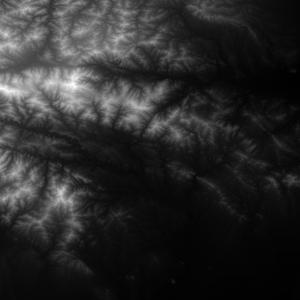
从谷歌地球上保存对应地区卫星图像
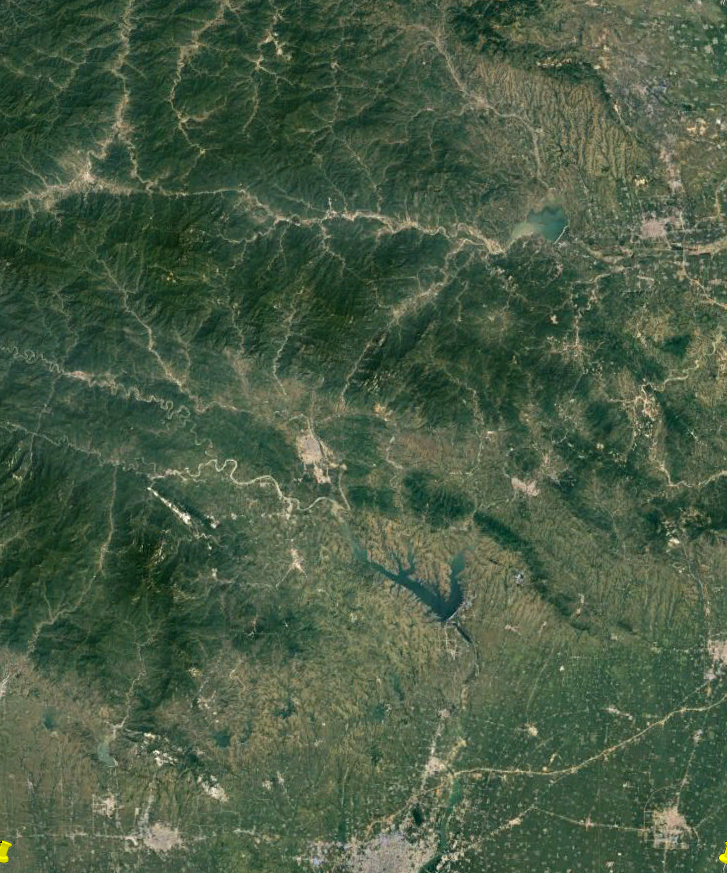
从灰度图创建地形模型,并将卫星影像作为贴图
using System.Collections;

using System.Collections.Generic;

using UnityEngine;

public class mapMeshCreate : MonoBehaviour {

    private Texture textureGray;//灰度图

    private Texture textureSatellite;//卫星影像贴图

    private int tGrayWidth = 0, tGrayHeight = 0;//灰度图的宽和高

    private bool bCreate = false;//是否完成创建

    private List<GameObject> meshList;//mesh集合

    private Texture2D texture2dGray;

    public float zScale = 100;//高度参数

    [Tooltip("传入mesh使用的材质")]

    public Material meshMaterial;

    void Start()

    {

        StartCoroutine(loadImage("T1.jpg", (t) => textureGray = t));

        StartCoroutine(loadImage("T2.png", (t) => textureSatellite = t));

        meshList = new List<GameObject>();

    }

    void Update()

    {

        if (textureGray != null && textureSatellite != null)

        {

            if (bCreate == false)

            {

                tGrayWidth = textureGray.width;

                tGrayHeight = textureGray.height;

                meshMaterial.mainTexture = textureSatellite;//设置材质贴图

                //mesh顶点数目最大65000,则取mes为250*250=62500

                int xNum = 1 + tGrayWidth / 250;//x方向mesh个数

                int zNum = 1 + tGrayHeight / 250; //z方向mesh个数

                texture2dGray = (Texture2D)textureGray;

                //根据灰度图创建mesh

                for (int i = 0; i < xNum; i++)

                {

                    for (int j = 0; j < zNum; j++)

                    {

                        if (i < xNum - 1 && j < zNum - 1)

                        {

                            meshList.Add(

                                createMesh("meshX" + i.ToString() + "Z" + j.ToString(), 251, 251,

                                i * new Vector3(2500, 0, 0) + j * new Vector3(0, 0, 2500),

                                (i + 1) * new Vector3(2500, 0, 0) + (j + 1) * new Vector3(0, 0, 2500) + new Vector3(10, 0, 10),

                                i * new Vector2(250, 0) + j * new Vector2(0, 250),

                                (i + 1) * new Vector2(250, 0) + (j + 1) * new Vector2(0, 250) + new Vector2(1, 1),i,j,tGrayWidth,tGrayHeight));

                        }

                        else if (i == xNum - 1 && j < zNum - 1)

                        {

                            meshList.Add(createMesh("meshX" + i.ToString() + "Z" + j.ToString(), tGrayWidth % 250, 251,

                            i * new Vector3(2500, 0, 0) + j * new Vector3(0, 0, 2500),

                            i * new Vector3(2500, 0, 0) + new Vector3(10 * (tGrayWidth % 250), 0, 10) + (j + 1) * new Vector3(0, 0, 2500),

                            i * new Vector2(250, 0) + j * new Vector2(0, 250),

                            i * new Vector2(250, 0) + new Vector2(tGrayWidth % 250, 1) + (j + 1) * new Vector2(0, 250),i,j, tGrayWidth, tGrayHeight));

                        }

                        else if (i < xNum - 1 && j == zNum - 1)

                        {

                            meshList.Add(createMesh("meshX" + i.ToString() + "Z" + j.ToString(), 251, tGrayHeight % 250,

                              i * new Vector3(2500, 0, 0) + j * new Vector3(0, 0, 2500),

                             (i + 1) * new Vector3(2500, 0, 0) + j * new Vector3(0, 0, 2500) + new Vector3(10, 0, 10 * (tGrayHeight % 250)),

                              i * new Vector2(250, 0) + j * new Vector2(0, 250),

                             (i + 1) * new Vector2(250, 0) + j * new Vector2(0, 150) + new Vector2(1, tGrayHeight % 250),i,j, tGrayWidth, tGrayHeight));

                        }

                        else if (i == xNum - 1 && j == zNum - 1)

                        {

                            meshList.Add(createMesh("meshX" + i.ToString() + "Z" + j.ToString(), tGrayWidth % 250, tGrayHeight % 250,

                             i * new Vector3(2500, 0, 0) + j * new Vector3(0, 0, 2500),

                             i * new Vector3(2500, 0, 0) + j * new Vector3(0, 0, 2500) + new Vector3(10 * (tGrayWidth % 250), 0, 10 * (tGrayHeight % 250)),

                             i * new Vector2(250, 0) + j * new Vector2(0, 250),

                             i * new Vector2(250, 0) + j * new Vector2(0, 250) + new Vector2(tGrayWidth % 250, tGrayHeight % 250),i,j, tGrayWidth, tGrayHeight));

                        }

                    }

                }

                bCreate = true;

            }

        }

    }

    //加载图片

    IEnumerator loadImage(string imagePath, System.Action<Texture> action)

    {

        WWW www = new WWW("file://" + Application.streamingAssetsPath + "/" + imagePath);

        yield return www;

        if (www.error == null)

        {

            action(www.texture);

        }

    }

    /// <summary>

    ///创建mesh

    /// </summary>

    /// <param name="meshName">mesh名称</param>

    /// <param name="row">行数</param>

    /// <param name="col">列数</param>

    /// <param name="minPoint">最小点位置</param>

    /// <param name="maxPoint">最大点位置</param>

    /// <param name="minImgPosition">最小点灰度图位置</param>

    /// <param name="maxImgPosition">最大点灰度图位置</param>

    /// <param name="xWidthIndex">横向索引</param>

    /// <param name="zHeightIndex">纵向索引</param>

    /// <param name="width">横向总宽度</param>

    /// <param name="height">纵向总高度</param>

    /// <returns></returns>

    ///

    private GameObject createMesh(string meshName, int row, int col, Vector3 minPoint, Vector3 maxPoint, Vector2 minImgPosition, Vector2 maxImgPosition,int xWidthIndex,int zHeightIndex,int width,int height)

    {

        GameObject meshObject = new GameObject(meshName);

        int verticeNum = row * col;

        Vector3[] vertices = new Vector3[verticeNum];//顶点数组大小

        int[] triangles = new int[verticeNum * 3 * 2];//三角集合数组,保存顶点索引

                                                      // Vector3[] normals = new Vector3[verticeNum];//顶点法线数组大小

        Vector2[] uvs = new Vector2[verticeNum];

        float rowF = (float)row;

        float colF = (float)col;

        Vector3 xStep = new Vector3((maxPoint.x - minPoint.x) / rowF, 0, 0);

        Vector3 zSetp = new Vector3(0, 0, (maxPoint.z - minPoint.z) / colF);

        int k = 0;

        for (int i = 0; i < row; i++)

        {

            for (int j = 0; j < col; j++)

            {

                float tempZ = texture2dGray.GetPixel((int)minImgPosition.x + i, (int)minImgPosition.y + j).grayscale;

                vertices[i + j * row] = minPoint + xStep * i + zSetp * j + new Vector3(0, tempZ * zScale, 0);

                // uvs[i + j * row] = new Vector2((float)i / rowF, (float)j / colF);

                uvs[i + j * row] = new Vector2((float)(i+ xWidthIndex*250) / width, (float)(j+zHeightIndex*250) / height);

                if (j < col - 1 && i < row - 1)

                {

                    triangles[k++] = j * row + i;

                    triangles[k++] = j * row + i + row;

                    triangles[k++] = j * row + i + 1;

                    triangles[k++] = j * row + i + row;

                    triangles[k++] = j * row + i + row + 1;

                    triangles[k++] = j * row + i + 1;

                }

            }

        }

        Mesh mesh = new Mesh();

        mesh.vertices = vertices;

        mesh.triangles = triangles;

        // mesh.normals = normals;

        mesh.uv = uvs;

        mesh.RecalculateBounds();

        mesh.RecalculateNormals();

        meshObject.AddComponent<MeshFilter>();

        meshObject.AddComponent<MeshRenderer>();

        meshObject.GetComponent<MeshFilter>().mesh = mesh;

        meshObject.GetComponent<MeshRenderer>().material = meshMaterial;

        return meshObject;

    }

}
效果如下

本文链接 https://www.cnblogs.com/gucheng/p/10951918.html
unity 读取灰度图生成三维地形并贴图卫星影像的更多相关文章
- unity读取灰度图生成三维地形mesh
准备灰度图 IGray.png及草地贴图 IGrass.jpg ,放入Assets下StreamingAssets文件夹中. 创建空材质,用作参数传入脚本. 脚本如下,挂载并传入材质球即可 ...
- opengl读取灰度图生成三维地形并添加光照
转自:https://www.cnblogs.com/gucheng/p/10152889.html 准备第三方库 glew.freeglut.glm.opencv 准备一张灰度图 最终效果 代码如下 ...
- ue4读取灰度图生成三维地形mesh
转自:https://www.cnblogs.com/gucheng/p/10116857.html 新建ue c++工程. 在Build.cs中添加"ProceduralMeshCompo ...
- opengl读取灰度图生成三维地形
准备第三方库 glew.freeglut.glm.opencv 准备灰度图片和草地贴图 最终效果 代码包括主程序源文件mainApp.cpp.顶点着色器shader.vs.片元着色器shader.fs ...
- unity 读取灰度图生成按高程分层设色地形模型
准备灰度图 1.高程按比例对应hue色相(hsv)生成mesh效果 o.color = float4(hsv2rgb(float3(v.vertex.y/100.0, 0.5, 0.75)), 1.0 ...
- unity读取灰度图生成等值线图
准备灰度图 grayTest.png,放置于Assets下StreamingAssets文件夹中. 在场景中添加RawImage用于显示最后的等值线图. 生成等值线的过程,使用Marching ...
- unity 读取excel表 生成asset资源文件
做unity 项目也有一段时间了,从unity项目开发和学习中也遇到了很多坑,并且也从中学习到了很多曾经未接触的领域.项目中的很多功能模块,从今天开始把自己的思路和代码奉上给学渣们作为一份学习的资料. ...
- (二)GameMaker:Studio ——使用等高图生成3D地形
上一篇,我们讲解了GM中导入模型的方法,这节我们来讲地形. 源文件地址:http://pan.baidu.com/share/link?shareid=685772423&uk=2466343 ...
- 一个简单的QQ隐藏图生成算法 通过jQuery和C#分别实现对.NET Core Web Api的访问以及文件上传
一个简单的QQ隐藏图生成算法 隐藏图不是什么新鲜的东西,具体表现在大部分社交软件中,预览图看到的是一张图,而点开后看到的又是另一张图.虽然很早就看到过这类图片,但是一直没有仔细研究过它的原理,今天 ...
随机推荐
- HttpClient获取数据
HttpClient 是Apache Jakarta Common 下的子项目,可以用来提供高效的.最新的.功能丰富的支持 HTTP 协议的客户端编程工具包,并且它支持 HTTP 协议最新的版本和建议 ...
- python----获取文件的路径(各种方式)
#获取到当前文件的上个文件夹目录ABSPATH = os.path.abspath(os.path.realpath(os.path.dirname(__file__))) #获取的是相对路径FRON ...
- centos7下redis和php-redis安装
centos7下redis安装和php-redis扩展安装 //一直yes就可以了 yum install redis //配置 whereis redis.conf vi /etc/redis.co ...
- [HTML5] Lazyload below the fold images and iframes with native browser lazy-loading
In this lesson, you'll learn how to use the loading="lazy" attribute available on images a ...
- keyup([[data],fn]) 当按钮被松开时,发生 keyup 事件。它发生在当前获得焦点的元素上。
keyup([[data],fn]) 概述 当按钮被松开时,发生 keyup 事件.它发生在当前获得焦点的元素上. 注释:如果在文档元素上进行设置,则无论元素是否获得焦点,该事件都会发生.直线电机选型 ...
- 009_Linux驱动之_request_irq()函数
1. request_irq()函数原型 int request_irq(unsigned int irq, irq_handler_t handler, unsigned long irqflags ...
- DbVisualizer用JDBC连接SQL Server
1.安装驱动,解压后得到jar文件 Drivers 4.1 and 4.0 for SQL Serve http://www.microsoft.com/en-us/download/confirma ...
- ueditor批量上传word图片
图片的复制无非有两种方法,一种是图片直接上传到服务器,另外一种转换成二进制流的base64码目前限chrome浏览器使用首先以um-editor的二进制流保存为例:打开umeditor.js,找到UM ...
- leetcode解题报告(10):Merge Two Sorted Lists
描述 Merge two sorted linked lists and return it as a new list. > The new list should be made by sp ...
- access函数
access函数是按照实际用户ID和实际组ID进行访问测试的.函数的定义如下: #include <unistd.h> int access(const char* pathname, i ...