
吴裕雄 python 神经网络——TensorFlow 实现LeNet-5模型处理MNIST手写数据集
import os

import numpy as np

import tensorflow as tf

from tensorflow.examples.tutorials.mnist import input_data

tf.reset_default_graph()

INPUT_NODE = 784

OUTPUT_NODE = 10

IMAGE_SIZE = 28

NUM_CHANNELS = 1

NUM_LABELS = 10

CONV1_DEEP = 32

CONV1_SIZE = 5

CONV2_DEEP = 64

CONV2_SIZE = 5

FC_SIZE = 512

def inference(input_tensor, train, regularizer):

    with tf.variable_scope('layer1-conv1'):

        conv1_weights = tf.get_variable("weight", [CONV1_SIZE, CONV1_SIZE, NUM_CHANNELS, CONV1_DEEP],initializer=tf.truncated_normal_initializer(stddev=0.1))

        conv1_biases = tf.get_variable("bias", [CONV1_DEEP], initializer=tf.constant_initializer(0.0))

        conv1 = tf.nn.conv2d(input_tensor, conv1_weights, strides=[1, 1, 1, 1], padding='SAME')

        relu1 = tf.nn.relu(tf.nn.bias_add(conv1, conv1_biases))

    with tf.name_scope("layer2-pool1"):

        pool1 = tf.nn.max_pool(relu1, ksize = [1,2,2,1],strides=[1,2,2,1],padding="SAME")

    with tf.variable_scope("layer3-conv2"):

        conv2_weights = tf.get_variable("weight", [CONV2_SIZE, CONV2_SIZE, CONV1_DEEP, CONV2_DEEP],initializer=tf.truncated_normal_initializer(stddev=0.1))

        conv2_biases = tf.get_variable("bias", [CONV2_DEEP], initializer=tf.constant_initializer(0.0))

        conv2 = tf.nn.conv2d(pool1, conv2_weights, strides=[1, 1, 1, 1], padding='SAME')

        relu2 = tf.nn.relu(tf.nn.bias_add(conv2, conv2_biases))

    with tf.name_scope("layer4-pool2"):

        pool2 = tf.nn.max_pool(relu2, ksize=[1, 2, 2, 1], strides=[1, 2, 2, 1], padding='SAME')

        pool_shape = pool2.get_shape().as_list()

        nodes = pool_shape[1] * pool_shape[2] * pool_shape[3]

        reshaped = tf.reshape(pool2, [pool_shape[0], nodes])

    with tf.variable_scope('layer5-fc1'):

        fc1_weights = tf.get_variable("weight", [nodes, FC_SIZE],initializer=tf.truncated_normal_initializer(stddev=0.1))

        if regularizer != None:

            tf.add_to_collection('losses', regularizer(fc1_weights))

        fc1_biases = tf.get_variable("bias", [FC_SIZE], initializer=tf.constant_initializer(0.1))

        fc1 = tf.nn.relu(tf.matmul(reshaped, fc1_weights) + fc1_biases)

        if train: fc1 = tf.nn.dropout(fc1, 0.5)

    with tf.variable_scope('layer6-fc2'):

        fc2_weights = tf.get_variable("weight", [FC_SIZE, NUM_LABELS],initializer=tf.truncated_normal_initializer(stddev=0.1))

        if regularizer != None: tf.add_to_collection('losses', regularizer(fc2_weights))

        fc2_biases = tf.get_variable("bias", [NUM_LABELS], initializer=tf.constant_initializer(0.1))

        logit = tf.matmul(fc1, fc2_weights) + fc2_biases

    return logit

BATCH_SIZE = 100

LEARNING_RATE_BASE = 0.01

LEARNING_RATE_DECAY = 0.99

REGULARIZATION_RATE = 0.0001

TRAINING_STEPS = 6000

MOVING_AVERAGE_DECAY = 0.99

def train(mnist):

    # 定义输出为4维矩阵的placeholder

    x = tf.placeholder(tf.float32, [BATCH_SIZE,IMAGE_SIZE,IMAGE_SIZE,NUM_CHANNELS],name='x-input')

    y_ = tf.placeholder(tf.float32, [None, OUTPUT_NODE], name='y-input')

    regularizer = tf.contrib.layers.l2_regularizer(REGULARIZATION_RATE)

    y = inference(x,False,regularizer)

    global_step = tf.Variable(0, trainable=False)

    # 定义损失函数、学习率、滑动平均操作以及训练过程。

    variable_averages = tf.train.ExponentialMovingAverage(MOVING_AVERAGE_DECAY, global_step)

    variables_averages_op = variable_averages.apply(tf.trainable_variables())

    cross_entropy = tf.nn.sparse_softmax_cross_entropy_with_logits(logits=y, labels=tf.argmax(y_, 1))

    cross_entropy_mean = tf.reduce_mean(cross_entropy)

    loss = cross_entropy_mean + tf.add_n(tf.get_collection('losses'))

    learning_rate = tf.train.exponential_decay(LEARNING_RATE_BASE,global_step,mnist.train.num_examples / BATCH_SIZE, LEARNING_RATE_DECAY,staircase=True)

    train_step = tf.train.GradientDescentOptimizer(learning_rate).minimize(loss, global_step=global_step)

    with tf.control_dependencies([train_step, variables_averages_op]):

        train_op = tf.no_op(name='train')

    # 初始化TensorFlow持久化类。

    saver = tf.train.Saver()

    with tf.Session() as sess:

        tf.global_variables_initializer().run()

        for i in range(TRAINING_STEPS):

            xs, ys = mnist.train.next_batch(BATCH_SIZE)

            reshaped_xs = np.reshape(xs, (BATCH_SIZE,IMAGE_SIZE,IMAGE_SIZE,NUM_CHANNELS))

            _, loss_value, step = sess.run([train_op, loss, global_step], feed_dict={x: reshaped_xs, y_: ys})

            if i % 1000 == 0:

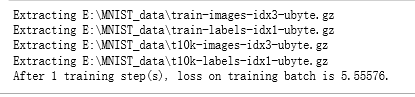
                print("After %d training step(s), loss on training batch is %g." % (step, loss_value))

def main(argv=None):

    mnist = input_data.read_data_sets("E:\\MNIST_data\\", one_hot=True)

    train(mnist)

if __name__ == '__main__':

    main()
吴裕雄 python 神经网络——TensorFlow 实现LeNet-5模型处理MNIST手写数据集的更多相关文章
- 吴裕雄 python 神经网络TensorFlow实现LeNet模型处理手写数字识别MNIST数据集
import tensorflow as tf tf.reset_default_graph() # 配置神经网络的参数 INPUT_NODE = 784 OUTPUT_NODE = 10 IMAGE ...
- TensorFlow实战第五课(MNIST手写数据集识别)
Tensorflow实现softmax regression识别手写数字 MNIST手写数字识别可以形象的描述为机器学习领域中的hello world. MNIST是一个非常简单的机器视觉数据集.它由 ...
- 吴裕雄 python 神经网络——TensorFlow 循环神经网络处理MNIST手写数字数据集
#加载TF并导入数据集 import tensorflow as tf from tensorflow.contrib import rnn from tensorflow.examples.tuto ...
- 吴裕雄 python 神经网络——TensorFlow 使用卷积神经网络训练和预测MNIST手写数据集
import tensorflow as tf import numpy as np from tensorflow.examples.tutorials.mnist import input_dat ...
- 吴裕雄 python 神经网络——TensorFlow 训练过程的可视化 TensorBoard的应用
#训练过程的可视化 ,TensorBoard的应用 #导入模块并下载数据集 import tensorflow as tf from tensorflow.examples.tutorials.mni ...
- 吴裕雄 python 神经网络——TensorFlow实现搭建基础神经网络
import numpy as np import tensorflow as tf import matplotlib.pyplot as plt def add_layer(inputs, in_ ...
- 吴裕雄 python 神经网络——TensorFlow图片预处理调整图片
import numpy as np import tensorflow as tf import matplotlib.pyplot as plt def distort_color(image, ...
- 吴裕雄 python 神经网络——TensorFlow pb文件保存方法
import tensorflow as tf from tensorflow.python.framework import graph_util v1 = tf.Variable(tf.const ...
- 吴裕雄 python 神经网络——TensorFlow 数据集高层操作
import tempfile import tensorflow as tf train_files = tf.train.match_filenames_once("E:\\output ...
- 吴裕雄 python 神经网络——TensorFlow 输入数据处理框架
import tensorflow as tf files = tf.train.match_filenames_once("E:\\MNIST_data\\output.tfrecords ...
随机推荐
- NOIP做题练习(day1)
A - Xenny and Alternating Tasks 题面 题解 枚举第一天是谁做,将两个答案取\(min\)即可. 代码 #include <iostream> #includ ...
- java中的try-catch-finally中的return的执行顺序
在这里看到了try catch finally块中含有return语句时程序执行的几种情况,但其实总结的并不全,而且分析的比较含糊.但有一点是可以肯定的,finally块中的内容会先于try中的ret ...
- mysql和oracle建表语句以及数据类型的区别
1.mysql和oracle建表语句的区别 mysql DROP TABLE IF EXISTS `order`;CREATE TABLE `order` ( `id` int(11) NOT NU ...
- 刷题4. Median of Two Sorted Arrays
一.题目 Median of Two Sorted Arrays,具体请自行搜索. 这个题目,我看了一下,经过一番思考,我觉得实现起来不是很复杂. 但要做到bug free也不难,最大的问题是性能问题 ...
- ErgExp-lookbehind assert(后行断言)
//先行断言:先遇到一个条件,判断后面的条件是否满足 let test = 'hello world' console.log(test.match(/hello(?=\sworld)/)) //后行 ...
- 简单docker示例
创建spring boot工程 工程目录 Controller.java 类说明 主要是接收界面请求,直接返回传入的参数 在启动工程,查看工程运行效果 右键SampleApplication.java ...
- opencv:自适应阈值
#include <opencv2/opencv.hpp> #include <iostream> using namespace cv; using namespace st ...
- mpvue 小程序 使用wx.request请求数据
1.创建src下创建utils/wx-request.js const host = 'http://10.0.0.6:8081' function request (url, method, dat ...
- Linux实现树莓派3B的国密SM9算法交叉编译——(一)环境部署、简单测试与eclipse工程项目测试
这篇文章主要介绍了交叉编译的实现,包括环境部署,并简单测试交叉编译环境是否安装成功. 一.交叉编译 在一个平台上生成另一个平台上的可执行代码.为什么要大费周折的进行交叉编译呢?一句话:不得已而为之.有 ...
- java 面试架构篇
1.非功能需求会考虑哪些? 可用性.扩展性.性能: 2.有没有遇到过建了索引反而变慢的情况? 3.从哪些角度去设计系统? 4.代码中使用过的设计模式?