
Quick Cocos2dx 场景转换问题
项目结构是这样子的:
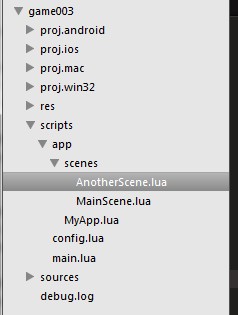
主场景代码是这样子的:
local MainScene = class("MainScene", function()

    return display.newScene("MainScene")

end)

function MainScene:ctor()

    self.layer = display.newLayer();

    self:addChild(self.layer)

    self.item0 = ui.newTTFLabelMenuItem({text = "START", size = , align = ui.TEXT_ALIGN_CENTER,

        x = display.cx, y = display.cy + ,

         listener = function()

            print("Start touched")

            nexScene = display.newScene("AnotherScene");

            CCDirector:sharedDirector():replaceScene(CCTransitionFade:create(, nexScene))

        end})

    self.item1 = ui.newTTFLabelMenuItem({text = "ABOUT", size = , align = ui.TEXT_ALIGN_CENTER,

        x=display.cx, y=display.cy,

         listener = function()

            print("About touched")

        end})

    self.item2 = ui.newTTFLabelMenuItem({text = "EXIT", size = , align = ui.TEXT_ALIGN_CENTER,

        x=display.cx, y=display.cy-,

        listener = function()

            print("Exit touched")

            game.exit()

        end})

    self.menu = ui.newMenu({self.item0,self.item1,self.item2})

    self.layer:addChild(self.menu)

end

function MainScene:onEnter()

    self.layer:setTouchEnabled(true)

end

function MainScene:onTouch(event, x, y)

    print(event)

end

function MainScene:onExit()

end

return MainScene
新场景代码是这样子的:
local AnotherScene = class("AnotherScene", function()

    return display.newScene("AnotherScene")

end)

function AnotherScene:ctor()

    print("Constructor of AnotherScene")

end

function AnotherScene:onEnter()

    print("Custom AnotherScene:onEnter")

    ui.newTTFLabel({text = "AnotherScene", size = , align = ui.TEXT_ALIGN_CENTER})

        :pos(display.cx, display.cy)

        :addTo(self)

end

return AnotherScene
可是点击点击START之后进入的是一个黑色的新场景,DEBUG内容如下:
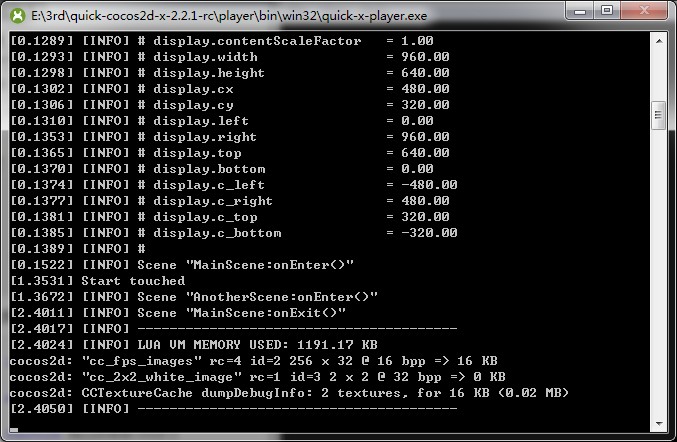
根本就没有打印AnotherScene.lua ctor()和onEnter()里面的提示内容。
经查验qucik cocos2dx源码,发现display.newScene("AnotherScene")新建了一个名为"AnotherScene"的CCScene,
而不是去取AnotherScene.lua,如下:
function display.newScene(name)

    local scene = CCSceneExtend.extend(CCScene:create())

    scene.name = name or "<unknown-scene>"

    return scene

end
于是将item0的listener的代码如下:
 print("Start touched")

            local AnotherScene = require("../scripts/app/scenes/AnotherScene")

            nexScene = AnotherScene:new();

            CCDirector:sharedDirector():replaceScene(CCTransitionFade:create(, nexScene))
然后就正常了。
如下:
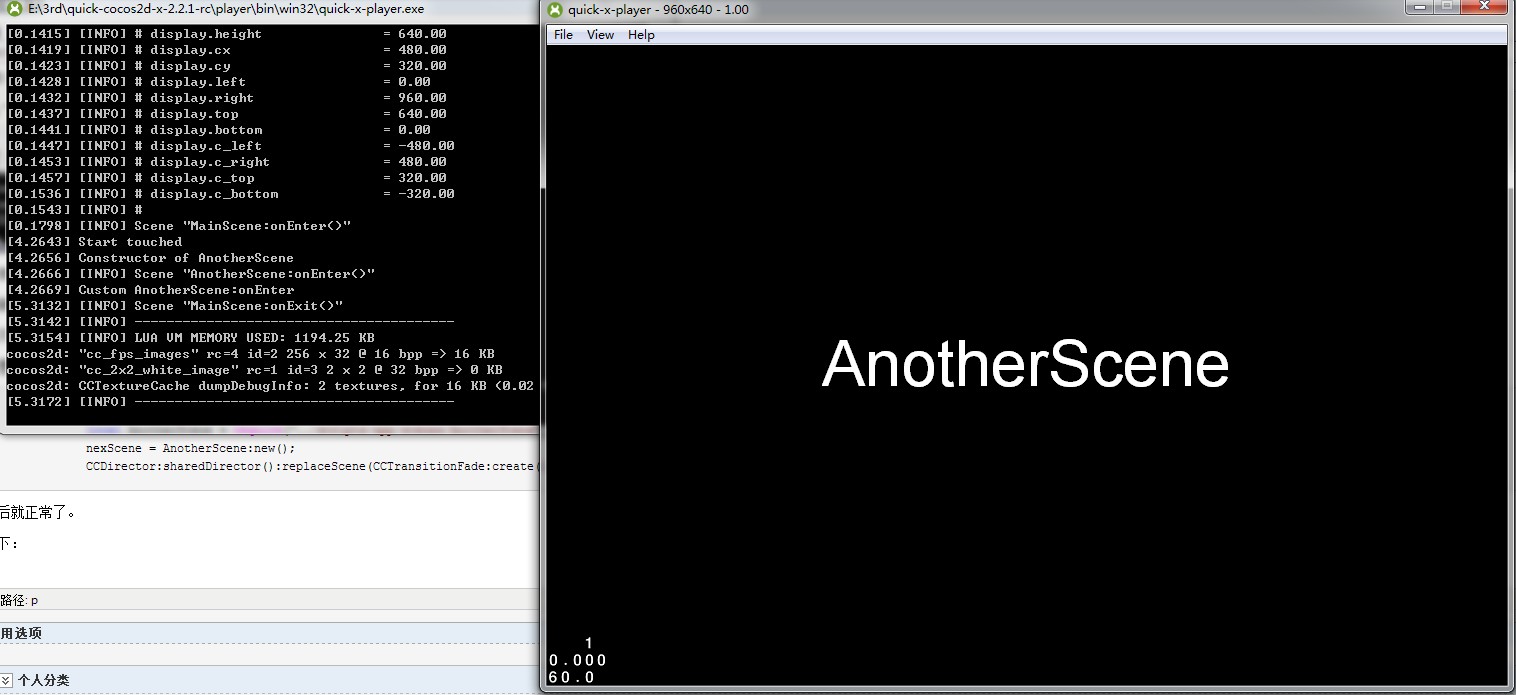
这也许就是脚本语言的便利与不便利之处了。
Quick Cocos2dx 场景转换问题的更多相关文章
- Quick Cocos2dx 场景对象基类实现
从使用Quick-Cocos2d-x搭建一个横版过关游戏(四)拷来个进度条类, 但是由于那个类有个bug,在setProgress里面self.fill是找不到的,所以我改进了一下,代码如下: loc ...
- Quick Cocos2dx Action相关
周末在家除了看犯罪心里和反恐24小时,啥都没干,为毛在家老是不能安安静静的看书学习敲代码?不知道啊 心好累,感觉学习不下去了. 然后公司上午有半天世界杯决赛假,下午回来更新了svn,没啥工作内容,只好 ...
- quick cocos2d-x 入门---井字棋
学习quick cocos2d-x 第二天 ,使用quick-x 做了一个井字棋游戏 . 我假设读者已经 http://wiki.quick-x.com/doku.php?id=zh_cn阅读了这个链 ...
- (10)场景转换(Transitions)
Cocos2d-x最爽的一个特性之一就是提供了在两个不同场景之间直接转换的能力.例如:淡入淡出,放大缩小,旋转,跳动等.从技术上来说,一个场景转换就是在展示并控制一个新场景之前执行一个转换效果. 场景 ...
- 【Unity3D】场景转换与退出
1.场景转换 : 老版本的场景切换用的是Application.LoadLevel([场景名字或者在File->Build settings里面的场景代号]); 新版本的场景转换用到了Scene ...
- cocos2d 场景转换的方法执行顺序
转自:http://shanbei.info/the-cocos2d-scene-conversion-method-execution-order.html 如果你希望在场景转换的过程中使用过渡效果 ...
- Mac下搭建quick cocos2d-x编译环境
一. 我知道在你的电脑中一定已经安装好了Xcode(没有自己下载去吧),打开Xcode,开启"偏好设置"对话框(commond + ,).假设打开之后出现的是这种一个对话框,那么直 ...
- Cocos2d-iPhone V3 (2) 场景转换
Cocos2d-iPhone V3 (2) 场景转换 博客:http://blog.csdn.net/prevention 作者:大锐哥 - 1. 准备工作 创建一个场景会吧? #import &qu ...
- Quick Cocos2dx Http通讯
服务端:Python 通讯协议:Http 参考文章: 1 用python实现一个基本的http server服务器 http://blog.sina.com.cn/s/blog_416e3063010 ...
随机推荐
- 转 dos 下的 find 和 重定向
1.find /i "ora-" *.* > check.log 附录: 我对findstr是如此的依赖,以至于当我向各位讲解find命令的时候,我还得老老实实地在cmd窗口 ...
- OpenLayers 3 的地图基本操作
<body> <div id="map"> <div id="menu"> <button id="zoom ...
- input内文字点击消失 弹出层,可以写表单
<!DOCTYPE HTML> <html> <head> <meta http-equiv="Content-Type" content ...
- 过滤器HttpModule
1.建一个类库文件 FirsModule,实现IHttpModule接口,实现其中的两个方法,写一函数实现自己的代码逻辑,在Init方法中调用即可. // <summary> /// 第 ...
- HDOJ3743<分治>
题意:求一个排列的逆序数. #include<cstdio> #include<iostream> #include<algorithm> const int ma ...
- php 四种基础的算法 ---- 冒泡排序法
1. 冒泡排序法 * 思路分析:法如其名,就是像冒泡一样,每次从数组当中 冒一个最大的数出来. * 比如:2,4,1 // 第一次 冒出的泡是4 * ...
- 关于前台主键输入错误对后台hibernate方法的影响
由于前台输入时开始不小心打错了主键为value=“${conf_id}”/ 导致后台得到的主键不是数字“1”而是“1/”所以到后台就算是进的updata方法结果运行的却是添加方法 原因可能是传入的对象 ...
- java 继承与多态
Example5_11.java class 动物 { void cry() { } } class 狗 extends 动物 { void cry() { System.out.println(&q ...
- cocos2d Android.mk自动添加类
打开Android.mk修改以下代码: LOCAL_SRC_FILES := hellocpp/main.cpp \ ../../Classes/AppDelegate.cpp \ ../../Cla ...
- 转:lr_eval_string函数的用法解析
在LR中,C的变量和LR的参数是不一样的. 任何C的变量都不能被LR的函数直接调用. 应该用lr_eval_string来取值. 比如{NewParam}(LR中参数化的变量)直接用这个引用是没有问题 ...