
[Python爬虫] 之二十五:Selenium +phantomjs 利用 pyquery抓取今日头条网数据
一、介绍
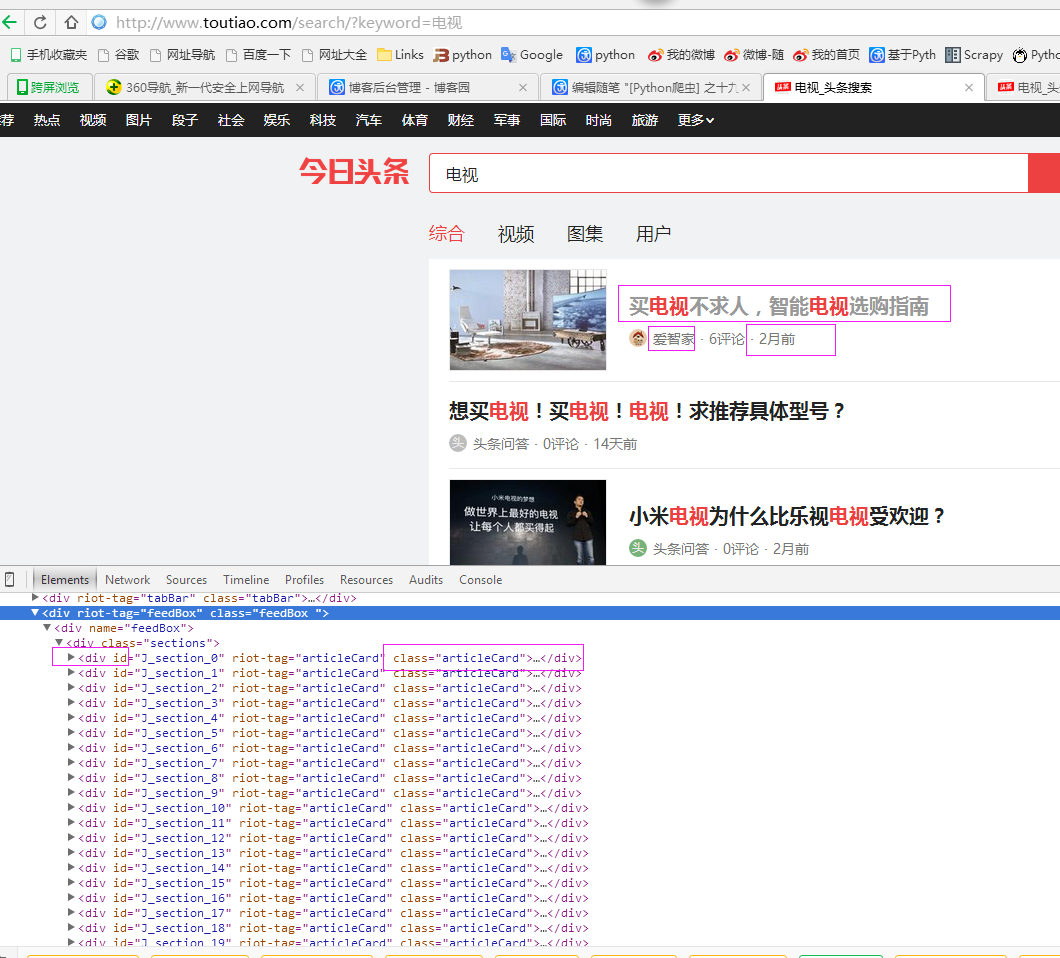
本例子用Selenium +phantomjs爬取今日头条(http://www.toutiao.com/search/?keyword=电视)的资讯信息,输入给定关键字抓取资讯信息。
给定关键字:数字;融合;电视
抓取信息内如下:
1、资讯标题
2、资讯链接
3、资讯时间
4、资讯来源
二、网站信息
三、数据抓取
针对上面的网站信息,来进行抓取
1、首先抓取信息列表
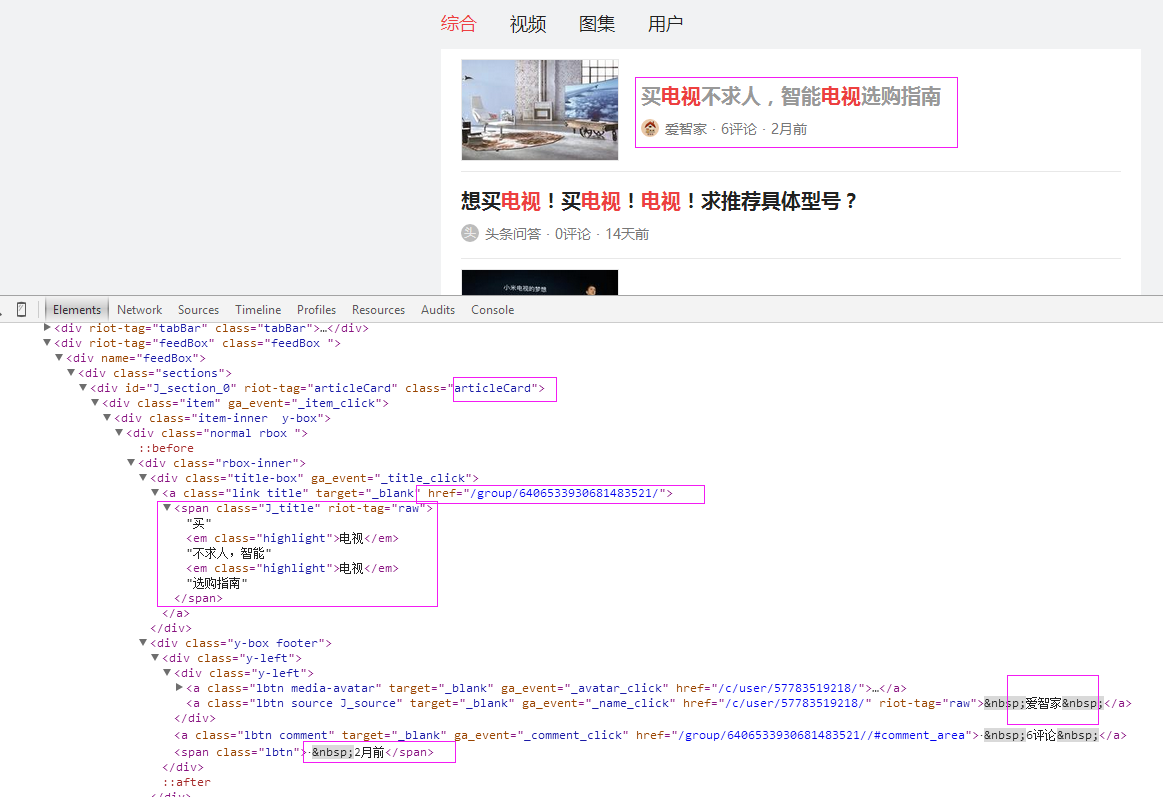
抓取代码:Elements = doc('div[class="articleCard"]')
2、抓取标题
抓取代码:title = element('a[class="link title"]').find('span').text().encode('utf8').replace(' ', '')
3、抓取链接
抓取代码:url = 'http://www.toutiao.com' + element.find('a[class="link title"]').attr('href')
4、抓取日期
抓取代码:strdate = element('span[class="lbtn"]').text().encode('utf8').strip()
5、抓取来源
抓取代码:source = element('a[class="lbtn source J_source"]').text().encode('utf8').replace(' ', '')
四、完整代码
# coding=utf-8

import os

import re

from selenium import webdriver

import selenium.webdriver.support.ui as ui

import time

from datetime import datetime

import IniFile

# from threading import Thread

from pyquery import PyQuery as pq

import LogFile

import mongoDB

import urllib

class toutiaoSpider(object):

    def __init__(self):

        logfile = os.path.join(os.path.dirname(os.getcwd()), time.strftime('%Y-%m-%d') + '.txt')

        self.log = LogFile.LogFile(logfile)

        configfile = os.path.join(os.path.dirname(os.getcwd()), 'setting.conf')

        cf = IniFile.ConfigFile(configfile)

        webSearchUrl = cf.GetValue("toutiao", "webSearchUrl")

        self.keyword_list = cf.GetValue("section", "information_keywords").split(';')

        self.db = mongoDB.mongoDbBase()

        self.start_urls = []

        for word in self.keyword_list:

            self.start_urls.append(webSearchUrl + urllib.quote(word))

        self.driver = webdriver.PhantomJS()

        self.wait = ui.WebDriverWait(self.driver, 2)

        self.driver.maximize_window()

    def scroll_foot(self):

        '''

                滚动条拉到底部

                :return:

                '''

        js = ""

        # 如何利用chrome驱动或phantomjs抓取

        if self.driver.name == "chrome" or self.driver.name == 'phantomjs':

            js = "var q=document.body.scrollTop=10000"

        # 如何利用IE驱动抓取

        elif self.driver.name == 'internet explorer':

            js = "var q=document.documentElement.scrollTop=10000"

        return self.driver.execute_script(js)

    def date_isValid(self, strDateText):

        '''

        判断日期时间字符串是否合法:如果给定时间大于当前时间是合法,或者说当前时间给定的范围内

        :param strDateText: 四种格式 '2小时前'; '2天前' ; '昨天' ;'2017.2.12 '

        :return: True:合法;False:不合法

        '''

        currentDate = time.strftime('%Y-%m-%d')

        if strDateText.find('分钟前') > 0 or strDateText.find('刚刚') > -1:

            return True, currentDate

        elif strDateText.find('小时前') > 0:

            datePattern = re.compile(r'\d{1,2}')

            ch = int(time.strftime('%H'))  # 当前小时数

            strDate = re.findall(datePattern, strDateText)

            if len(strDate) == 1:

                if int(strDate[0]) <= ch:  # 只有小于当前小时数,才认为是今天

                    return True, currentDate

        return False, ''

    def log_print(self, msg):

        '''

        #         日志函数

        #         :param msg: 日志信息

        #         :return:

        #         '''

        print '%s: %s' % (time.strftime('%Y-%m-%d %H-%M-%S'), msg)

    def scrapy_date(self):

        strsplit = '------------------------------------------------------------------------------------'

        index = 0

        for link in self.start_urls:

            self.driver.get(link)

            keyword = self.keyword_list[index]

            index = index + 1

            time.sleep(1) #数据比较多,延迟下,否则会出现查不到数据的情况

            selenium_html = self.driver.execute_script("return document.documentElement.outerHTML")

            doc = pq(selenium_html)

            infoList = []

            self.log.WriteLog(strsplit)

            self.log_print(strsplit)

            Elements = doc('div[class="articleCard"]')

            for element in Elements.items():

                strdate = element('span[class="lbtn"]').text().encode('utf8').strip()

                flag, date = self.date_isValid(strdate)

                if flag:

                    title = element('a[class="link title"]').find('span').text().encode('utf8').replace(' ', '')

                    if title.find(keyword) > -1:

                        url = 'http://www.toutiao.com' + element.find('a[class="link title"]').attr('href')

                        source = element('a[class="lbtn source J_source"]').text().encode('utf8').replace(' ', '')

                        dictM = {'title': title, 'date': date,

                                 'url': url, 'keyword': keyword, 'introduction': title, 'source': source}

                        infoList.append(dictM)

                        # self.log.WriteLog('title:%s' % title)

                        # self.log.WriteLog('url:%s' % url)

                        # self.log.WriteLog('source:%s' % source)

                        # self.log.WriteLog('kword:%s' % keyword)

                        # self.log.WriteLog(strsplit)

                        self.log_print('title:%s' % dictM['title'])

                        self.log_print('url:%s' % dictM['url'])

                        self.log_print('date:%s' % dictM['date'])

                        self.log_print('source:%s' % dictM['source'])

                        self.log_print('kword:%s' % dictM['keyword'])

                        self.log_print(strsplit)

            if len(infoList)>0:

                self.db.SaveInformations(infoList)

        self.driver.close()

        self.driver.quit()

obj = toutiaoSpider()

obj.scrapy_date()
[Python爬虫] 之二十五:Selenium +phantomjs 利用 pyquery抓取今日头条网数据的更多相关文章
- [Python爬虫] 之二十七:Selenium +phantomjs 利用 pyquery抓取今日头条视频
一.介绍 本例子用Selenium +phantomjs爬取今天头条视频(http://www.tvhome.com/news/)的信息,输入给定关键字抓取图片信息. 给定关键字:视频:融合:电视 二 ...
- [Python爬虫] 之二十一:Selenium +phantomjs 利用 pyquery抓取36氪网站数据
一.介绍 本例子用Selenium +phantomjs爬取36氪网站(http://36kr.com/search/articles/电视?page=1)的资讯信息,输入给定关键字抓取资讯信息. 给 ...
- [Python爬虫] 之二十三:Selenium +phantomjs 利用 pyquery抓取智能电视网数据
一.介绍 本例子用Selenium +phantomjs爬取智能电视网(http://news.znds.com/article/news/)的资讯信息,输入给定关键字抓取资讯信息. 给定关键字:数字 ...
- [Python爬虫] 之二十:Selenium +phantomjs 利用 pyquery通过搜狗搜索引擎数据
一.介绍 本例子用Selenium +phantomjs 利用 pyquery通过搜狗搜索引擎数据()的资讯信息,输入给定关键字抓取资讯信息. 给定关键字:数字:融合:电视 抓取信息内如下: 1.资讯 ...
- [Python爬虫] 之十九:Selenium +phantomjs 利用 pyquery抓取超级TV网数据
一.介绍 本例子用Selenium +phantomjs爬取超级TV(http://www.chaojitv.com/news/index.html)的资讯信息,输入给定关键字抓取资讯信息. 给定关键 ...
- [Python爬虫] 之二十四:Selenium +phantomjs 利用 pyquery抓取中广互联网数据
一.介绍 本例子用Selenium +phantomjs爬取中广互联网(http://www.tvoao.com/select.html)的资讯信息,输入给定关键字抓取资讯信息. 给定关键字:数字:融 ...
- [Python爬虫] 之三十:Selenium +phantomjs 利用 pyquery抓取栏目
一.介绍 本例子用Selenium +phantomjs爬取栏目(http://tv.cctv.com/lm/)的信息 二.网站信息 三.数据抓取 首先抓取所有要抓取网页链接,共39页,保存到数据库里 ...
- [Python爬虫] 之二十八:Selenium +phantomjs 利用 pyquery抓取网站排名信息
一.介绍 本例子用Selenium +phantomjs爬取中文网站总排名(http://top.chinaz.com/all/index.html,http://top.chinaz.com/han ...
- [Python爬虫] 之二十九:Selenium +phantomjs 利用 pyquery抓取节目信息信息
一.介绍 本例子用Selenium +phantomjs爬取节目(http://tv.cctv.com/epg/index.shtml?date=2018-03-25)的信息 二.网站信息 三.数据抓 ...
随机推荐
- UVALIVE 2686 Stargates
尼玛真深坑合时p[x] = y 就RE,p[y] = x 就AC . #include <map> #include <set> #include <list> # ...
- python基础===map和zip的用法
>>> list1=[1,45,232,45,666,64] >>> list2=["ss","kein","to ...
- 冒泡排序的思想 python 冒泡排序、递归排序
冒泡排序的时间复杂度是O(N^2) 冒泡排序的思想: 每次比较两个相邻的元素, 如果他们的顺序错误就把他们交换位置 比如有五个数: 12, 35, 99, 18, 76, 从大到小排序, 对相邻的两位 ...
- servlet(6) - servlet总结 - 小易Java笔记
垂阅前必看: 这都是我总结的我觉得是学习servlet应该掌握的,我在学习期间也做了一个博客项目来让所学的知识得以巩固.下面就是博客项目链接.前面的servlet相关的笔记总汇,还有就是我把觉得在学习 ...
- 表单文件上传,ajax文件上传
原创链接:http://www.cnblogs.com/yanqin/p/5345562.html html代码 index.jsp(表单文件上传) <form action="sh ...
- [ 总结 ] vsftpd 虚拟用户配置
需求:在不更改目录权限的前提下,ftp用户对目录里的文件拥有所有权. [root@server2 ~]# yum install vsftpd -y [root@server2 ~]# cd /etc ...
- [git] warning: LF will be replaced by CRLF | fatal: CRLF would be replaced by LF[ git 处理和修改行结束符(CRLF和LF)]
我自己的设置是: [core] autocrlf = false[core] safecrlf = true 取消自动转换CRLF(上图中选的是commit as is),但是有提交前混用检查 本人用 ...
- centeros7远程访问mysql5.7
先启动firewall防火墙: service firewalld start 打开3306端口: firewall-cmd --add-port=/tcp --permanent mysql授权ro ...
- notepad++ quicktext插件安装与代码片段配置[quicktext v0.2.1]
1 下载quicktext插件0.2.1版本 http://sourceforge.net/projects/quicktext/ 2 解压 3 把QuickText.ANSI.dll和QuickTe ...
- 水流(water)(BFS)(DFS)
水流(water) 时间限制: 1 Sec 内存限制: 64 MB提交: 9 解决: 2[提交][状态][讨论版] 题目描述 全球气候变暖,小镇A面临水灾,于是你必须买一些泵把水抽走.泵的抽水能力 ...