
[Python爬虫] 之二十七:Selenium +phantomjs 利用 pyquery抓取今日头条视频
一、介绍
本例子用Selenium +phantomjs爬取今天头条视频(http://www.tvhome.com/news/)的信息,输入给定关键字抓取图片信息。
给定关键字:视频;融合;电视
二、网站信息
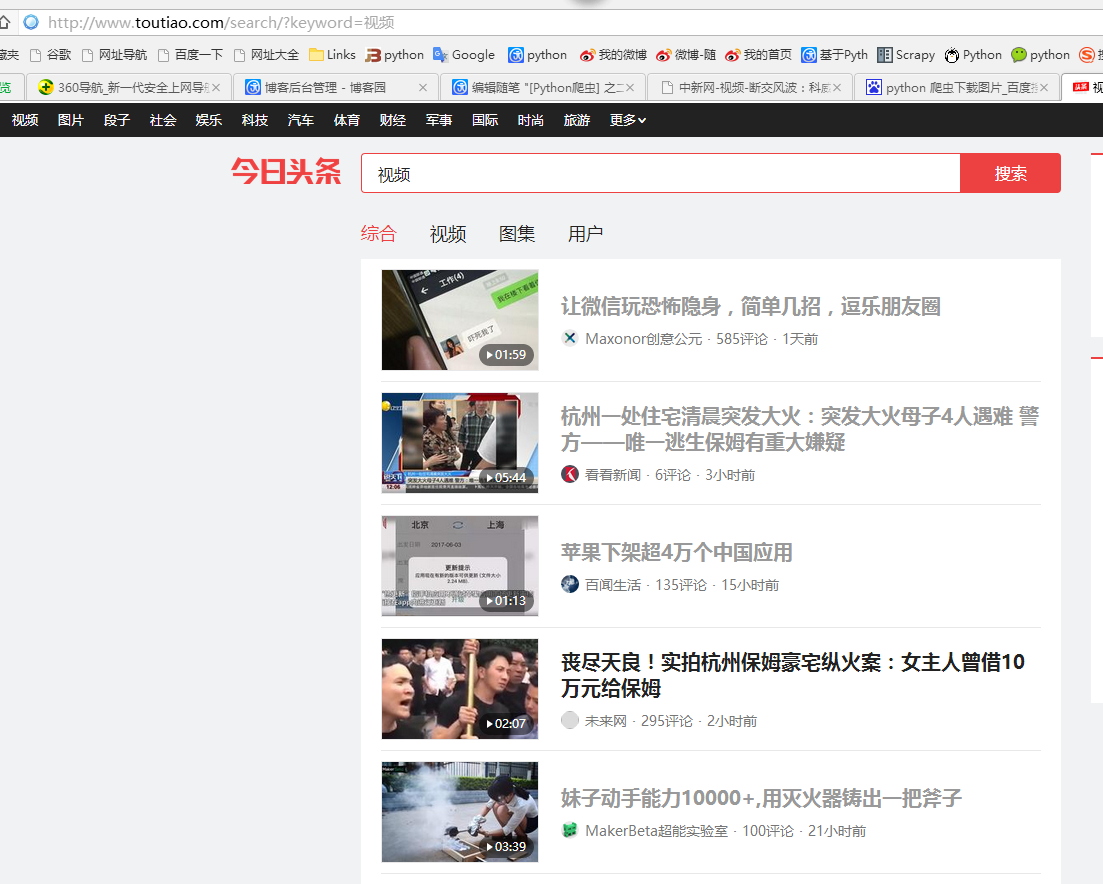
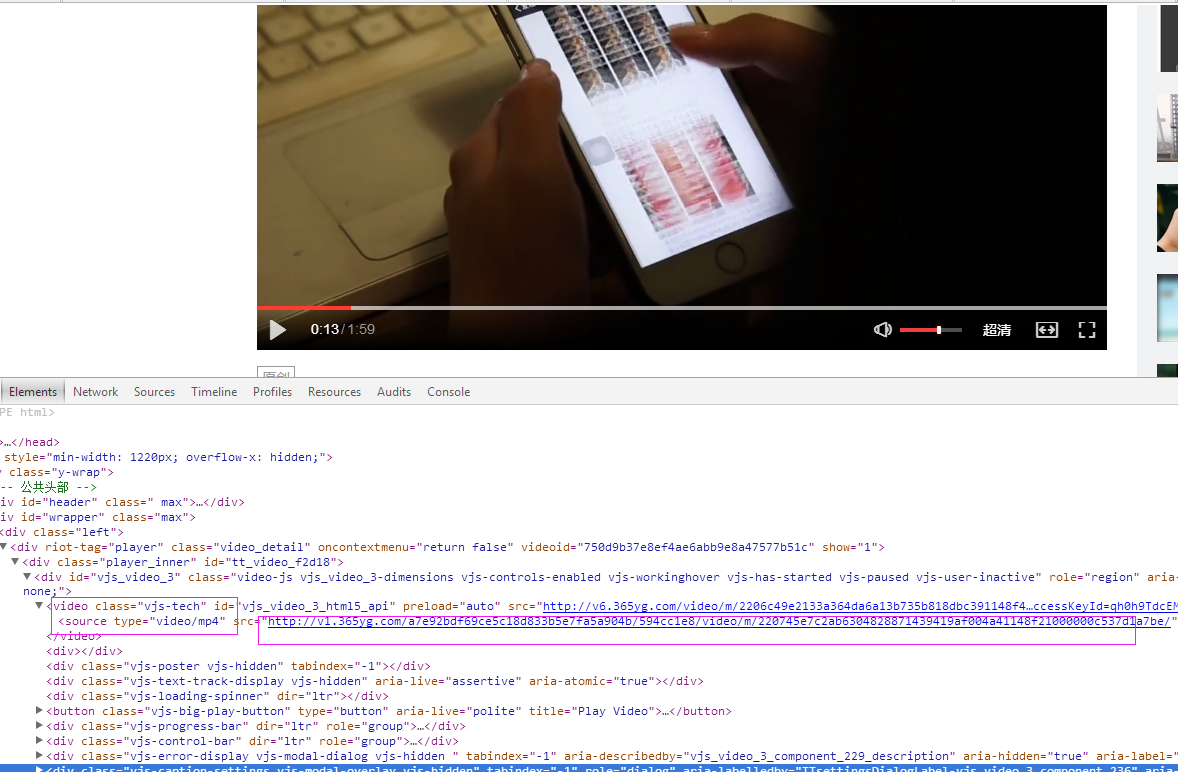
三、数据抓取
针对上面的网站信息,来进行抓取
1、首先抓取视频信息列表
抓取代码:Elements = doc('div[class="articleCard"]')
2、抓取图片
视频url:url = 'http://www.toutiao.com' + element.find('a[class="link title"]').attr('href')
videourl = dochtml('video[class="vjs-tech"]').find('source').attr('src')
四、完整代码
# coding=utf-8

import os

import re

from selenium import webdriver

import selenium.webdriver.support.ui as ui

import time

from datetime import datetime

import IniFile

# from threading import Thread

from pyquery import PyQuery as pq

import LogFile

import mongoDB

import urllib

class toutiaoSpider(object):

    def __init__(self):

        logfile = os.path.join(os.path.dirname(os.getcwd()), time.strftime('%Y-%m-%d') + '.txt')

        self.log = LogFile.LogFile(logfile)

        configfile = os.path.join(os.path.dirname(os.getcwd()), 'setting.conf')

        cf = IniFile.ConfigFile(configfile)

        webSearchUrl = cf.GetValue("toutiao", "webSearchUrl")

        self.keyword_list = cf.GetValue("section", "information_keywords").split(';')

        self.db = mongoDB.mongoDbBase()

        self.start_urls = []

        for word in self.keyword_list:

            self.start_urls.append(webSearchUrl + urllib.quote(word))

        self.driver = webdriver.PhantomJS()

        self.wait = ui.WebDriverWait(self.driver, 2)

        self.driver.maximize_window()

    def down_video(self, videourl):

        """

                                       下载视频到本地

                                       :param videourl: 视频url

                                       """

        # http://img.tvhomeimg.com/uploads/2017/06/23/144910c41de4781ccfe9435e736ef72b.jpg

        if len(videourl) > 0:

            fileName = ''

            if videourl.rfind('/') > 0:

                fileName = time.strftime('%Y%m%d%H%M%S') + '.mp4'

                u = urllib.urlopen(videourl)

                data = u.read()

                strpath = os.path.join(os.path.dirname(os.getcwd()), 'video')

                with open(os.path.join(strpath, fileName), 'wb') as f:

                    f.write(data)

    def scrapy_date(self):

        strsplit = '------------------------------------------------------------------------------------'

        index = 0

        for link in self.start_urls:

            self.driver.get(link)

            keyword = self.keyword_list[index]

            index = index + 1

            time.sleep(1) #数据比较多,延迟下,否则会出现查不到数据的情况

            selenium_html = self.driver.execute_script("return document.documentElement.outerHTML")

            doc = pq(selenium_html)

            infoList = []

            self.log.WriteLog(strsplit)

            self.log_print(strsplit)

            Elements = doc('div[class="articleCard"]')

            for element in Elements.items():

                url = 'http://www.toutiao.com' + element.find('a[class="link title"]').attr('href')

                infoList.append(url)

            if len(infoList)>0:

                for url in infoList:

                    self.driver.get(url)

                    htext = self.driver.execute_script("return document.documentElement.outerHTML")

                    dochtml = pq(htext)

                    videourl = dochtml('video[class="vjs-tech"]').find('source').attr('src')

                    if videourl:

                        self.down_video(videourl)

        self.driver.close()

        self.driver.quit()

obj = toutiaoSpider()

obj.scrapy_date()
[Python爬虫] 之二十七:Selenium +phantomjs 利用 pyquery抓取今日头条视频的更多相关文章
- [Python爬虫] 之二十五:Selenium +phantomjs 利用 pyquery抓取今日头条网数据
一.介绍 本例子用Selenium +phantomjs爬取今日头条(http://www.toutiao.com/search/?keyword=电视)的资讯信息,输入给定关键字抓取资讯信息. 给定 ...
- [Python爬虫] 之三十一:Selenium +phantomjs 利用 pyquery抓取消费主张信息
一.介绍 本例子用Selenium +phantomjs爬取央视栏目(http://search.cctv.com/search.php?qtext=消费主张&type=video)的信息(标 ...
- [Python爬虫] 之三十:Selenium +phantomjs 利用 pyquery抓取栏目
一.介绍 本例子用Selenium +phantomjs爬取栏目(http://tv.cctv.com/lm/)的信息 二.网站信息 三.数据抓取 首先抓取所有要抓取网页链接,共39页,保存到数据库里 ...
- [Python爬虫] 之二十二:Selenium +phantomjs 利用 pyquery抓取界面网站数据
一.介绍 本例子用Selenium +phantomjs爬取界面(https://a.jiemian.com/index.php?m=search&a=index&type=news& ...
- [Python爬虫] 之二十一:Selenium +phantomjs 利用 pyquery抓取36氪网站数据
一.介绍 本例子用Selenium +phantomjs爬取36氪网站(http://36kr.com/search/articles/电视?page=1)的资讯信息,输入给定关键字抓取资讯信息. 给 ...
- [Python爬虫] 之二十九:Selenium +phantomjs 利用 pyquery抓取节目信息信息
一.介绍 本例子用Selenium +phantomjs爬取节目(http://tv.cctv.com/epg/index.shtml?date=2018-03-25)的信息 二.网站信息 三.数据抓 ...
- [Python爬虫] 之二十八:Selenium +phantomjs 利用 pyquery抓取网站排名信息
一.介绍 本例子用Selenium +phantomjs爬取中文网站总排名(http://top.chinaz.com/all/index.html,http://top.chinaz.com/han ...
- [Python爬虫] 之十七:Selenium +phantomjs 利用 pyquery抓取梅花网数据
一.介绍 本例子用Selenium +phantomjs爬取梅花网(http://www.meihua.info/a/list/today)的资讯信息,输入给定关键字抓取资讯信息. 给定关键字:数字: ...
- [Python爬虫] 之二十六:Selenium +phantomjs 利用 pyquery抓取智能电视网站图片信息
一.介绍 本例子用Selenium +phantomjs爬取智能电视网站(http://www.tvhome.com/news/)的资讯信息,输入给定关键字抓取图片信息. 给定关键字:数字:融合:电视 ...
随机推荐
- zhudongfangyu.exe进程是360主动防御进程,用来监控电脑系统,防止电脑病毒出现并阻止病毒或木马的安全进程
zhudongfangyu.exe进程是360主动防御进程,用来监控电脑系统,防止电脑病毒出现并阻止病毒或木马的安全进程
- python学习 - yield
def myYield2(): for i in range(3): yield '2222 i am in myYield2', 'i = ', i def myYield(): for i in ...
- Jmeter4.0启动闪退问题解决方案
jmeter:4.0 jdk版本:1.8 在Jmeter.bat的最后添加pause可以让Jmeter启动停止: 添加了pause进行强制停止在启动命令页面,查看到Jmeter报错信息如下: 第一次解 ...
- Appium+python自动化29-toast消息【转载】
本篇转自博客:上海-悠悠 前言 appium1.5以后的版本才支持toast定位,并且 'automationName'得设置为'Uiautomator2',才能捕获到. 一. Supported P ...
- KO工作原理及带来的好处
介绍 Knockout是一个以数据模型(data model)为基础的能够帮助你创建富文本,响应显示和编辑用户界面的JavaScript类库.任何时候如果你的UI需要自动更新(比如:更新依赖于用户的行 ...
- 【转载】Linux中profile、bashrc、bash_profile之间的区别和联系
如果你想对所有的使用bash的用户修改某个配置并在以后打开的bash都生效的话可以修改这个文件,修改这个文件不用重启,重新打开一个bash即可生效.~/.bash_profile:每个用户都可使用该文 ...
- [ThinkPHP] 独立分组配置,坑!!!
'APP_GROUP_LIST'=>'Index,Admin', //逗号后面别跟空格啊,真是逗
- HDU 6362.oval-and-rectangle-数学期望、微积分 (2018 Multi-University Training Contest 6 1001)
2018 Multi-University Training Contest 6 6362.oval-and-rectangle 题意就是椭圆里画内接矩形,问你矩形周长的期望. 比赛的时候推了公式,但 ...
- HDU 6343.Problem L. Graph Theory Homework-数学 (2018 Multi-University Training Contest 4 1012)
6343.Problem L. Graph Theory Homework 官方题解: 一篇写的很好的博客: HDU 6343 - Problem L. Graph Theory Homework - ...
- 一句话木马与caidao
实验吧有个试验环境:http://www.shiyanbar.com/experiment-course/experiment-course/vid/1812 菜刀的主要功能是用来连接一句话木马的,a ...