
Android学习笔记进阶20之得到图片的缩略图
<1>简介
之前往往是通过Bitmap、Drawable和Canvas配合完成,需要写一系列繁杂的逻辑去缩小原有图片,从而得到缩略图。
现在我给大家介绍一种比较简单的方法:(网上有)
在Android 2.2版本中,新增了一个ThumbnailUtils工具类来是实现缩略图,此工具类的功能是强大的,使用是简单,它提供了一个常量和三个方法。利用这些常数和方法,可以轻松快捷的实现图片和视频的缩略图功能。
<2>ThumbnailUtils工具类
常量:
OPTIONS_RECYCLE_INPUT
从此常量用于表示应该回收extractThumbnail(Bitmap, int, int, int)输入源图片(第一个参数),除非输出图片就是输入图片。
方法:
Bitmap createVideoThumbnail(String filePath, int kind)
创建一张视频的缩略图。如果视频已损坏或者格式不支持可能返回null。
参数:
filePath: 视频文件路径
kind: 文件种类,可以是 MINI_KIND 或 MICRO_KIND
Bitmap extractThumbnail(Bitmap source, int width, int height, int options)
创建所需尺寸居中缩放的位图。
参数:
source: 需要被创造缩略图的源位图对象
width: 生成目标的宽度
height: 生成目标的高度
options:在缩略图抽取时提供的选项
Bitmap extractThumbnail(Bitmap source, int width, int height)
创建所需尺寸居中缩放的位图。
参数:
source: 需要被创造缩略图的源位图对象
width: 生成目标的宽度
height: 生成目标的高度
<3>具体实现:
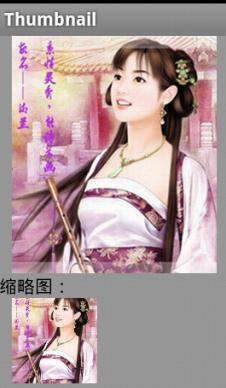
- package xiaosi.thumbnail;
- import android.app.Activity;
- import android.graphics.Bitmap;
- import android.graphics.BitmapFactory;
- import android.graphics.drawable.BitmapDrawable;
- import android.graphics.drawable.Drawable;
- import android.media.ThumbnailUtils;
- import android.os.Bundle;
- import android.widget.ImageView;
- public class ThumbnailActivity extends Activity {
- private Bitmap bitmap = null;
- private ImageView image;
- @Override
- public void onCreate(Bundle savedInstanceState) {
- super.onCreate(savedInstanceState);
- setContentView(R.layout.main);
- image = (ImageView) findViewById(R.id.image);
- //得到原图片
- bitmap = BitmapFactory.decodeResource(getResources(), R.drawable.v);
- //得到缩略图
- bitmap = ThumbnailUtils.extractThumbnail(bitmap, 100, 100);
- image.setImageBitmap(bitmap);
- }
- }
main.xml
- <?xml version="1.0" encoding="utf-8"?>
- <LinearLayout
- xmlns:android="http://schemas.android.com/apk/res/android"
- android:orientation="vertical"
- android:background="#999999"
- android:layout_width="fill_parent"
- android:layout_height="fill_parent">
- <ImageView
- android:layout_width="wrap_content"
- android:layout_height="wrap_content"
- android:src="@drawable/v"
- android:layout_marginLeft="10dip"/>
- <TextView
- android:layout_width="wrap_content"
- android:layout_height="wrap_content"
- android:text="缩略图:"
- android:textColor="#000000"/>
- <ImageView android:id="@+id/image"
- android:layout_width="wrap_content"
- android:layout_height="wrap_content"
- android:layout_marginLeft="10dip"/>
- </LinearLayout>
Android学习笔记进阶20之得到图片的缩略图的更多相关文章
- Android学习笔记进阶20 之得到图片的缩略图
<1>简介 之前往往是通过Bitmap.Drawable和Canvas配合完成,需要写一系列繁杂的逻辑去缩小原有图片,从而得到缩略图. 现在我给大家介绍一种比较简单的方法:(网上有) 在A ...
- Android学习笔记进阶19 之给图片加边框
//设置颜色 public void setColour(int color){ co = color; } //设置边框宽度 public void setBorderWidth(int width ...
- Android学习笔记进阶19之给图片加边框
//设置颜色 public void setColour(int color){ co = color; } //设置边框宽度 public void setBorderWidth(int width ...
- Android学习笔记进阶之在图片上涂鸦(能清屏)
Android学习笔记进阶之在图片上涂鸦(能清屏) 2013-11-19 10:52 117人阅读 评论(0) 收藏 举报 HandWritingActivity.java package xiaos ...
- Android学习笔记进阶16之BitmapShader
<1>简介 具体的看一下博文:Android学习笔记进阶15之Shader渲染 public BitmapShader(Bitmap bitmap,Shader.TileMode ti ...
- Android学习笔记进阶17之LinearGradient
具体的看一下博文:Android学习笔记进阶15之Shader渲染 package xiaosi.BitmapShader; import android.app.Activity; import a ...
- Android学习笔记进阶18 之画图并保存图片到本地
1.首先创建一个Bitmap图片,并指定大小: 2.在该图片上创建一个新的画布Canvas,然后在画布上绘制,并保存即可: 3.需要保存的目录File,注意如果写的目录如“/sdcard/so ...
- Android学习笔记进阶18之画图并保存图片到本地
1.首先创建一个Bitmap图片,并指定大小: 2.在该图片上创建一个新的画布Canvas,然后在画布上绘制,并保存即可: 3.需要保存的目录File,注意如果写的目录如“/sdcard/so ...
- Android 学习笔记进阶十二之裁截图片
package xiaosi.cut; import java.io.File; import android.app.Activity; import android.content.Intent; ...
随机推荐
- Python使用Redis实现一个简单作业调度系统
Python使用Redis实现一个简单作业调度系统 概述 Redis作为内存数据库的一个典型代表,已经在非常多应用场景中被使用,这里仅就Redis的pub/sub功能来说说如何通过此功能来实现一个简单 ...
- HDU3265 Examining the Rooms【stirling数】
题目链接: http://acm.hdu.edu.cn/showproblem.php? pid=3625 题目大意: 有N个房间,每一个房间的要是随机放在某个房间内,概率同样.有K次炸门的机会. 求 ...
- js的一些常用判断小实验
下面是小实验案例 // 0 if(undefined) { console.log('1'); } else { console.log('0'); } // 0 if(null) { console ...
- Linux常用截图软件
1.Gnome-screenshot 是一款 GNOME 截图工具,顾名思义,它是一款用来对整个屏幕.一个特定的窗口或者用户所定义一些其他区域进行捕获的工具.该工具提供了几个其他的功能,包括对所捕获的 ...
- 如何查看 Linux 中所有正在运行的服务
有许多方法和工具可以查看 Linux 中所有正在运行的服务.大多数管理员会在 System V(SysV)初始化系统中使用 service service-name status 或 /etc/ini ...
- 手把手教你如何在Ubuntu系统中安装Pycharm
前几天带大家一起安装了Ubuntu14.04系统,没来得及上车的伙伴可以戳这篇文章:手把手教你在VMware虚拟机中安装Ubuntu14.04系统.今天小编带大家一起在Ubuntu14.04中安装Py ...
- BZOJ2337: [HNOI2011]XOR和路径(高斯消元,期望)
解题思路: Xor的期望???怕你不是在逗我. 按为期望,新技能get 剩下的就是游走了. 代码: #include<cmath> #include<cstdio> #incl ...
- Mark Compact GC (Part one: Lisp2)
目录 什么是GC 标记-压缩算法 Lisp2 算法的对象 概要 步骤 步骤一:设定forwarding指针 步骤二:更新指针 步骤三:移动对象 优缺点 什么是GC 标记-压缩算法 需要对标记清除和GC ...
- ttf字体转换成web中使用的woff、svg、eot格式字体
网站地址:http://www.fontsquirrel.com/tools/webfont-generator(还可以缩小字体文件大小,强烈推荐) ttf转换成eot格式的字体软件:EOTFAST. ...
- IDEA全局更改统一编码为utf-8
File -> Other Settings->Deaault Settings->Settings->File Encodings -> Defaule encodin ...