
Android学习笔记进阶19之给图片加边框
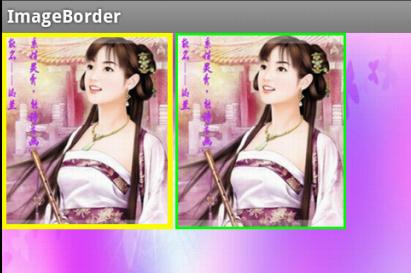
- //设置颜色
- public void setColour(int color){
- co = color;
- }
- //设置边框宽度
- public void setBorderWidth(int width){
- borderwidth = width;
- }
具体实现:
- package xiaosi.imageborder;
- import android.app.Activity;
- import android.graphics.Color;
- import android.os.Bundle;
- public class ImageBorderActivity extends Activity {
- /** Called when the activity is first created. */
- private myImageView image = null;
- private myImageView image1 = null;
- @Override
- public void onCreate(Bundle savedInstanceState) {
- super.onCreate(savedInstanceState);
- setContentView(R.layout.main);
- image = (myImageView)findViewById(R.id.iamge);
- image.setColour(Color.YELLOW);
- image.setBorderWidth(10);
- image1 = (myImageView)findViewById(R.id.iamge1);
- image1.setColour(Color.GREEN);
- image1.setBorderWidth(5);
- }
- }
main.xml
- <LinearLayout
- xmlns:android="http://schemas.android.com/apk/res/android"
- android:background="@drawable/playerbackground"
- android:layout_width="fill_parent"
- android:layout_height="fill_parent">
- <xiaosi.imageborder.myImageView
- android:id="@+id/iamge"
- android:layout_width="200px"
- android:layout_height="230px"
- android:layout_alignParentRight="true"
- android:src="@drawable/v"
- android:layout_centerInParent="true"
- android:layout_marginRight="3px"
- />
- <xiaosi.imageborder.myImageView
- android:id="@+id/iamge1"
- android:layout_width="200px"
- android:layout_height="230px"
- android:layout_alignParentRight="true"
- android:src="@drawable/v"
- android:layout_centerInParent="true"
- android:layout_marginRight="3px"
- />
- </LinearLayout>
- package xiaosi.imageborder;
- import android.content.Context;
- import android.graphics.Canvas;
- import android.graphics.Paint;
- import android.graphics.Rect;
- import android.util.AttributeSet;
- import android.widget.ImageView;
- public class myImageView extends ImageView {
- private int co;
- private int borderwidth;
- public myImageView(Context context) {
- super(context);
- }
- public myImageView(Context context, AttributeSet attrs,
- int defStyle) {
- super(context, attrs, defStyle);
- }
- public myImageView(Context context, AttributeSet attrs) {
- super(context, attrs);
- }
- //设置颜色
- public void setColour(int color){
- co = color;
- }
- //设置边框宽度
- public void setBorderWidth(int width){
- borderwidth = width;
- }
- @Override
- protected void onDraw(Canvas canvas) {
- super.onDraw(canvas);
- // 画边框
- Rect rec = canvas.getClipBounds();
- rec.bottom--;
- rec.right--;
- Paint paint = new Paint();
- //设置边框颜色
- paint.setColor(co);
- paint.setStyle(Paint.Style.STROKE);
- //设置边框宽度
- paint.setStrokeWidth(borderwidth);
- canvas.drawRect(rec, paint);
- }
- }
源代码下载:点击打开链接
Android学习笔记进阶19之给图片加边框的更多相关文章
- Android学习笔记进阶19 之给图片加边框
//设置颜色 public void setColour(int color){ co = color; } //设置边框宽度 public void setBorderWidth(int width ...
- Android学习笔记进阶20 之得到图片的缩略图
<1>简介 之前往往是通过Bitmap.Drawable和Canvas配合完成,需要写一系列繁杂的逻辑去缩小原有图片,从而得到缩略图. 现在我给大家介绍一种比较简单的方法:(网上有) 在A ...
- Android学习笔记进阶20之得到图片的缩略图
<1>简介 之前往往是通过Bitmap.Drawable和Canvas配合完成,需要写一系列繁杂的逻辑去缩小原有图片,从而得到缩略图. 现在我给大家介绍一种比较简单的方法:(网上有) 在A ...
- Android学习笔记进阶之在图片上涂鸦(能清屏)
Android学习笔记进阶之在图片上涂鸦(能清屏) 2013-11-19 10:52 117人阅读 评论(0) 收藏 举报 HandWritingActivity.java package xiaos ...
- Android学习笔记进阶16之BitmapShader
<1>简介 具体的看一下博文:Android学习笔记进阶15之Shader渲染 public BitmapShader(Bitmap bitmap,Shader.TileMode ti ...
- Android学习笔记进阶17之LinearGradient
具体的看一下博文:Android学习笔记进阶15之Shader渲染 package xiaosi.BitmapShader; import android.app.Activity; import a ...
- Android学习笔记进阶18 之画图并保存图片到本地
1.首先创建一个Bitmap图片,并指定大小: 2.在该图片上创建一个新的画布Canvas,然后在画布上绘制,并保存即可: 3.需要保存的目录File,注意如果写的目录如“/sdcard/so ...
- Android学习笔记进阶18之画图并保存图片到本地
1.首先创建一个Bitmap图片,并指定大小: 2.在该图片上创建一个新的画布Canvas,然后在画布上绘制,并保存即可: 3.需要保存的目录File,注意如果写的目录如“/sdcard/so ...
- Android学习笔记(二)之异步加载图片
最近在android开发中碰到比较棘手的问题,就是加载图片内存溢出.我开发的是一个新闻应用,应用中用到大量的图片,一个界面中可能会有上百张图片.开发android应用的朋友可能或多或少碰到加载图片内存 ...
随机推荐
- python中的装饰器decorator
python中的装饰器 装饰器是为了解决以下描述的问题而产生的方法 我们在已有的函数代码的基础上,想要动态的为这个函数增加功能而又不改变原函数的代码 例如有三个函数: def f1(x): retur ...
- 用react native 做的一个推酷client
用react native 做的一个推酷client 仅供大家參考.仅仅为抛砖引玉.希望大家能以此来了解react.并编写出很多其它的优质的开源库,为程序猿做出贡献. 用的的组件: Navigator ...
- poj 1681 Painter's Problem(高斯消元)
id=1681">http://poj.org/problem? id=1681 求最少经过的步数使得输入的矩阵全变为y. 思路:高斯消元求出自由变元.然后枚举自由变元,求出最优值. ...
- 怎样用第三方开源免费软件portecle从https站点上导出SSL的CA证书?
在我这篇文章中.我提到了怎样用OpenSSL从https站点上导出SSL的CA证书? 这样的方式不太直观,且须要用户自己手工拷贝.然后另存为文件,那么有没有更好更方便的工具呢? 幸运的是,有热心于开 ...
- zzuli--1812--sort(模拟水题)
1812: sort Time Limit: 1 Sec Memory Limit: 128 MB Submit: 158 Solved: 30 SubmitStatusWeb Board Des ...
- 获取windows版本信息的做法
作者:朱金灿 来源:http://blog.csdn.net/clever101 个人不建议用 GetVersion 或GetVersionEx 之类的 API 来获取系统版本号.注意微软也说过,这个 ...
- Linux软件万花筒
650) this.width=650;" border="0" alt="" src="http://img1.51cto.com/att ...
- DevExpress Report打印边距越界问题
DevExpress Report Print的时候,出现这样的问题:one or more margins are set outside the printable area of the pa ...
- noip 2018 day2 T1 旅行 基环树 tarjan
Code: #include<cstdio> #include<cstring> #include<string> #include<stack> #i ...
- 《三》build 快速创建模块
一.将build.php文件复制一份放在 application目录下 二.修改build.php文件代码 <?php return [ 'home' => [ //需要生成的目录 '__ ...