
Android学习笔记进阶19 之给图片加边框
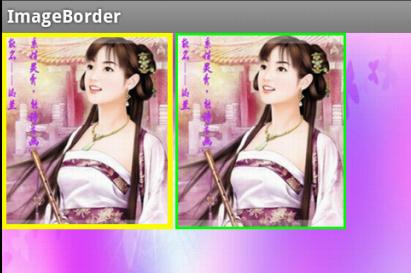
- //设置颜色
- public void setColour(int color){
- co = color;
- }
- //设置边框宽度
- public void setBorderWidth(int width){
- borderwidth = width;
- }
具体实现:
- package xiaosi.imageborder;
- import android.app.Activity;
- import android.graphics.Color;
- import android.os.Bundle;
- public class ImageBorderActivity extends Activity {
- /** Called when the activity is first created. */
- private myImageView image = null;
- private myImageView image1 = null;
- @Override
- public void onCreate(Bundle savedInstanceState) {
- super.onCreate(savedInstanceState);
- setContentView(R.layout.main);
- image = (myImageView)findViewById(R.id.iamge);
- image.setColour(Color.YELLOW);
- image.setBorderWidth(10);
- image1 = (myImageView)findViewById(R.id.iamge1);
- image1.setColour(Color.GREEN);
- image1.setBorderWidth(5);
- }
- }
main.xml
- <LinearLayout
- xmlns:android="http://schemas.android.com/apk/res/android"
- android:background="@drawable/playerbackground"
- android:layout_width="fill_parent"
- android:layout_height="fill_parent">
- <xiaosi.imageborder.myImageView
- android:id="@+id/iamge"
- android:layout_width="200px"
- android:layout_height="230px"
- android:layout_alignParentRight="true"
- android:src="@drawable/v"
- android:layout_centerInParent="true"
- android:layout_marginRight="3px"
- />
- <xiaosi.imageborder.myImageView
- android:id="@+id/iamge1"
- android:layout_width="200px"
- android:layout_height="230px"
- android:layout_alignParentRight="true"
- android:src="@drawable/v"
- android:layout_centerInParent="true"
- android:layout_marginRight="3px"
- />
- </LinearLayout>
- package xiaosi.imageborder;
- import android.content.Context;
- import android.graphics.Canvas;
- import android.graphics.Paint;
- import android.graphics.Rect;
- import android.util.AttributeSet;
- import android.widget.ImageView;
- public class myImageView extends ImageView {
- private int co;
- private int borderwidth;
- public myImageView(Context context) {
- super(context);
- }
- public myImageView(Context context, AttributeSet attrs,
- int defStyle) {
- super(context, attrs, defStyle);
- }
- public myImageView(Context context, AttributeSet attrs) {
- super(context, attrs);
- }
- //设置颜色
- public void setColour(int color){
- co = color;
- }
- //设置边框宽度
- public void setBorderWidth(int width){
- borderwidth = width;
- }
- @Override
- protected void onDraw(Canvas canvas) {
- super.onDraw(canvas);
- // 画边框
- Rect rec = canvas.getClipBounds();
- rec.bottom--;
- rec.right--;
- Paint paint = new Paint();
- //设置边框颜色
- paint.setColor(co);
- paint.setStyle(Paint.Style.STROKE);
- //设置边框宽度
- paint.setStrokeWidth(borderwidth);
- canvas.drawRect(rec, paint);
- }
- }
源代码下载:点击打开链接
Android学习笔记进阶19 之给图片加边框的更多相关文章
- Android学习笔记进阶19之给图片加边框
//设置颜色 public void setColour(int color){ co = color; } //设置边框宽度 public void setBorderWidth(int width ...
- Android学习笔记进阶20 之得到图片的缩略图
<1>简介 之前往往是通过Bitmap.Drawable和Canvas配合完成,需要写一系列繁杂的逻辑去缩小原有图片,从而得到缩略图. 现在我给大家介绍一种比较简单的方法:(网上有) 在A ...
- Android学习笔记进阶20之得到图片的缩略图
<1>简介 之前往往是通过Bitmap.Drawable和Canvas配合完成,需要写一系列繁杂的逻辑去缩小原有图片,从而得到缩略图. 现在我给大家介绍一种比较简单的方法:(网上有) 在A ...
- Android学习笔记进阶之在图片上涂鸦(能清屏)
Android学习笔记进阶之在图片上涂鸦(能清屏) 2013-11-19 10:52 117人阅读 评论(0) 收藏 举报 HandWritingActivity.java package xiaos ...
- Android学习笔记进阶16之BitmapShader
<1>简介 具体的看一下博文:Android学习笔记进阶15之Shader渲染 public BitmapShader(Bitmap bitmap,Shader.TileMode ti ...
- Android学习笔记进阶17之LinearGradient
具体的看一下博文:Android学习笔记进阶15之Shader渲染 package xiaosi.BitmapShader; import android.app.Activity; import a ...
- Android学习笔记进阶18 之画图并保存图片到本地
1.首先创建一个Bitmap图片,并指定大小: 2.在该图片上创建一个新的画布Canvas,然后在画布上绘制,并保存即可: 3.需要保存的目录File,注意如果写的目录如“/sdcard/so ...
- Android学习笔记进阶18之画图并保存图片到本地
1.首先创建一个Bitmap图片,并指定大小: 2.在该图片上创建一个新的画布Canvas,然后在画布上绘制,并保存即可: 3.需要保存的目录File,注意如果写的目录如“/sdcard/so ...
- Android学习笔记(二)之异步加载图片
最近在android开发中碰到比较棘手的问题,就是加载图片内存溢出.我开发的是一个新闻应用,应用中用到大量的图片,一个界面中可能会有上百张图片.开发android应用的朋友可能或多或少碰到加载图片内存 ...
随机推荐
- 实时监控Cat之旅~对请求是否正常结束做监控(分布式的消息树)
对基于请求的分布式消息树的分析 在MVC时有过滤器System.Web.Mvc.ActionFilterAttribute,它可以对action执行的整个过程进行拦截,执行前与执行后我们可以注入自己的 ...
- spring boot整合mail
1.添加依赖 </dependency> <dependency> <groupId>org.springframework.boot</groupId> ...
- List<List<model>>如何更快捷的取里面的model?
访问接口返回数据类型为List<List<model>>,现在想将其中的model插入数据库,感觉一点点循环有点傻,0.0...,各位有没有其他的方法? List<Lis ...
- php八大设计模式之单例模式
单例模式的好处: 实例化后只得到一个对象,减少内存的开销. 实现单例模式: 提供一个私有的属性用来存储实例后的对象. 禁止外部实例化对象,提供公共的的方法,返回实例化后的对象. 避免继承此类,然后重写 ...
- write---向指定登录用户终端上发送信息
write命令用于向指定登录用户终端上发送信息.通过write命令可传递信息给另一位登入系统的用户,当输入完毕后,键入EOF表示信息结束,write命令就会将信息传给对方.如果接收信息的用户不只登入本 ...
- python 任何基础问题,包括语法等
*)copy()和deep copy() 参考链接:https://blog.csdn.net/qq_32907349/article/details/52190796 *)OPP面向对象编程 *)接 ...
- BEGINNING SHAREPOINT® 2013 DEVELOPMENT 第9章节--client对象模型和REST APIs概览 JavaScript
BEGINNING SHAREPOINT® 2013 DEVELOPMENT 第9章节--client对象模型和REST APIs概览 JavaScript 与托管.NETclien ...
- CSU1608: Particle Collider(后缀数组)
Description In the deep universe, there is a beautiful planet named as CS on which scientists have d ...
- RenderScript on LLVM笔记
Android 为何引入 Render Script: 3D 可移植 ( 直接用 opengl 也能够移植呀?) 性能 易用性 ( 让 opengl 难入门的人,用 Render Script ?) ...
- 理解FPGA中的RAM、ROM和CAM;ROM、RAM、DRAM、SRAM、FLASH
目前大多数FPGA都有内嵌的块RAM(Block RAM),可以将其灵活地配置成单端口RAM(DPRAM,Single Port RAM).双端口RAM(DPRAM,Double Ports RAM) ...