
New UWP Community Toolkit - ImageEx
概述
UWP Community Toolkit 中有一个图片的扩展控件 - ImageEx,本篇我们结合代码详细讲解 ImageEx 的实现。
ImageEx 是一个图片的扩展控件,包括 ImageEx 和 RoundImageEx,它可以在异步加载图片源时显示加载状态,也可以在加载前使用占位图片,在下载完成后可以在应用内缓存,避免了重复加载的过程。我们来看一下官方的介绍和官网示例中的展示:

Doc: https://docs.microsoft.com/zh-cn/windows/uwpcommunitytoolkit/controls/imageex
Namespace: Microsoft.Toolkit.Uwp.UI.Controls; Nuget: Microsoft.Toolkit.Uwp.UI.Controls;
开发过程
代码分析
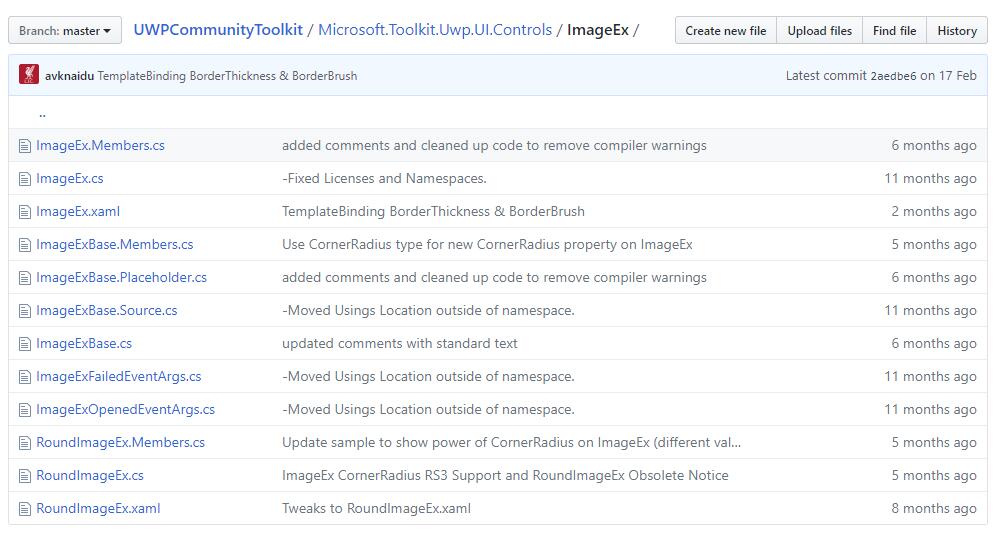
我们来看一下 ImageEx 控件的结构:
- ImageEx.Members.cs - ImageEx 控件部分类的成员变量类
- ImageEx.cs - ImageEx 控件部分类的定义类
- ImageEx.xaml - ImageEx 控件样式文件
- ImageExBase.Members.cs - ImageEx 控件基类部分类的成员变量类
- ImageExBase.Placeholder.cs - ImageEx 控件基类部分类的占位符类
- ImageExBase.Source.cs - ImageEx 控件基类部分类的图片源类
- ImageExBase.cs - ImageEx 控件基类部分类的定义类
- ImageExFailedEventArgs.cs - ImageEx 控件的失败事件参数类
- ImageExOpenedEventArgs.cs - ImageEx 控件的打开事件参数类
- RoundImageEx.Members.cs - RoundImageEx 控件部分类的成员变量类
- RoundImageEx.cs - RoundImageEx 控件部分类的定义类
- RoundImageEx.xaml - RoundImageEx 控件样式文件
下面把几个重点的类详细分析一下:
1. ImageEx.xaml
ImageEx 控件的样式文件,来看一下 Template 部分,包含了三层的控件:PlaceHolderImage,Image 和 Progress,这样就可以完成加载中或失败时显示 PlaceHolder 和 Progress,加载成功后显示 Image;同时样式在 Failed,Loading,Loaded 和 Unloaded 状态时,也会切换不同层的显示来完成状态切换;
<Style TargetType="controls:ImageEx">
    <Setter Property="Background" Value="Transparent" />
    <Setter Property="Foreground" Value="{ThemeResource ApplicationForegroundThemeBrush}" />
    <Setter Property="Template">
        <Setter.Value>
            <ControlTemplate TargetType="controls:ImageEx">
                <Grid Background="{TemplateBinding Background}" CornerRadius="{TemplateBinding CornerRadius}"
                        BorderBrush="{TemplateBinding BorderBrush}" BorderThickness="{TemplateBinding BorderThickness}">
                    <Image Name="PlaceholderImage" Opacity="1.0" .../>
                    <Image Name="Image" NineGrid="{TemplateBinding NineGrid}" Opacity="0.0" .../>
                    <ProgressRing Name="Progress" Margin="16" HorizontalAlignment="Center" VerticalAlignment="Center"
                                    Background="Transparent" Foreground="{TemplateBinding Foreground}" IsActive="False" Visibility="Collapsed" />
                    <VisualStateManager.VisualStateGroups>
                        <VisualStateGroup x:Name="CommonStates">
                            <VisualState x:Name="Failed">
                                <Storyboard>
                                    <ObjectAnimationUsingKeyFrames Storyboard.TargetName="Image"
                                                                Storyboard.TargetProperty="Opacity">
                                        <DiscreteObjectKeyFrame KeyTime="0"
                                                            Value="0" />
                                    </ObjectAnimationUsingKeyFrames>
                                    <ObjectAnimationUsingKeyFrames Storyboard.TargetName="PlaceholderImage"
                                                                Storyboard.TargetProperty="Opacity">
                                        <DiscreteObjectKeyFrame KeyTime="0"
                                                            Value="1" />
                                    </ObjectAnimationUsingKeyFrames>
                                </Storyboard>
                            </VisualState>
                            <VisualState x:Name="Loading" .../>
                            <VisualState x:Name="Loaded" .../>
                            <VisualState x:Name="Unloaded" .../>
                        </VisualStateGroup>
                    </VisualStateManager.VisualStateGroups>
                </Grid>
            </ControlTemplate>
        </Setter.Value>
    </Setter>
</Style>
2. ImageExBase.Members.cs
ImageEx 控件的定义和功能实现主要在 ImageExBase 类中,而 ImageExBase.Members.cs 主要定义了类的成员,具体如下:
- Stretch - 获取或设置控件的拉伸属性
- CornerRadius - 获取或设置控件的圆角半径,用于 Rounded 或 Circle 图片控件
- DecodePixelHeight - 获取或设置控件的解码像素高度
- DecodePixelType - 获取或设置控件的解码像素类型
- DecodePixelWidth - 获取或设置控件的解码像素宽度
- IsCacheEnabled - 获取或设置缓存是否可用
另外还定义了 ImageFailed、ImageOpened、ImageExInitialized 事件,以及 GetAlphaMask() 方法,用于获取 alpha 通道的蒙板;
3. ImageExBase.Placeholder.cs
主要定义了 ImageExBase 类的占位符成员,具体如下:
- PlaceholderStretch - 获取或设置占位符的拉伸属性
- PlaceholderSource - 获取或设置占位符的图像源,ImageSource 类型,改变时会触发 PlaceholderSourceChanged(d, e) 方法;
4. ImageExBase.Source.cs
主要定义了 ImageExBase 类的图像源,除了定义 Source 外,还实现了以下几个方法:
① SetSource(source)
初始化 token 后,如果 source 为空,则进入 Unloaded 状态;否则进入 Loading 状态;判断 source 是 ImageSource 类型且有效,则赋值,然后进入 Loaded 状态;如果 source 是 Uri 类型但无效,或 ImageSource 类型无效,则进入 Failed 状态;如果 Uri 有效,判断为 httpUri 则进入 LoadImageAsync(uri) 方法,否则直接拼接 ms-appx:/// 资源格式加载给控件;
private async void SetSource(object source)
{
    if (!IsInitialized) { return;}

    this._tokenSource?.Cancel();
    this._tokenSource = new CancellationTokenSource();

    AttachSource(null);

    if (source == null)
    {
        VisualStateManager.GoToState(this, UnloadedState, true);
        return;
    }

    VisualStateManager.GoToState(this, LoadingState, true);

    var imageSource = source as ImageSource;
    if (imageSource != null)
    {
        AttachSource(imageSource);

        ImageExOpened?.Invoke(this, new ImageExOpenedEventArgs());
        VisualStateManager.GoToState(this, LoadedState, true);
        return;
    }

    _uri = source as Uri;
    if (_uri == null)
    {
        var url = source as string ?? source.ToString();
        if (!Uri.TryCreate(url, UriKind.RelativeOrAbsolute, out _uri))
        {
            VisualStateManager.GoToState(this, FailedState, true);
            return;
        }
    }

    _isHttpSource = IsHttpUri(_uri);
    if (!_isHttpSource && !_uri.IsAbsoluteUri)
    {
        _uri = new Uri("ms-appx:///" + _uri.OriginalString.TrimStart('/'));
    }

    await LoadImageAsync(_uri);
}
② LoadImageAsync(imageUri)
异步加载图片方法,在缓存可用且是 httpUri 时,从缓存里加载图片资源,根据 token 加载;然后加载对应资源后,进入 Loaded 状态;如果遇到一场,则进入 Failed 状态;如果是本地资源,或 http 资源不允许缓存,则直接实例化,不做缓存操作;
private async Task LoadImageAsync(Uri imageUri)
{
    if (_uri != null)
    {
        if (IsCacheEnabled && _isHttpSource)
        {
            try
            {
                var propValues = new List<KeyValuePair<string, object>>();
                // Add DecodePixelHeight, DecodePixelWidth, DecodePixelType into propValues
                ...
                var img = await ImageCache.Instance.GetFromCacheAsync(imageUri, true, _tokenSource.Token, propValues);

                lock (LockObj)
                {
                    if (_uri == imageUri)
                    {
                        AttachSource(img);
                        ImageExOpened?.Invoke(this, new ImageExOpenedEventArgs());
                        VisualStateManager.GoToState(this, LoadedState, true);
                    }
                }
            }
            catch (OperationCanceledException)
            {
                // nothing to do as cancellation has been requested.
            }
            catch (Exception e)
            {
                lock (LockObj)
                {
                    if (_uri == imageUri)
                    {
                        ImageExFailed?.Invoke(this, new ImageExFailedEventArgs(e));
                        VisualStateManager.GoToState(this, FailedState, true);
                    }
                }
            }
        }
        else
        {
            AttachSource(new BitmapImage(_uri));
        }
    }
}
5. ImageExBase.cs
类中定义了 ImageEx Template 定义字段对应的变量,包括 Image,Progress,CommonStates,Loading 等等;
此外在 AttachImageOpened,RemoveImageOpened 时设置附加对应的 handler;在 AttachImageFailed,RemoveImageFailed 时设置解除对应的 handler;分别触发对应的事件,并把 VisualState 设置为对应的状态;
6. RoundImageEx.xaml
我们看到,PlaceHolder 和 Image 都是用矩形来实现的,定义了 RadiusX 和 RadiusY 来实现圆角,Fill 使用 ImageBrush 来加载图像;实现圆角或圆形的图片控件;
另外需要注意的是,从 16299 开始,CornerRadius 属性也能适用于 ImageEx 控件,实现圆角矩形图片;如果系统低于 16299,不会引发异常,但是设置会不生效;
<Setter Property="Template">
    <Setter.Value>
        <ControlTemplate TargetType="controls:RoundImageEx">
            <Grid Width="{TemplateBinding Width}"
                Height="{TemplateBinding Height}">
                <Rectangle x:Name="PlaceholderRectangle" RadiusX="{TemplateBinding CornerRadius}" RadiusY="{TemplateBinding CornerRadius}"...>
                    <Rectangle.Fill>
                        <ImageBrush x:Name="PlaceholderImage"
                                ImageSource="{Binding RelativeSource={RelativeSource TemplatedParent}, Path=PlaceholderSource}"
                                Stretch="{Binding RelativeSource={RelativeSource TemplatedParent}, Path=PlaceholderStretch}" />
                    </Rectangle.Fill>
                </Rectangle>
                <Rectangle x:Name="ImageRectangle" RadiusX="{TemplateBinding CornerRadius}" RadiusY="{TemplateBinding CornerRadius}"...>
                    <Rectangle.Fill>
                        <ImageBrush x:Name="Image"
                                Stretch="{Binding RelativeSource={RelativeSource TemplatedParent}, Path=Stretch}" />
                    </Rectangle.Fill>
                </Rectangle>
                <ProgressRing Name="Progress" ... />

                <VisualStateManager.VisualStateGroups>
                    ...
                </VisualStateManager.VisualStateGroups>
            </Grid>
        </ControlTemplate>
    </Setter.Value>
</Setter>
调用示例
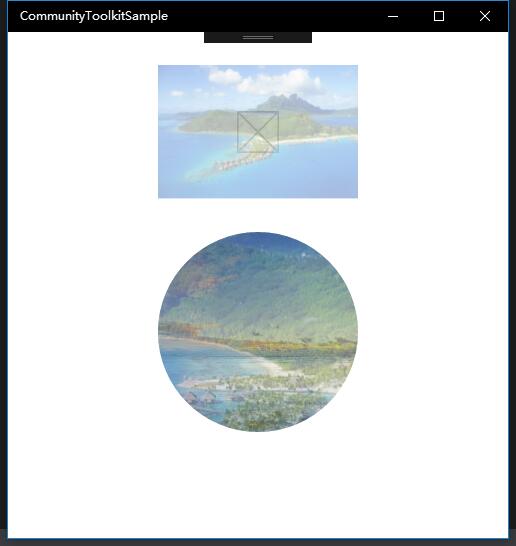
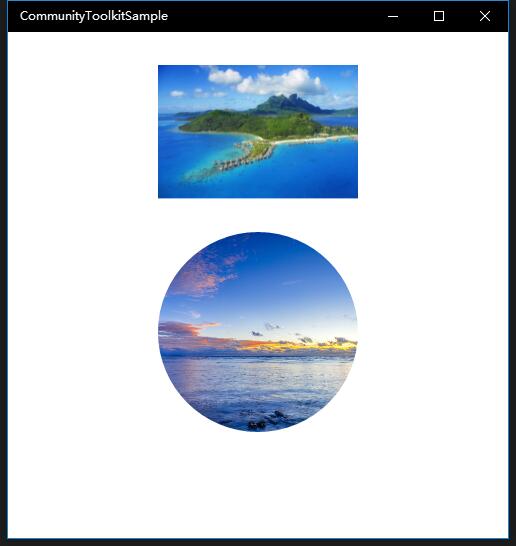
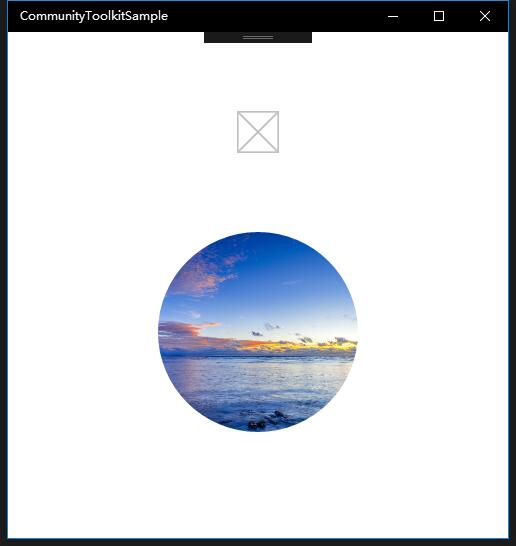
我们创建了两个控件,ImageEx 和 RoundImageEx,如下图一是加载中的过渡状态,图二是正常显示的状态;如果 Source 设置有误,则会出现图三只显示 PlaceHolder 的情况,实际应用中,在图片加载失败时我们应该有对应的显示方法;
<controls:ImageEx Name="ImageExControl"
    IsCacheEnabled="True" Width="200" Height="200"
    PlaceholderSource="/assets/LockScreenLogo.scale-200.png"
    Source="/assets/01.jpg"/>

<controls:RoundImageEx Name="RoundImageExControl"
    IsCacheEnabled="True" Width="200" Height="200" Stretch="UniformToFill"
    PlaceholderSource="/assets/01.jpg"
    Source="/assets/02.jpg"
    CornerRadius="999"/>
总结
到这里我们就把 UWP Community Toolkit 中的 ImageEx 控件的源代码实现过程和简单的调用示例讲解完成了,希望能对大家更好的理解和使用这个控件有所帮助。欢迎大家多多交流,谢谢!
最后,再跟大家安利一下 UWPCommunityToolkit 的官方微博:https://weibo.com/u/6506046490, 大家可以通过微博关注最新动态。
衷心感谢 UWPCommunityToolkit 的作者们杰出的工作,Thank you so much, UWPCommunityToolkit authors!!!
New UWP Community Toolkit - ImageEx的更多相关文章
- New UWP Community Toolkit
概述 UWP Community Toolkit 是一个 UWP App 自定义控件.应用服务和帮助方法的集合,能够很大程度的简化和指引开发者的开发工作,相信广大 UWPer 并不陌生. 下面是截取自 ...
- New UWP Community Toolkit - XAML Brushes
概述 上一篇 New UWP Community Toolkit 文章中,我们对 V2.2.0 版本的重要更新做了简单回顾.接下来会针对每个重要更新,结合 SDK 源代码和调用代码详细讲解. 本篇我们 ...
- New UWP Community Toolkit - Markdown
概述 前面 New UWP Community Toolkit 文章中,我们对 V2.2.0 版本的重要更新做了简单回顾,其中简单介绍了 MarkdownTextBlock 和 MarkdownDoc ...
- New UWP Community Toolkit - Staggered panel
概述 前面 New UWP Community Toolkit 文章中,我们对 2.2.0 版本的重要更新做了简单回顾,其中简单介绍了 Staggered panel,本篇我们结合代码详细讲解 St ...
- New UWP Community Toolkit - Carousel
概述 New UWP Community Toolkit V2.2.0 的版本发布日志中提到了 Carousel 的调整,本篇我们结合代码详细讲解 Carousel 的实现. Carousel 是 ...
- New UWP Community Toolkit - RadialProgressBar
概述 UWP Community Toolkit 中有一个圆形的进度条控件 - RadialProgressBar,本篇我们结合代码详细讲解 RadialProgressBar 的实现. Radi ...
- New UWP Community Toolkit - RadialGauge
概述 New UWP Community Toolkit V2.2.0 的版本发布日志中提到了 RadialGauge 的调整,本篇我们结合代码详细讲解 RadialGauge 的实现. Radi ...
- New UWP Community Toolkit - RangeSelector
概述 前面 New UWP Community Toolkit 文章中,我们对 V2.2.0 版本的重要更新做了简单回顾,其中简单介绍了 RangeSelector,本篇我们结合代码详细讲解一下 Ra ...
- New UWP Community Toolkit - AdaptiveGridView
概述 UWP Community Toolkit 中有一个自适应的 GridView 控件 - AdaptiveGridView,本篇我们结合代码详细讲解 AdaptiveGridView 的实现 ...
随机推荐
- ES2015 类中的静态方法
在ES2015中,终于不用用函数原型来实现类系统,可以直接使用关键字class,下面是对class的静态属性的研究: 举例:一个Node类,每一个Node类之间都可以建立从属关系,每一个Node实例下 ...
- Object类----toString,equals,hashcode
一.toString 的应用方法与覆写 public class testoveridetoString { public static void main(String[] args) { /*ob ...
- JavaScript之优化DOM
优化DOM得从重绘和重排讲起,long long ago... 1.重绘和重排 1.1 重绘和重排是什么 重绘是指一些样式的修改,元素的位置和大小都没有改变: 重排是指元素的位置或尺寸发生了变化,浏览 ...
- 用Node.js写爬虫,撸羞羞的图片
说到爬虫,很多人都认为是很高大上的东西.哇塞,是不是可以爬妹纸图啊,是不是可以爬小片片啊.答案就是对的.爬虫可以完成这些东西的操作.但是,作为一个正直的程序员,我们要在法律允许范围内用爬虫来为我们服务 ...
- WordPress添加个性化的博客宠物的方法
在很多的网站上都看见过这种效果,于是自己也想试试.看见我网站上的小宠物了吗,就是这种效果. 不多说,方法如下: 工具: 下载地址:http://yunpan.cn/cFUmZB8WWthty 访问密码 ...
- 使用localtunne一分钟搞定微信公众号接入
记得15年那个刚刚进入工作的时候,公司有个微信公众号的项目,那个时候微信官方没有什么调试工具,也没有什么比较好的本地调试工具.当时有个功能需要调用微信JSSDK里面的扫一扫的功能.由于本地不能调试 ...
- SignalR Self Host+MVC等多端消息推送服务(3)
一.概述 最近项目确实太忙,而且身体也有点不舒服,慢性咽炎犯了,昨晚睡觉时喘不过气来,一直没休息好,也没什么时间写博客,今天朋友问我什么时候能出web端的消息发送的文章时,我还在忙着改项目的事,趁着中 ...
- 值得 .NET 开发者了解的15个特性
本文列举了 15 个值得了解的 C# 特性,旨在让 .NET 开发人员更好的使用 C# 语言进行开发工作. 1. ObsoleteAttribute ObsoleteAttribute 适用于除组件. ...
- 正则表达式入门+实战(c#实现)
如果有人和你说,如果不将字符串转换为数字,你要如何判断字符串是否由全数字组成?把字符串拆成char数组,然后放入一个循环,来判断每个char是否为数字?那你要如何判断手机号是否合法?IP是否合法呢?把 ...
- 【原创】快应用QuickApp--HelloWorld体验
快应用: 快应用是九大手机厂商基于硬件平台共同推出的新型应用生态.用户无需下载安装,即点即用,享受原生应用的性能体验. 3月20日在北京联合召开快应用标准启动发布会.过去1天了,官网(快应用官方网站) ...