
New UWP Community Toolkit - ImageEx
概述
UWP Community Toolkit 中有一个图片的扩展控件 - ImageEx,本篇我们结合代码详细讲解 ImageEx 的实现。
ImageEx 是一个图片的扩展控件,包括 ImageEx 和 RoundImageEx,它可以在异步加载图片源时显示加载状态,也可以在加载前使用占位图片,在下载完成后可以在应用内缓存,避免了重复加载的过程。我们来看一下官方的介绍和官网示例中的展示:

Doc: https://docs.microsoft.com/zh-cn/windows/uwpcommunitytoolkit/controls/imageex
Namespace: Microsoft.Toolkit.Uwp.UI.Controls; Nuget: Microsoft.Toolkit.Uwp.UI.Controls;
开发过程
代码分析
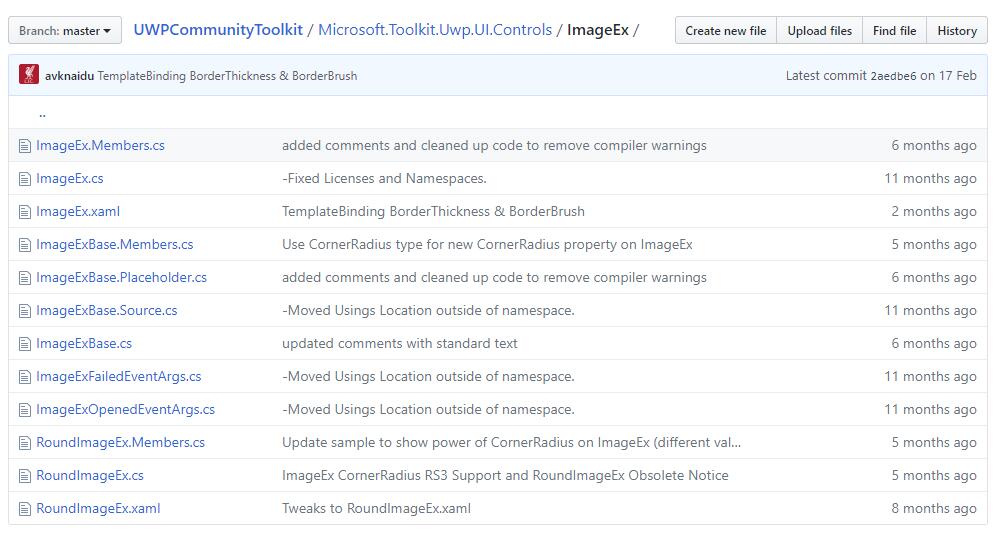
我们来看一下 ImageEx 控件的结构:
- ImageEx.Members.cs - ImageEx 控件部分类的成员变量类
- ImageEx.cs - ImageEx 控件部分类的定义类
- ImageEx.xaml - ImageEx 控件样式文件
- ImageExBase.Members.cs - ImageEx 控件基类部分类的成员变量类
- ImageExBase.Placeholder.cs - ImageEx 控件基类部分类的占位符类
- ImageExBase.Source.cs - ImageEx 控件基类部分类的图片源类
- ImageExBase.cs - ImageEx 控件基类部分类的定义类
- ImageExFailedEventArgs.cs - ImageEx 控件的失败事件参数类
- ImageExOpenedEventArgs.cs - ImageEx 控件的打开事件参数类
- RoundImageEx.Members.cs - RoundImageEx 控件部分类的成员变量类
- RoundImageEx.cs - RoundImageEx 控件部分类的定义类
- RoundImageEx.xaml - RoundImageEx 控件样式文件
下面把几个重点的类详细分析一下:
1. ImageEx.xaml
ImageEx 控件的样式文件,来看一下 Template 部分,包含了三层的控件:PlaceHolderImage,Image 和 Progress,这样就可以完成加载中或失败时显示 PlaceHolder 和 Progress,加载成功后显示 Image;同时样式在 Failed,Loading,Loaded 和 Unloaded 状态时,也会切换不同层的显示来完成状态切换;
<Style TargetType="controls:ImageEx">
    <Setter Property="Background" Value="Transparent" />
    <Setter Property="Foreground" Value="{ThemeResource ApplicationForegroundThemeBrush}" />
    <Setter Property="Template">
        <Setter.Value>
            <ControlTemplate TargetType="controls:ImageEx">
                <Grid Background="{TemplateBinding Background}" CornerRadius="{TemplateBinding CornerRadius}"
                        BorderBrush="{TemplateBinding BorderBrush}" BorderThickness="{TemplateBinding BorderThickness}">
                    <Image Name="PlaceholderImage" Opacity="1.0" .../>
                    <Image Name="Image" NineGrid="{TemplateBinding NineGrid}" Opacity="0.0" .../>
                    <ProgressRing Name="Progress" Margin="16" HorizontalAlignment="Center" VerticalAlignment="Center"
                                    Background="Transparent" Foreground="{TemplateBinding Foreground}" IsActive="False" Visibility="Collapsed" />
                    <VisualStateManager.VisualStateGroups>
                        <VisualStateGroup x:Name="CommonStates">
                            <VisualState x:Name="Failed">
                                <Storyboard>
                                    <ObjectAnimationUsingKeyFrames Storyboard.TargetName="Image"
                                                                Storyboard.TargetProperty="Opacity">
                                        <DiscreteObjectKeyFrame KeyTime="0"
                                                            Value="0" />
                                    </ObjectAnimationUsingKeyFrames>
                                    <ObjectAnimationUsingKeyFrames Storyboard.TargetName="PlaceholderImage"
                                                                Storyboard.TargetProperty="Opacity">
                                        <DiscreteObjectKeyFrame KeyTime="0"
                                                            Value="1" />
                                    </ObjectAnimationUsingKeyFrames>
                                </Storyboard>
                            </VisualState>
                            <VisualState x:Name="Loading" .../>
                            <VisualState x:Name="Loaded" .../>
                            <VisualState x:Name="Unloaded" .../>
                        </VisualStateGroup>
                    </VisualStateManager.VisualStateGroups>
                </Grid>
            </ControlTemplate>
        </Setter.Value>
    </Setter>
</Style>
2. ImageExBase.Members.cs
ImageEx 控件的定义和功能实现主要在 ImageExBase 类中,而 ImageExBase.Members.cs 主要定义了类的成员,具体如下:
- Stretch - 获取或设置控件的拉伸属性
- CornerRadius - 获取或设置控件的圆角半径,用于 Rounded 或 Circle 图片控件
- DecodePixelHeight - 获取或设置控件的解码像素高度
- DecodePixelType - 获取或设置控件的解码像素类型
- DecodePixelWidth - 获取或设置控件的解码像素宽度
- IsCacheEnabled - 获取或设置缓存是否可用
另外还定义了 ImageFailed、ImageOpened、ImageExInitialized 事件,以及 GetAlphaMask() 方法,用于获取 alpha 通道的蒙板;
3. ImageExBase.Placeholder.cs
主要定义了 ImageExBase 类的占位符成员,具体如下:
- PlaceholderStretch - 获取或设置占位符的拉伸属性
- PlaceholderSource - 获取或设置占位符的图像源,ImageSource 类型,改变时会触发 PlaceholderSourceChanged(d, e) 方法;
4. ImageExBase.Source.cs
主要定义了 ImageExBase 类的图像源,除了定义 Source 外,还实现了以下几个方法:
① SetSource(source)
初始化 token 后,如果 source 为空,则进入 Unloaded 状态;否则进入 Loading 状态;判断 source 是 ImageSource 类型且有效,则赋值,然后进入 Loaded 状态;如果 source 是 Uri 类型但无效,或 ImageSource 类型无效,则进入 Failed 状态;如果 Uri 有效,判断为 httpUri 则进入 LoadImageAsync(uri) 方法,否则直接拼接 ms-appx:/// 资源格式加载给控件;
private async void SetSource(object source)
{
    if (!IsInitialized) { return;}

    this._tokenSource?.Cancel();
    this._tokenSource = new CancellationTokenSource();

    AttachSource(null);

    if (source == null)
    {
        VisualStateManager.GoToState(this, UnloadedState, true);
        return;
    }

    VisualStateManager.GoToState(this, LoadingState, true);

    var imageSource = source as ImageSource;
    if (imageSource != null)
    {
        AttachSource(imageSource);

        ImageExOpened?.Invoke(this, new ImageExOpenedEventArgs());
        VisualStateManager.GoToState(this, LoadedState, true);
        return;
    }

    _uri = source as Uri;
    if (_uri == null)
    {
        var url = source as string ?? source.ToString();
        if (!Uri.TryCreate(url, UriKind.RelativeOrAbsolute, out _uri))
        {
            VisualStateManager.GoToState(this, FailedState, true);
            return;
        }
    }

    _isHttpSource = IsHttpUri(_uri);
    if (!_isHttpSource && !_uri.IsAbsoluteUri)
    {
        _uri = new Uri("ms-appx:///" + _uri.OriginalString.TrimStart('/'));
    }

    await LoadImageAsync(_uri);
}
② LoadImageAsync(imageUri)
异步加载图片方法,在缓存可用且是 httpUri 时,从缓存里加载图片资源,根据 token 加载;然后加载对应资源后,进入 Loaded 状态;如果遇到一场,则进入 Failed 状态;如果是本地资源,或 http 资源不允许缓存,则直接实例化,不做缓存操作;
private async Task LoadImageAsync(Uri imageUri)
{
    if (_uri != null)
    {
        if (IsCacheEnabled && _isHttpSource)
        {
            try
            {
                var propValues = new List<KeyValuePair<string, object>>();
                // Add DecodePixelHeight, DecodePixelWidth, DecodePixelType into propValues
                ...
                var img = await ImageCache.Instance.GetFromCacheAsync(imageUri, true, _tokenSource.Token, propValues);

                lock (LockObj)
                {
                    if (_uri == imageUri)
                    {
                        AttachSource(img);
                        ImageExOpened?.Invoke(this, new ImageExOpenedEventArgs());
                        VisualStateManager.GoToState(this, LoadedState, true);
                    }
                }
            }
            catch (OperationCanceledException)
            {
                // nothing to do as cancellation has been requested.
            }
            catch (Exception e)
            {
                lock (LockObj)
                {
                    if (_uri == imageUri)
                    {
                        ImageExFailed?.Invoke(this, new ImageExFailedEventArgs(e));
                        VisualStateManager.GoToState(this, FailedState, true);
                    }
                }
            }
        }
        else
        {
            AttachSource(new BitmapImage(_uri));
        }
    }
}
5. ImageExBase.cs
类中定义了 ImageEx Template 定义字段对应的变量,包括 Image,Progress,CommonStates,Loading 等等;
此外在 AttachImageOpened,RemoveImageOpened 时设置附加对应的 handler;在 AttachImageFailed,RemoveImageFailed 时设置解除对应的 handler;分别触发对应的事件,并把 VisualState 设置为对应的状态;
6. RoundImageEx.xaml
我们看到,PlaceHolder 和 Image 都是用矩形来实现的,定义了 RadiusX 和 RadiusY 来实现圆角,Fill 使用 ImageBrush 来加载图像;实现圆角或圆形的图片控件;
另外需要注意的是,从 16299 开始,CornerRadius 属性也能适用于 ImageEx 控件,实现圆角矩形图片;如果系统低于 16299,不会引发异常,但是设置会不生效;
<Setter Property="Template">
    <Setter.Value>
        <ControlTemplate TargetType="controls:RoundImageEx">
            <Grid Width="{TemplateBinding Width}"
                Height="{TemplateBinding Height}">
                <Rectangle x:Name="PlaceholderRectangle" RadiusX="{TemplateBinding CornerRadius}" RadiusY="{TemplateBinding CornerRadius}"...>
                    <Rectangle.Fill>
                        <ImageBrush x:Name="PlaceholderImage"
                                ImageSource="{Binding RelativeSource={RelativeSource TemplatedParent}, Path=PlaceholderSource}"
                                Stretch="{Binding RelativeSource={RelativeSource TemplatedParent}, Path=PlaceholderStretch}" />
                    </Rectangle.Fill>
                </Rectangle>
                <Rectangle x:Name="ImageRectangle" RadiusX="{TemplateBinding CornerRadius}" RadiusY="{TemplateBinding CornerRadius}"...>
                    <Rectangle.Fill>
                        <ImageBrush x:Name="Image"
                                Stretch="{Binding RelativeSource={RelativeSource TemplatedParent}, Path=Stretch}" />
                    </Rectangle.Fill>
                </Rectangle>
                <ProgressRing Name="Progress" ... />

                <VisualStateManager.VisualStateGroups>
                    ...
                </VisualStateManager.VisualStateGroups>
            </Grid>
        </ControlTemplate>
    </Setter.Value>
</Setter>
调用示例
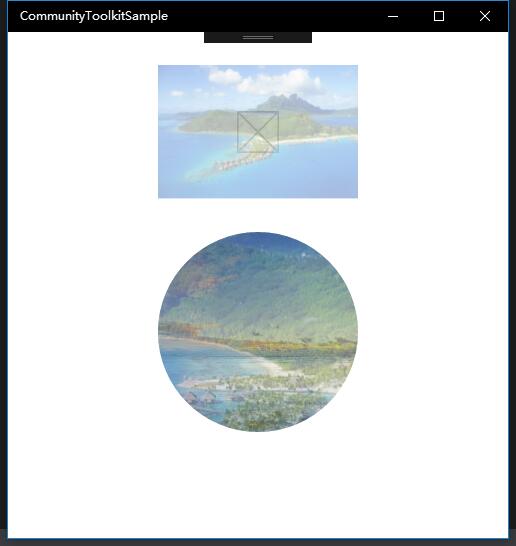
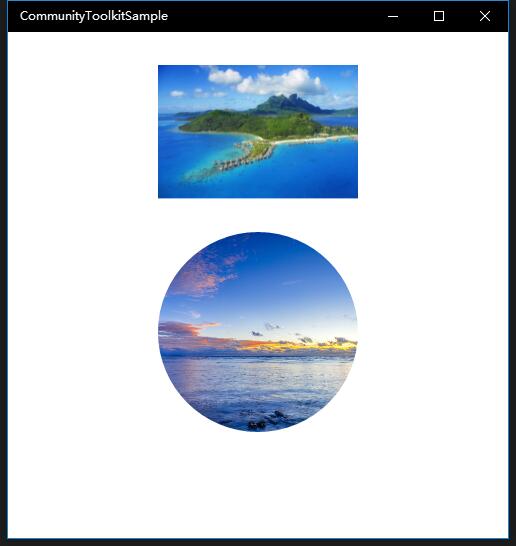
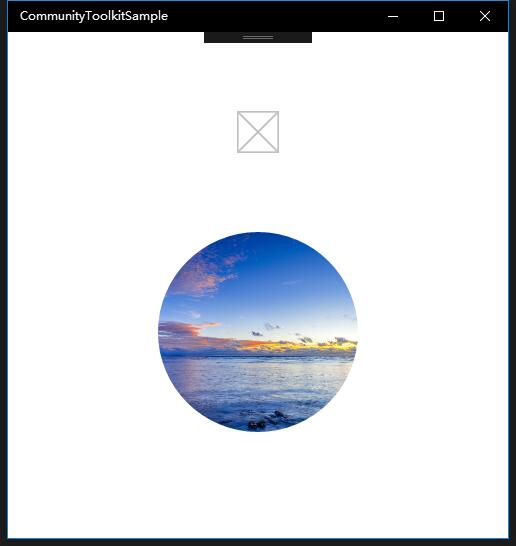
我们创建了两个控件,ImageEx 和 RoundImageEx,如下图一是加载中的过渡状态,图二是正常显示的状态;如果 Source 设置有误,则会出现图三只显示 PlaceHolder 的情况,实际应用中,在图片加载失败时我们应该有对应的显示方法;
<controls:ImageEx Name="ImageExControl"
    IsCacheEnabled="True" Width="200" Height="200"
    PlaceholderSource="/assets/LockScreenLogo.scale-200.png"
    Source="/assets/01.jpg"/>

<controls:RoundImageEx Name="RoundImageExControl"
    IsCacheEnabled="True" Width="200" Height="200" Stretch="UniformToFill"
    PlaceholderSource="/assets/01.jpg"
    Source="/assets/02.jpg"
    CornerRadius="999"/>
总结
到这里我们就把 UWP Community Toolkit 中的 ImageEx 控件的源代码实现过程和简单的调用示例讲解完成了,希望能对大家更好的理解和使用这个控件有所帮助。欢迎大家多多交流,谢谢!
最后,再跟大家安利一下 UWPCommunityToolkit 的官方微博:https://weibo.com/u/6506046490, 大家可以通过微博关注最新动态。
衷心感谢 UWPCommunityToolkit 的作者们杰出的工作,Thank you so much, UWPCommunityToolkit authors!!!
New UWP Community Toolkit - ImageEx的更多相关文章
- New UWP Community Toolkit
概述 UWP Community Toolkit 是一个 UWP App 自定义控件.应用服务和帮助方法的集合,能够很大程度的简化和指引开发者的开发工作,相信广大 UWPer 并不陌生. 下面是截取自 ...
- New UWP Community Toolkit - XAML Brushes
概述 上一篇 New UWP Community Toolkit 文章中,我们对 V2.2.0 版本的重要更新做了简单回顾.接下来会针对每个重要更新,结合 SDK 源代码和调用代码详细讲解. 本篇我们 ...
- New UWP Community Toolkit - Markdown
概述 前面 New UWP Community Toolkit 文章中,我们对 V2.2.0 版本的重要更新做了简单回顾,其中简单介绍了 MarkdownTextBlock 和 MarkdownDoc ...
- New UWP Community Toolkit - Staggered panel
概述 前面 New UWP Community Toolkit 文章中,我们对 2.2.0 版本的重要更新做了简单回顾,其中简单介绍了 Staggered panel,本篇我们结合代码详细讲解 St ...
- New UWP Community Toolkit - Carousel
概述 New UWP Community Toolkit V2.2.0 的版本发布日志中提到了 Carousel 的调整,本篇我们结合代码详细讲解 Carousel 的实现. Carousel 是 ...
- New UWP Community Toolkit - RadialProgressBar
概述 UWP Community Toolkit 中有一个圆形的进度条控件 - RadialProgressBar,本篇我们结合代码详细讲解 RadialProgressBar 的实现. Radi ...
- New UWP Community Toolkit - RadialGauge
概述 New UWP Community Toolkit V2.2.0 的版本发布日志中提到了 RadialGauge 的调整,本篇我们结合代码详细讲解 RadialGauge 的实现. Radi ...
- New UWP Community Toolkit - RangeSelector
概述 前面 New UWP Community Toolkit 文章中,我们对 V2.2.0 版本的重要更新做了简单回顾,其中简单介绍了 RangeSelector,本篇我们结合代码详细讲解一下 Ra ...
- New UWP Community Toolkit - AdaptiveGridView
概述 UWP Community Toolkit 中有一个自适应的 GridView 控件 - AdaptiveGridView,本篇我们结合代码详细讲解 AdaptiveGridView 的实现 ...
随机推荐
- jxl 导出数据到excel
优点: Jxl对中文支持非常好,操作简单,方法看名知意. Jxl是纯javaAPI,在跨平台上表现的非常完美,代码可以再windows或者Linux上运行而无需重新编写 支持Excel 95-2000 ...
- 46个Linux面试常见问题送给你
问题一: 绝对路径用什么符号表示?当前目录.上层目录用什么表示?主目录用什么表示? 切换目录用什么命令? 答案:绝对路径: 如/etc/init.d当前目录和上层目录: ./ ../主目录: ~/切 ...
- 环境变量配置为jdk8,显示的java版本为jdk7
经查找发现是jdk版本的问题,我系统环境变量配置的是jdk7,可是这个war包需要在jdk8的环境下运行.于是我就手动将环境变量的jdk7换成jdk8,结果发现依然还是会出现以上问题.于是我打开cmd ...
- jQuery中的自定义插件之----工厂方法(Factory Widget)
jQuery赋予了我们很强大的插件自定义的功能,可以作为我们的武器库,应用到所有的网页中,使用的语法比较有意思,下面是对它的一些探讨. 遵循以下的原则: 1 IIFE 创建一个jQuery的scope ...
- win7上Android环境搭建以及调试
工欲善其事必先利其器,好记性不如烂笔头.要学习一门新的语言,首先必须得先搭环境,否则没法实践.如果之前按照网上的提示,搭建过环境,而且环境比较复杂的话,我相信隔很长一段时间后,就会忘记,到真正用的时候 ...
- Rlwrap工具的安装和配置
1.创建安装目录装备安装包 root权限 [root@dbsrc oracle]# mkdir /stage [root@dbsrc oracle]# chmod –R 777 /stage 从U盘将 ...
- 简单总结下 cookie、session
Cookies: 定义:cookie 中文意思是"小甜饼",但是,在互联网中它跟食品没有半毛钱关系,它主要是由web服务器应用程序创建,在客户端计算机中保存,问题来了, ...
- C#中的多线程与线程互斥
通过多线程,C#可以并行地执行代码. 每一个线程都有它独立的执行路径,所有线程都能访问共有变量. 这就引发了线程竞争 这时就需要使用线程安全的处理方式使得线程互斥 先来看一段多线程代码 using S ...
- 设计模式——策略模式(C++实现)
程序优化是用于消除程序中大量的if else这种判断语句 #include <iostream> #include <string> using namespace std; ...
- svn版本提交冲突问题解决详解
svn冲突文件解决方法 工具/原料 svn客户端 方法/步骤 1 通过SVN客户端更新需要的文件,如果出现有感叹号的文件,找到出现感叹号的文件. 2 选择感叹号文件,即冲突文件,单击鼠标右 ...