
003 使用SpringMVC开发restful API--查询用户
一:介绍说明
1.介绍

2.restful api的成熟度

二:编写Restful API的测试用例
1.引入spring的测试框架
在effective pom中查找
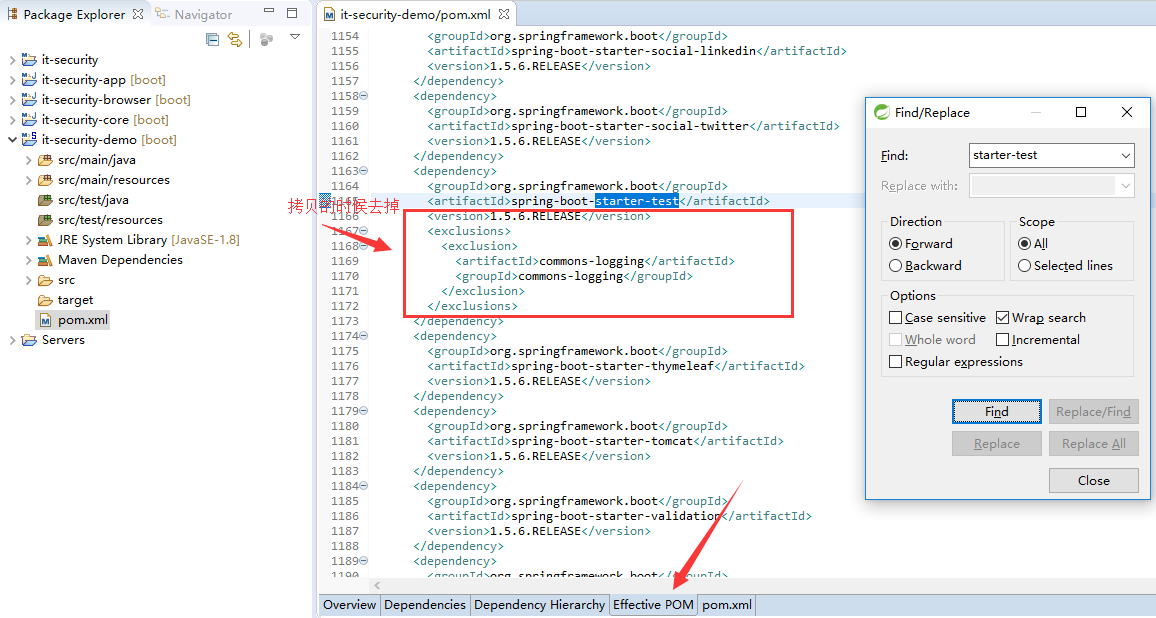
2.新建测试包,测试类
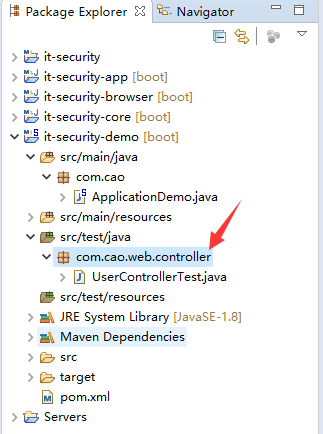
3.测试用例程序
 package com.cao.web.controller;

 import org.junit.Before;

 import org.junit.Test;

 import org.junit.runner.RunWith;

 import org.springframework.beans.factory.annotation.Autowired;

 import org.springframework.boot.test.context.SpringBootTest;

 import org.springframework.http.MediaType;

 import org.springframework.test.context.junit4.SpringRunner;

 import org.springframework.test.web.servlet.MockMvc;

 import org.springframework.test.web.servlet.request.MockMvcRequestBuilders;

 import org.springframework.test.web.servlet.result.MockMvcResultMatchers;

 import org.springframework.test.web.servlet.setup.MockMvcBuilders;

 import org.springframework.web.context.WebApplicationContext;

 //如何运行测试用例

 @RunWith(SpringRunner.class)

 //这是一个测试用例

 @SpringBootTest

 public class UserControllerTest {

     //伪造测试用例,不需要跑tomcat,运行会很快

     @Autowired

     private WebApplicationContext wac;

     //伪造的一个mvc环境

     private MockMvc mockMvc;

     @Before

     public void setup() {

         //初始化这个环境

         mockMvc=MockMvcBuilders.webAppContextSetup(wac).build();

     }

     @Test

     public void whenQuerySuccess() throws Exception {

         //发送请求

         mockMvc.perform(MockMvcRequestBuilders.get("/user")

                 .contentType(MediaType.APPLICATION_JSON_UTF8))

             .andExpect(MockMvcResultMatchers.status().isOk())

             .andExpect(MockMvcResultMatchers.jsonPath("$.length()").value(3));

     }

 }
4.执行效果

三:使用注解声明RestfulAPI
1.常用注解
@RestController标明此controller提供RestAPI
@RequestMapping及其变体,映射url到java
@RequestParam映射请求参数到java方法上的参数、
@PageableDefault指定分页参数默认值
2.@RestController与@RequestMapping小测试
控制类
 package com.cao.web.controller;

 import java.util.ArrayList;

 import java.util.List;

 import org.springframework.web.bind.annotation.RequestMapping;

 import org.springframework.web.bind.annotation.RequestMethod;

 import org.springframework.web.bind.annotation.RestController;

 import com.cao.dto.User;

 //此controller可以提供restful服务

 @RestController

 public class UserController {

     @RequestMapping(value="/user",method=RequestMethod.GET)

     public List<User> query(){

         List<User> userList=new ArrayList<>();

         userList.add(new User());

         userList.add(new User());

         userList.add(new User());

         return userList;

     }

 }
User.java
新建dto包
 package com.cao.dto;

 public class User {

     private String username;

     private String password;

     public String getUsername() {

         return username;

     }

     public void setUsername(String username) {

         this.username = username;

     }

     public String getPassword() {

         return password;

     }

     public void setPassword(String password) {

         this.password = password;

     }

 }
3.效果
说明,服务已经建立起来了。

4.@RequestParam小测试【单个参数】
常规的用法
测试类
 package com.cao.web.controller;

 import org.junit.Before;

 import org.junit.Test;

 import org.junit.runner.RunWith;

 import org.springframework.beans.factory.annotation.Autowired;

 import org.springframework.boot.test.context.SpringBootTest;

 import org.springframework.http.MediaType;

 import org.springframework.test.context.junit4.SpringRunner;

 import org.springframework.test.web.servlet.MockMvc;

 import org.springframework.test.web.servlet.request.MockMvcRequestBuilders;

 import org.springframework.test.web.servlet.result.MockMvcResultMatchers;

 import org.springframework.test.web.servlet.setup.MockMvcBuilders;

 import org.springframework.web.context.WebApplicationContext;

 //如何运行测试用例

 @RunWith(SpringRunner.class)

 //这是一个测试用例

 @SpringBootTest

 public class UserControllerTest {

     //伪造测试用例,不需要跑tomcat,运行会很快

     @Autowired

     private WebApplicationContext wac;

     //伪造的一个mvc环境

     private MockMvc mockMvc;

     @Before

     public void setup() {

         //初始化这个环境

         mockMvc=MockMvcBuilders.webAppContextSetup(wac).build();

     }

     @Test

     public void whenQuerySuccess() throws Exception {

         //发送请求

         mockMvc.perform(MockMvcRequestBuilders.get("/user")

                 .param("username", "Job")

                 .contentType(MediaType.APPLICATION_JSON_UTF8))

             .andExpect(MockMvcResultMatchers.status().isOk())

             .andExpect(MockMvcResultMatchers.jsonPath("$.length()").value(3));

     }

 }
控制类
 package com.cao.web.controller;

 import java.util.ArrayList;

 import java.util.List;

 import org.springframework.web.bind.annotation.RequestMapping;

 import org.springframework.web.bind.annotation.RequestMethod;

 import org.springframework.web.bind.annotation.RequestParam;

 import org.springframework.web.bind.annotation.RestController;

 import com.cao.dto.User;

 //此controller可以提供restful服务

 @RestController

 public class UserController {

     @RequestMapping(value="/user",method=RequestMethod.GET)

     public List<User> query(@RequestParam String username){

         List<User> userList=new ArrayList<>();

         System.out.println("username="+username);

         userList.add(new User());

         userList.add(new User());

         userList.add(new User());

         return userList;

     }

 }
RequestParam的其他参数

 package com.cao.web.controller;

 import java.util.ArrayList;

 import java.util.List;

 import org.springframework.web.bind.annotation.RequestMapping;

 import org.springframework.web.bind.annotation.RequestMethod;

 import org.springframework.web.bind.annotation.RequestParam;

 import org.springframework.web.bind.annotation.RestController;

 import com.cao.dto.User;

 //此controller可以提供restful服务

 @RestController

 public class UserController {

     @RequestMapping(value="/user",method=RequestMethod.GET)

     public List<User> query(@RequestParam(name="username",required=false,defaultValue="Tom") String name){

         List<User> userList=new ArrayList<>();

         System.out.println("name="+name);

         userList.add(new User());

         userList.add(new User());

         userList.add(new User());

         return userList;

     }

 }
这里主要是要注意一下别名。
5.使用类组装多个参数【多个参数进行传递】
这里主要是说上面的RequestParam不再满足的时候,主要的场景是复杂的多请求参数时
测试类
 package com.cao.web.controller;

 import org.junit.Before;

 import org.junit.Test;

 import org.junit.runner.RunWith;

 import org.springframework.beans.factory.annotation.Autowired;

 import org.springframework.boot.test.context.SpringBootTest;

 import org.springframework.http.MediaType;

 import org.springframework.test.context.junit4.SpringRunner;

 import org.springframework.test.web.servlet.MockMvc;

 import org.springframework.test.web.servlet.request.MockMvcRequestBuilders;

 import org.springframework.test.web.servlet.result.MockMvcResultMatchers;

 import org.springframework.test.web.servlet.setup.MockMvcBuilders;

 import org.springframework.web.context.WebApplicationContext;

 //如何运行测试用例

 @RunWith(SpringRunner.class)

 //这是一个测试用例

 @SpringBootTest

 public class UserControllerTest {

     //伪造测试用例,不需要跑tomcat,运行会很快

     @Autowired

     private WebApplicationContext wac;

     //伪造的一个mvc环境

     private MockMvc mockMvc;

     @Before

     public void setup() {

         //初始化这个环境

         mockMvc=MockMvcBuilders.webAppContextSetup(wac).build();

     }

     @Test

     public void whenQuerySuccess() throws Exception {

         //发送请求

         mockMvc.perform(MockMvcRequestBuilders.get("/user")

                 .param("username", "Job")

                 .param("age", "18")

                 .param("xxx", "XXX")

                 .contentType(MediaType.APPLICATION_JSON_UTF8))

             .andExpect(MockMvcResultMatchers.status().isOk())

             .andExpect(MockMvcResultMatchers.jsonPath("$.length()").value(3));

     }

 }
控制类
 package com.cao.web.controller;

 import static org.mockito.Matchers.contains;

 import java.util.ArrayList;

 import java.util.List;

 import org.apache.commons.lang.builder.ReflectionToStringBuilder;

 import org.apache.commons.lang.builder.ToStringStyle;

 import org.springframework.web.bind.annotation.RequestMapping;

 import org.springframework.web.bind.annotation.RequestMethod;

 import org.springframework.web.bind.annotation.RequestParam;

 import org.springframework.web.bind.annotation.RestController;

 import com.cao.dto.User;

 import com.cao.dto.UserQueryCondition;

 //此controller可以提供restful服务

 @RestController

 public class UserController {

     @RequestMapping(value="/user",method=RequestMethod.GET)

     public List<User> query(UserQueryCondition condition){

         //反射的方法来打印

         System.out.println(ReflectionToStringBuilder.toString(condition, ToStringStyle.MULTI_LINE_STYLE));

         //

         List<User> userList=new ArrayList<>();

         userList.add(new User());

         userList.add(new User());

         userList.add(new User());

         return userList;

     }

 }
UserQueryCondition.java
 package com.cao.dto;

 public class UserQueryCondition {

     private String username;

     private int age;

     private int ageTo;

     private String xxx;

     public String getUsername() {

         return username;

     }

     public void setUsername(String username) {

         this.username = username;

     }

     public int getAge() {

         return age;

     }

     public void setAge(int age) {

         this.age = age;

     }

     public int getAgeTo() {

         return ageTo;

     }

     public void setAgeTo(int ageTo) {

         this.ageTo = ageTo;

     }

     public String getXxx() {

         return xxx;

     }

     public void setXxx(String xxx) {

         this.xxx = xxx;

     }

 }
效果

6.@Pageable
测试类
 package com.cao.web.controller;

 import org.junit.Before;

 import org.junit.Test;

 import org.junit.runner.RunWith;

 import org.springframework.beans.factory.annotation.Autowired;

 import org.springframework.boot.test.context.SpringBootTest;

 import org.springframework.http.MediaType;

 import org.springframework.test.context.junit4.SpringRunner;

 import org.springframework.test.web.servlet.MockMvc;

 import org.springframework.test.web.servlet.request.MockMvcRequestBuilders;

 import org.springframework.test.web.servlet.result.MockMvcResultMatchers;

 import org.springframework.test.web.servlet.setup.MockMvcBuilders;

 import org.springframework.web.context.WebApplicationContext;

 //如何运行测试用例

 @RunWith(SpringRunner.class)

 //这是一个测试用例

 @SpringBootTest

 public class UserControllerTest {

     //伪造测试用例,不需要跑tomcat,运行会很快

     @Autowired

     private WebApplicationContext wac;

     //伪造的一个mvc环境

     private MockMvc mockMvc;

     @Before

     public void setup() {

         //初始化这个环境

         mockMvc=MockMvcBuilders.webAppContextSetup(wac).build();

     }

     @Test

     public void whenQuerySuccess() throws Exception {

         //发送请求

         mockMvc.perform(MockMvcRequestBuilders.get("/user")

                 .param("username", "Job")

                 .param("age", "18")

                 .param("xxx", "XXX")

                 //分页,查第三页,每页15条,按照age降序

                 .param("page", "3")

                 .param("size", "15")

                 .param("sort", "age,desc")

                 //

                 .contentType(MediaType.APPLICATION_JSON_UTF8))

             .andExpect(MockMvcResultMatchers.status().isOk())

             .andExpect(MockMvcResultMatchers.jsonPath("$.length()").value(3));

     }

 }
控制类
 package com.cao.web.controller;

 import static org.mockito.Matchers.contains;

 import java.util.ArrayList;

 import java.util.List;

 import org.apache.commons.lang.builder.ReflectionToStringBuilder;

 import org.apache.commons.lang.builder.ToStringStyle;

 import org.springframework.data.domain.Pageable;

 import org.springframework.data.web.PageableDefault;

 import org.springframework.web.bind.annotation.RequestMapping;

 import org.springframework.web.bind.annotation.RequestMethod;

 import org.springframework.web.bind.annotation.RequestParam;

 import org.springframework.web.bind.annotation.RestController;

 import com.cao.dto.User;

 import com.cao.dto.UserQueryCondition;

 //此controller可以提供restful服务

 @RestController

 public class UserController {

     @RequestMapping(value="/user",method=RequestMethod.GET)

     public List<User> query(UserQueryCondition condition,@PageableDefault(size=13) Pageable pageable){

         //反射的方法来打印

         System.out.println(ReflectionToStringBuilder.toString(condition, ToStringStyle.MULTI_LINE_STYLE));

         //

         System.out.println(pageable.getPageSize());

         System.out.println(pageable.getPageNumber());

         System.out.println(pageable.getSort());

         //

         List<User> userList=new ArrayList<>();

         userList.add(new User());

         userList.add(new User());

         userList.add(new User());

         return userList;

     }

 }
效果

003 使用SpringMVC开发restful API--查询用户的更多相关文章
- 006 使用SpringMVC开发restful API四--用户信息的修复与删除,重在注解的定义
一:任务 1.任务 常用的验证注解 自定义返回消息 自定义校验注解 二:Hibernate Validator 1.常见的校验注解 2.程序 测试类 /** * @throws Exception * ...
- 004 使用SpringMVC开发restful API二--编写用户详情
一:编写用户详情服务 1.任务 @PathVariable隐射url片段到java方法的参数 在url声明中使用正则表达式 @JsonView控制json输出内容 二:@PathVariable 1. ...
- 007 使用SpringMVC开发restful API五--异常处理
一:任务 1.任务 Spring Boot中默认的错误机制处理机制 自定义异常处理 二:Spring Boot中的默认错误处理机制 1.目前 浏览器访问的时候, restful 接口主要是根据状态码进 ...
- 005 使用SpringMVC开发restful API三--处理创建请求
一:主要任务 1.说明 @RequestBody 映射请求体到java方法的参数 日期类型参数的处理 @Valid注解 BindingResult验证请求参数的合法性并处理校验结果 二:@Reques ...
- springmvc/springboot开发restful API
非rest的url写法: 查询 GET /user/query?name=tom 详情 GET /user/getinfo? 创建 POST /user/create?name=tom 修改 POST ...
- ASP.NET Core Web API 开发-RESTful API实现
ASP.NET Core Web API 开发-RESTful API实现 REST 介绍: 符合REST设计风格的Web API称为RESTful API. 具象状态传输(英文:Representa ...
- 使用Spring MVC开发RESTful API
第3章 使用Spring MVC开发RESTful API Restful简介 第一印象 左侧是传统写法,右侧是RESTful写法 用url描述资源,而不是行为 用http方法描述行为,使用http状 ...
- flask开发restful api系列(8)-再谈项目结构
上一章,我们讲到,怎么用蓝图建造一个好的项目,今天我们继续深入.上一章中,我们所有的接口都写在view.py中,如果几十个,还稍微好管理一点,假如上百个,上千个,怎么找?所有接口堆在一起就显得杂乱无章 ...
- flask开发restful api
flask开发restful api 如果有几个原因可以让你爱上flask这个极其灵活的库,我想蓝图绝对应该算上一个,部署蓝图以后,你会发现整个程序结构非常清晰,模块之间相互不影响.蓝图对restfu ...
随机推荐
- 【原创】大数据基础之Presto(1)简介、安装、使用
presto 0.217 官方:http://prestodb.github.io/ 一 简介 Presto is an open source distributed SQL query engin ...
- 【原创】大数据基础之Kerberos(1)简介、安装、使用
kerberos5-1.17 官方:https://kerberos.org/ 一 简介 The Kerberos protocol is designed to provide reliable a ...
- 初步了解three.js
<!DOCTYPE html> <html> <head lang="en"> <meta charset="UTF-8&quo ...
- swift 学习- 11 -- 属性
// '属性'将值跟特定的类, 结构体或枚举关联, 存储属性常量或变量作为实例的一部分,而计算属性计算(不是存储) 一个值, 计算属性可以用于 类, 结构体, 枚举, 存储属性只能用于 类 和 结构体 ...
- STM32L476应用开发之七:流量的PID控制
在气体分析仪使用过程中,为了力求分析结果的准确性,一般要求通过的气体流量尽可能的稳定.为了保证流量控制的稳定,我们采用PID调节来控制气路阀门的开度. 1.硬件设计 我们采用的流量计为气体质量流量计, ...
- kernel_size
kernel_size=(1,3)[flag] if flag==True:kernel_size=3 else: kernel_size=1
- nodejs之glob与globby
glob glob允许使用规则,从而获取对应规则匹配的文件.这个glob工具基于javascript.它使用了 minimatch 库来进行匹配 安装 npm install glob 引入 cons ...
- LeetCode(93): 复原IP地址
Medium! 题目描述: 给定一个只包含数字的字符串,复原它并返回所有可能的 IP 地址格式. 示例: 输入: "25525511135" 输出: ["255.255. ...
- C#关于线程的问题
1.通过System.threading.Thread类可以创建新的线程,并在线程堆栈中运行静态和动态的实例,可以通过Thread类的构造方法传递一个无参数,并且不返回的委托, class Progr ...
- CF 1051F
题意:给定一张n个点,m条边的无向联通图,其中m-n<=20,共q次询问,每次询问求给定两点u,v间的最短路长度 第一眼看见这题的时候,以为有什么神奇的全图最短路算法,满心欢喜的去翻了题解,发现 ...