
Nginx 核心配置-location的登录账户认证实战篇
Nginx核心配置-location的登录账户认证实战篇
作者:尹正杰
版权声明:原创作品,谢绝转载!否则将追究法律责任。
一.使用ab命令模拟网站攻击
1>.安装httpd-tools工具
[root@node108.yinzhengjie.org.cn ~]# yum -y install httpd-tools

Loaded plugins: fastestmirror

Loading mirror speeds from cached hostfile

 * base: mirrors.aliyun.com

 * extras: mirrors.tuna.tsinghua.edu.cn

 * updates: mirror.bit.edu.cn

Resolving Dependencies

--> Running transaction check

---> Package httpd-tools.x86_64 :2.4.-.el7.centos will be installed

--> Processing Dependency: libaprutil-.so.()(64bit) for package: httpd-tools-2.4.-.el7.centos.x86_64

--> Processing Dependency: libapr-.so.()(64bit) for package: httpd-tools-2.4.-.el7.centos.x86_64

--> Running transaction check

---> Package apr.x86_64 :1.4.-.el7 will be installed

---> Package apr-util.x86_64 :1.5.-.el7 will be installed

--> Finished Dependency Resolution

Dependencies Resolved

============================================================================================================================================================================

 Package                                   Arch                                 Version                                            Repository                          Size

============================================================================================================================================================================

Installing:

 httpd-tools                               x86_64                               2.4.-.el7.centos                                base                                 k

Installing for dependencies:

 apr                                       x86_64                               1.4.-.el7                                        base                                k

 apr-util                                  x86_64                               1.5.-.el7                                        base                                 k

Transaction Summary

============================================================================================================================================================================

Install   Package (+ Dependent packages)

Total download size:  k

Installed size:  k

Downloading packages:

(/): apr-1.4.-.el7.x86_64.rpm                                                                                                                    |  kB  ::

(/): apr-util-1.5.-.el7.x86_64.rpm                                                                                                               |   kB  ::

(/): httpd-tools-2.4.-.el7.centos.x86_64.rpm                                                                                                    |   kB  ::

----------------------------------------------------------------------------------------------------------------------------------------------------------------------------

Total                                                                                                                                        kB/s |  kB  ::

Running transaction check

Running transaction test

Transaction test succeeded

Running transaction

  Installing : apr-1.4.-.el7.x86_64                                                                                                                                   /

  Installing : apr-util-1.5.-.el7.x86_64                                                                                                                              /

  Installing : httpd-tools-2.4.-.el7.centos.x86_64                                                                                                                   /

  Verifying  : apr-1.4.-.el7.x86_64                                                                                                                                   /

  Verifying  : httpd-tools-2.4.-.el7.centos.x86_64                                                                                                                   /

  Verifying  : apr-util-1.5.-.el7.x86_64                                                                                                                              /

Installed:

  httpd-tools.x86_64 :2.4.-.el7.centos

Dependency Installed:

  apr.x86_64 :1.4.-.el7                                                           apr-util.x86_64 :1.5.-.el7

Complete!

[root@node108.yinzhengjie.org.cn ~]#
[root@node108.yinzhengjie.org.cn ~]# yum -y install httpd-tools
2>.查看软件包的信息
[root@node108.yinzhengjie.org.cn ~]# rpm -qi httpd-tools

Name        : httpd-tools

Version     : 2.4.

Release     : .el7.centos

Architecture: x86_64

Install Date: Tue  Dec  :: AM CST

Group       : System Environment/Daemons

Size        :

License     : ASL 2.0

Signature   : RSA/SHA256, Fri  Aug  :: AM CST, Key ID 24c6a8a7f4a80eb5

Source RPM  : httpd-2.4.-.el7.centos.src.rpm

Build Date  : Thu  Aug  :: PM CST

Build Host  : x86-.bsys.centos.org

Relocations : (not relocatable)

Packager    : CentOS BuildSystem <http://bugs.centos.org>

Vendor      : CentOS

URL         : http://httpd.apache.org/

Summary     : Tools for use with the Apache HTTP Server

Description :

The httpd-tools package contains tools which can be used with

the Apache HTTP Server.

[root@node108.yinzhengjie.org.cn ~]#
3>.查看httpd-tools软件包安装了哪些文件或目录
[root@node108.yinzhengjie.org.cn ~]# rpm -ql httpd-tools

/usr/bin/ab

/usr/bin/htdbm

/usr/bin/htdigest

/usr/bin/htpasswd

/usr/bin/httxt2dbm

/usr/bin/logresolve

/usr/share/doc/httpd-tools-2.4.

/usr/share/doc/httpd-tools-2.4./LICENSE

/usr/share/doc/httpd-tools-2.4./NOTICE

/usr/share/man/man1/ab..gz

/usr/share/man/man1/htdbm..gz

/usr/share/man/man1/htdigest..gz

/usr/share/man/man1/htpasswd..gz

/usr/share/man/man1/httxt2dbm..gz

/usr/share/man/man1/logresolve..gz

[root@node108.yinzhengjie.org.cn ~]#
4>.使用ab命令来模仿大量连接访问某web网站。
[root@node108.yinzhengjie.org.cn ~]# ab -n  -c  http://node101.yinzhengjie.org.cn/

This is ApacheBench, Version 2.3 <$Revision:  $>

Copyright  Adam Twiss, Zeus Technology Ltd, http://www.zeustech.net/

Licensed to The Apache Software Foundation, http://www.apache.org/

Benchmarking node101.yinzhengjie.org.cn (be patient)

Completed  requests

Completed  requests

Completed  requests

Completed  requests

Completed  requests

Completed  requests

Completed  requests

Completed  requests

Completed  requests

Completed  requests

Finished  requests

Server Software:        nginx/1.14.

Server Hostname:        node101.yinzhengjie.org.cn

Server Port:

Document Path:          /

Document Length:         bytes

Concurrency Level:

Time taken for tests:   29.892 seconds

Complete requests:

Failed requests:

Write errors:

Total transferred:       bytes

HTML transferred:        bytes

Requests per second:    3345.34 [#/sec] (mean)

Time per request:       597.846 [ms] (mean)

Time per request:       0.299 [ms] (mean, across all concurrent requests)

Transfer rate:          1091.16 [Kbytes/sec] received

Connection Times (ms)

              min  mean[+/-sd] median   max

Connect:           971.4

Processing:        143.7

Waiting:           143.5

Total:            985.6

Percentage of the requests served within a certain time (ms)

  %

  %

  %

  %

  %

  %

  %

  %

 %   (longest request)

[root@node108.yinzhengjie.org.cn ~]#

以上输出每行参数说明请参考:

    https://www.cnblogs.com/yinzhengjie/p/6204049.html
5>.nginx支持安全认证
  针对使用ab命令发起的简单攻击,我们可以在nginx做限制,可以设置最大并发数来加以限制,但并不推荐这样干,我们可以直接使用防护墙进行拦截。这样攻击压根就打不到nginx服务器上。

  和httpd服务一样,nginx也支持基于用户账号认证和IP地址认证,接下来咱们就来一起来体验一下吧。
二.Nginx账户认证功能
1>.安装httpd-tools工具并创建用户名和密码
[root@node101.yinzhengjie.org.cn ~]# yum -y install httpd-tools

Loaded plugins: fastestmirror

Loading mirror speeds from cached hostfile

 * base: mirrors.huaweicloud.com

 * extras: mirror.jdcloud.com

 * updates: mirrors.huaweicloud.com

base                                                                                                                                                 | 3.6 kB  ::

extras                                                                                                                                               | 2.9 kB  ::

updates                                                                                                                                              | 2.9 kB  ::

Resolving Dependencies

--> Running transaction check

---> Package httpd-tools.x86_64 :2.4.-.el7.centos will be installed

--> Processing Dependency: libaprutil-.so.()(64bit) for package: httpd-tools-2.4.-.el7.centos.x86_64

--> Processing Dependency: libapr-.so.()(64bit) for package: httpd-tools-2.4.-.el7.centos.x86_64

--> Running transaction check

---> Package apr.x86_64 :1.4.-.el7 will be installed

---> Package apr-util.x86_64 :1.5.-.el7 will be installed

--> Finished Dependency Resolution

Dependencies Resolved

============================================================================================================================================================================

 Package                                   Arch                                 Version                                            Repository                          Size

============================================================================================================================================================================

Installing:

 httpd-tools                               x86_64                               2.4.-.el7.centos                                base                                 k

Installing for dependencies:

 apr                                       x86_64                               1.4.-.el7                                        base                                k

 apr-util                                  x86_64                               1.5.-.el7                                        base                                 k

Transaction Summary

============================================================================================================================================================================

Install   Package (+ Dependent packages)

Total download size:  k

Installed size:  k

Downloading packages:

apr-util-1.5.-.el7.x86_64.rp FAILED

http://mirror.lzu.edu.cn/centos/7.7.1908/os/x86_64/Packages/apr-util-1.5.2-6.el7.x86_64.rpm: [Errno 14] curl#56 - "Recv failure: Connection reset by peer"0 B  --:--:-- ETA

Trying other mirror.

(/): httpd-tools-2.4.-.el7.centos.x86_64.rpm                                                                                                    |   kB  ::

(/): apr-1.4.-.el7.x86_64.rpm                                                                                                                    |  kB  ::

(/): apr-util-1.5.-.el7.x86_64.rpm                                                                                                               |   kB  ::

----------------------------------------------------------------------------------------------------------------------------------------------------------------------------

Total                                                                                                                                        kB/s |  kB  ::

Running transaction check

Running transaction test

Transaction test succeeded

Running transaction

  Installing : apr-1.4.-.el7.x86_64                                                                                                                                   /

  Installing : apr-util-1.5.-.el7.x86_64                                                                                                                              /

  Installing : httpd-tools-2.4.-.el7.centos.x86_64                                                                                                                   /

  Verifying  : apr-1.4.-.el7.x86_64                                                                                                                                   /

  Verifying  : httpd-tools-2.4.-.el7.centos.x86_64                                                                                                                   /

  Verifying  : apr-util-1.5.-.el7.x86_64                                                                                                                              /

Installed:

  httpd-tools.x86_64 :2.4.-.el7.centos

Dependency Installed:

  apr.x86_64 :1.4.-.el7                                                           apr-util.x86_64 :1.5.-.el7

Complete!

[root@node101.yinzhengjie.org.cn ~]#
[root@node101.yinzhengjie.org.cn ~]# yum -y install httpd-tools
[root@node101.yinzhengjie.org.cn ~]# htpasswd -cbm /yinzhengjie/softwares/nginx/conf/.htpasswd jason

Adding password for user jason

[root@node101.yinzhengjie.org.cn ~]#

[root@node101.yinzhengjie.org.cn ~]# htpasswd -bm /yinzhengjie/softwares/nginx/conf/.htpasswd yin

Adding password for user yin

[root@node101.yinzhengjie.org.cn ~]#

[root@node101.yinzhengjie.org.cn ~]# cat /yinzhengjie/softwares/nginx/conf/.htpasswd

jason:$apr1$RE.cs2Iz$4Ch18u4FWJdRHCGj1Ttrm.

yin:$apr1$2oDUwP6.$JcFiDD16mspK//1QsV7rj1

[root@node101.yinzhengjie.org.cn ~]#
2>.查看主配置文件
[root@node101.yinzhengjie.org.cn ~]# cat /yinzhengjie/softwares/nginx/conf/nginx.conf

worker_processes  ;

worker_cpu_affinity    ;

events {

    worker_connections  ;

    use epoll;

    accept_mutex on;

    multi_accept on;

}

http {

    include       mime.types;

    default_type  application/octet-stream;

    sendfile        on;

    gzip  on;

    charset utf-;

    keepalive_timeout   ;

    #导入其他路径的配置文件

    include /yinzhengjie/softwares/nginx/conf.d/*.conf;

}

[root@node101.yinzhengjie.org.cn ~]#

[root@node101.yinzhengjie.org.cn ~]# nginx -t

nginx: the configuration file /yinzhengjie/softwares/nginx/conf/nginx.conf syntax is ok

nginx: configuration file /yinzhengjie/softwares/nginx/conf/nginx.conf test is successful

[root@node101.yinzhengjie.org.cn ~]#
3>.编辑子配置文件
[root@node101.yinzhengjie.org.cn ~]# cat /yinzhengjie/softwares/nginx/conf.d/auth.conf

server {

    listen ;

    server_name node101.yinzhengjie.org.cn;

    location / {

        root /yinzhengjie/data/web/nginx/html;

        index index.html;

    }

    location /login {

        root /yinzhengjie/data/web/nginx;

        index index.html;

        auth_basic "login password";

        auth_basic_user_file /yinzhengjie/softwares/nginx/conf/.htpasswd;

    }

}

[root@node101.yinzhengjie.org.cn ~]#

[root@node101.yinzhengjie.org.cn ~]# nginx -t

nginx: the configuration file /yinzhengjie/softwares/nginx/conf/nginx.conf syntax is ok

nginx: configuration file /yinzhengjie/softwares/nginx/conf/nginx.conf test is successful

[root@node101.yinzhengjie.org.cn ~]#
4>.创建测试数据
[root@node101.yinzhengjie.org.cn ~]# mkdir -pv /yinzhengjie/data/web/nginx/login

mkdir: created directory ‘/yinzhengjie/data/web/nginx/login’

[root@node101.yinzhengjie.org.cn ~]#

[root@node101.yinzhengjie.org.cn ~]# echo "<h1 style='color:rgb(255,0,0)'>Java</h1>" > /yinzhengjie/data/web/nginx/login/index.html

[root@node101.yinzhengjie.org.cn ~]#

[root@node101.yinzhengjie.org.cn ~]# echo "<h1 style='color:rgb(0,255,0)'>Python</h1>" >> /yinzhengjie/data/web/nginx/login/index.html

[root@node101.yinzhengjie.org.cn ~]#

[root@node101.yinzhengjie.org.cn ~]# echo "<h1 style='color:rgb(0,0,255)'>Golang</h1>" >> /yinzhengjie/data/web/nginx/login/index.html

[root@node101.yinzhengjie.org.cn ~]#

[root@node101.yinzhengjie.org.cn ~]# echo "<h1 style='color:rgb(255,0,255)'>Shell</h1>" >> /yinzhengjie/data/web/nginx/login/index.html

[root@node101.yinzhengjie.org.cn ~]#

[root@node101.yinzhengjie.org.cn ~]# cat /yinzhengjie/data/web/nginx/login/index.html

<h1 style='color:rgb(255,0,0)'>Java</h1>

<h1 style='color:rgb(0,255,0)'>Python</h1>

<h1 style='color:rgb(0,0,255)'>Golang</h1>

<h1 style='color:rgb(255,0,255)'>Shell</h1>

[root@node101.yinzhengjie.org.cn ~]#

[root@node101.yinzhengjie.org.cn ~]#
5>.启动nginx服务
[root@node101.yinzhengjie.org.cn ~]# ss -ntl

State      Recv-Q Send-Q                                         Local Address:Port                                                        Peer Address:Port

LISTEN                                                                   *:                                                                     *:*

LISTEN                                                                  :::                                                                    :::*

[root@node101.yinzhengjie.org.cn ~]#

[root@node101.yinzhengjie.org.cn ~]# nginx

[root@node101.yinzhengjie.org.cn ~]#

[root@node101.yinzhengjie.org.cn ~]# ss -ntl

State      Recv-Q Send-Q                                         Local Address:Port                                                        Peer Address:Port

LISTEN                                                                   *:                                                                     *:*

LISTEN                                                                   *:                                                                     *:*

LISTEN                                                                  :::                                                                    :::*

[root@node101.yinzhengjie.org.cn ~]#
5>.客户端访问nginx
浏览器输入:"http://node101.yinzhengjie.org.cn/login",会弹出如下图所示的对话框,输入咱们自定义的密码进行登录验证
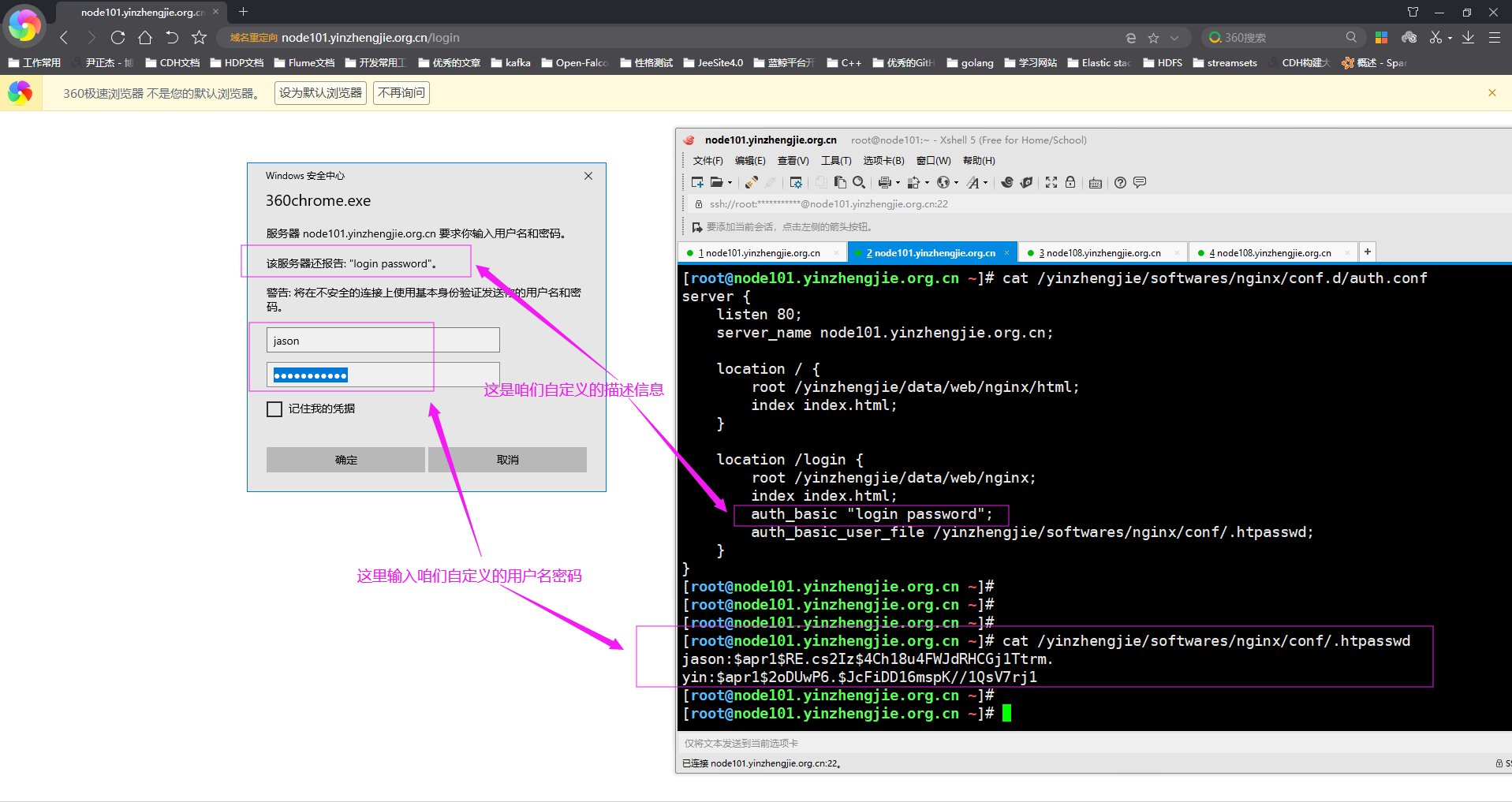
如下图所示,输入正确的用户名和密码就可以正常登录啦。

如果没有输入正确的用户名和密码则验证错误,无法看到我们预定义的网页,如下图所示。

三.Nginx 四层访问控制
1>.编辑子配置文件
[root@node101.yinzhengjie.org.cn ~]# cat /yinzhengjie/softwares/nginx/conf.d/auth.conf

server {

    listen ;

    server_name node101.yinzhengjie.org.cn;

    location / {

        root /yinzhengjie/data/web/nginx/html;

        index index.html;

    }

    location /login {

        root /yinzhengjie/data/web/nginx;

        index index.html;

        deny 172.30.1.108;          #咱们可以拒绝某个IP访问

        allow 172.30.1.0/;         #咱们可以设置运行某个网段访问

        allow :0db8::/;        #当然,也支持IPV6地址限制哟~

        deny all;               #上面做了允许小部分IP地址后,其它的默认都被拒绝了,因为匹配规则是自上而下进行匹配,一旦匹配后就不在往下继续匹配。

    }

}

[root@node101.yinzhengjie.org.cn ~]#

[root@node101.yinzhengjie.org.cn ~]# nginx -t

nginx: the configuration file /yinzhengjie/softwares/nginx/conf/nginx.conf syntax is ok

nginx: configuration file /yinzhengjie/softwares/nginx/conf/nginx.conf test is successful

[root@node101.yinzhengjie.org.cn ~]#

[root@node101.yinzhengjie.org.cn ~]#
2>.重新加载nginx的配置文件
[root@node101.yinzhengjie.org.cn ~]# ps -ef | grep nginx | grep -v grep

root              : ?        :: nginx: master process nginx

nginx          : ?        :: nginx: worker process

nginx          : ?        :: nginx: worker process

nginx          : ?        :: nginx: worker process

nginx          : ?        :: nginx: worker process

[root@node101.yinzhengjie.org.cn ~]#

[root@node101.yinzhengjie.org.cn ~]# nginx -s reload

[root@node101.yinzhengjie.org.cn ~]#

[root@node101.yinzhengjie.org.cn ~]# ps -ef | grep nginx | grep -v grep

root              : ?        :: nginx: master process nginx

nginx          : ?        :: nginx: worker process

nginx         : ?        :: nginx: worker process

nginx         : ?        :: nginx: worker process

nginx         : ?        :: nginx: worker process

[root@node101.yinzhengjie.org.cn ~]#

[root@node101.yinzhengjie.org.cn ~]#
3>.在IP地址为"172.30.1.108"节点上访问nginx的服务被拒绝
[root@node108.yinzhengjie.org.cn ~]# hostname

node108.yinzhengjie.org.cn

[root@node108.yinzhengjie.org.cn ~]#

[root@node108.yinzhengjie.org.cn ~]# hostname -i

172.30.1.108

[root@node108.yinzhengjie.org.cn ~]#

[root@node108.yinzhengjie.org.cn ~]# curl -I http://node101.yinzhengjie.org.cn/login/        #很显然,报错403啦,即权限被拒绝!

HTTP/1.1  Forbidden

Server: nginx/1.14.

Date: Tue,  Dec  :: GMT

Content-Type: text/html; charset=utf-

Content-Length:

Connection: keep-alive

Keep-Alive: timeout=

[root@node108.yinzhengjie.org.cn ~]#

[root@node108.yinzhengjie.org.cn ~]#
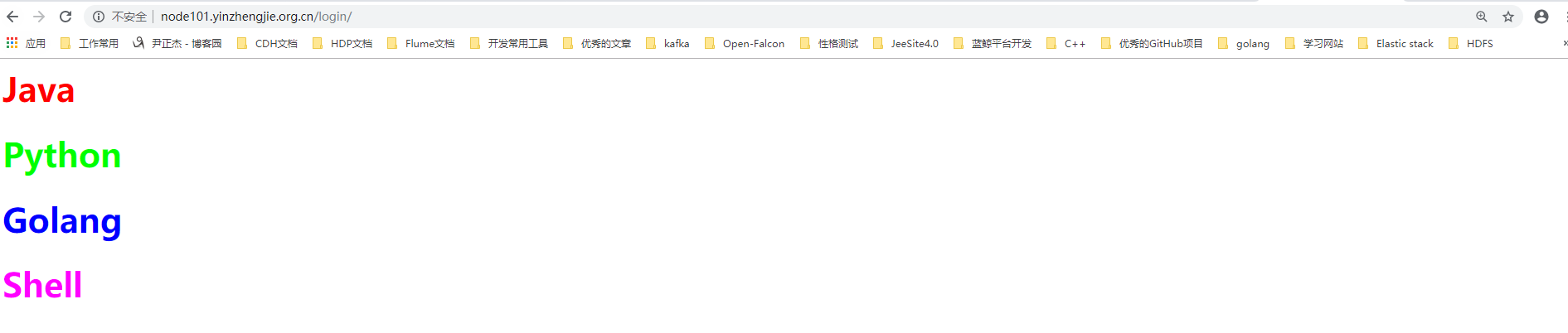
4>.在浏览器上是可以正常访问的,如下图所示
Nginx 核心配置-location的登录账户认证实战篇的更多相关文章
- Nginx 核心配置-location的匹配案例实战篇
Nginx 核心配置-location的匹配案例实战篇 作者:尹正杰 版权声明:原创作品,谢绝转载!否则将追究法律责任. 一.location语法规则介绍 在没有使用正则表达式的时候,nginx会先在 ...
- Nginx 核心配置详解
目录 Nginx 核心配置详解 Nginx 四层访问控制: Nginx账户认证功能: 自定义错误页面: 自定义访问日志: 检测文件是否存在: 长连接配置: 作为下载服务器配置: 作为上传服务器: 其他 ...
- Nginx 核心配置-作为上传服务器配置
Nginx 核心配置-作为上传服务器配置 作者:尹正杰 版权声明:原创作品,谢绝转载!否则将追究法律责任. 一.关键参数说明 client_max_body_size 1m: 设置允许客户端上传单 ...
- Nginx 核心配置-作为下载服务器配置
Nginx 核心配置-作为下载服务器配置 作者:尹正杰 版权声明:原创作品,谢绝转载!否则将追究法律责任. 一.无限速版本的下载服务器 1>.查看主配置文件 [root@node101.yinz ...
- Nginx 核心配置-检测文件是否存在
Nginx 核心配置-检测文件是否存在 作者:尹正杰 版权声明:原创作品,谢绝转载!否则将追究法律责任. try_files会按顺序检查文件是否存在,返回第一个找到的文件或文件夹(结尾加斜线表示为文件 ...
- Nginx 核心配置-自定义日志路径及清空日志注意事项
Nginx 核心配置-自定义日志路径及清空日志注意事项 作者:尹正杰 版权声明:原创作品,谢绝转载!否则将追究法律责任. 一.关于日志清空注意事项 1>.nginx服务写访问日志是基于acces ...
- Nginx 核心配置-自定义错误页面
Nginx 核心配置-自定义错误页面 作者:尹正杰 版权声明:原创作品,谢绝转载!否则将追究法律责任. 生产环境中错误页面一般都是UI或开发工程师提供的,他们已经在软件中定义好了,我们这里就简单写个h ...
- Nginx 核心配置-根目录root指令与别名alias指令实战案例
Nginx 核心配置-根目录root指令与别名alias指令实战案例 作者:尹正杰 版权声明:原创作品,谢绝转载!否则将追究法律责任. 一.试验环境说明 1>.虚拟机环境说明 [root@nod ...
- Nginx 核心配置-单节点实现多域名访问
Nginx 核心配置-单节点实现多域名访问 作者:尹正杰 版权声明:原创作品,谢绝转载!否则将追究法律责任. 一.试验环境说明 1>.虚拟机环境说明 [root@node101.yinzheng ...
随机推荐
- ESP8266 LUA脚本语言开发: 准备工作-LUA文件加载与变量调用
前言 这节说一下多个文件调用 多个文件之间变量调用 准备两个文件 init.lua other.lua 开始 模块默认一开始调用的是init.lua 咱让init.lua调用 other.lua 很简 ...
- pytest--fixture
前戏 fixture是在测试函数运行前后,由pytest执行的外壳函数.fixture中的代码可以定制,满足多变的测试需求,包括定义传入测试中的数据集.配置测试前系统的初始状态.为批量测试提供数据源等 ...
- 来吧!一文彻底搞定Vue组件!
作者 | Jeskson 来源 | 达达前端小酒馆 Vue组件的概述 组件是什么呢,了解组件对象的分析,Vue组件中的data属性,props传递数据的原理到底是什么. 事件通信的那些事 如何了解父子 ...
- [LeetCode] 72. Edit Distance 编辑距离
Given two words word1 and word2, find the minimum number of operations required to convert word1 to ...
- requests访问https站点证书告警问题
背景 想使用api的方式去访问公司内部azkaban平台,https站点,azkaban的官方api文档使用的curl语句,如下: curl -k -X POST --data "actio ...
- Mysql遇到的问题总结
1.解决导出csv中文乱码问题: 将csv用txt打开,另存为,选择utf8编码即可. 解决导入问题: mysql安装目录下的my.ini,增加如下参数: [client]default-charac ...
- JAVA主动抛异常的几种方式及捕捉结果输出对比
测试代码: /** * 测试异常抛出及捕捉 */ @Test public void test() { try { this.testA(); } catch (Exception ex) { Sys ...
- Azure Devops (VSTS) Extensions 开发小记
我在使用tfx-cli打包Azure Devops插件时,输出了很黄很黄很亮瞎眼的(尤其是在Visual Studio Code采用了Dark Black Theme的情况下)警告warning: P ...
- Qt 操作SQLite数据库
项目中通常需要采用各种数据库(如 Qracle.SQL Server.MySQL等)来实现对数据的存储.查询等功能.下面讲解如何在 Qt 中操作 SQlite 数据库. 一.SQLite 介绍 Sql ...
- 大数据基础总结---HDFS分布式文件系统
HDFS分布式文件系统 文件系统的基本概述 文件系统定义:文件系统是一种存储和组织计算机数据的方法,它使得对其访问和查找变得容易. 文件名:在文件系统中,文件名是用于定位存储位置. 元数据(Metad ...