
tensorflow在文本处理中的使用——Word2Vec预测
代码来源于:tensorflow机器学习实战指南(曾益强 译,2017年9月)——第七章:自然语言处理
代码地址:https://github.com/nfmcclure/tensorflow-cookbook
数据:http://www.cs.cornell.edu/people/pabo/movie-review-data/rt-polaritydata.tar.gz
问题:加载和使用预训练的嵌套,并使用这些单词嵌套进行情感分析,通过训练线性逻辑回归模型来预测电影的好坏
步骤如下:
- 必要包
- 声明模型参数
- 读取并转换文本数据集,划分训练集和测试集
- 构建图
- 训练
step1:必要包
import tensorflow as tf

import matplotlib.pyplot as plt

import numpy as np

import random

import os

import pickle

import string

import requests

import collections

import io

import tarfile

import urllib.request

import text_helpers

from nltk.corpus import stopwords

from tensorflow.python.framework import ops

ops.reset_default_graph()

os.chdir(os.path.dirname(os.path.realpath(__file__)))

# Start a graph session

sess = tf.Session()
step2:声明模型参数
# Declare model parameters

embedding_size = 200

vocabulary_size = 2000

batch_size = 100

max_words = 100

# Declare stop words

stops = stopwords.words('english')
step3:读取并转换本文数据集,划分训练集和测试集
# Load Data

print('Loading Data')

data_folder_name = 'temp'

texts, target = text_helpers.load_movie_data(data_folder_name)

# Normalize text

print('Normalizing Text Data')

texts = text_helpers.normalize_text(texts, stops)

# Texts must contain at least 3 words

target = [target[ix] for ix, x in enumerate(texts) if len(x.split()) > 2]

texts = [x for x in texts if len(x.split()) > 2]

# Split up data set into train/test

train_indices = np.random.choice(len(target), round(0.8*len(target)), replace=False)

test_indices = np.array(list(set(range(len(target))) - set(train_indices)))

texts_train = [x for ix, x in enumerate(texts) if ix in train_indices]

texts_test = [x for ix, x in enumerate(texts) if ix in test_indices]

target_train = np.array([x for ix, x in enumerate(target) if ix in train_indices])

target_test = np.array([x for ix, x in enumerate(target) if ix in test_indices])

# Load dictionary and embedding matrix加载CBOW嵌套中保存的单词字典

dict_file = os.path.join(data_folder_name, 'movie_vocab.pkl')

word_dictionary = pickle.load(open(dict_file, 'rb'))

# Convert texts to lists of indices根据单词字典将加载的句子转化为数值型numpy数组

text_data_train = np.array(text_helpers.text_to_numbers(texts_train, word_dictionary))

text_data_test = np.array(text_helpers.text_to_numbers(texts_test, word_dictionary))

# Pad/crop movie reviews to specific length电影影评长度不一,不满100维的用0凑满,超过100维的取前100维

text_data_train = np.array([x[0:max_words] for x in [y+[0]*max_words for y in text_data_train]])

text_data_test = np.array([x[0:max_words] for x in [y+[0]*max_words for y in text_data_test]])
step4:构建图
print('Creating Model')

# Define Embeddings:创建嵌套变量,用于之后加载CBOW训练好的嵌套向量

embeddings = tf.Variable(tf.random_uniform([vocabulary_size, embedding_size], -1.0, 1.0))

# Define model:

# Create variables for logistic regression变量

A = tf.Variable(tf.random_normal(shape=[embedding_size,1]))

b = tf.Variable(tf.random_normal(shape=[1,1]))

# Initialize placeholders数据占位符

x_data = tf.placeholder(shape=[None, max_words], dtype=tf.int32)

y_target = tf.placeholder(shape=[None, 1], dtype=tf.float32)

# Lookup embeddings vectors

embed = tf.nn.embedding_lookup(embeddings, x_data)

# Take average of all word embeddings in documents计算句子中所有单词的平均嵌套

embed_avg = tf.reduce_mean(embed, 1)

# Declare logistic model (sigmoid in loss function)

model_output = tf.add(tf.matmul(embed_avg, A), b)

# Declare loss function (Cross Entropy loss)

loss = tf.reduce_mean(tf.nn.sigmoid_cross_entropy_with_logits(model_output, y_target))

# Actual Prediction

prediction = tf.round(tf.sigmoid(model_output))

predictions_correct = tf.cast(tf.equal(prediction, y_target), tf.float32)

accuracy = tf.reduce_mean(predictions_correct)

# Declare optimizer

my_opt = tf.train.AdagradOptimizer(0.005)

train_step = my_opt.minimize(loss)
step5:训练
# Intitialize Variables

init = tf.initialize_all_variables()

sess.run(init)

# Load model embeddings加载CBOW训练好的嵌套矩阵

model_checkpoint_path = os.path.join(data_folder_name,'cbow_movie_embeddings.ckpt')

saver = tf.train.Saver({"embeddings": embeddings})

saver.restore(sess, model_checkpoint_path)

# Start Logistic Regression

print('Starting Model Training')

train_loss = []

test_loss = []

train_acc = []

test_acc = []

i_data = []

for i in range(10000):

    rand_index = np.random.choice(text_data_train.shape[0], size=batch_size)

    rand_x = text_data_train[rand_index]

    rand_y = np.transpose([target_train[rand_index]])

    sess.run(train_step, feed_dict={x_data: rand_x, y_target: rand_y})

    # Only record loss and accuracy every 100 generations

    if (i+1)%100==0:

        i_data.append(i+1)

        train_loss_temp = sess.run(loss, feed_dict={x_data: rand_x, y_target: rand_y})

        train_loss.append(train_loss_temp)

        test_loss_temp = sess.run(loss, feed_dict={x_data: text_data_test, y_target: np.transpose([target_test])})

        test_loss.append(test_loss_temp)

        train_acc_temp = sess.run(accuracy, feed_dict={x_data: rand_x, y_target: rand_y})

        train_acc.append(train_acc_temp)

        test_acc_temp = sess.run(accuracy, feed_dict={x_data: text_data_test, y_target: np.transpose([target_test])})

        test_acc.append(test_acc_temp)

    if (i+1)%500==0:

        acc_and_loss = [i+1, train_loss_temp, test_loss_temp, train_acc_temp, test_acc_temp]

        acc_and_loss = [np.round(x,2) for x in acc_and_loss]

        print('Generation # {}. Train Loss (Test Loss): {:.2f} ({:.2f}). Train Acc (Test Acc): {:.2f} ({:.2f})'.format(*acc_and_loss))
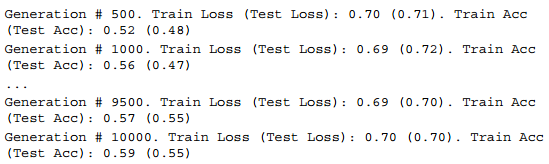
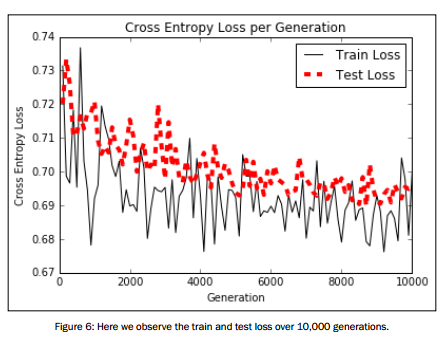
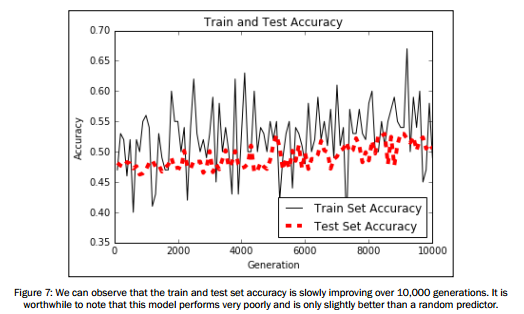
可视化结果展示:
# Plot loss over time

plt.plot(i_data, train_loss, 'k-', label='Train Loss')

plt.plot(i_data, test_loss, 'r--', label='Test Loss', linewidth=4)

plt.title('Cross Entropy Loss per Generation')

plt.xlabel('Generation')

plt.ylabel('Cross Entropy Loss')

plt.legend(loc='upper right')

plt.show()

# Plot train and test accuracy

plt.plot(i_data, train_acc, 'k-', label='Train Set Accuracy')

plt.plot(i_data, test_acc, 'r--', label='Test Set Accuracy', linewidth=4)

plt.title('Train and Test Accuracy')

plt.xlabel('Generation')

plt.ylabel('Accuracy')

plt.legend(loc='lower right')

plt.show()
tensorflow在文本处理中的使用——Word2Vec预测的更多相关文章
- tensorflow在文本处理中的使用——Doc2Vec情感分析
代码来源于:tensorflow机器学习实战指南(曾益强 译,2017年9月)——第七章:自然语言处理 代码地址:https://github.com/nfmcclure/tensorflow-coo ...
- tensorflow在文本处理中的使用——CBOW词嵌入模型
代码来源于:tensorflow机器学习实战指南(曾益强 译,2017年9月)——第七章:自然语言处理 代码地址:https://github.com/nfmcclure/tensorflow-coo ...
- tensorflow在文本处理中的使用——skip-gram模型
代码来源于:tensorflow机器学习实战指南(曾益强 译,2017年9月)——第七章:自然语言处理 代码地址:https://github.com/nfmcclure/tensorflow-coo ...
- tensorflow在文本处理中的使用——TF-IDF算法
代码来源于:tensorflow机器学习实战指南(曾益强 译,2017年9月)——第七章:自然语言处理 代码地址:https://github.com/nfmcclure/tensorflow-coo ...
- tensorflow在文本处理中的使用——词袋
代码来源于:tensorflow机器学习实战指南(曾益强 译,2017年9月)——第七章:自然语言处理 代码地址:https://github.com/nfmcclure/tensorflow-coo ...
- tensorflow在文本处理中的使用——辅助函数
代码来源于:tensorflow机器学习实战指南(曾益强 译,2017年9月)——第七章:自然语言处理 代码地址:https://github.com/nfmcclure/tensorflow-coo ...
- tensorflow在文本处理中的使用——skip-gram & CBOW原理总结
摘自:http://www.cnblogs.com/pinard/p/7160330.html 先看下列三篇,再理解此篇会更容易些(个人意见) skip-gram,CBOW,Word2Vec 词向量基 ...
- TensorFlow实现文本情感分析详解
http://c.biancheng.net/view/1938.html 前面我们介绍了如何将卷积网络应用于图像.本节将把相似的想法应用于文本. 文本和图像有什么共同之处?乍一看很少.但是,如果将句 ...
- jQuery文本框中的事件应用
jQuery文本框中的事件应用 <!DOCTYPE html PUBLIC "-//W3C//DTD XHTML 1.0 Transitional//EN" "ht ...
随机推荐
- R是用于统计分析、绘图的语言和操作环境
R是一套完整的数据处理.计算和制图软件系统.其功能包括:数据存储和处理系统:数组运算工具(其向量.矩阵运算方面功能尤其强大):完整连贯的统计分析工具:优秀的统计制图功能:简便而强大的编程语言:可操纵数 ...
- 可变参数与foreach 的原理
曾经写过c++11特性使用,但是这个究竟是什么呢,和其他语言的foreach语句十分相像 函数必须具有在编译时已知的单个返回类型;当编译器可以从上下文中找出它必须是什么时,auto只会使您不必输入它. ...
- day5 from 金角大王
Python 之路 Day5 - 常用模块学习 本节大纲: 模块介绍 time &datetime模块 random os sys shutil json & picle shel ...
- nginx+tomcat集群+redis(memcache)session共享!
常用保持session的方式: 1.一些代理(比如nginxIP_hash) 1.使用数据库来存储Session 2.使用Cookie来存储Session ...
- Silverlight 2.5D RPG游戏技巧与特效处理:(五)HLSL渲染动画
原文:Silverlight 2.5D RPG游戏技巧与特效处理:(五)HLSL渲染动画 或许大家依旧对上一节中的“黑夜”及“梦回过去”记忆犹新,追问下去HLSL到底是何方神圣能实现如此炫酷之效果?层 ...
- oracle 数据库安全审计
Oracle的审计机制是用来监视用户对ORACLE数据库所做的各种操作. 在缺省情况下,系统的审计功能是关闭的.可以在INIT.ORA参数文件中将参数AUDIT_TRAIL设置为正整数来激活. 审计功 ...
- LeetCode97 Interleaving String
Given s1, s2, s3, find whether s3 is formed by the interleaving of s1 and s2. (Hard) For example,Giv ...
- Cython保护Python代码
注:.pyc也有一定的保护性,容易被反编译出源码... 项目发布时,为防止源码泄露,需要对源码进行一定的保护机制,本文使用Cython将.py文件转为.so进行保护.这一方法,虽仍能被反编译,但难度会 ...
- Data Flow-File Read-网络距离
- QQ第三方登录报错error=-1
qq 第三方登录报错error=-1 再次实例化qc类.