
tensorflow在文本处理中的使用——CBOW词嵌入模型
代码来源于:tensorflow机器学习实战指南(曾益强 译,2017年9月)——第七章:自然语言处理
代码地址:https://github.com/nfmcclure/tensorflow-cookbook
数据:http://www.cs.cornell.edu/people/pabo/movie-review-data/rt-polaritydata.tar.gz
CBOW概念图:
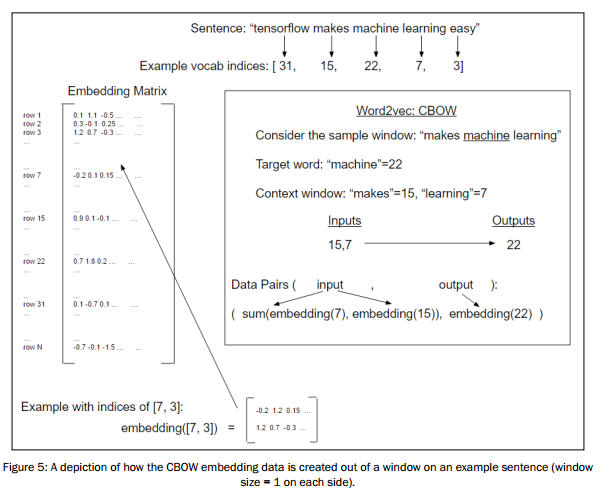
步骤如下:
- 必要包
- 声明模型参数
- 读取数据集
- 创建单词字典,转换句子列表为单词索引列表
- 生成批量数据
- 构建图
- 训练
step1:必要包
参考:tensorflow在文本处理中的使用——skip-gram模型
step2:声明模型参数
# Declare model parameters

batch_size = 500

embedding_size = 200

vocabulary_size = 2000

generations = 50000

model_learning_rate = 0.001

num_sampled = int(batch_size/2)    # Number of negative examples to sample.

window_size = 3       # How many words to consider left and right.

# Add checkpoints to training

save_embeddings_every = 5000

print_valid_every = 5000

print_loss_every = 100

# Declare stop words

stops = stopwords.words('english')

# We pick some test words. We are expecting synonyms to appear

valid_words = ['love', 'hate', 'happy', 'sad', 'man', 'woman']
step3:读取数据集
step4:创建单词字典,转换句子列表为单词索引列表
step5:生成批量数据
看一下单步执行的中间结果,利于更好理解处理过程:
>>> rand_sentence=[, , , , , , , , , ]

>>> window_size =

#类似skip-gram

>>> window_sequences = [rand_sentence[max((ix-window_size),):(ix+window_size+)] for ix, x in enumerate(rand_sentence)]

>>> label_indices = [ix if ix<window_size else window_size for ix,x in enumerate(window_sequences)]

>>> window_sequences

[[, , , ], [, , , , ], [, , , , , ], [, , , , , , ], [, , , , , , ], [, , , , , , ], [, , , , , , ], [, , , , , ], [, , , , ], [, , , ]]

>>> label_indices

[, , , , , , , , , ]

#生成input和label

>>> batch_and_labels = [(x[:y] + x[(y+):], x[y]) for x,y in zip(window_sequences, label_indices)]

>>> batch_and_labels = [(x,y) for x,y in batch_and_labels if len(x)==*window_size]

>>> batch, labels = [list(x) for x in zip(*batch_and_labels)]

>>> batch_and_labels

[([, , , , , ], ), ([, , , , , ], ), ([, , , , , ], ), ([, , , , , ], )]

>>> batch

[[, , , , , ], [, , , , , ], [, , , , , ], [, , , , , ]]

>>> labels

[, , , ]
step6:构建图
# Define Embeddings:

embeddings = tf.Variable(tf.random_uniform([vocabulary_size, embedding_size], -1.0, 1.0))

# NCE loss parameters

nce_weights = tf.Variable(tf.truncated_normal([vocabulary_size, embedding_size], stddev=1.0 / np.sqrt(embedding_size)))

nce_biases = tf.Variable(tf.zeros([vocabulary_size]))

# Create data/target placeholders

x_inputs = tf.placeholder(tf.int32, shape=[batch_size, 2*window_size])

y_target = tf.placeholder(tf.int32, shape=[batch_size, 1])

valid_dataset = tf.constant(valid_examples, dtype=tf.int32)

# Lookup the word embedding

# Add together window embeddings:CBOW模型将上下文窗口内的单词嵌套叠加在一起

embed = tf.zeros([batch_size, embedding_size])

for element in range(2*window_size):

    embed += tf.nn.embedding_lookup(embeddings, x_inputs[:, element])

# Get loss from prediction

loss = tf.reduce_mean(tf.nn.nce_loss(nce_weights, nce_biases, embed, y_target, num_sampled, vocabulary_size))

# Create optimizer

optimizer = tf.train.GradientDescentOptimizer(learning_rate=model_learning_rate).minimize(loss)

# Cosine similarity between words计算验证单词集

norm = tf.sqrt(tf.reduce_sum(tf.square(embeddings), 1, keep_dims=True))

normalized_embeddings = embeddings / norm

valid_embeddings = tf.nn.embedding_lookup(normalized_embeddings, valid_dataset)

similarity = tf.matmul(valid_embeddings, normalized_embeddings, transpose_b=True)

# Create model saving operation该方法默认会保存整个计算图会话,本例中指定参数只保存嵌套变量并设置名字

saver = tf.train.Saver({"embeddings": embeddings})
step7:训练
#Add variable initializer.

init = tf.initialize_all_variables()

sess.run(init)

# Run the skip gram model.

print('Starting Training')

loss_vec = []

loss_x_vec = []

for i in range(generations):

    batch_inputs, batch_labels = text_helpers.generate_batch_data(text_data, batch_size, window_size, method='cbow')

    feed_dict = {x_inputs : batch_inputs, y_target : batch_labels}

    # Run the train step

    sess.run(optimizer, feed_dict=feed_dict)

    # Return the loss

    if (i+1) % print_loss_every == 0:

        loss_val = sess.run(loss, feed_dict=feed_dict)

        loss_vec.append(loss_val)

        loss_x_vec.append(i+1)

        print('Loss at step {} : {}'.format(i+1, loss_val))

    # Validation: Print some random words and top 5 related words

    if (i+1) % print_valid_every == 0:

        sim = sess.run(similarity, feed_dict=feed_dict)

        for j in range(len(valid_words)):

            valid_word = word_dictionary_rev[valid_examples[j]]

            top_k = 5 # number of nearest neighbors

            nearest = (-sim[j, :]).argsort()[1:top_k+1]

            log_str = "Nearest to {}:".format(valid_word)

            for k in range(top_k):

                close_word = word_dictionary_rev[nearest[k]]

                log_str = '{} {},' .format(log_str, close_word)

            print(log_str)

    # Save dictionary + embeddings

    if (i+1) % save_embeddings_every == 0:

        # Save vocabulary dictionary

        with open(os.path.join(data_folder_name,'movie_vocab.pkl'), 'wb') as f:

            pickle.dump(word_dictionary, f)

        # Save embeddings

        model_checkpoint_path = os.path.join(os.getcwd(),data_folder_name,'cbow_movie_embeddings.ckpt')

        save_path = saver.save(sess, model_checkpoint_path)

        print('Model saved in file: {}'.format(save_path))
运行结果:

工作原理:Word2Vec嵌套的CBOW模型和skip-gram模型非常相似。主要不同点是生成数据和单词嵌套的处理。加载文本数据,归一化文本,创建词汇字典,使用词汇字典查找嵌套,组合嵌套并训练神经网络模型预测目标单词。
延伸学习:CBOW方法是在上下文窗口内单词嵌套叠加上进行训练并预测目标单词的。Word2Vec的CBOW方法更平滑,更适用于小文本数据集。
tensorflow在文本处理中的使用——CBOW词嵌入模型的更多相关文章
- tensorflow在文本处理中的使用——Doc2Vec情感分析
代码来源于:tensorflow机器学习实战指南(曾益强 译,2017年9月)——第七章:自然语言处理 代码地址:https://github.com/nfmcclure/tensorflow-coo ...
- tensorflow在文本处理中的使用——Word2Vec预测
代码来源于:tensorflow机器学习实战指南(曾益强 译,2017年9月)——第七章:自然语言处理 代码地址:https://github.com/nfmcclure/tensorflow-coo ...
- tensorflow在文本处理中的使用——skip-gram模型
代码来源于:tensorflow机器学习实战指南(曾益强 译,2017年9月)——第七章:自然语言处理 代码地址:https://github.com/nfmcclure/tensorflow-coo ...
- tensorflow在文本处理中的使用——TF-IDF算法
代码来源于:tensorflow机器学习实战指南(曾益强 译,2017年9月)——第七章:自然语言处理 代码地址:https://github.com/nfmcclure/tensorflow-coo ...
- tensorflow在文本处理中的使用——skip-gram & CBOW原理总结
摘自:http://www.cnblogs.com/pinard/p/7160330.html 先看下列三篇,再理解此篇会更容易些(个人意见) skip-gram,CBOW,Word2Vec 词向量基 ...
- tensorflow在文本处理中的使用——辅助函数
代码来源于:tensorflow机器学习实战指南(曾益强 译,2017年9月)——第七章:自然语言处理 代码地址:https://github.com/nfmcclure/tensorflow-coo ...
- tensorflow在文本处理中的使用——词袋
代码来源于:tensorflow机器学习实战指南(曾益强 译,2017年9月)——第七章:自然语言处理 代码地址:https://github.com/nfmcclure/tensorflow-coo ...
- TensorFlow NMT的词嵌入(Word Embeddings)
本文转载自:http://blog.stupidme.me/2018/08/05/tensorflow-nmt-word-embeddings/,本站转载出于传递更多信息之目的,版权归原作者或者来源机 ...
- TensorFlow实现文本情感分析详解
http://c.biancheng.net/view/1938.html 前面我们介绍了如何将卷积网络应用于图像.本节将把相似的想法应用于文本. 文本和图像有什么共同之处?乍一看很少.但是,如果将句 ...
随机推荐
- 462. Minimum Moves to Equal Array Elements II
Given a non-empty integer array, find the minimum number of moves required to make all array element ...
- 笔记:less的三种使用方法
直接在浏览器端使用 第一步,引入 .less 文件(注意要将 rel 属性设置为“stylesheet/less”) <link rel="stylesheet/less" ...
- KiCad EDA 5.1.4 发布了
KiCad EDA 5.1.4 发布了 KiCad EDA 自豪地宣布 KiCad 5 系列最新稳定版发布.5.1.4 稳定版修复了来自 5.1.2 和 5.1.3 版本的关键错误修复和其他一些小改进 ...
- 从Kubernetes 1.14 发布,看技术社区演进方向
Kubernetes 1.14 正式发布已经过去了一段时间,相信你已经从不同渠道看过了各种版本的解读. 不过,相比于代码 Release,马上就要迎来5周岁生日的Kubernetes 项目接下来如何演 ...
- IMEI校验思路及代码
<!DOCTYPE html> <html> <head> <meta charset="UTF-8"> <title> ...
- Javascript 用来验证电话号码的正则
Javascript 用来验证电话号码的正则 在学习 Javascript 时学习到的. function telephoneCheck(str) { // return /^(1\s?)?(\d{3 ...
- 《C语言深度解剖》学习笔记之符号
第2章 符号 1.注释符号 编译器会将注释剔除,用空格代替原来的注释 y=x /* p; 编译器提示出错的原因:实际上,编译器会把“/*”当作一段注释的开始,直到出现“*/”为止. [规则 2-1]注 ...
- oracle 和 mysql 遍历当前月份每一天
获取当前月份的每一天的数据 oracle SELECT TO_DATE(TO_CHAR(SYSDATE, 'YYYYMM'), 'YYYYMM') + (ROWNUM - 1) DAY_ID FROM ...
- 2019-8-31-dotnet-通过-WMI-获取系统补丁
title author date CreateTime categories dotnet 通过 WMI 获取系统补丁 lindexi 2019-08-31 16:55:59 +0800 2019- ...
- HZOJ 寿司
这题也是挺神仙的,现在O(n)的解法还没打出来,只是用O(nlogn)卡过去了(理论上可以过),sdfz某大佬用三分拿到了65分…… 考试连暴力都没打出来…… n2暴力T40: 首先将环拆成链,我们可 ...