
吴裕雄 python 机器学习-KNN(2)
import matplotlib

import numpy as np

import matplotlib.pyplot as plt

from matplotlib.patches import Rectangle

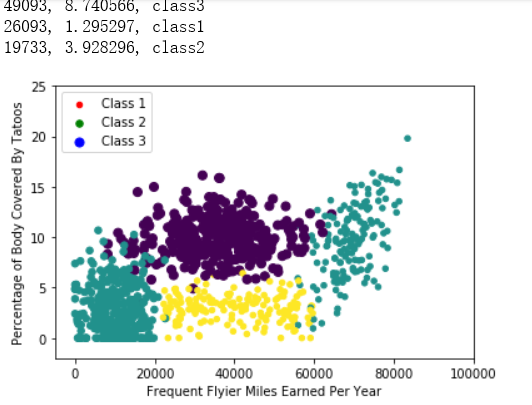
n = 1000 #number of points to create

xcord = np.zeros((n))

ycord = np.zeros((n))

markers =[]

colors =[]

fw = open('D:\\LearningResource\\machinelearninginaction\\Ch02\\EXTRAS\\testSet.txt','w')

for i in range(n):

    [r0,r1] = np.random.standard_normal(2)

    myClass = np.random.uniform(0,1)

    if (myClass <= 0.16):

        fFlyer = np.random.uniform(22000, 60000)

        tats = 3 + 1.6*r1

        markers.append(20)

        colors.append(2.1)

        classLabel = 1 #'didntLike'

        print(("%d, %f, class1") % (fFlyer, tats))

    elif ((myClass > 0.16) and (myClass <= 0.33)):

        fFlyer = 6000*r0 + 70000

        tats = 10 + 3*r1 + 2*r0

        markers.append(20)

        colors.append(1.1)

        classLabel = 1 #'didntLike'

        print(("%d, %f, class1") % (fFlyer, tats))

    elif ((myClass > 0.33) and (myClass <= 0.66)):

        fFlyer = 5000*r0 + 10000

        tats = 3 + 2.8*r1

        markers.append(30)

        colors.append(1.1)

        classLabel = 2 #'smallDoses'

        print(("%d, %f, class2") % (fFlyer, tats))

    else:

        fFlyer = 10000*r0 + 35000

        tats = 10 + 2.0*r1

        markers.append(50)

        colors.append(0.1)

        classLabel = 3 #'largeDoses'

        print(("%d, %f, class3") % (fFlyer, tats))

    if (tats < 0):

        tats =0

    if (fFlyer < 0):

        fFlyer =0

    xcord[i] = fFlyer

    ycord[i]=tats

    fw.write("%d\t%f\t%f\t%d\n" % (fFlyer, tats, np.random.uniform(0.0, 1.7), classLabel))

fw.close()

fig = plt.figure()

ax = fig.add_subplot(111)

ax.scatter(xcord,ycord, c=colors, s=markers)

type1 = ax.scatter([-10], [-10], s=20, c='red')

type2 = ax.scatter([-10], [-15], s=30, c='green')

type3 = ax.scatter([-10], [-20], s=50, c='blue')

ax.legend([type1, type2, type3], ["Class 1", "Class 2", "Class 3"], loc=2)

ax.axis([-5000,100000,-2,25])

plt.xlabel('Frequent Flyier Miles Earned Per Year')

plt.ylabel('Percentage of Body Covered By Tatoos')

plt.show()

...................................................
import numpy as np

import matplotlib

import matplotlib.pyplot as plt

from matplotlib.patches import Rectangle

n = 1000 #number of points to create

xcord1 = []; ycord1 = []

xcord2 = []; ycord2 = []

xcord3 = []; ycord3 = []

markers =[]

colors =[]

fw = open('D:\\LearningResource\\machinelearninginaction\\Ch02\\EXTRAS\\testSet.txt','w')

for i in range(n):

    [r0,r1] = np.random.standard_normal(2)

    myClass = np.random.uniform(0,1)

    if (myClass <= 0.16):

        fFlyer = np.random.uniform(22000, 60000)

        tats = 3 + 1.6*r1

        markers.append(20)

        colors.append(2.1)

        classLabel = 1 #'didntLike'

        xcord1.append(fFlyer)

        ycord1.append(tats)

    elif ((myClass > 0.16) and (myClass <= 0.33)):

        fFlyer = 6000*r0 + 70000

        tats = 10 + 3*r1 + 2*r0

        markers.append(20)

        colors.append(1.1)

        classLabel = 1 #'didntLike'

        if (tats < 0):

            tats =0

        if (fFlyer < 0):

            fFlyer =0

        xcord1.append(fFlyer)

        ycord1.append(tats)

    elif ((myClass > 0.33) and (myClass <= 0.66)):

        fFlyer = 5000*r0 + 10000

        tats = 3 + 2.8*r1

        markers.append(30)

        colors.append(1.1)

        classLabel = 2 #'smallDoses'

        if (tats < 0):

            tats =0

        if (fFlyer < 0):

            fFlyer =0

        xcord2.append(fFlyer)

        ycord2.append(tats)

    else:

        fFlyer = 10000*r0 + 35000

        tats = 10 + 2.0*r1

        markers.append(50)

        colors.append(0.1)

        classLabel = 3 #'largeDoses'

        if (tats < 0): tats =0

        if (fFlyer < 0): fFlyer =0

        xcord3.append(fFlyer)

        ycord3.append(tats)

        fw.write("%d\t%f\t%f\t%d\n" % (fFlyer, tats, np.random.uniform(0.0, 1.7), classLabel))

fw.close()

fig = plt.figure()

ax = fig.add_subplot(111)

# ax.scatter(xcord,ycord, c=colors, s=markers)

type1 = ax.scatter(xcord1, ycord1, s=20, c='red')

type2 = ax.scatter(xcord2, ycord2, s=30, c='green')

type3 = ax.scatter(xcord3, ycord3, s=50, c='blue')

ax.legend([type1, type2, type3], ["Did Not Like", "Liked in Small Doses", "Liked in Large Doses"], loc=2)

ax.axis([-5000,100000,-2,25])

plt.xlabel('Frequent Flyier Miles Earned Per Year')

plt.ylabel('Percentage of Time Spent Playing Video Games')

plt.show()

import numpy as np

import matplotlib

import matplotlib.pyplot as plt

def file2matrix(filename):

    fr = open(filename)

    returnMat = []

    classLabelVector = []                       #prepare labels return

    for line in fr.readlines():

        line = line.strip()

        listFromLine = line.split('\t')

        returnMat.append([float(listFromLine[0]),float(listFromLine[1]),float(listFromLine[2])])

        classLabelVector.append(int(listFromLine[-1]))

    return np.array(returnMat),np.array(classLabelVector)

fig = plt.figure()

ax = fig.add_subplot(111)

datingDataMat,datingLabels = file2matrix('D:\\LearningResource\\machinelearninginaction\\Ch02\\datingTestSet2.txt')

#ax.scatter(datingDataMat[:,1], datingDataMat[:,2])

ax.scatter(datingDataMat[:,1], datingDataMat[:,2], 15.0*np.array(datingLabels), 15.0*np.array(datingLabels))

ax.axis([-2,25,-0.2,2.0])

plt.xlabel('Percentage of Time Spent Playing Video Games')

plt.ylabel('Liters of Ice Cream Consumed Per Week')

plt.show()

吴裕雄 python 机器学习-KNN(2)的更多相关文章
- 吴裕雄 python 机器学习——KNN回归KNeighborsRegressor模型
import numpy as np import matplotlib.pyplot as plt from sklearn import neighbors, datasets from skle ...
- 吴裕雄 python 机器学习——KNN分类KNeighborsClassifier模型
import numpy as np import matplotlib.pyplot as plt from sklearn import neighbors, datasets from skle ...
- 吴裕雄 python 机器学习-KNN算法(1)
import numpy as np import operator as op from os import listdir def classify0(inX, dataSet, labels, ...
- 吴裕雄 python 机器学习——半监督学习LabelSpreading模型
import numpy as np import matplotlib.pyplot as plt from sklearn import metrics from sklearn import d ...
- 吴裕雄 python 机器学习——半监督学习标准迭代式标记传播算法LabelPropagation模型
import numpy as np import matplotlib.pyplot as plt from sklearn import metrics from sklearn import d ...
- 吴裕雄 python 机器学习——分类决策树模型
import numpy as np import matplotlib.pyplot as plt from sklearn import datasets from sklearn.model_s ...
- 吴裕雄 python 机器学习——回归决策树模型
import numpy as np import matplotlib.pyplot as plt from sklearn import datasets from sklearn.model_s ...
- 吴裕雄 python 机器学习——线性判断分析LinearDiscriminantAnalysis
import numpy as np import matplotlib.pyplot as plt from matplotlib import cm from mpl_toolkits.mplot ...
- 吴裕雄 python 机器学习——逻辑回归
import numpy as np import matplotlib.pyplot as plt from matplotlib import cm from mpl_toolkits.mplot ...
随机推荐
- mobx.js 使用教程-react
1.store: import { observer } from "mobx-react"; import { observable, action, computed ,aut ...
- Java 12 - Java StringBuffer和StringBuilder类
Java StringBuffer和StringBuilder类 当对字符串进行修改的时候,需要使用StringBuffer和StringBuilder类. 和String类不同的是,StringBu ...
- SQL SERVER 数据压缩
从SQL SERVER 2008开始,SQL SERVER 提供了对数据进行压缩的功能,启用数据压缩无须修改应用程序. 数据压缩可有效减少数据的占用空间,读取和写入相同数据花费的IO也响应减少,从而可 ...
- CF1017G The Tree
/* 这是什么神仙题目QAQ 首先考虑在序列上的问题 先不考虑修改成白色, 一个白点能r被染成黑色 意味着能够找到一个l使得在l-r中的操作1次数大于等于 r - l + 1 我们把初始值覆盖成-1就 ...
- python 之 XML的基本应用总结
1.XML 的特征:xml即可扩展标记语言,它可以用来标记数据.定义数据类型,是一种允许用户对自己的标记语言进行定义的源语言.从结构上,很像HTML超文本标记语言.但他们被设计的目的是不同的,超文本标 ...
- Es6入门解构
变量解构赋值:数组和对象中提取值,对变量进行赋值 1️⃣模式匹配:只要等号左右两边的模式相同,左边的变量就会被赋予对应的值 2️⃣不完全解构:等号左边的模式匹配等号右边数组的部分 默认值:解构赋值允许 ...
- 剑指offer(一):二维数组中的查找
说明: 1.本系列是根据<剑指Offer>这个系列做的一个小笔记. 2.直接动力是因为师兄师姐找工作很难,而且机械出生的我面试算法更难. 3.刚开始准备刷LeetCode.LintCode ...
- uva-529-枚举
题意: a0,a1,a2,a3....an 对于任意的i,j,k 0<=k<=n 0<=i<=k-1 0<=j<=k-1 ak=ai+aj 求a0.....an 解 ...
- 0基础学习MySQL 之常用数据类型
原文地址 =========================================== 数据类型是定义列中可以存储什么数据以及该数据实际怎么存储的基本规则. Mysql的常用数据类型主要有: ...
- 简单ATM机功能实现及感想
感想: 在那一天下午气喘吁吁的上了六楼 在建民的课上 都要带电脑 第一次上这样的课,每一次都是个段子 ,这一次考试是学前考试,什么也不知道 ,但是通过百度, 发现JAVA有很多还都和C语言相似的地方 ...