
吴裕雄 python 机器学习——半监督学习LabelSpreading模型
import numpy as np

import matplotlib.pyplot as plt

from sklearn import  metrics

from sklearn import datasets

from sklearn.semi_supervised.label_propagation import LabelSpreading

def load_data():

    '''

    加载数据集

    '''

    digits = datasets.load_digits()

    ######   混洗样本 ########

    rng = np.random.RandomState(0)

    indices = np.arange(len(digits.data)) # 样本下标集合

    rng.shuffle(indices) # 混洗样本下标集合

    X = digits.data[indices]

    y = digits.target[indices]

    ###### 生成未标记样本的下标集合 ####

    # 只有 10% 的样本有标记

    n_labeled_points = int(len(y)/10)

    # 后面 90% 的样本未标记

    unlabeled_indices = np.arange(len(y))[n_labeled_points:]

    return X,y,unlabeled_indices

#半监督学习LabelSpreading模型

def test_LabelSpreading(*data):

    X,y,unlabeled_indices=data

    y_train=np.copy(y) # 必须拷贝,后面要用到 y

    y_train[unlabeled_indices]=-1 # 未标记样本的标记设定为 -1

    clf=LabelSpreading(max_iter=100,kernel='rbf',gamma=0.1)

    clf.fit(X,y_train)

    ### 获取预测准确率

    predicted_labels = clf.transduction_[unlabeled_indices] # 预测标记

    true_labels = y[unlabeled_indices] # 真实标记

    print("Accuracy:%f"%metrics.accuracy_score(true_labels,predicted_labels))

    # 或者 print("Accuracy:%f"%clf.score(X[unlabeled_indices],true_labels))

# 获取半监督分类数据集

data=load_data()

# 调用 test_LabelSpreading

test_LabelSpreading(*data)

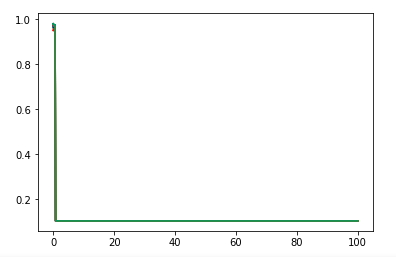
def test_LabelSpreading_rbf(*data):

    '''

    测试 LabelSpreading 的 rbf 核时,预测性能随 alpha 和 gamma 的变化

    '''

    X,y,unlabeled_indices=data

    # 必须拷贝,后面要用到 y

    y_train=np.copy(y)

    # 未标记样本的标记设定为 -1

    y_train[unlabeled_indices]=-1

    fig=plt.figure()

    ax=fig.add_subplot(1,1,1)

    alphas=np.linspace(0.01,1,num=10,endpoint=True)

    gammas=np.logspace(-2,2,num=50)

    # 颜色集合,不同曲线用不同颜色

    colors=((1,0,0),(0,1,0),(0,0,1),(0.5,0.5,0),(0,0.5,0.5),(0.5,0,0.5),(0.4,0.6,0),(0.6,0.4,0),(0,0.6,0.4),(0.5,0.3,0.2))

    ## 训练并绘图

    for alpha,color in zip(alphas,colors):

        scores=[]

        for gamma in gammas:

            clf=LabelSpreading(max_iter=100,gamma=gamma,alpha=alpha,kernel='rbf')

            clf.fit(X,y_train)

            scores.append(clf.score(X[unlabeled_indices],y[unlabeled_indices]))

        ax.plot(gammas,scores,label=r"$\alpha=%s$"%alpha,color=color)

    ### 设置图形

    ax.set_xlabel(r"$\gamma$")

    ax.set_ylabel("score")

    ax.set_xscale("log")

    ax.legend(loc="best")

    ax.set_title("LabelSpreading rbf kernel")

    plt.show()

# 调用 test_LabelSpreading_rbf

test_LabelSpreading_rbf(*data)
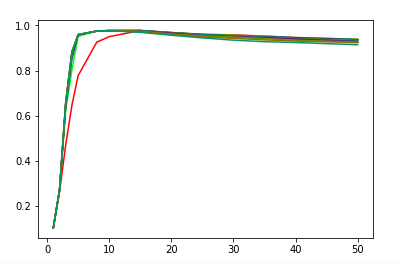
def test_LabelSpreading_knn(*data):

    '''

   测试 LabelSpreading 的 knn 核时,预测性能随 alpha 和 n_neighbors 的变化

    '''

    X,y,unlabeled_indices=data

    # 必须拷贝,后面要用到 y

    y_train=np.copy(y)

    # 未标记样本的标记设定为 -1

    y_train[unlabeled_indices]=-1

    fig=plt.figure()

    ax=fig.add_subplot(1,1,1)

    alphas=np.linspace(0.01,1,num=10,endpoint=True)

    Ks=[1,2,3,4,5,8,10,15,20,25,30,35,40,50]

    # 颜色集合,不同曲线用不同颜色

    colors=((1,0,0),(0,1,0),(0,0,1),(0.5,0.5,0),(0,0.5,0.5),(0.5,0,0.5),(0.4,0.6,0),(0.6,0.4,0),(0,0.6,0.4),(0.5,0.3,0.2))

    ## 训练并绘图

    for alpha,color in zip(alphas,colors):

        scores=[]

        for K in Ks:

            clf=LabelSpreading(kernel='knn',max_iter=100,n_neighbors=K,alpha=alpha)

            clf.fit(X,y_train)

            scores.append(clf.score(X[unlabeled_indices],y[unlabeled_indices]))

        ax.plot(Ks,scores,label=r"$\alpha=%s$"%alpha,color=color)

    ### 设置图形

    ax.set_xlabel(r"$k$")

    ax.set_ylabel("score")

    ax.legend(loc="best")

    ax.set_title("LabelSpreading knn kernel")

    plt.show()

# 调用 test_LabelSpreading_knn

test_LabelSpreading_knn(*data)
吴裕雄 python 机器学习——半监督学习LabelSpreading模型的更多相关文章
- 吴裕雄 python 机器学习——半监督学习标准迭代式标记传播算法LabelPropagation模型
import numpy as np import matplotlib.pyplot as plt from sklearn import metrics from sklearn import d ...
- 吴裕雄 python 机器学习——层次聚类AgglomerativeClustering模型
import numpy as np import matplotlib.pyplot as plt from sklearn import cluster from sklearn.metrics ...
- 吴裕雄 python 机器学习——密度聚类DBSCAN模型
import numpy as np import matplotlib.pyplot as plt from sklearn import cluster from sklearn.metrics ...
- 吴裕雄 python 机器学习——支持向量机非线性回归SVR模型
import numpy as np import matplotlib.pyplot as plt from sklearn import datasets, linear_model,svm fr ...
- 吴裕雄 python 机器学习——KNN回归KNeighborsRegressor模型
import numpy as np import matplotlib.pyplot as plt from sklearn import neighbors, datasets from skle ...
- 吴裕雄 python 机器学习——KNN分类KNeighborsClassifier模型
import numpy as np import matplotlib.pyplot as plt from sklearn import neighbors, datasets from skle ...
- 吴裕雄 python 机器学习——支持向量机线性回归SVR模型
import numpy as np import matplotlib.pyplot as plt from sklearn import datasets, linear_model,svm fr ...
- 吴裕雄 python 机器学习——分类决策树模型
import numpy as np import matplotlib.pyplot as plt from sklearn import datasets from sklearn.model_s ...
- 吴裕雄 python 机器学习——回归决策树模型
import numpy as np import matplotlib.pyplot as plt from sklearn import datasets from sklearn.model_s ...
随机推荐
- 数据预处理 | python 第三方库 imblearn 处理样本分布不均衡问题
说明:目前 只记录了 过采样 和 欠采样 的代码部分 1 样本分布不均衡描述: 主要出现在与分类相关的建模问题上,不均衡指的是不同类别的样本量差异非常大. 样本量差距过大会影响到建模结果 2 出现的场 ...
- 机器学习作业(四)神经网络参数的拟合——Python(numpy)实现
题目下载[传送门] 题目简述:识别图片中的数字,训练该模型,求参数θ. 出现了一个问题:虽然训练的模型能够有很好的预测准确率,但是使用minimize函数时候始终无法成功,无论设计的迭代次数有多大,如 ...
- [P1361] 小M的作物 - 最小割
没想到今天早上的第一题网络流就血了这么多发 从经典的二选一问题上魔改 仍然考虑最小割 #include <bits/stdc++.h> using namespace std; #defi ...
- static静态不是很静
在类中定义变量时,不会开辟存储空间,只有类定义一个对象时才会开辟类中成员变量的内存空间,且建立一个对象开辟一次,大小与类中的成员变量及函数有关.而static在静态区开辟内存空间,不占用内存空间. 1 ...
- AntDesign(React)学习-10 Dva 与后台数据交互
明天正式在线办公没时间学习了,今天晚上再更新一篇, 代码提交一次:https://github.com/zhaogaojian/jgdemo 1.src下创建services目录 创建文件userSr ...
- JDBC添加为null的数据报错
定义实体类的时候定义为了基本数据类型,不能接收null需要改为引用数据类型
- mybatis(五):源码分析 - 结果集映射流程
- 牛客多校第七场H Pair 数位dp理解
Pair 题意 给出A B C,问x取值[1,A]和y取值[1,B]存在多少组pair<x,y>满足以下最小一种条件,\(x \& y >c\),\(x\) xor \(y& ...
- 11g RAC添加用户表空间(数据文件)至文件系统(File System)的修正
前提:非TEMP.UNDO和SYSTEM表空间,这仨是大爷,您得搂着点.来自博客园AskScuti .客户是添加临时表空间数据文件时,不小心 ADD 到了文件系统中,然后发现,后悔了,还在OS层面 R ...
- 托管代码中调用c++本地代码
c++本地动态连接库代码 #pragma once #include "stdafx.h" #ifdef PERSON_EXPORTS #define PERSON_API __d ...