
【转】Setting up SDL 2 on Code::Blocks 12.11
FROM: http://lazyfoo.net/tutorials/SDL/01_hello_SDL/windows/codeblocks/index.php
Setting up SDL 2 on Code::Blocks 12.11
Last Updated 9/17/13
1)First thing you need to do is download SDL headers, libary and binaries. You will find them on the SDL website, specifically on this page.
Since Code::Blocks comes with the MinGW compiler by default, odds are you'll want to download the MinGW development libraries.
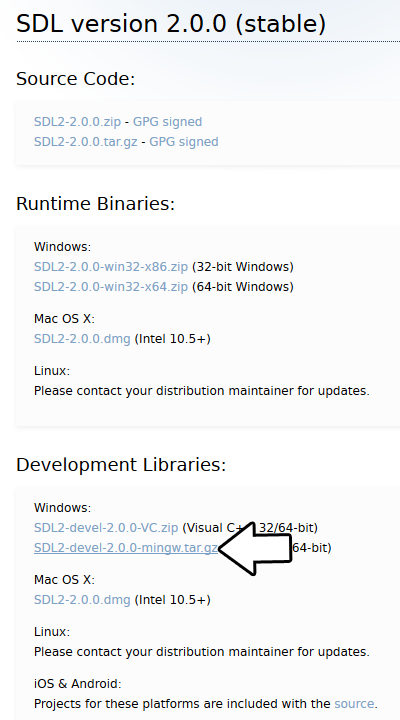
Open the gzip archive and there should be a tar archive. Open up the tar archive and the should be a folder called SDL2-2.something.something. In side of that folder there should be a bunch of folders and files, most importantly i686-w64-mingw32 which contains the 32bit library and x86_64-w64-mingw32 which contains the 64bit library.
This is important: most compilers still compile 32bit binaries by default to maximize compatibility. We will be using the 32bit binaries for this tutorial set. It doesn't matter if you have a 64bit operating system, since we are compiling 32bit binaries we will be using the 32bit library.
Inside of i686-w64-mingw32 are the include, lib, and bin folders which contain everything we need compile and run SDL applications. Copy the contents of i686-w64-mingw32 to any directory you want. I recommend putting it in a folder that you dedicate to holding all your development libraries for MinGW. For these tutorials I'm putting it in a directory I created C:\mingw_dev_lib
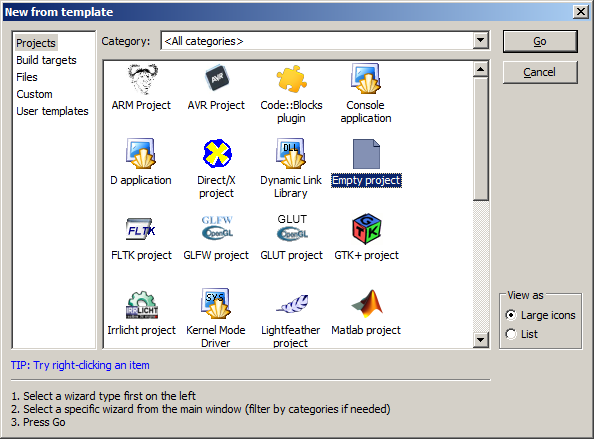
2)Start up Code::Blocks and create a new empty project.
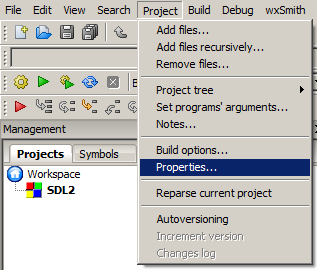
3)Go to project properties.
4)Now we have to tell Code::Blocks to search for header files in the library folder we just extracted. Go to build options.
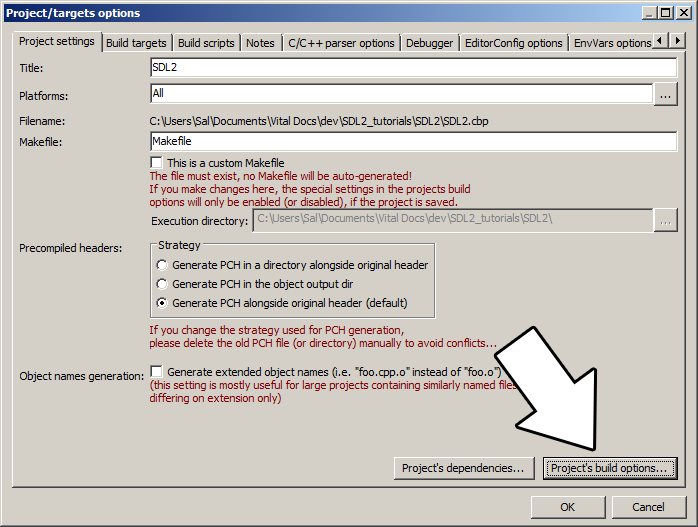
In the Search Directories, we need to add a new compiler directory. Click add, Select the SDL2 folder inside of the include directory from the folder we extracted. Say no when it asks you whether you want it to be a relative path. Now Code::Blocks knows where to find the SDL 2 header files.

If you get an error where the compiler says it can't find SDL.h, it means you messed up this step.
5)Next we are going to tell Code::Blocks to search for library files in the SDL folder we just extracted. All you have to is go to the linker tab and add the lib directory from the folder we extacted to the linker search directories.
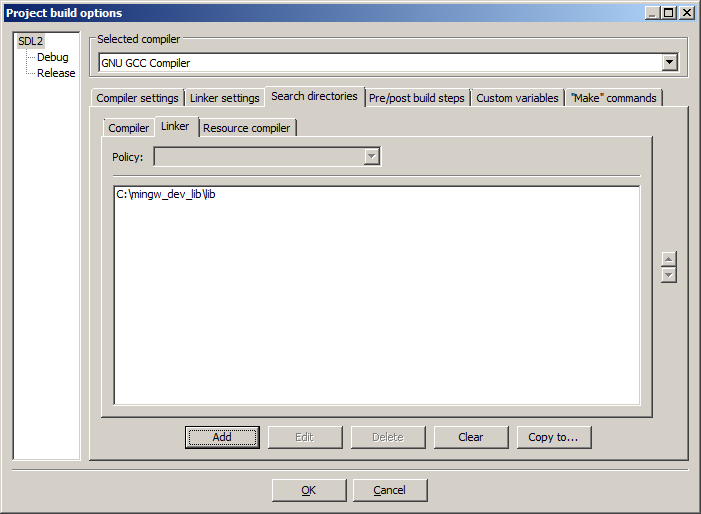
If you get an error where the linker complains it can't find -lSDL2 or -lSDL2main, it means you messed up this step.
6)In order to compile SDL 2 code, we have to tell the compiler to link against the libraries. Go under Linker Settings and paste
-lmingw32 -lSDL2main -lSDL2
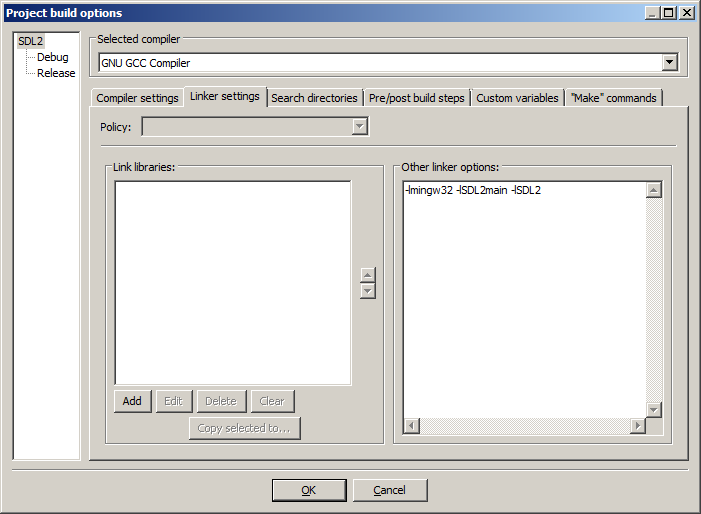
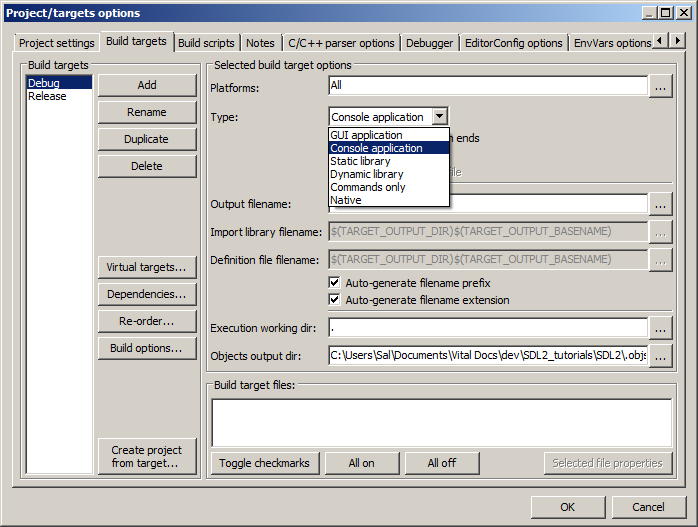
7)Go back to the project properites and under Build Targets select the build type.
8)When our SDL 2 application runs, the operating system needs to be able to find the dll file.
Go find the SDL 2 folder you extracted and from the bin folder inside copy SDL2.dll and put it either where your executable will run, or inside of the system directory. C:\WINDOWS\SYSTEM32 is the 32bit windows system directory and C:\Windows\SysWOW64 is the 64bit system directory of 32bit applications. For these tutorials, I'm assuming we're making 32bit applications. If you get an error when you run the program where it complains that it can't find SDL2.dll, it means you messed up this step.
9)Now go download the source for lesson 01. Add the source files inside to your project.
Now build. If there are any errors, make sure you didn't skip a step.
Now that you have SDL 2 compiling, it time to go onto part 2 of the tutorial.
【转】Setting up SDL 2 on Code::Blocks 12.11的更多相关文章
- 【转】Setting up SDL Extension Libraries on Code::Blocks 12.11
FROM: http://lazyfoo.net/tutorials/SDL/06_extension_libraries_and_loading_other_image_formats/window ...
- Code::Blocks
Code::Blocks 是一个开放源码的全功能的跨平台C/C++集成开发环境. Code::Blocks是开放源码软件.Code::Blocks由纯粹的C++语言开发完成,它使用了著名的图形界面库w ...
- 【转】Setting up SDL Extension Libraries on Windows
FROM: http://lazyfoo.net/tutorials/SDL/06_extension_libraries_and_loading_other_image_formats/window ...
- 【转】Setting up SDL on Windows
FROM: http://lazyfoo.net/tutorials/SDL/01_hello_SDL/windows/index.php Setting up SDL on Windows Last ...
- 【转】Setting up SDL 2 on MinGW
FROM: http://lazyfoo.net/tutorials/SDL/01_hello_SDL/windows/mingw/index.php Setting up SDL 2 on MinG ...
- Code::Blocks配置GTK+2和GTK+3
Code::Blocks配置GTK+2和GTK+3 作者 He YiJun – storysnail<at>gmail.com 团队 ls 版权 转载请保留本声明! 本文档包含的原创代码根 ...
- 【转】Setting up SDL 2 on Visual Studio 2010 Ultimate
from: Lazy Foo'Productions - Setting up SDL 2 on Visual Studio 2010 Ultimate 1)First thing you need ...
- code::Blocks生成的dll 在 java jni 调用遇到的问题
Test.java__________________________________ public class Test{ public static native void p(); pub ...
- 编译Code::Blocks源码 with MinGW on Win
Build Code::Blocks源码 ---By 狂徒归来 CodeBlocks是一款非常优秀的IDE !可惜的是没有64位的版本,而且本来是轻量级别的IDE就应该够轻,能够像记事本工具一样,迅速 ...
随机推荐
- spring-boot-route(一)Controller接收参数的几种方式
Controller接收参数的常用方式总体可以分为三类.第一类是Get请求通过拼接url进行传递,第二类是Post请求通过请求体进行传递,第三类是通过请求头部进行参数传递. 1 @PathVariab ...
- kubernetes1.15极速部署prometheus和grafana
关于prometheus和grafana prometheus负责监控数据采集,grafana负责展示,下图来自官网: 环境信息 硬件:三台CentOS 7.7服务器 kubernetes:1.15 ...
- obj2opengl:转换OBJ 3D模型到iPhone OpenGL ES兼容的数组中
原文如下:obj2opengl: convert obj 3D models to arrays compatible with iPhone OpenGL ES obj2opengl在GitHub中 ...
- Win32控制台、Win32项目、MFC项目、CLR控制台、CLR空项目、空项目区别
转载:https://blog.csdn.net/zfmss/article/details/79244696 1.Win32控制台 初始代码模版以main为程序入口,默认情况下,只链接C++运行时库 ...
- 温湿度传感器DHT11程序示例
DHT11概述 HT11数字温湿度传感器是一款含有已校准数字信号输出的温湿度复合传感器. 它应用专用的数字模块采集技术和温湿度传感技术,确保产品具有极高的可靠性与卓越的长期稳定性.传感器包括一个电阻式 ...
- 【题解】[CQOI]动态逆序对
题目链接 题意如题,维护一个动态序列的逆序对总数. 注意题目给的是\([1,n]\)的排列,所以没必要离散化了. 考虑逆序对:二维偏序可以用树状数组做,现在是三维偏序,即加了一个时间维度. 找一个数前 ...
- Keil ARm新建项目
一.新建一个工程 选好芯片后确认,完成创建 二.新建一个文件 保存为后缀名为*.c的文件 三.把文件添加进项目里面 四.测试 发现有警告 五.给项目添加特定的文件,去除警告或错误 现在保存项目的文件夹 ...
- day63:Linux:nginx基础知识&nginx基础模块
目录 1.nginx基础知识 1.1 什么是nginx 1.2 nginx应用场景 1.3 nginx组成结构 1.4 nginx安装部署 1.5 nginx目录结构 1.6 nginx配置文件 1. ...
- CF724G 【Xor-matic Number of the Graph】
题目就不翻译了吧,应该写的很清楚了... 首先 \(,\) 不懂线性基的可以戳这里.知道了线性基\(,\) 但是从来没有写过线性基和图论相结合的\(,\) 可以戳这里. 好\(,\) 点完了这些前置技 ...
- MeteoInfoLab脚本示例:读取文本文件绘制散度图
MeteoInfoLab中读取文本文件数据的函数是asciiread,获取文本文件行.列数的函数是numasciirow和numasciicol,和NCL中函数名一致,但都是小写字母.本例中的示例数据 ...