
二十四、MongoDB数据库的使用
首先按照上一篇文章的介绍,启动并连接数据库
然后我们开始学习如何使用MongoDB数据库:
1、创建数据库
第一步,在cmd窗口执行:
use dbname
dbname是你打算要创建的数据库名称
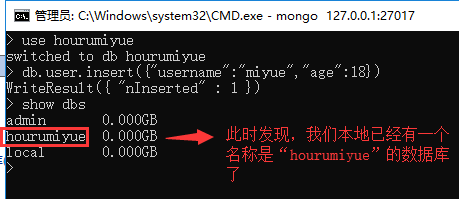
执行完上一步,我们并没有真正的创建数据库,我们如果想要dbname数据库真正的创建,我们需要先创建一个表(集合),但是MongoDB也没有创建表的命令,
那么我们如果想创建表,我们需要直接向表里插入一条数据:

此时我们可以通过命令查看本地所有的数据库:
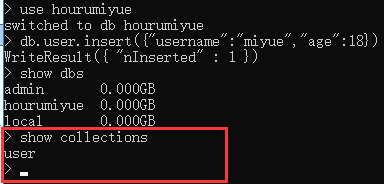
显示当前的所有数据集合(mysql 中叫表)
show collections
2、删除数据库,删除表:
删除数据库,删除当前所在的数据库
db.dropDatabase();
删除集合,删除指定的集合 删除表
删除集合 db.COLLECTION_NAME.drop()
db.user.drop()
3、向某个表插入数据:
db.表名.insert({"name":"zhangsan"});
注意,在插入数据的时候字段数可以不保持统一
例如:
db.user.insert({"name":"zhangsan"});
db.user.insert({"name":"lisi","age":20});
4、查找数据
1、查询所有记录
db.userInfo.find();
相当于:select* from userInfo;

2、查询去掉后的当前聚集集合中的某列的重复数据
db.userInfo.distinct("name");
会过滤掉 name 中的相同数据
相当于:select distict name from userInfo;
3、查询 age = 22 的记录
db.userInfo.find({"age": 22});
相当于: select * from userInfo where age = 22;
4、查询 age > 22 的记录
db.userInfo.find({age: {$gt: 22}});
相当于:select * from userInfo where age >22;
5、查询 age < 22 的记录
db.userInfo.find({age: {$lt: 22}});
相当于:select * from userInfo where age <22;
6、查询 age >= 25 的记录
db.userInfo.find({age: {$gte: 25}});
相当于:select * from userInfo where age >= 25;
7、查询 age <= 25 的记录
db.userInfo.find({age: {$lte: 25}});
8、查询 age >= 23 并且 age <= 26 注意书写格式
db.userInfo.find({age: {$gte: 23, $lte: 26}});
9、查询 name 中包含 mongo 的数据 模糊查询用于搜索
db.userInfo.find({name: /mongo/});
//相当于%%
select * from userInfo where name like ‘%mongo%’;
10、查询 name 中以 mongo 开头的
db.userInfo.find({name: /^mongo/});
select * from userInfo where name like ‘mongo%’;
11、查询指定列 name、age 数据
db.userInfo.find({}, {name: 1, age: 1});
相当于:select name, age from userInfo;
当然 name 也可以用 true 或 false,当用 ture 的情况下河 name:1 效果一样,如果用 false 就
是排除 name,显示 name 以外的列信息。
12、查询指定列 name、age 数据, age > 25
db.userInfo.find({age: {$gt: 25}}, {name: 1, age: 1});
相当于:select name, age from userInfo where age >25;
13、按照年龄排序 1 升序 -1 降序
升序:db.userInfo.find().sort({age: 1});
降序:db.userInfo.find().sort({age: -1});
14、查询 name = zhangsan, age = 22 的数据
db.userInfo.find({name: 'zhangsan', age: 22});
相当于:select * from userInfo where name = ‘zhangsan’ and age = ‘22’;
15、查询前 5 条数据
db.userInfo.find().limit(5);
相当于:selecttop 5 * from userInfo;
16、查询 10 条以后的数据
db.userInfo.find().skip(10);
相当于:select * from userInfo where id not in (
selecttop 10 * from userInfo
);
17、分页查询
db.userInfo.find().limit(10).skip(500);
可用于分页,limit 是 pageSize,skip (50*10)是第几页*pageSize,查出来的是501-510之间的数据
18、or 与 查询
db.userInfo.find({$or: [{age: 22}, {age: 25}]});
相当于:select * from userInfo where age = 22 or age = 25;
19、findOne 查询第一条数据
db.userInfo.findOne();
相当于:selecttop 1 * from userInfo;
db.userInfo.find().limit(1);
20、查询某个结果集的记录条数 统计数量
db.userInfo.find({age: {$gte: 25}}).count();
相当于:select count(*) from userInfo where age >= 20;
如果要返回限制之后的记录数量,要使用 count(true)或者 count(非 0)
db.users.find().skip(10).limit(5).count(true);
5、修改数据
查找名字叫做小明的,把年龄更改为 16 岁:
db.student.update({"name":"小明"},{$set:{"age":16}});
查找数学成绩是 70,把年龄更改为 33 岁:
db.student.update({"score.shuxue":70},{$set:{"age":33}});
更改所有匹配项目:"
By default, the update() method updates a single document. To update multiple documents, use
the multi option in the update() method.
默认情况下,update()方法更新单个文档。若要更新多个文档,请使用

update()方法中的multi选项。
db.student.update({"sex":"男"},{$set:{"age":33}},{multi: true});
如果不使用$set 关键字了:完整替换, 注意:下面这句sql的意思就是把name=小明的数据的数据内容填充为:{"name":"大明","age":16}
db.student.update({"name":"小明"},{"name":"大明","age":16});
db.users.update({name: 'Lisi'}, {$inc: {age: 50}}, false, true);
相当于:update users set age = age + 50 where name = ‘Lisi’;
db.users.update({name: 'Lisi'}, {$inc: {age: 50}, $set: {name: 'hoho'}}, false, true);
相当于:update users set age = age + 50, name = ‘hoho’ where name = ‘Lisi’;
6、删除数据
db.collectionsNames.remove( { "borough": "Manhattan" } )
db.users.remove({age: 132,“username”:“zhagsan”});
By default, the remove() method removes all documents that match the remove condition. Use
the justOne option to limit the remove operation to only one of the matching documents.
默认情况下,remove()方法删除所有匹配remove条件的文档。使用

justOne选项将删除操作限制为只有一个匹配的文档。
db.restaurants.remove( { "borough": "Queens" }, { justOne: true } )
二十四、MongoDB数据库的使用的更多相关文章
- 第三百二十四节,web爬虫,scrapy模块介绍与使用
第三百二十四节,web爬虫,scrapy模块介绍与使用 Scrapy是一个为了爬取网站数据,提取结构性数据而编写的应用框架. 其可以应用在数据挖掘,信息处理或存储历史数据等一系列的程序中.其最初是为了 ...
- python3.4学习笔记(二十四) Python pycharm window安装redis MySQL-python相关方法
python3.4学习笔记(二十四) Python pycharm window安装redis MySQL-python相关方法window安装redis,下载Redis的压缩包https://git ...
- Bootstrap<基础二十四> 缩略图
Bootstrap 缩略图.大多数站点都需要在网格中布局图像.视频.文本等.Bootstrap 通过缩略图为此提供了一种简便的方式.使用 Bootstrap 创建缩略图的步骤如下: 在图像周围添加带有 ...
- 二十四、Struts2中的UI标签
二十四.Struts2中的UI标签 Struts2中UI标签的优势: 数据回显 页面布局和排版(Freemark),struts2提供了一些常用的排版(主题:xhtml默认 simple ajax) ...
- WCF技术剖析之二十四: ServiceDebugBehavior服务行为是如何实现异常的传播的?
原文:WCF技术剖析之二十四: ServiceDebugBehavior服务行为是如何实现异常的传播的? 服务端只有抛出FaultException异常才能被正常地序列化成Fault消息,并实现向客户 ...
- VMware vSphere 服务器虚拟化之二十四 桌面虚拟化之手动池管理物理机
VMware vSphere 服务器虚拟化之二十四 桌面虚拟化之手动池管理物理机 VMwareView手动池可以管理物理计算机 说明: 环境基于实验二十三 1.准备一台Windows 7的物理计算机名 ...
- Bootstrap入门(二十四)data属性
Bootstrap入门(二十四)data属性 你可以仅仅通过 data 属性 API 就能使用所有的 Bootstrap 插件,无需写一行 JavaScript 代码.这是 Bootstrap 中的一 ...
- 3360: [Usaco2004 Jan]算二十四
3360: [Usaco2004 Jan]算二十四 Time Limit: 10 Sec Memory Limit: 128 MBSubmit: 6 Solved: 6[Submit][Statu ...
- JAVA之旅(二十四)——I/O流,字符流,FileWriter,IOException,文件续写,FileReader,小练习
JAVA之旅(二十四)--I/O流,字符流,FileWriter,IOException,文件续写,FileReader,小练习 JAVA之旅林林总总也是写了二十多篇了,我们今天终于是接触到了I/O了 ...
- 二十四. Python基础(24)--封装
二十四. Python基础(24)--封装 ● 知识结构 ● 类属性和__slots__属性 class Student(object): grade = 3 # 也可以写在__slots ...
随机推荐
- PHP 性能优化之 PHP-FPM
简介: PHP-FPM 是一个 PHP FastCGI 管理器,一般 Nginx 上面跑 PHP 程序都会将 PHP 程序丢给 PHP-FPM 来解析.好了,就这样! PHP 5.4 开始集成了 PH ...
- 在springBoot在控制台打印sql语句
在springBoot+Mybatis日志显示SQL的执行情况的最简单方法就是在properties新增: logging.level.com.dy.springboot.server.mapper= ...
- delphi三层架构
我们的delphi程序很多是以前开发的,采用典型的CS架构,由程序直接连接数据库.现在需要改成在外网可以直接操作软件.先把数据库搬到了阿里云上,测试发现直接连数据库和VPN连接测试速度很慢,直连还容易 ...
- python开源项目Scrapy抓取文件乱码解决
scrapy进行页面抓去的时候,保存的文件出现乱码,经过分析是编码的原因,只需要把编码转换为utf-8即可,代码片段 ...... import chardet ...... cont ...
- C++ split
/*************************************************Function: splitDescription: 根据空格切分字符串Calls: // 被本函 ...
- 136. Single Number唯一的数字
[抄题]: Given an array of integers, every element appears twice except for one. Find that single one. ...
- Linux系统profile、bashrc、bash_profile等环境设置文件的使用
一.前言 关于bash的环境设置文件,分为系统设置和个人设置,一般来说建议用户直接修改个人的设置. 本文测试环境为:centos6.5. 二.系统设置值 1. /etc/sysconfig/i18n ...
- 洛谷P1186 玛丽卡 spfa+删边
洛谷P1186 玛丽卡http://blog.csdn.net/huihao123456/article/details/73414139题目描述 麦克找了个新女朋友,玛丽卡对他非常恼火并伺机报复. ...
- Header add Access-Control-Allow-Origin: *
允许所有域名跨域 Header add Access-Control-Allow-Origin: *
- Spring思维导图(AOP篇)
什么是aop AOP(Aspect-OrientedProgramming,面向方面编程),可以说是OOP(Object-Oriented Programing,面向对象编程)的补充和完善.OOP允许 ...