
IdentityServer4[5]简化模式
Implicit简化模式(直接通过浏览器的链接跳转申请令牌)
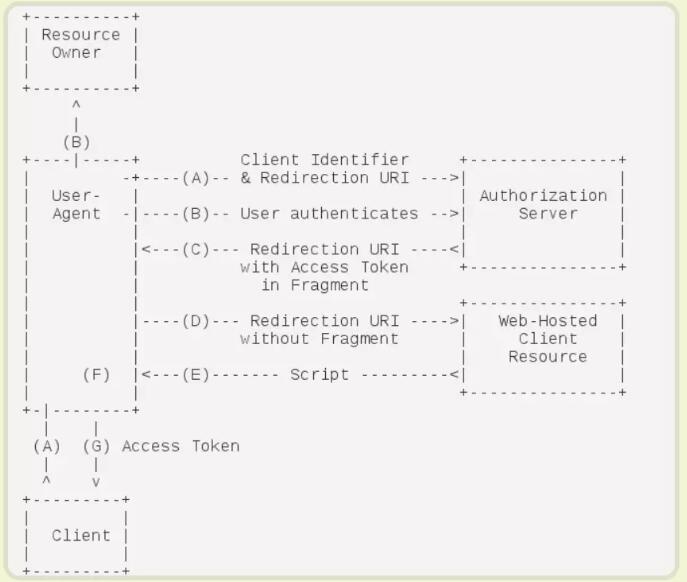
简化模式是相对于授权码模式而言的。其不再需要【Client】的参与,所有的认证和授权都是通过浏览器来完成的。
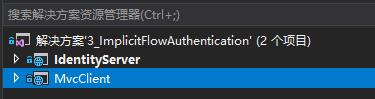
创建项目
IdentityServer的ASP.NET Core Web空项目,端口5300
MvcClient的ASP.NET Core Web项目,端口5301
IdentityServer准备工作
定义API资源
public static IEnumerable<ApiResource> GetResources()

{

	return new List<ApiResource>()

	{

		new ApiResource("api","My Api")

	};

}
public static IEnumerable<IdentityResource> GetIdentityResource()

{

    return new List<IdentityResource>()

    {

        new IdentityResources.OpenId(),

        new IdentityResources.Profile(),

        new IdentityResources.Email()

    };

}
定义客户端
public static IEnumerable<Client> GetClients()

{

    return new List<Client>()

    {

        new Client()

        {

            ClientId="mvc",

            AllowedGrantTypes = GrantTypes.Implicit,

            ClientSecrets = new List<Secret>()

            {

                new Secret("secret".Sha256())

            },

            RequireConsent = false,

            RedirectUris = {"http://localhost:5301/signin-oidc"},

            PostLogoutRedirectUris = {"http://localhost:5301/signout-callback-oidc"},

            AllowedScopes =

            {

                IdentityServerConstants.StandardScopes.Profile,

                IdentityServerConstants.StandardScopes.OpenId

            }

        }

    };

}
定义测试用户
public static List<TestUser> GetUsers()

{

    return new List<TestUser>()

    {

        new TestUser()

        {

            SubjectId = "1",

            Username = "Test1",

            Password = "123456"

        }

    };

}
配置IdentityServer
public class Startup

{

    public Startup(IConfiguration configuration)

    {

        Configuration = configuration;

    }

    public IConfiguration Configuration { get; }

    public void ConfigureServices(IServiceCollection services)

    {

        services.Configure<CookiePolicyOptions>(options =>

        {

            options.CheckConsentNeeded = context => true;

            options.MinimumSameSitePolicy = SameSiteMode.None;

        });

        services.AddIdentityServer()

            .AddDeveloperSigningCredential()

            .AddInMemoryClients(Config.GetClients())

            .AddInMemoryApiResources(Config.GetResources())

            .AddInMemoryIdentityResources(Config.GetIdentityResource())

            .AddTestUsers(Config.GetUsers());

        services.AddMvc().SetCompatibilityVersion(CompatibilityVersion.Version_2_2);

    }

    public void Configure(IApplicationBuilder app, IHostingEnvironment env)

    {

        if (env.IsDevelopment())

        {

            app.UseDeveloperExceptionPage();

        }

        else

        {

            app.UseExceptionHandler("/Home/Error");

        }

        app.UseStaticFiles();

        app.UseCookiePolicy();

        app.UseIdentityServer();

        app.UseMvc(routes =>

        {

            routes.MapRoute(

                name: "default",

                template: "{controller=Home}/{action=Index}/{id?}");

        });

    }

}
MvcClient准备
在Home控制器上,增加[Authorize]特性(授权)
[Authorize]

public class HomeController : Controller
Startup增加如下代码:
public class Startup

{

    public Startup(IConfiguration configuration)

    {

        Configuration = configuration;

    }

    public IConfiguration Configuration { get; }

    public void ConfigureServices(IServiceCollection services)

    {

        services.Configure<CookiePolicyOptions>(options =>

        {

            options.CheckConsentNeeded = context => true;

            options.MinimumSameSitePolicy = SameSiteMode.None;

        });

        services.AddIdentityServer()

            .AddDeveloperSigningCredential()

            .AddInMemoryClients(Config.GetClients())

            .AddInMemoryApiResources(Config.GetResources())

            .AddInMemoryIdentityResources(Config.GetIdentityResource())

            .AddTestUsers(Config.GetUsers());

        services.AddMvc().SetCompatibilityVersion(CompatibilityVersion.Version_2_2);

    }

    public void Configure(IApplicationBuilder app, IHostingEnvironment env)

    {

        if (env.IsDevelopment())

        {

            app.UseDeveloperExceptionPage();

        }

        else

        {

            app.UseExceptionHandler("/Home/Error");

        }

        app.UseStaticFiles();

        app.UseCookiePolicy();

        app.UseIdentityServer();

        app.UseMvc(routes =>

        {

            routes.MapRoute(

                name: "default",

                template: "{controller=Home}/{action=Index}/{id?}");

        });

    }

}
IdentityServer中Account控制器
public class AccountController : Controller

{

    private readonly TestUserStore _users;

    public AccountController(TestUserStore users)

    {

        _users = users;

    }

    public IActionResult Login(string returnUrl = null)

    {

        ViewData["ReturnUrl"] = returnUrl;

        return View();

    }

    [HttpPost]

    public async Task<IActionResult> Login(LoginViewModel loginViewModel, string returnUrl = null)

    {

        if (ModelState.IsValid)

        {

            ViewData["ReturnUrl"] = returnUrl;

            var user = _users.FindByUsername(loginViewModel.UserName);

            if (user == null)

            {

                ModelState.AddModelError(nameof(loginViewModel.UserName), "UserName not exists");

            }

            if (_users.ValidateCredentials(loginViewModel.UserName, loginViewModel.Password))

            {

                var props = new AuthenticationProperties()

                {

                    IsPersistent = true,

                    ExpiresUtc = DateTimeOffset.UtcNow.Add(TimeSpan.FromMinutes(30))

                };

                await Microsoft.AspNetCore.Http.AuthenticationManagerExtensions.SignInAsync(

                    HttpContext,

                    user.SubjectId,

                    user.Username,

                    props);

                return Redirect(returnUrl);

            }

            else

            {

                ModelState.AddModelError(nameof(loginViewModel.Password), "password wrong");

            }

        }

        return View();

    }

    public async Task<IActionResult> Logout()

    {

        await HttpContext.SignOutAsync();

        return RedirectToAction("Index", "Home");

    }

}
定义Model
public class LoginViewModel

{

    [Required]

    public string UserName { get; set; }

    [Required]

    [DataType(DataType.Password)]

    public string Password { get; set; }

    [Display(Name = "Remember me?")]

    public bool RememberMe { get; set; }

}
前端代码
@model LoginViewModel

@{

    ViewData["Title"] = "Login";

}

<h2>Login</h2>

<div class="row">

    <div class="col-md-4">

        <section>

            <form method="post" asp-controller="Account" asp-action="Login" asp-route-returnUrl="@ViewData["ReturnUrl"]">

                <h4>Use a local account to log in.</h4>

                <hr />

                <div asp-validation-summary="All" class="text-danger"></div>

                <div class="form-group">

                    <label asp-for="UserName"></label>

                    <input asp-for="UserName" class="form-control" />

                    <span asp-validation-for="UserName" class="text-danger"></span>

                </div>

                <div class="form-group">

                    <label asp-for="Password"></label>

                    <input asp-for="Password" class="form-control" />

                    <span asp-validation-for="Password" class="text-danger"></span>

                </div>

                <div class="form-group">

                    <button type="submit" class="btn btn-default">Log in</button>

                </div>

            </form>

        </section>

    </div>

</div>

@section Scripts {

    @await Html.PartialAsync("_ValidationScriptsPartial")

}
先启动IdentityServer(5300),然后启动MvcClient(5301),会直接跳转到IdentityServer的登陆页,登陆后,会返回MvcClient的Home页。
IdentityServer4[5]简化模式的更多相关文章
- IdentityServer4系列 | 简化模式
一.前言 从上一篇关于资源密码凭证模式中,通过使用client_id和client_secret以及用户名密码通过应用Client(客户端)直接获取,从而请求获取受保护的资源,但是这种方式存在clie ...
- Core篇——初探IdentityServer4(OpenID Connect模式)
Core篇——初探IdentityServer4(OpenID Connect客户端验证) 目录 1.Oauth2协议授权码模式介绍2.IdentityServer4的OpenID Connect客户 ...
- 认证授权:IdentityServer4 - 各种授权模式应用
前言: 前面介绍了IdentityServer4 的简单应用,本篇将继续讲解IdentityServer4 的各种授权模式使用示例 授权模式: 环境准备 a)调整项目结构如下: b)调整cz.Id ...
- asp.net权限认证:OWIN实现OAuth 2.0 之简化模式(Implicit)
asp.net权限认证系列 asp.net权限认证:Forms认证 asp.net权限认证:HTTP基本认证(http basic) asp.net权限认证:Windows认证 asp.net权限认证 ...
- 接口测试工具-Jmeter使用笔记(八:模拟OAuth2.0协议简化模式的请求)
背景 博主的主要工作是测试API,目前已经用Jmeter+Jenkins实现了项目中的接口自动化测试流程.但是马上要接手的项目,API应用的是OAuth2.0协议授权,并且采用的是简化模式(impli ...
- Core篇——初探IdentityServer4(客户端模式,密码模式)
Core篇——初探IdentityServer4(客户端模式,密码模式) 目录 1.Oatuth2协议的客户端模式介绍2.IdentityServer4客户端模式实现3.Oatuth2协议的密码模式介 ...
- IdentityServer4 自定义授权模式
IdentityServer4除了提供常规的几种授权模式外(AuthorizationCode.ClientCredentials.Password.RefreshToken.DeviceCode), ...
- asp.net core 使用identityServer4的密码模式来进行身份认证(一)
IdentityServer4是ASP.NET Core的一个包含OpenID和OAuth 2.0协议的框架.具体Oauth 2.0和openId请百度. 前言本博文适用于前后端分离或者为移动产品来后 ...
- IdentityServer4(客户端授权模式)
1.新建三个项目 IdentityServer:端口5000 IdentityAPI:端口5001 IdentityClient: 2.在IdentityServer项目中添加IdentityServ ...
随机推荐
- 【mysql】explain性能分析
1. explain的概念 使用EXPLAIN 关键字可以模拟优化器执行SQL 查询语句,从而知道MySQL 是如何处理你的SQL 语句的.分析你的查询语句或是表结构的性能瓶颈. 用法: Explai ...
- nodejs根据word模板生成文档(方法二)
[推荐该方法,模板比较简洁] 1,代码, 这里采用的模块为 docxtemplater 和 open-docxtemplater-image-module,均为开源(docxtemplater 有收费 ...
- return 和 return false 的区别
return返回null,起到中断方法执行的效果,只要不return false事件处理函数将会继续执行,表单将提交. return false,事件处理函数会取消事件,不再继续向下执行.比如表单将终 ...
- Java HashMap工作原理:不仅仅是HashMap
前言: 几乎所有java程序员都用过hashMap,但会用不一定会说. 近年来hashMap是非常常见的面试题,如何为自己的回答加分?需要从理解开始. "你用过hashMap吗?" ...
- 剑指 Offer 14- II. 剪绳子 II
剑指 Offer 14- II. 剪绳子 II 给你一根长度为 n 的绳子,请把绳子剪成整数长度的 m 段(m.n都是整数,n>1并且m>1),每段绳子的长度记为 k[0],k[1]... ...
- docker日常使用指南
docker日常使用指南 目录 docker日常使用指南 前言 1.基础知识 1.1 docker是什么 1.2 与虚拟机(VM)的区别 1.3 镜像与容器 2.安装 2.1 在线安装 2.2 离线安 ...
- python-request 实现企业微信接口自动化-1(DDT)
环境准备 python+requests 读取企业微信api开发文档,得知调用企业微信接口必须先获取企业微信的accesstoken是通过 ("corpid","&quo ...
- C# Dapper基本三层架构使用 (三、DAL)
数据访问层(DAL),主要是存放对数据类的访问,即对数据库的添加.删除.修改.更新等基本操作 首先需要在UI层App.Config配置文件中增加连接字符串,如下所示 <connectionStr ...
- 分布式必备理论基础:CAP和BASE
大家好,我是老三,今天是没有刷题的一天,心情愉悦,给大家分享两个简单的知识点:分布式理论中的CAP和BASE. CAP理论 什么是CAP CAP原则又称CAP定理,指的是在一个分布式系统中,Consi ...
- python动态网站爬虫实战(requests+xpath+demjson+redis)
目录 前言 一.主要思路 1.观察网站 2.编写爬虫代码 二.爬虫实战 1.登陆获取cookie 2.请求资源列表页面,定位获得左侧目录每一章的跳转url(难点) 3.请求每个跳转url,定位右侧下载 ...