
JS框架_(JQuery.js)带阴影贴纸标签按钮
百度云盘 传送门 密码:azo6
纯CSS带阴影贴纸标签按钮效果:
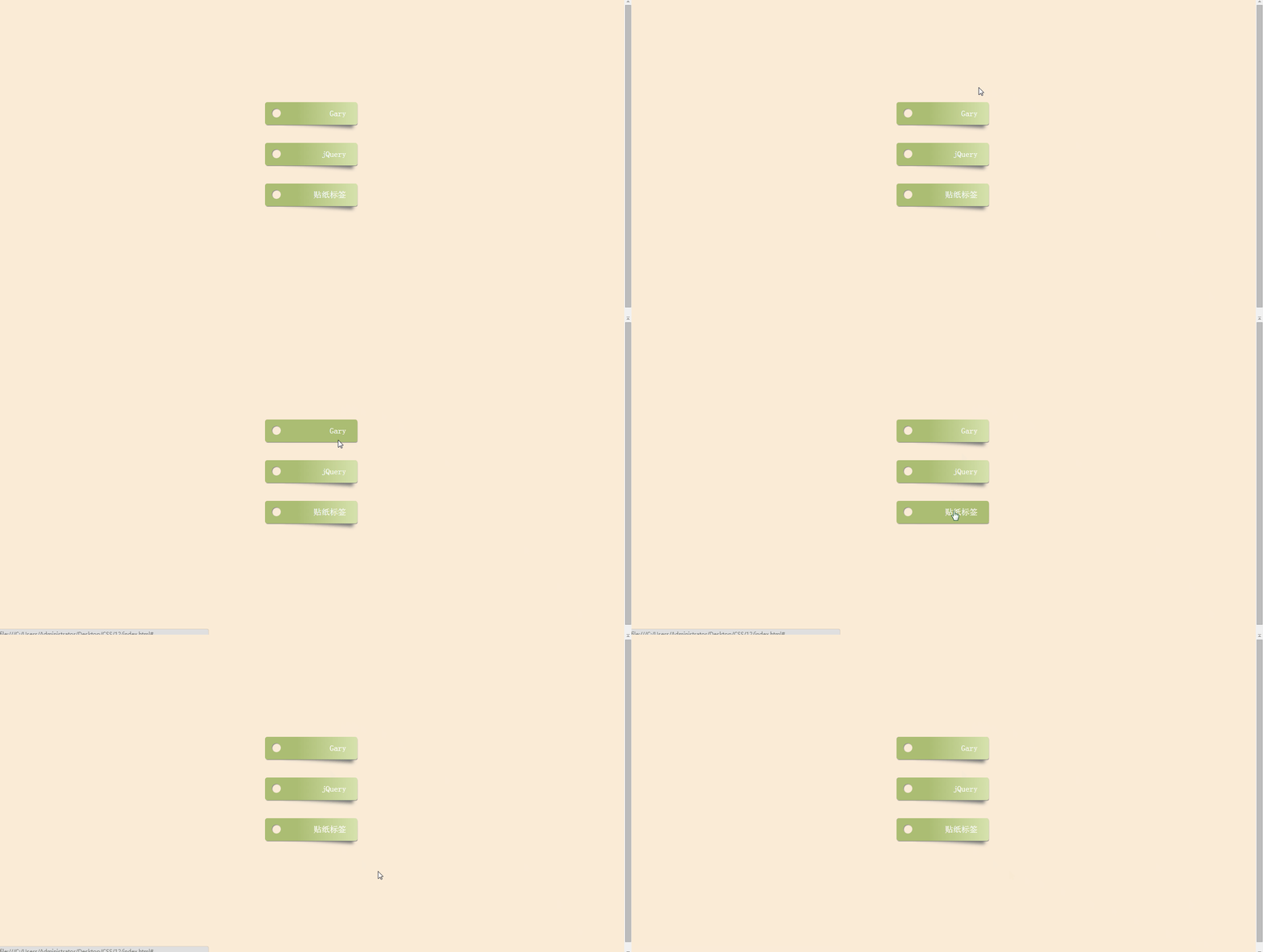
<!doctype html>

<html>

<head>

<meta charset="utf-8">

<title>CSS3带阴影贴纸标签按钮样式</title>

<style>

html {

  box-sizing: border-box;

  font: 18px PT Mono;

  background: antiquewhite;

}

*,

*::before,

*::after {

  box-sizing: inherit;

}

body {

  display: flex;

  align-items: center;

  justify-content: center;

  flex-direction: column;

  height: 100vh;

}

.box {

  width: 15%;

  min-width: 150px;

  display: block;

  height: 50px;

  position: relative;

  border-radius: 5px;

  background: linear-gradient(to right, #abbd73 35%, #d6e2ad 100%);

  margin-bottom: 40px;

  padding: 15px 25px 0 40px;

  color: darkslategray;

  box-shadow: 1px 2px 1px -1px #777;

  transition: background 200ms ease-in-out;

  text-align:right;

}

.box a{color:#fff;text-decoration:none;}

.shadow {

  position: relative;

}

.shadow:before {

  z-index: -1;

  position: absolute;

  content: "";

  bottom: 13px;

  right: 7px;

  width: 75%;

  top: 0;

  box-shadow: 0 15px 10px #777;

  -webkit-transform: rotate(4deg);

          transform: rotate(4deg);

  transition: all 150ms ease-in-out;

}

.box:hover {

  background: linear-gradient(to right, #abbd73 0%, #abbd73 100%);

}

.shadow:hover::before {

  -webkit-transform: rotate(0deg);

          transform: rotate(0deg);

  bottom: 20px;

  z-index: -10;

}

.circle {

  position: absolute;

  top: 14px;

  left: 15px;

  border-radius: 50%;

  box-shadow: inset 1px 1px 1px 0px rgba(0, 0, 0, 0.5), inset 0 0 0 25px antiquewhite;

  width: 20px;

  height: 20px;

  display: inline-block;

  text-align:right;

  padding:0 20px 0 0;

}

</style>

</head>

<body>

<div class="box shadow">

    <a href="#">Gary</a>

  <div class="circle"></div>

</div>

<div class="box shadow">

    <a href="#">jQuery</a>

  <div class="circle"></div>

</div>

<div class="box shadow">

    <a href="#">贴纸标签</a>

  <div class="circle"></div>

</div>

</div>

</body>

</html>
index.html
实现过程:
一、设置CSS样式
justify-content 用于设置或检索弹性盒子元素在主轴(横轴)方向上的对齐方式。

flex-start    默认值。项目位于容器的开头

flex-end    项目位于容器的结尾

center    项目位于容器的中心

space-between    项目位于各行之间留有空白的容器内

space-around    项目位于各行之前、之间、之后都留有空白的容器内
justify-content: center;
1、绘制标签盒子
.box {

  width: 15%;

  min-width: 150px;

  display: block;

  height: 50px;

  position: relative;

  border-radius: 5px;

  background: linear-gradient(to right, #abbd73 35%, #d6e2ad 100%);

  margin-bottom: 40px;

  padding: 15px 25px 0 40px;

  color: darkslategray;

  box-shadow: 1px 2px 1px -1px #777;

  transition: background 200ms ease-in-out;

  text-align:right;

}
min-width :设置元素的最小宽度。
border-radius:向 div 元素添加圆角边框
background: linear-gradient(direction, color-stop1, color-stop2, ...) 百度经验
linear-gradient(线性渐变)
radial-gradient(径向渐变)
direction:渐变方法
color-stop1, color-stop2:要呈现平稳过渡的颜色
margin-bottom :设置元素的下外边距
color: darkslategray;深石板灰......(英语差)
transition:鼠标碰到时触发过度动画 传送门
2、绘制盒子阴影
.shadow:before {

  z-index: -1;

  position: absolute;

  content: "";

  bottom: 13px;

  right: 7px;

  width: 75%;

  top: 0;

  box-shadow: 0 15px 10px #777;

  -webkit-transform: rotate(4deg);

          transform: rotate(4deg);

  transition: all 150ms ease-in-out;

}
z-index :设置元素的堆叠顺序。拥有更高堆叠顺序的元素总是会处于堆叠顺序较低的元素的前面
使得阴影位于标签按钮下方
bottom :规定盒子的底部边缘与阴影之间的偏移(调大了会有点丑∑(= = !))
transform: rotate(4deg)定义 2D 旋转4度
3、绘制标签圆角
.circle {

  position: absolute;

  top: 14px;

  left: 15px;

  border-radius: 50%;

  box-shadow: inset 1px 1px 1px 0px rgba(0, 0, 0, 0.5), inset 0 0 0 25px antiquewhite;

  width: 20px;

  height: 20px;

  display: inline-block;

  text-align:right;

  padding:0 20px 0 0;

}
border-radius:向标签添加圆角边框
antiquewhite颜色:古董白(石材百科说是中国产花岗岩!!!)上一张图
二、在Body中给“标签”添加CSS样式
<body>

<div class="box shadow">

    <a href="#">Gary</a>

<div class="circle"></div>

</div>

<div class="box shadow">

    <a href="#">jQuery</a>

  <div class="circle"></div>

</div>

<div class="box shadow">

    <a href="#">贴纸标签</a>

  <div class="circle"></div>

</div>

</div>

</body>
JS框架_(JQuery.js)带阴影贴纸标签按钮的更多相关文章
- JS框架_(JQuery.js)绚丽的3D星空动画
百度云盘: 传送门 密码:8ft8 绚丽的3D星空动画效果(纯CSS) (3D星空动画可以用作网页背景,Gary为文本文字) <!doctype html> <html lang=& ...
- JS框架_(JQuery.js)Tooltip弹出式按钮插件
百度云盘 传送门 密码:7eh5 弹出式按钮效果 <!DOCTYPE html> <html > <head> <meta charset="UTF ...
- JS框架_(JQuery.js)圆形多选菜单选项
百度云盘 传送门 密码:zb1c 圆形多选菜单选项效果: <!DOCTYPE html> <html lang="en" > <head> &l ...
- JS框架_(JQuery.js)夜晚天空满天星星闪烁动画
百度云盘 传送门 密码:xftr 满天星星闪烁动画效果: (可用星空动画来作为页面背景,白色文字改为文章或者其他的O(∩_∩)O) <!doctype html> <html> ...
- JS框架_(JQuery.js)文章全屏动画切换
百度云盘 传送门 密码:anap 文章全屏动画切换效果 <!doctype html> <html lang="zh"> <head> < ...
- JS框架_(JQuery.js)动画效果鼠标跟随
百度云盘 传送门 密码 :4n9u 火狐浏览器上纯CSS_动画效果鼠标跟随效果: (作者:lily_lcj 传送门) <!DOCTYPE html PUBLIC "-//W3C//DT ...
- JS框架_(JQuery.js)点赞按钮动画
百度云盘 传送门 密码: 0ihy 点赞按钮动画效果: (点击一次随机生成一颗小爱心,作为点赞动画~) <!doctype html> <html lang="en&quo ...
- JS框架_(JQuery.js)图片相册掀开切换效果
百度云盘 传送门 密码:y0dk 图片掀开切换效果: <!DOCTYPE html PUBLIC "-//W3C//DTD XHTML 1.0 Transitional//EN&quo ...
- JS框架_(JQuery.js)上传进度条
百度云盘 传送门 密码: 1pou 纯CSS上传进度条效果: <!DOCTYPE html PUBLIC "-//W3C//DTD XHTML 1.0 Transitional//EN ...
随机推荐
- centos终端显示字母重叠
在使用VMware虚拟机安装linux之后,之后调整了中文显示,但是后来不知道怎么回事在终端显示的字母很多都是重叠的. 在百度上也找到很多的解决办法 eg: 终端键入:vi /etc/fonts/co ...
- cut,sort,awk,sed,tr,find,wc,uniq在Linux中的用法
cut语法cut [-bn] [file]cut [-c] [file]cut [-df] [file] -b :以字节为单位进行分割.这些字节位置将忽略多字节字符边界,除非也指定了 -n 标志.-c ...
- Box-shadow制作漂亮的外阴影输入框
背景:之前做项目中的一个移动端页面,关于在搜索框中输入信息查找对应的照片 改了几次ui图之后,最终的搜索框的设计图如下: 开始做页面的时候,就想到了用box-shadow 来实现外阴影边框.用bord ...
- 枚举类型C语言规律用法总结
注:以下全部代码的执行环境为VC++ 6.0 在程序中,可能需要为某些整数定义一个别名,我们可以利用预处理指令#define来完成这项工作,您的代码可能是: #define MON 1#define ...
- IDEA修改Maven全局配置
在使用过程中发现,IDEA每次新建一个Project ,这个maven配置都会初始化默认的. 这里需要设置下全局配置: File -> Other Settings -> Settings ...
- python、第八篇:索引原理与慢查询优化
一 介绍 1. 为何要有索引? 一般的应用系统,读写比例在10:1左右,而且插入操作和一般的更新操作很少出现性能问题,在生产环境中,我们遇到最多的,也是最容易出问题的,还是一些复杂的查询操作,因此对查 ...
- 【bzoj 4025 改编版】graph
题意 给定一张 \(n\) 个点 \(m\) 条边的无向图,问删去每个点后,原图是不是二分图.输出一个长度为 \(n\) 的 \(\text{01}\) 串表示答案. 多组数据. \(T\le 5,\ ...
- linux下编译安装SDL2和ffmpeg
首先安装sudo apt-get install libsdl2-dev ./configure --prefix=/tools/SDL2 make && make install $ ...
- 第五章 动画 44:动画-使用第三方animate.css类库实现动画
<!DOCTYPE html> <html lang="en"> <head> <meta charset="utf-8&quo ...
- flutter 学习路上碰到的错误问题。
决定还是把碰到的问题进行简单记录吧 19.8.14 错误日志: type '_InternalLinkedHashMap<dynamic, dynamic>' is not a subty ...