
JS框架_(JQuery.js)上传进度条
百度云盘 传送门 密码: 1pou
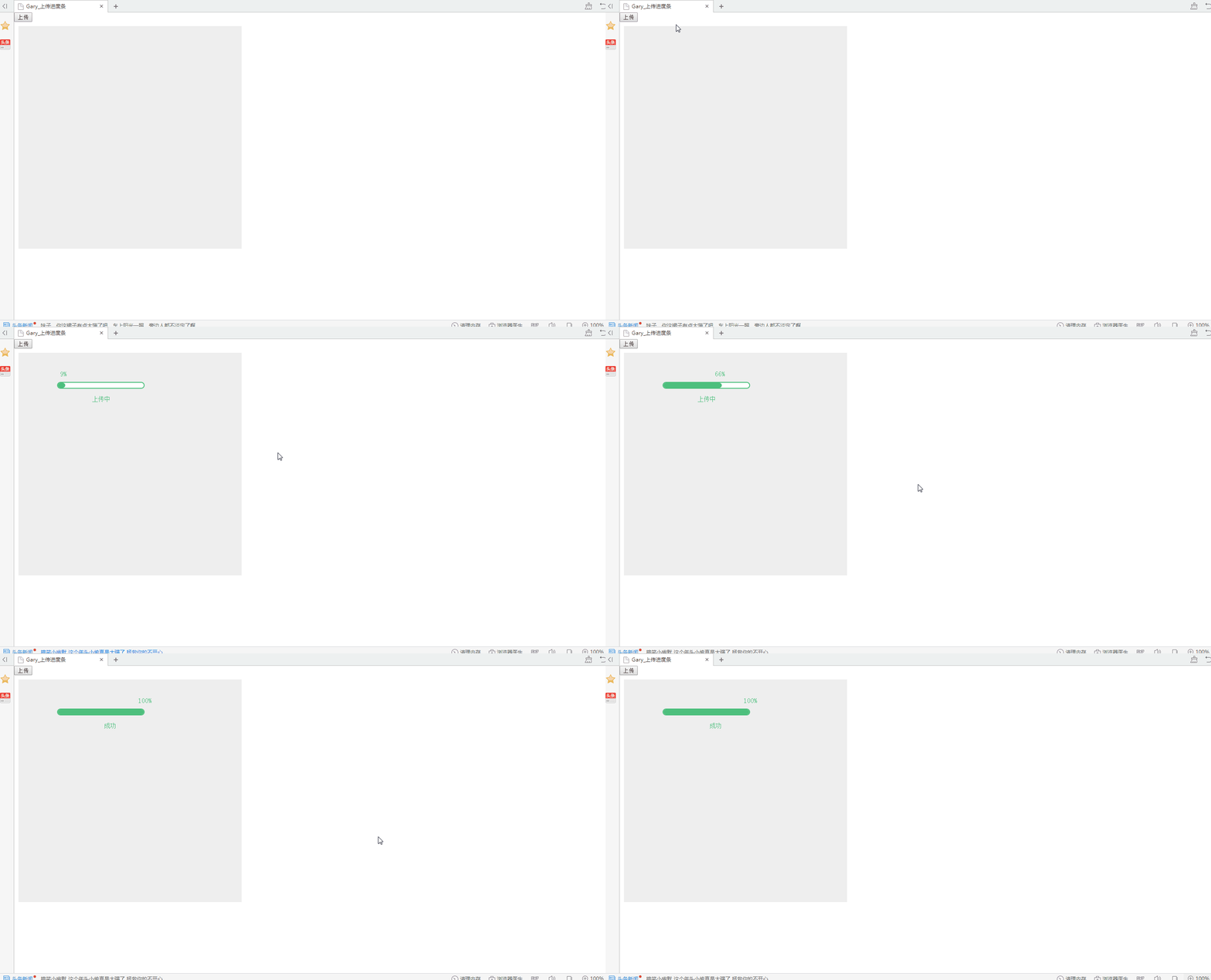
纯CSS上传进度条效果:
<!DOCTYPE html PUBLIC "-//W3C//DTD XHTML 1.0 Transitional//EN" "http://www.w3.org/TR/xhtml1/DTD/xhtml1-transitional.dtd">
<html xmlns="http://www.w3.org/1999/xhtml">
<head>
<meta http-equiv="Content-Type" content="text/html; charset=utf-8" />
<title>Gary_ </title>
</head> <link rel="stylesheet" type="text/css" href="css/css.css" /> <script src="js/jquery.min.js" type="text/javascript"></script> <body> <button type="button" onClick="processerbar(3000)">上传</button> <!--进度条区域-->
<div style="margin:10px;padding:10px;width:500px;height:500px;background:#EEE;"> <!-- 进度条 -->
<div class="barline" id="probar">
<div id="percent"></div>
<div id="line" w="100" style="width:0px;"></div>
<div id="msg" style=""></div>
</div> </div> <script language="javascript">
function processerbar(time){
document.getElementById('probar').style.display="block";
$("#line").each(function(i,item){
var a=parseInt($(item).attr("w"));
$(item).animate({
width: a+"%"
},time);
}); var si = window.setInterval(
function(){
a=$("#line").width();
b=(a/200*100).toFixed(0);
document.getElementById('percent').innerHTML=b+"%";
document.getElementById('percent').style.left=a-12+"px";
document.getElementById('msg').innerHTML="上传中";
if(document.getElementById('percent').innerHTML=="100%") {
clearInterval(si);
document.getElementById('msg').innerHTML=" 成功";
}
},900);
};
</script> </body>
</html>
index.html
@charset "utf-8";

body,h1,h2,h3,h4,h5,h6,p,ul,ol,li,form,img,dl,dt,dd,table,th,td,blockquote,fieldset,strong,label,em{margin:0;padding:0;border:0;}

ul,ol,li{list-style:none;}

.barline{

float:left;

width:200px;

background:#FFF;

border:2px solid #4DBF7D;

height:12px;

display:inline-block;

border-radius:8px;

display:none;

position:absolute;left:100px;top:100px;

}

.barline #percent{position:absolute;left:0px;top:-30px;display:inline-block;color:#4DBF7D;font-size:16px;}

.barline #line{float:left;height:12px;overflow:hidden;background:#4DBF7D;border-radius:8px;}

.barline #msg{position:absolute;left:80px;top:30px;display:inline-block;color:#4DBF7D;font-size:14px;}<!---->
css.css
实现过程:
一、进度条CSS属性
1、位置
.barline{

float:left;

width:200px;

background:#FFF;

border:2px solid #4DBF7D;

height:12px;

display:inline-block;

border-radius:8px;

display:none;

position:absolute;left:100px;top:100px;

}
display:block就是将元素显示为块级元素.

  block元素的特点是:

  总是在新行上开始;

  高度,行高以及顶和底边距都可控制;

  宽度缺省是它的容器的100%,除非设定一个宽度

  <div>, <p>, <h1>, <form>, <ul> 和 <li>是块元素的例子。

  display:inline就是将元素显示为行内元素.

  inline元素的特点是:

  和其他元素都在一行上;

  高,行高及顶和底边距不可改变;

  宽度就是它的文字或图片的宽度,不可改变。

  <span>, <a>, <label>, <input>, <img>, <strong> 和<em>是inline元素的例子。

  inline和block可以控制一个元素的行宽高等特性,需要切换的情况如下:

  让一个inline元素从新行开始;

  让块元素和其他元素保持在一行上;

  控制inline元素的宽度(对导航条特别有用);

  控制inline元素的高度;

  无须设定宽度即可为一个块元素设定与文字同宽的背景色。

  display:inline-block将对象呈递为内联对象,但是对象的内容作为块对象呈递。旁边的内联对象会被呈递在同一行内,允许空格。

  inline-block的元素特点:

  将对象呈递为内联对象,但是对象的内容作为块对象呈递。旁边的内联对象会被呈递在同一行内,允许空格。(准确地说,应用此特性的元素呈现为内联对象,周围元素保持在同一行,但可以设置宽度和高度地块元素的属性)
display属性inline、block、inline-block的区别
2、进度条动画效果
<!--提示文字上传进度-->

.barline #percent{position:absolute;left:0px;top:-30px;display:inline-block;color:#4DBF7D;font-size:16px;}

<!--填充进度条上传百分比-->

.barline #line{float:left;height:12px;overflow:hidden;background:#4DBF7D;border-radius:8px;}

<!--提示文字上传状态-->

.barline #msg{position:absolute;left:80px;top:30px;display:inline-block;color:#4DBF7D;font-size:14px;}
二、响应事件
<button type="button" onClick="processerbar(3000)">上传</button>
<script language="javascript">
function processerbar(time){
<!--获取进度条ID-->
document.getElementById('probar').style.display="block";
<!--block此元素将显示为块级元素,此元素前后会带有换行符-->
<!--进度条填充触发的事件-->
$("#line").each(function(i,item){
<!--attr()方法设置进度条的填充多少-->
var a=parseInt($(item).attr("w"));
<!--animate()方法执行动画
$(item).animate({
width: a+"%"
},time);
}); <!-- clearInterval()方法创建执行定时操作时要使用全局变量:-->
var si = window.setInterval(
function(){
a=$("#line").width();
b=(a/200*100).toFixed(0);
<!--提示上传进度-->
document.getElementById('percent').innerHTML=b+"%";
<!--填充进度条上传百分比-->
document.getElementById('percent').style.left=a-12+"px";
<!--提示上传状态-->
document.getElementById('msg').innerHTML="上传中";
<!--当上传进度完成时调用下面方法-->
if(document.getElementById('percent').innerHTML=="100%") {
<!--通过 clearInterval() 方法来停止执行window.setInterval-->
clearInterval(si);
<!--提示上传成功-->
document.getElementById('msg').innerHTML=" 成功";
}
},70);
};
</script>
(每一步都有自己的说明,选择插入代码发现没有高亮显示Js注解的,∑(= = !)。。。)
JS框架_(JQuery.js)上传进度条的更多相关文章
- JS框架_(JQuery.js)纯css3进度条动画
百度云盘 传送门 密码:wirc 进度条动画效果: <!DOCTYPE html> <html lang="zh"> <head> <me ...
- JS框架_(JQuery.js)绚丽的3D星空动画
百度云盘: 传送门 密码:8ft8 绚丽的3D星空动画效果(纯CSS) (3D星空动画可以用作网页背景,Gary为文本文字) <!doctype html> <html lang=& ...
- JS框架_(JQuery.js)Tooltip弹出式按钮插件
百度云盘 传送门 密码:7eh5 弹出式按钮效果 <!DOCTYPE html> <html > <head> <meta charset="UTF ...
- JS框架_(JQuery.js)圆形多选菜单选项
百度云盘 传送门 密码:zb1c 圆形多选菜单选项效果: <!DOCTYPE html> <html lang="en" > <head> &l ...
- jQuery实现上传进度条效果
效果:(点击上传按钮) See the Pen pjGNJr by moyu (@MoYu1991) on CodePen. html代码: <!DOCTYPE html> <h ...
- JS框架_(JQuery.js)动画效果鼠标跟随
百度云盘 传送门 密码 :4n9u 火狐浏览器上纯CSS_动画效果鼠标跟随效果: (作者:lily_lcj 传送门) <!DOCTYPE html PUBLIC "-//W3C//DT ...
- JS框架_(JQuery.js)图片相册掀开切换效果
百度云盘 传送门 密码:y0dk 图片掀开切换效果: <!DOCTYPE html PUBLIC "-//W3C//DTD XHTML 1.0 Transitional//EN&quo ...
- JS框架_(JQuery.js)夜晚天空满天星星闪烁动画
百度云盘 传送门 密码:xftr 满天星星闪烁动画效果: (可用星空动画来作为页面背景,白色文字改为文章或者其他的O(∩_∩)O) <!doctype html> <html> ...
- JS框架_(JQuery.js)模拟刮奖
百度云盘:传送门 密码:6p5q 纯CSS模拟刮奖效果 <!DOCTYPE html> <html lang="en"> <head> < ...
随机推荐
- GitHub从小白到熟悉<二>
创建 仓库
- 从入门到自闭之Python递归
递归:不断地调用自身,用函数实现 死递归(死循环): def func(): print(1) func() func() 知识点:官方说明最大深度1000,但实际执行998或997以下,看电脑性能 ...
- JAVA基础:接口
接口声明: interface 接口名 实现接口: class 类名 implements 接口名 接口特点: 1. 接口中的成员变量默认都是public.static.final类型的,必须被显式初 ...
- WPF中Matrix介绍
最近在做一些图形变换操作的功能,图形变换涉及大学中的矩阵运算部分的知识,又重新复习了一下矩阵.这里做一下记录.由于不知道矩阵如何输入,一个个截图又麻烦,所以这里就全部用截图了^-^.
- O006、CPU和内存虚拟化原理
参考https://www.cnblogs.com/CloudMan6/p/5263981.html 前面我们成功的把KVM跑起来了,有了些感性认识,这个对于初学者非常重要.不过还不够,我们多少要 ...
- @babel/traverse 使用方法小记
@babel/traverse 官网: https://babeljs.io/docs/en/babel-traverse github:https://github.com/babel/babel/ ...
- openlayers之点,线,面(以城市,河流,省份为例,分别对应点线面)
kpst._this这里指向初始化的map // 设置标注样式函数 function createStyle(name) { // 河流style var riverStyle = new Style ...
- TVM安装
因为现在NNVM的代码都转移到了TVM中,NNVM代码也不再进行更新,因此选择安装的是TVM. git clone --recursive https://github.com/dmlc/tvm su ...
- ELF文件格式理解
ELF(Executable and Linking Format)是一种对象文件的格式,用于定义不同类型的对象文件(Object files)中都放了什么东西.以及都以什么样的格式去放这些东西.它自 ...
- react 中 css模块化类名 和普通全局类名 一起使用
<div className={[`${styles.tableOpers}`,`clearfix`].join(' ')}></div>