
ShardingSphere-proxy-5.0.0容量范围分片的实现(五)
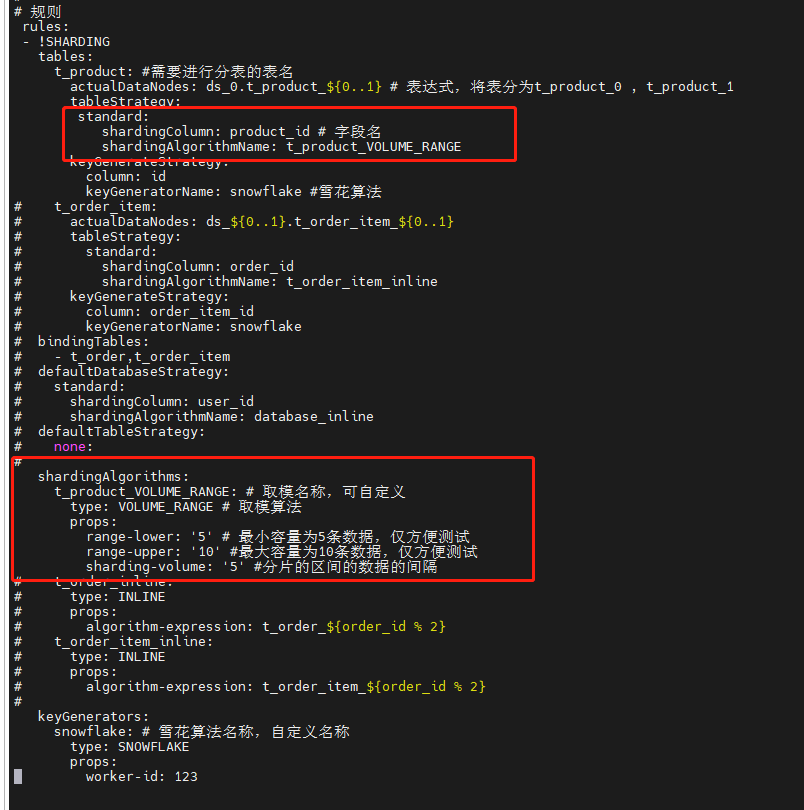
一、修改配置文件config-sharding.yaml,并重启服务
#

# Licensed to the Apache Software Foundation (ASF) under one or more

# contributor license agreements.  See the NOTICE file distributed with

# this work for additional information regarding copyright ownership.

# The ASF licenses this file to You under the Apache License, Version 2.0

# (the "License"); you may not use this file except in compliance with

# the License.  You may obtain a copy of the License at

#

#     http://www.apache.org/licenses/LICENSE-2.0

#

# Unless required by applicable law or agreed to in writing, software

# distributed under the License is distributed on an "AS IS" BASIS,

# WITHOUT WARRANTIES OR CONDITIONS OF ANY KIND, either express or implied.

# See the License for the specific language governing permissions and

# limitations under the License.

#

######################################################################################################

#

# Here you can configure the rules for the proxy.

# This example is configuration of sharding rule.

#

######################################################################################################

#

#schemaName: sharding_db

#

#dataSources:

#  ds_0:

#    url: jdbc:postgresql://127.0.0.1:5432/demo_ds_0

#    username: postgres

#    password: postgres

#    connectionTimeoutMilliseconds: 30000

#    idleTimeoutMilliseconds: 60000

#    maxLifetimeMilliseconds: 1800000

#    maxPoolSize: 50

#    minPoolSize: 1

#  ds_1:

#    url: jdbc:postgresql://127.0.0.1:5432/demo_ds_1

#    username: postgres

#    password: postgres

#    connectionTimeoutMilliseconds: 30000

#    idleTimeoutMilliseconds: 60000

#    maxLifetimeMilliseconds: 1800000

#    maxPoolSize: 50

#    minPoolSize: 1

#

#rules:

#- !SHARDING

#  tables:

#    t_order:

#      actualDataNodes: ds_${0..1}.t_order_${0..1}

#      tableStrategy:

#        standard:

#          shardingColumn: order_id

#          shardingAlgorithmName: t_order_inline

#      keyGenerateStrategy:

#          column: order_id

#          keyGeneratorName: snowflake

#    t_order_item:

#      actualDataNodes: ds_${0..1}.t_order_item_${0..1}

#      tableStrategy:

#        standard:

#          shardingColumn: order_id

#          shardingAlgorithmName: t_order_item_inline

#      keyGenerateStrategy:

#        column: order_item_id

#        keyGeneratorName: snowflake

#  bindingTables:

#    - t_order,t_order_item

#  defaultDatabaseStrategy:

#    standard:

#      shardingColumn: user_id

#      shardingAlgorithmName: database_inline

#  defaultTableStrategy:

#    none:

#

#  shardingAlgorithms:

#    database_inline:

#      type: INLINE

#      props:

#        algorithm-expression: ds_${user_id % 2}

#    t_order_inline:

#      type: INLINE

#      props:

#        algorithm-expression: t_order_${order_id % 2}

#    t_order_item_inline:

#      type: INLINE

#      props:

#        algorithm-expression: t_order_item_${order_id % 2}

#

#  keyGenerators:

#    snowflake:

#      type: SNOWFLAKE

#      props:

#        worker-id: 123

######################################################################################################

#

# If you want to connect to MySQL, you should manually copy MySQL driver to lib directory.

#

######################################################################################################

# 连接mysql所使用的数据库名

 schemaName: MyDb

 dataSources:

  ds_0:

    url: jdbc:mysql://127.0.0.1:3306/MyDb?serverTimezone=UTC&useSSL=false

    username: root # 数据库用户名

    password: mysql123  # 登录密码

    connectionTimeoutMilliseconds: 30000

    idleTimeoutMilliseconds: 60000

    maxLifetimeMilliseconds: 1800000

    maxPoolSize: 50

    minPoolSize: 1

#  ds_1:

#    url: jdbc:mysql://127.0.0.1:3306/demo_ds_1?serverTimezone=UTC&useSSL=false

#    username: root

#    password:

#    connectionTimeoutMilliseconds: 30000

#    idleTimeoutMilliseconds: 60000

#    maxLifetimeMilliseconds: 1800000

#    maxPoolSize: 50

#    minPoolSize: 1

#

# 规则

 rules:

 - !SHARDING

   tables:

     t_product: #需要进行分表的表名

       actualDataNodes: ds_0.t_product_${0..1} # 表达式,将表分为t_product_0 , t_product_1

       tableStrategy:

        standard:

           shardingColumn: product_id # 字段名

           shardingAlgorithmName: t_product_VOLUME_RANGE

       keyGenerateStrategy:

         column: id

         keyGeneratorName: snowflake #雪花算法

#    t_order_item:

#      actualDataNodes: ds_${0..1}.t_order_item_${0..1}

#      tableStrategy:

#        standard:

#          shardingColumn: order_id

#          shardingAlgorithmName: t_order_item_inline

#      keyGenerateStrategy:

#        column: order_item_id

#        keyGeneratorName: snowflake

#  bindingTables:

#    - t_order,t_order_item

#  defaultDatabaseStrategy:

#    standard:

#      shardingColumn: user_id

#      shardingAlgorithmName: database_inline

#  defaultTableStrategy:

#    none:

#

   shardingAlgorithms:

     t_product_VOLUME_RANGE: # 取模名称,可自定义

       type: VOLUME_RANGE # 取模算法

       props:

         range-lower: '5' # 最小容量为5条数据,仅方便测试

         range-upper: '10' #最大容量为10条数据,仅方便测试

         sharding-volume: '5' #分片的区间的数据的间隔

#    t_order_inline:

#      type: INLINE

#      props:

#        algorithm-expression: t_order_${order_id % 2}

#    t_order_item_inline:

#      type: INLINE

#      props:

#        algorithm-expression: t_order_item_${order_id % 2}

#

   keyGenerators:

     snowflake: # 雪花算法名称,自定义名称

       type: SNOWFLAKE

       props:

         worker-id: 123
二、数据准备
-- 创建表

SET NAMES utf8mb4;

SET FOREIGN_KEY_CHECKS = 0;

-- ----------------------------

-- Table structure for t_product_0

-- ----------------------------

DROP TABLE IF EXISTS `t_product`;

CREATE TABLE `t_product_0`  (

  `id` varchar(225) CHARACTER SET utf8mb4 COLLATE utf8mb4_general_ci NOT NULL,

  `product_id` int(11) NOT NULL,

  `product_name` varchar(255) CHARACTER SET utf8mb4 COLLATE utf8mb4_general_ci NOT NULL,

  PRIMARY KEY (`id`, `product_id`) USING BTREE

) ENGINE = InnoDB CHARACTER SET = utf8mb4 COLLATE = utf8mb4_general_ci ROW_FORMAT = Dynamic;

SET FOREIGN_KEY_CHECKS = 1;

-- 插入表数据

INSERT INTO t_product(product_id,product_name) VALUES(1,'one');

INSERT INTO t_product(product_id,product_name) VALUES(2,'two');

INSERT INTO t_product(product_id,product_name) VALUES(3,'three');

INSERT INTO t_product(product_id,product_name) VALUES(4,'four');

INSERT INTO t_product(product_id,product_name) VALUES(5,'five');

INSERT INTO t_product(product_id,product_name) VALUES(6,'six');

INSERT INTO t_product(product_id,product_name) VALUES(7,'seven');
三、查看数据
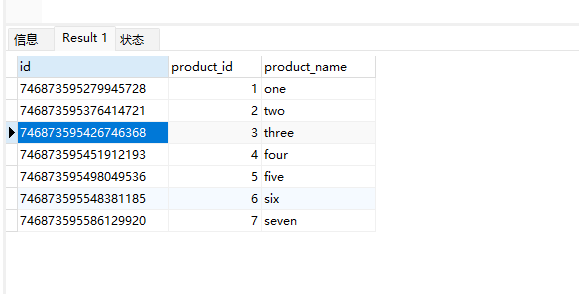
1、查看shardingsphere中间件t_product表数据
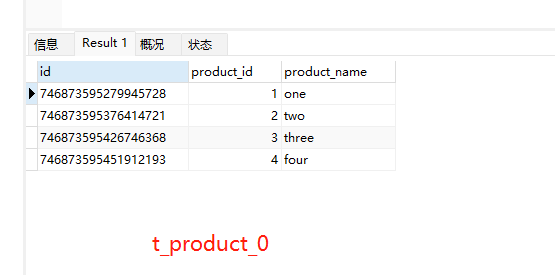
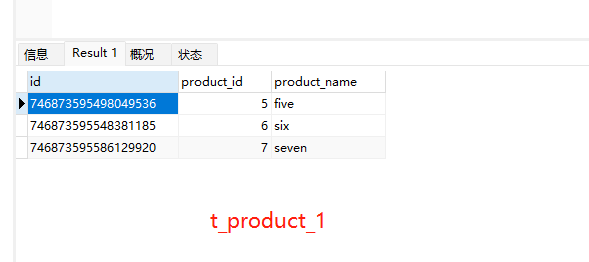
2、查看t_product_0、t_product_1表数据,同时对数据进行了分表存储(因为配置文件中有做分表和雪花id生成配置)
ShardingSphere-proxy-5.0.0容量范围分片的实现(五)的更多相关文章
- Apache ShardingSphere 5.0.0 内核优化及升级指南
经过近两年时间的优化和打磨,Apache ShardingSphere 5.0.0 GA 版终于在本月正式发布,相比于 4.1.1 GA 版,5.0.0 GA 版在内核层面进行了大量的优化.首先,基于 ...
- ShardingSphere-proxy-5.0.0分布式哈希取模分片实现(四)
一.说明 主要是对字符串的字段进行hash取模 二.修改配置文件config-sharding.yaml,并重启服务 # # Licensed to the Apache Software Found ...
- 重磅|Apache ShardingSphere 5.0.0 即将正式发布
Apache ShardingSphere 5.0.0 GA 版在经历 5.0.0-alpha 及 5.0.0-beta 接近两年时间的研发和打磨,终于将在 11 月份与大家正式见面! 11 月 10 ...
- Docker 在转发端口时的这个错误Error starting userland proxy: mkdir /port/tcp:0.0.0.0:3306:tcp:172.17.0.2:3306: input/output error.
from:https://www.v2ex.com/amp/t/463719 系统环境是 Windows 10 Pro,Docker 版本 18.03.1-ce,电脑开机之后第一次运行 docker ...
- ShardingSphere-proxy-5.0.0建立mysql读写分离的连接(六)
一.修改配置文件config-sharding.yaml,并重启服务 # # Licensed to the Apache Software Foundation (ASF) under one or ...
- ShardingSphere-proxy-5.0.0分布式雪花ID生成(三)
一.目的 保证在分库分表中每条数据具有唯一性 二.修改配置文件config-sharding.yaml,并重启服务 # # Licensed to the Apache Software Founda ...
- ShardingSphere-proxy-5.0.0企业级分库分表、读写分离、负载均衡、雪花算法、取模算法整合(八)
一.简要说明 以下配置实现了: 1.分库分表 2.每一个分库的读写分离 3.读库负载均衡算法 4.雪花算法,生成唯一id 5.字段取模 二.配置项 # # Licensed to the Apache ...
- Redis 3.0.0 集群部署
简述: 1.0.1:redis cluster的现状 目前redis支持的cluster特性 1):节点自动发现 2):slave->master 选举,集群容错 3):Hot reshardi ...
- sharding-jdbc5.0.0分表实践
本文基于shardingsphere-jdbc-core-spring-boot-starter 5.0.0,请注意不同版本的sharding-jdbc配置可能有不一样的地方,本文不一定适用于其它版本 ...
随机推荐
- Python操作数据库类 Oracle、Sqlserver、PostgreSQL
我在工作中经常使用Python,特点很明显,轻量,效率还不错,尤其在维护或者自动化方面. 下面是我使用到的访问数据库(Oracle.Sqlserver.PostgreSQL)的公共类. 一.Oracl ...
- 前端CSS浮动、定位、溢出、z-index、透明度
一.浮动float 在 CSS 中,任何元素都可以浮动. 浮动元素会生成一个块级框,而不论它本身是何种元素. 关于浮动的两个特点: 浮动的框可以向左或向右移动,直到它的外边缘碰到包含框或另一个浮动框的 ...
- Postman大势已去
作为一名前端,日常开发过程中除了写业务代码,前后端联调更是重要的一环.但这一环却往往是整个开发中最繁琐也最累人的一环.任谁都想早点下班,然而提升联调效率并不是个纯技术相关的问题,而是需要有良好工作流程 ...
- 安卓记账本开发学习day2
今天遇到了xml文件报错,Wrong orientation? No orientation specified, and the default is horizontal, yet this la ...
- mysql的半同步复制
1. binlog dump线程何时向从库发送binlog mysql在server层进行了组提交之后,为了提高并行度,将提交阶段分为了 flush sync commit三个阶段,根据sync_bi ...
- JavaScript基础第05天笔记
JavaScript基础第05天笔记 1 - 作用域 1.1 作用域概述 通常来说,一段程序代码中所用到的名字并不总是有效和可用的,而限定这个名字的可用性的代码范围就是这个名字的作用域.作用域的使用提 ...
- svelte组件:svelte3自定义桌面PC端对话框组件svelte-layer
基于Svelte3.x开发pc网页版自定义弹窗组件svelteLayer. svelte-layer:基于svelte.js轻量级多功能pc桌面端对话框组件.支持多种弹窗类型.30+参数随意组合配置, ...
- 使用钡铼BL102网关连接西门子S7-1200PLC 以及mosquitto服务器方法
一.软硬件描述 西门子PLC S7-1215 钡铼BL102网关 mosquitto MQTT服务器(腾讯云上搭建) 可以上网的路由器一套 二.需要使用的软件. 西门子Portal v15.1 (西门 ...
- 事务的隔离级别与MVCC
提到数据库,你多半会联想到事务,进而还可能想起曾经背得滚瓜乱熟的ACID,不知道你有没有想过这个问题,事务有原子性.隔离性.一致性和持久性四大特性,为什么偏偏给隔离性设置了级别? 一切还得从事务说起. ...
- 02. 树莓派初始配置——安装rz命令
安装rz命令 如果你的ssh工具不带xftp文件上传功能,则需要安装使用ZMODEM协议的rz.sz命令. 1. 用root权限登录 2. 创建下载的目录地址(不创建也行,创建后方便以后文件管理) m ...