
PS滤镜— —波浪效果
    clc;

    clear all;

    close all;

    addpath('E:\PhotoShop Algortihm\Image Processing\PS Algorithm');

    I=imread('4.jpg');

    I=double(I);

    Image=I/255;

    xAmplitude = 25.0;

    yAmplitude = 25.0;

    xWavelength =32.0

    yWavelength = 32.0;

    SINE=1;

    SAWTOOTH=2;

    TRIANGLE=3;

    NOISE=4;

    [height, width, depth]=size(Image);

    Image_new=Image;

    wavetype=1;

    [ind, g1, g2, g3]=init_arr();

    for ii=1:height

        for jj=1:width

             nx = ii / xWavelength;

             ny = jj / yWavelength;

             switch wavetype

                 case 1

                     fx=sin(nx);

                     fy=sin(ny);

                 case 2

                     fx=mod(nx, 1);

                     fy=mod(ny, 1);

                 case 3

                     fx=triangle(nx);

                     fy=triangle(ny);

                 case 4

                     fx=Noise1(nx, ind, g1);

                     fy=Noise1(ny, ind, g1);

             end

             x=jj+xAmplitude * fx;

             y=ii+yAmplitude * fy;

             % %         if (x<=1)     x=1;  end

    % %         if (x>=width)   x=width-1; end;

    % %         if (y>=height)  y=height-1; end;

    % %         if (y<1)  y=1;     end;

    % %

            if (x<=1)     continue;  end

            if (x>=width)   continue; end;

            if (y>=height)  continue; end;

            if (y<1)  continue;     end;

            x1=floor(x);

            y1=floor(y);

            p=x-x1;

            q=y-y1;

            Image_new(ii,jj,:)=(1-p)*(1-q)*Image(y1,x1,:)+p*(1-q)*Image(y1,x1+1,:)...

                +q*(1-p)*Image(y1+1,x1,:)+p*q*Image(y1+1,x1+1,:);

        end

    end

    imshow(Image_new)

imwrite(Image_new, 'out.jpg');参考来源:http://www.jhlabs.com/index.html
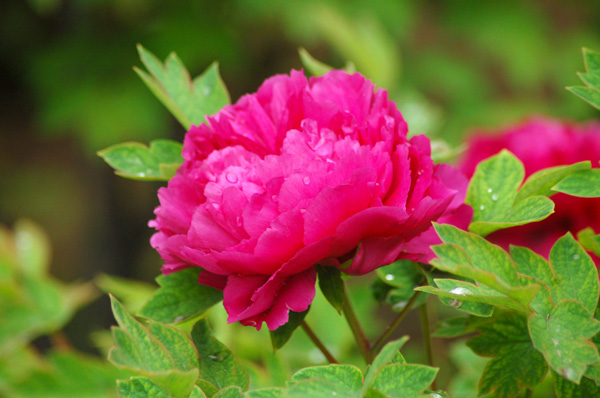
原图:
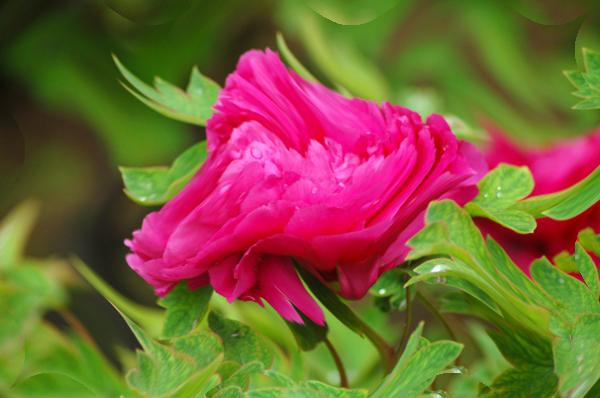
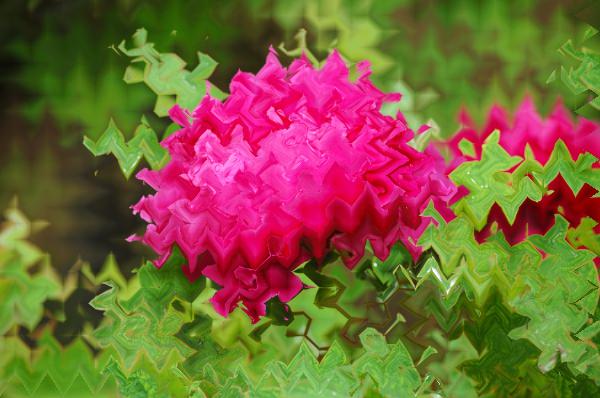
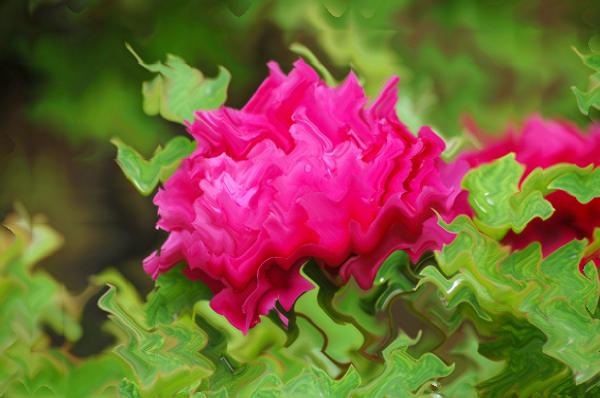
效果图:

PS滤镜— —波浪效果的更多相关文章
- Python: PS 滤镜--波浪特效
本文用 Python 实现 PS 滤镜的波浪特效,具体效果可以参考之前的博客 http://blog.csdn.net/matrix_space/article/details/42215221 im ...
- PS 滤镜——波浪 wave
%%% Wave %%% 波浪效果 clc; clear all; close all; addpath('E:\PhotoShop Algortihm\Image Processing\PS Alg ...
- Python: PS 滤镜--万花筒效果
本文用 Python 实现 PS 的一种滤镜效果,称为万花筒.也是对图像做各种扭曲变换,最后图像呈现的效果就像从万花筒中看到的一样: 图像的效果可以参考之前的博客: http://blog.csdn. ...
- PS 滤镜— —挤压效果
clc; clear all; close all; addpath('E:\PhotoShop Algortihm\Image Processing\PS Algorithm'); I=imread ...
- PS 滤镜— —Marble 效果
clc; clear all; close all; addpath('E:\PhotoShop Algortihm\Image Processing\PS Algorithm'); I=imread ...
- PS 滤镜— — 万花筒效果
clc; clear all; close all; addpath('E:\PhotoShop Algortihm\Image Processing\PS Algorithm'); I=imread ...
- PS 滤镜— —水波效果
clc; clear all; close all; addpath('E:\PhotoShop Algortihm\Image Processing\PS Algorithm'); I=imread ...
- PS 滤镜— — sparkle 效果
clc; clear all; close all; addpath('E:\PhotoShop Algortihm\Image Processing\PS Algorithm'); I=imread ...
- PS 滤镜— —球面化效果
clc; clear all; close all; addpath('E:\PhotoShop Algortihm\Image Processing\PS Algorithm'); I=imread ...
随机推荐
- 转:HDMI介绍与流程
HDMI介绍与流程 HDMI,全称为(High Definition Multimedia Interface)高清多媒体接口,主要用于传输高清音视频信号. HDMI引脚: HDMI有A,B,C, ...
- PHP session回收机制(转)
由于PHP的工作机制,它并没有一个daemon线程,来定时地扫描session信息并判断其是否失效.当一个有效请求发生时,PHP会根据全局变量 session.gc_probability/sessi ...
- Shell脚本笔记 1
函数别名 设置别名 alias name="command" alias ll="ls -laS" 取消别名 unalias name 求取数学表达式 valu ...
- 【强网杯2018】Gamebox
参考: https://www.cnblogs.com/hac425/p/9416787.html http://tacxingxing.com/2018/03/28/2018qwb/ 事后复盘pwn ...
- 2个YUV视频拼接技术
http://blog.csdn.net/huahuahailang/article/details/9040847 2个YUV视频拼接技术 http://zhongcong386.blog.163. ...
- log4j入门及常用配置
<pre class="java" name="code">import org.apache.log4j.BasicConfigurator; ...
- HDU 2112 HDU Today(STL MAP + Djistra)
题目链接:HDU Today 立即集训要開始,抓紧时间练练手,最短路的基础题,第一次用STL的map 题目非常水,可是错了N遍.手贱了.本题不优点理的就是把地名转化为数字 #include <i ...
- YARN/MRv2 中基本术语介绍
YARN/MRv2是下一代MapReduce框架(见Hadoop-0.23.0),该框架完全不同于当前的MapReduce框架,它在扩展性,容错性和通用性等方面更出色,据统计,Yarn有超过15000 ...
- 未加载Microsoft.SqlServer.management.sdk.sfc version......
这个问题卡了我好久,于是决定记录下来,我这里缺失的是Microsoft.SqlServer.management.sdk.sfc version 12.0.0,当然你也可能后面是11开头的, 这个是由 ...
- Linux 文件系统IO性能优化
对于LINUX SA来说,服务器性能是需要我们特别关注的,包括CPU.IO.内存等等系统的优化变得至关重要,这里转载一篇非常不错的关于IO优化的文章,供大家参考和学习: 一.关于页面缓存的信息,可以用 ...