
abp(net core)+easyui+efcore实现仓储管理系统——EasyUI之货物管理一 (十九)
abp(net core)+easyui+efcore实现仓储管理系统目录
abp(net core)+easyui+efcore实现仓储管理系统——ABP总体介绍(一)
abp(net core)+easyui+efcore实现仓储管理系统——解决方案介绍(二)
abp(net core)+easyui+efcore实现仓储管理系统——领域层创建实体(三)
abp(net core)+easyui+efcore实现仓储管理系统——定义仓储并实现 (四)
abp(net core)+easyui+efcore实现仓储管理系统——创建应用服务(五)
abp(net core)+easyui+efcore实现仓储管理系统——展现层实现增删改查之控制器(六)
abp(net core)+easyui+efcore实现仓储管理系统——展现层实现增删改查之列表视图(七)
abp(net core)+easyui+efcore实现仓储管理系统——展现层实现增删改查之增删改视图(八)
abp(net core)+easyui+efcore实现仓储管理系统——展现层实现增删改查之菜单与测试(九)
abp(net core)+easyui+efcore实现仓储管理系统——多语言(十)
abp(net core)+easyui+efcore实现仓储管理系统——使用 WEBAPI实现CURD (十一)
abp(net core)+easyui+efcore实现仓储管理系统——使用 WEBAPI实现CURD (十二)
abp(net core)+easyui+efcore实现仓储管理系统——使用 WEBAPI实现CURD (十三)
abp(net core)+easyui+efcore实现仓储管理系统——使用 WEBAPI实现CURD (十四)
abp(net core)+easyui+efcore实现仓储管理系统——使用 WEBAPI实现CURD (十五)
abp(net core)+easyui+efcore实现仓储管理系统——菜单-上 (十六)
abp(net core)+easyui+efcore实现仓储管理系统——菜单-下(十七)
abp(net core)+easyui+efcore实现仓储管理系统——EasyUI前端页面框架 (十八)
通过上一篇(abp(net core)+easyui+efcore实现仓储管理系统——EasyUI前端页面框架 (十八))文章,我们已经将EasyUI添加到我们的项目中了。下面我们通过EasyUI做为前端页面的UI控件来展现一个货物信息管理的前端功能,并使用创建相应的实体类,服务类等来实现后台功能。
四、创建Cargo实体
1. 在Visual Studio 2017的“解决方案资源管理器”中,右键单击“ABP.TPLMS.Core”项目的“Entitys”文件夹,在弹出菜单中选择“添加” >
> “类”。 将类命名为 Cargo,然后选择“添加”。
2.创建Cargo类继承自Entity<int>,通过实现审计模块中的IHasCreationTime来实现保存创建时间。代码如下:
using Abp.Domain.Entities;

using Abp.Domain.Entities.Auditing;

using System;

using System.Collections.Generic;

using System.ComponentModel.DataAnnotations;

using System.ComponentModel.DataAnnotations.Schema;

using System.Text;

namespace ABP.TPLMS.Entitys

{

    public class Cargo : Entity<int>, IHasCreationTime

    {

        public Cargo()

        {

            this.Id = ;

            this.SupplierId = ;

            this.CargoCode = string.Empty;

            this.CargoName = string.Empty;

            this.Brand = string.Empty;

            this.Country = string.Empty;

            this.CreationTime = DateTime.Now;

            this.Curr = string.Empty;

            this.GrossWt = ;

            this.Height = ;

            this.HSCode = string.Empty;

            this.Length = ;

            this.MaxNum = ;

            this.MinNum = ;

            this.NetWt = ;

            this.Package = string.Empty;

            this.Price = ;

            this.Remark = string.Empty;

            this.Spcf = string.Empty;

            this.Unit = string.Empty;

            this.UpdateTime = DateTime.Now;

            this.UpdOper = string.Empty;

            this.Vol = ;

            this.Width = ;

        }

        public int SupplierId { get; set; }

        [StringLength()]

        public string CargoCode { get; set; }

        [StringLength()]

        public string HSCode { get; set; }

        [StringLength()]

        public string CargoName { get; set; }

        [StringLength()]

        public string Spcf { get; set; }

        public string Unit { get; set; }

        public string Country { get; set; }

        public string Brand { get; set; }

        public string Curr { get; set; }

        public string Package { get; set; }

        public decimal Length { get; set; }

        public decimal Width { get; set; }

        public decimal Height { get; set; }

        public decimal Vol { get; set; }

        public decimal MinNum { get; set; }

        public decimal MaxNum { get; set; }

        public decimal Price { get; set; }

        public decimal GrossWt { get; set; }

         public decimal NetWt { get; set; }

        public string Remark { get; set; }

        public DateTime CreationTime { get; set; }

        public DateTime UpdateTime { get; set; }

        public string UpdOper { get; set; }

    }

}
3.定义好实体之后,我们去“ABP.TPLMS.EntityFrameworkCore”项目中的“TPLMSDbContext”类中定义实体对应的DbSet,以应用Code First 数据迁移。添加以下代码
using Microsoft.EntityFrameworkCore;

using Abp.Zero.EntityFrameworkCore;

using ABP.TPLMS.Authorization.Roles;

using ABP.TPLMS.Authorization.Users;

using ABP.TPLMS.MultiTenancy;

using ABP.TPLMS.Entitys;

namespace ABP.TPLMS.EntityFrameworkCore

{

    public class TPLMSDbContext : AbpZeroDbContext<Tenant, Role, User, TPLMSDbContext>

    {

        /* Define a DbSet for each entity of the application */

        public TPLMSDbContext(DbContextOptions<TPLMSDbContext> options)

            : base(options)

        {

        }

        public DbSet<Module> Modules { get; set; }

        public DbSet<Supplier> Suppliers { get; set; }

  public DbSet<Cargo> Cargos { get; set; }

    }

}
4.从菜单中选择“工具->NuGet包管理器器—>程序包管理器控制台”菜单。
5. 在PMC中,默认项目选择EntityframeworkCore对应的项目后。输入以下命令:Add-Migration AddEntityCargo,创建迁移。
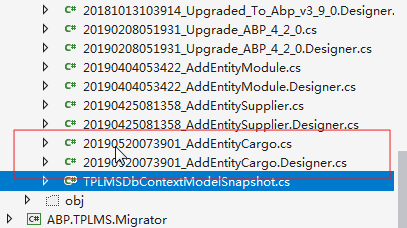
6. 在上面的命令执行完毕之后,创建成功后,会在Migrations文件夹下创建时间_AddEntityCargo格式的类文件,这些代码是基于DbContext指定的模型。如下图。
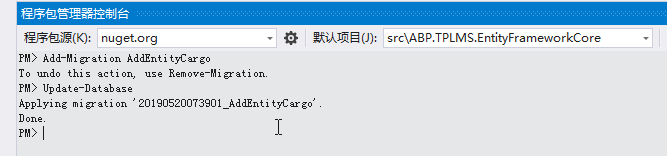
7.在程序包管理器控制台,输入Update-Database,回车执行迁移。执行成功后,如下图。
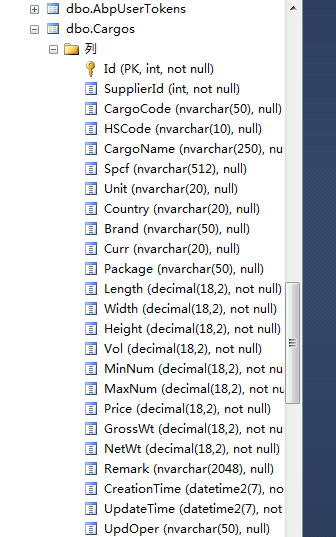
8. 在SQL Server Management Studio中查看数据库,Cargos表创建成功。
五、定义应用服务接口需要用到的分页类
为了在进行查询时使用, PagedCargoResultRequestDto被用来将货物查询条件的数据传递到给应用层.
1. 在Visual Studio 2017的“解决方案资源管理器”中,右键单击“ABP.TPLMS.Application”项目,在弹出菜单中选择“添加” > “新建文件夹”,并重命名为“Cargos”
2. 使用鼠标右键单击我们刚才创建的“Cargos”文件夹,在弹出菜单中选择“添加” > “新建文件夹”,并重命名为“Dto”。
3.右键单击“Dto”文件夹,然后选择“添加” > “类”。 将类命名为 Paged CargoResultRequestDto,然后选择“添加”。代码如下。
using Abp.Application.Services.Dto;

using System;

using System.Collections.Generic;

using System.Text;

namespace ABP.TPLMS.Cargos.Dto

{

    public class PagedCargoResultRequestDto : PagedResultRequestDto

    {

        public string Keyword { get; set; }

    }

}
4.右键单击“Dto”文件夹,然后选择“添加” > “类”。 将类命名为 CargoDto,然后选择“添加”。代码如下。
using Abp.Application.Services.Dto;

using Abp.AutoMapper;

using ABP.TPLMS.Entitys;

using System;

using System.Collections.Generic;

using System.Text;

namespace ABP.TPLMS.Cargos.Dto

{

    [AutoMapFrom(typeof(Cargo))]

    public class CargoDto:EntityDto<int>

    {

        public int SupplierId { get; set; }

        public string CargoCode { get; set; }

        public string HSCode { get; set; }

        public string CargoName { get; set; }

        public string Spcf { get; set; }

        public string Unit { get; set; }

        public string Country { get; set; }

        public string Brand { get; set; }

        public string Curr { get; set; }

        public string Package { get; set; }

        public decimal Length { get; set; }

        public decimal Width { get; set; }

        public decimal Height { get; set; }

       public decimal Vol { get; set; }

         public decimal MinNum { get; set; }

        public decimal MaxNum { get; set; }

        public decimal Price { get; set; }

        public decimal GrossWt { get; set; }

        public decimal NetWt { get; set; }

        public string Remark { get; set; }

        public DateTime CreationTime { get; set; }

        public DateTime UpdateTime { get; set; }

        public string UpdOper { get; set; }

    }

}
5.右键单击“Dto”文件夹,然后选择“添加” > “类”。 将类命名为 CreateUpdateCargoDto,然后选择“添加”。代码如下。
using Abp.Application.Services.Dto;

using Abp.AutoMapper;

using ABP.TPLMS.Entitys;

using System;

using System.Collections.Generic;

using System.ComponentModel.DataAnnotations;

using System.Text;

namespace ABP.TPLMS.Cargos.Dto

{

    [AutoMapTo(typeof(Cargo))]

    public class CreateUpdateCargoDto : EntityDto<int>

    {

        public int SupplierId { get; set; }

        [StringLength()]

        public string CargoCode { get; set; }

        [StringLength()]

        public string HSCode { get; set; }

        [StringLength()]

        public string CargoName { get; set; }

        [StringLength()]

        public string Spcf { get; set; }

        [StringLength()]

        public string Unit { get; set; }

        [StringLength()]

        public string Country { get; set; }

        [StringLength()]

        public string Brand { get; set; }

        [StringLength()]

        public string Curr { get; set; }

        [StringLength()]

        public string Package { get; set; }

        public decimal Length { get; set; }

        public decimal Width { get; set; }

        public decimal Height { get; set; }

        public decimal Vol { get; set; }

        public decimal MinNum { get; set; }

        public decimal MaxNum { get; set; }

        public decimal Price { get; set; }

        public decimal GrossWt { get; set; }

        public decimal NetWt { get; set; }

        [StringLength()]

        public string Remark { get; set; }

        public DateTime CreationTime { get; set; }

        public DateTime UpdateTime { get; set; }

        [StringLength()]

        public string UpdOper { get; set; }

    }

}
abp(net core)+easyui+efcore实现仓储管理系统——EasyUI之货物管理一 (十九)的更多相关文章
- abp(net core)+easyui+efcore实现仓储管理系统——EasyUI之货物管理二 (二十)
abp(net core)+easyui+efcore实现仓储管理系统目录 abp(net core)+easyui+efcore实现仓储管理系统——ABP总体介绍(一) abp(net core)+ ...
- abp(net core)+easyui+efcore实现仓储管理系统——EasyUI之货物管理三 (二十一)
abp(net core)+easyui+efcore实现仓储管理系统目录 abp(net core)+easyui+efcore实现仓储管理系统——ABP总体介绍(一) abp(net core)+ ...
- abp(net core)+easyui+efcore实现仓储管理系统——EasyUI之货物管理四 (二十二)
abp(net core)+easyui+efcore实现仓储管理系统目录 abp(net core)+easyui+efcore实现仓储管理系统——ABP总体介绍(一) abp(net core)+ ...
- abp(net core)+easyui+efcore实现仓储管理系统——EasyUI之货物管理五 (二十三)
abp(net core)+easyui+efcore实现仓储管理系统目录 abp(net core)+easyui+efcore实现仓储管理系统——ABP总体介绍(一) abp(net core)+ ...
- abp(net core)+easyui+efcore实现仓储管理系统——EasyUI之货物管理六(二十四)
abp(net core)+easyui+efcore实现仓储管理系统目录 abp(net core)+easyui+efcore实现仓储管理系统——ABP总体介绍(一) abp(net core)+ ...
- abp(net core)+easyui+efcore实现仓储管理系统——EasyUI之货物管理七(二十五)
abp(net core)+easyui+efcore实现仓储管理系统目录 abp(net core)+easyui+efcore实现仓储管理系统——ABP总体介绍(一) abp(net core)+ ...
- abp(net core)+easyui+efcore实现仓储管理系统——EasyUI之货物管理八(二十六)
abp(net core)+easyui+efcore实现仓储管理系统目录 abp(net core)+easyui+efcore实现仓储管理系统——ABP总体介绍(一) abp(net core)+ ...
- abp(net core)+easyui+efcore实现仓储管理系统——出库管理之二(五十)
abp(net core)+easyui+efcore实现仓储管理系统目录 abp(net core)+easyui+efcore实现仓储管理系统--ABP总体介绍(一) abp(net core)+ ...
- abp(net core)+easyui+efcore实现仓储管理系统——EasyUI前端页面框架 (十八)
目录 abp(net core)+easyui+efcore实现仓储管理系统——ABP总体介绍(一) abp(net core)+easyui+efcore实现仓储管理系统——解决方案介绍(二) ab ...
随机推荐
- DRF (Django REST framework) 中的Request 与 Response
DRF中的Request 与 Response 1. Request - REST framework 传入视图的request对象不再是Django默认的HttpRequest对象,而是REST f ...
- vulnhub-XXE靶机渗透
下载链接:https://download.vulnhub.com/xxe/XXE.zip 0x01 确定目标IP 目标网络模式默认为net模式,无需修改 使用arp-scan或者netdisco ...
- 编程题及解题思路(1,String)
题目描述 请实现一个算法,确定一个字符串的所有字符是否全都不同.这里我们要求不允许使用额外的存储结构. 给定一个string iniString,请返回一个bool值,True代表所有字符全都不同,F ...
- springBoot与Swagger2的整合
1.在项目pom文件中引入swagger2的jar包 <!-- swagger2开始 --> <dependency> <groupId>io.springfox& ...
- Scala 系列(九)—— 继承和特质
一.继承 1.1 Scala中的继承结构 Scala 中继承关系如下图: Any 是整个继承关系的根节点: AnyRef 包含 Scala Classes 和 Java Classes,等价于 Jav ...
- Elasticsearch核心技术(1)--- Docker容器中运行ES、Kibana、Cerebro
Docker容器中运行ES,Kibana,Cerebro和Logstash安装与数据导入ES 想加强ES有关的知识,看了阮一鸣老师讲的<Elasticsearch核心技术与实战>收获很大, ...
- Codeforces 396D
题意略. 思路: 很经典的逆序对计数问题. https://blog.csdn.net/v5zsq/article/details/79006684 这篇博客讲得很好. 当循环到n的时候,我们需要特殊 ...
- Spring框架介绍及使用(转载)
原文链接 Spring框架—控制反转(IOC) 1 Spring框架概述1.1 什么是SpringSpring是一个开源框架,Spring是于2003 年兴起的一个轻量级的Java 开发框架,由Rod ...
- 从入门到入土的JS 随笔day02 新手向
讲讲自增自减和循环语句及三元一次表达式: 一.自增自减实际上就是按照顺序来解读代码, 例如,a++;代表了a先进行了计算,运算完毕后,才进行增加: ++a呢,则是先进行了自增,值加一后再进行运算: 如 ...
- CodeForces 931E Game with String
Game with String 题意:有一个字符串,可以选择从第K位开始,将[K,len(s)-1]的字符都移到前面去,现在给你一个首字母,你可以再选择一位进行观察,然后猜测这个K的值是多少, 现在 ...