
《DSP using MATLAB》Problem 8.31

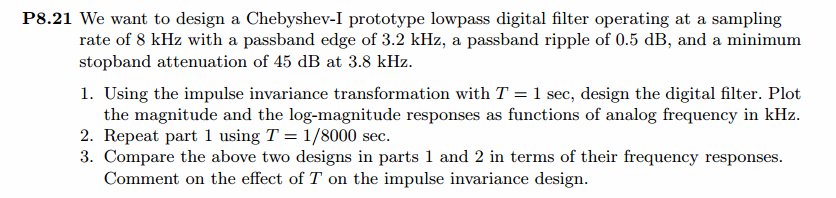
代码:
%% ------------------------------------------------------------------------

%%            Output Info about this m-file

fprintf('\n***********************************************************\n');

fprintf('        <DSP using MATLAB> Problem 8.31 \n\n');

banner();

%% ------------------------------------------------------------------------

Fp = 3.2;                    % analog passband freq in kHz   6.4 kpi

Fs = 3.8;                    % analog stopband freq in kHz   7.6 kpi

fs = 8;                      % sampling rate in kHz         16.0 kpi

% -------------------------------

%       Ω=(2/T)tan(ω/2)

%       ω=2*[atan(ΩT/2)]

% Digital Filter Specifications:

% -------------------------------

wp = 2*pi*Fp/fs                 % digital passband freq in rad     0.8pi

%wp = Fp;

ws = 2*pi*Fs/fs                 % digital stopband freq in rad     0.95pi

%ws = Fs;

Rp = 0.5;                        % passband ripple in dB

As = 45;                         % stopband attenuation in dB

Ripple = 10 ^ (-Rp/20)           % passband ripple in absolute

Attn = 10 ^ (-As/20)             % stopband attenuation in absolute

% Analog prototype specifications: Inverse Mapping for frequencies

T = 1/8000;                           % set T = 1

%fs = 1/T;

OmegaP = (2/T)*tan(wp/2)        % prototype passband freq      1.9593pi     15675pi

OmegaS = (2/T)*tan(ws/2)        % prototype stopband freq      8.089pi      64712pi

% Analog Chebyshev-1 Prototype Filter Calculation:

[cs, ds] = afd_chb1(OmegaP, OmegaS, Rp, As);

% Calculation of second-order sections:

fprintf('\n***** Cascade-form in s-plane: START *****\n');

[CS, BS, AS] = sdir2cas(cs, ds)

fprintf('\n***** Cascade-form in s-plane: END *****\n');

% Calculation of Frequency Response:

[db_s, mag_s, pha_s, ww_s] = freqs_m(cs, ds, 8*pi/T);

% --------------------------------------------------------------------

%   find exact band-edge frequencies for the given dB specifications

% --------------------------------------------------------------------

[diff_to_45dB, ind] = min(abs(db_s+45))

db_s(ind-3 : ind+3)                                     % magnitude response, dB

ww_s(ind)/(pi)          % analog frequency in kpi units

%ww_s(ind)/(2*pi)        % analog frequency in Hz units

[sA,index] = sort(abs(db_s+45));

AA_dB = db_s(index(1:8))

AB_rad = ww_s(index(1:8))/(pi)

AC_Hz = ww_s(index(1:8))/(2*pi)

% -------------------------------------------------------------------

% Calculation of Impulse Response:

[ha, x, t] = impulse(cs, ds);

% Impulse Invariance Transformation:

%[b, a] = imp_invr(cs, ds, T);

% Bilinear Transformation

[b, a] = bilinear(cs, ds, 1/T)

[C, B, A] = dir2cas(b, a)

% Calculation of Frequency Response:

[db, mag, pha, grd, ww] = freqz_m(b, a);

% --------------------------------------------------------------------

%   find exact band-edge frequencies for the given dB specifications

% --------------------------------------------------------------------

[diff_to_45dB, ind] = min(abs(db+45))

db(ind-3 : ind+3)                                     % magnitude response, dB

ww(ind)/(pi)

(2/T)*tan(ww(ind)/2)/pi

[sA,index] = sort(abs(db+45));

AA_dB = db(index(1:8))'

AB_rad = ww(index(1:8))'/pi

AC_Hz = (2/T)*tan(ww(index(1:8))'/2)/pi

% -------------------------------------------------------------------

%% -----------------------------------------------------------------

%%                             Plot

%% -----------------------------------------------------------------

figure('NumberTitle', 'off', 'Name', 'Problem 8.31 Analog Chebyshev-I lowpass')

set(gcf,'Color','white');

M = 1.0;                          % Omega max

subplot(2,2,1); plot(ww_s/pi, mag_s);  grid on; %axis([-10, 10, 0, 1.2]);

xlabel(' Analog frequency in \piHz units'); ylabel('|H|'); title('Magnitude in Absolute');

% set(gca, 'XTickMode', 'manual', 'XTick', [-8.089, -1.9593, 0, 1.9593, 8.089]);  % T = 1

set(gca, 'XTickMode', 'manual', 'XTick', [-80000, -64712, -15675, 0, 15675, 64712, 80000]);  % T = 1/8000

set(gca, 'YTickMode', 'manual', 'YTick', [0, 0.006, 0.94, 1.0, 1.5]);

subplot(2,2,2); plot(ww_s/pi, db_s);  grid on; %axis([0, M, -50, 10]);

xlabel('Analog frequency in \piHz units'); ylabel('Decibels'); title('Magnitude in dB ');

% set(gca, 'XTickMode', 'manual', 'XTick', [-8.089, -1.9593, 0, 1.9593, 5.7, 8.089]);        % T = 1

set(gca, 'XTickMode', 'manual', 'XTick', [-80000, -64712, -15675, 0, 15675, 45696, 64712, 80000]);  % T = 1/8000

set(gca, 'YTickMode', 'manual', 'YTick', [-45, -1, 0]);

set(gca,'YTickLabelMode','manual','YTickLabel',['45';' 1';' 0']);

subplot(2,2,3); plot(ww_s/pi, pha_s/pi);  grid on; %axis([-10, 10, -1.2, 1.2]);

xlabel('Analog frequency in \piHz nuits'); ylabel('radians'); title('Phase Response');

% set(gca, 'XTickMode', 'manual', 'XTick', [-8.089, -1.9593, 0, 1.9593, 8.089]);    % T = 1

set(gca, 'XTickMode', 'manual', 'XTick', [-80000, -64712, -15675, 0, 15675, 45696, 64712, 80000]);  % T = 1/8000

set(gca, 'YTickMode', 'manual', 'YTick', [-1:0.5:1]);

subplot(2,2,4); plot(t, ha); grid on; %axis([0, 30, -0.05, 0.25]);

xlabel('time in seconds'); ylabel('ha(t)'); title('Impulse Response');

figure('NumberTitle', 'off', 'Name', 'Problem 8.31 Digital Chebyshev-I lowpass')

set(gcf,'Color','white');

M = 2;                          % Omega max

subplot(2,2,1); plot(ww/pi, mag); axis([0, M, 0, 1.2]); grid on;

xlabel(' Digital frequency in \pi units'); ylabel('|H|'); title('Magnitude Response');

set(gca, 'XTickMode', 'manual', 'XTick', [0, 0.8, 0.95, M]);

set(gca, 'YTickMode', 'manual', 'YTick', [0, 0.0056, 0.9441, 1]);

subplot(2,2,2); plot(ww/pi, pha/pi); axis([0, M, -1.1, 1.1]); grid on;

xlabel('Digital frequency in \pi nuits'); ylabel('radians in \pi units'); title('Phase Response');

set(gca, 'XTickMode', 'manual', 'XTick', [0, 0.8, 0.95, M]);

set(gca, 'YTickMode', 'manual', 'YTick', [-1:1:1]);

subplot(2,2,3); plot(ww/pi, db); axis([0, M, -80, 10]); grid on;

xlabel('Digital frequency in \pi units'); ylabel('Decibels'); title('Magnitude in dB ');

set(gca, 'XTickMode', 'manual', 'XTick', [0, 0.8, 0.93, 0.95, M]);

set(gca, 'YTickMode', 'manual', 'YTick', [-70, -45, -1, 0]);

set(gca,'YTickLabelMode','manual','YTickLabel',['70';'45';' 1';' 0']);

subplot(2,2,4); plot(ww/pi, grd); grid on; %axis([0, M, 0, 35]);

xlabel('Digital frequency in \pi units'); ylabel('Samples'); title('Group Delay');

set(gca, 'XTickMode', 'manual', 'XTick', [0, 0.8, 0.95, M]);

%set(gca, 'YTickMode', 'manual', 'YTick', [0:5:35]);

figure('NumberTitle', 'off', 'Name', 'Problem 8.31 Pole-Zero Plot')

set(gcf,'Color','white');

zplane(b,a);

title(sprintf('Pole-Zero Plot'));

%pzplotz(b,a);

% ----------------------------------------------

%       Calculation of Impulse Response

% ----------------------------------------------

figure('NumberTitle', 'off', 'Name', 'Problem 8.31 Imp & Freq Response')

set(gcf,'Color','white');

t = [0: 0.000005 : 8*0.0001]; subplot(2,1,1); impulse(cs,ds,t); grid on;   % Impulse response of the analog filter

axis([0, 8*0.0001, -1.5*10000, 2.0*10000]);hold on

n = [0:1:7*0.0001/T]; hn = filter(b,a,impseq(0,0,7*0.0001/T));           % Impulse response of the digital filter

stem(n*T,hn); xlabel('time in sec'); title (sprintf('Impulse Responses T=%2d',T));

hold off

% Calculation of Frequency Response:

[dbs, mags, phas, wws] = freqs_m(cs, ds, 8*pi/T);             % Analog frequency   s-domain

[dbz, magz, phaz, grdz, wwz] = freqz_m(b, a);                  % Digital  z-domain

%% -----------------------------------------------------------------

%%                             Plot

%% -----------------------------------------------------------------

subplot(2,1,2); plot(wws/(2*pi), mags/T, 'b+', wwz/(2*pi*T), magz, 'r'); grid on;

xlabel('frequency in Hz'); title('Magnitude Responses'); ylabel('Magnitude');

text(-0.8,0.15,'Analog filter', 'Color', 'b'); text(0.6,1.05,'Digital filter', 'Color', 'r');

%% -----------------------------------------------------------------------

%%                   MATLAB cheby1 function

%% -----------------------------------------------------------------------

% Analog Prototype Order Calculations:

ep = sqrt(10^(Rp/10)-1);           % Passband Ripple Factor

A = 10^(As/20);                    % Stopband Attenuation Factor

OmegaC = OmegaP;                   % Analog Chebyshev-1 prototype cutoff freq

OmegaR = OmegaS/OmegaP;            % Analog prototype Transition ratio

g = sqrt(A*A-1)/ep;                % Analog prototype Intermediate cal

N  = ceil(log10(g+sqrt(g*g-1))/log10(OmegaR+sqrt(OmegaR*OmegaR-1)));

fprintf('\n\n ********** Chebyshev-I Filter Order = %3.0f  \n', N)

% Digital Chebyshev-1 Filter Design:

wn = wp/pi;                        % Digital Chebyshev-1 cutoff freq in pi units

[b, a] = cheby1(N, Rp, wn)

[C, B, A] = dir2cas(b, a)

% Calculation of Frequency Response:

[db, mag, pha, grd, ww] = freqz_m(b, a);

% --------------------------------------------------------------------

%   find exact band-edge frequencies for the given dB specifications

% --------------------------------------------------------------------

[diff_to_45dB, ind] = min(abs(db+45))

db(ind-3 : ind+3)                                     % magnitude response, dB

ww(ind)/(pi)

(2/T)*tan(ww(ind)/2)/pi

[sA,index] = sort(abs(db+45));

AA_dB = db(index(1:8))'

AB_rad = ww(index(1:8))'/pi

AC_Hz = (2/T)*tan(ww(index(1:8))'/2)/pi

% -------------------------------------------------------------------

%% -----------------------------------------------------------------

%%                             Plot

%% -----------------------------------------------------------------

figure('NumberTitle', 'off', 'Name', 'Problem 8.31 Digital Chebyshev-I lowpass by cheby1 function')

set(gcf,'Color','white');

M = 2;                          % Omega max

subplot(2,2,1); plot(ww/pi, mag); axis([0, M, 0, 1.2]); grid on;

xlabel('Digital frequency in \pi units'); ylabel('|H|'); title('Magnitude Response');

set(gca, 'XTickMode', 'manual', 'XTick', [0, 0.8, 0.95, M]);

set(gca, 'YTickMode', 'manual', 'YTick', [0, 0.0056, 0.9441, 1]);

subplot(2,2,2); plot(ww/pi, pha/pi); axis([0, M, -1.1, 1.1]); grid on;

xlabel('Digital frequency in \pi nuits'); ylabel('radians in \pi units'); title('Phase Response');

set(gca, 'XTickMode', 'manual', 'XTick', [0, 0.8, 0.95, M]);

set(gca, 'YTickMode', 'manual', 'YTick', [-1:1:1]);

subplot(2,2,3); plot(ww/pi, db); axis([0, M, -100, 10]); grid on;

xlabel('Digital frequency in \pi units'); ylabel('Decibels'); title('Magnitude in dB ');

set(gca, 'XTickMode', 'manual', 'XTick', [0, 0.8, 0.93, 0.95, M]);

set(gca, 'YTickMode', 'manual', 'YTick', [-60, -45, -1, 0]);

set(gca,'YTickLabelMode','manual','YTickLabel',['60';'45';' 1';' 0']);

subplot(2,2,4); plot(ww/pi, grd); grid on; %axis([0, M, 0, 35]);

xlabel('Digital frequency in \pi units'); ylabel('Samples'); title('Group Delay');

set(gca, 'XTickMode', 'manual', 'XTick', [0, 0.8, 0.95, M]);

%set(gca, 'YTickMode', 'manual', 'YTick', [0:5:35]);

figure('NumberTitle', 'off', 'Name', 'Problem 8.31 Pole-Zero Plot')

set(gcf,'Color','white');

zplane(b,a);

title(sprintf('Pole-Zero Plot'));

%pzplotz(b,a);

% ----------------------------------------------

%       Calculation of Impulse Response

% ----------------------------------------------

figure('NumberTitle', 'off', 'Name', 'Problem 8.31 Imp & Freq Response')

set(gcf,'Color','white');

t = [0: 0.000005 : 8*0.0001]; subplot(2,1,1); impulse(cs,ds,t); grid on;   % Impulse response of the analog filter

axis([0, 8*0.0001, -1.5*10000, 2.0*10000]);hold on

n = [0:1:7*0.0001/T]; hn = filter(b,a,impseq(0,0,7*0.0001/T));           % Impulse response of the digital filter

stem(n*T,hn); xlabel('time in sec'); title (sprintf('Impulse Responses T=%2d',T));

hold off

% Calculation of Frequency Response:

[dbs, mags, phas, wws] = freqs_m(cs, ds, 8*pi/T);             % Analog frequency   s-domain

[dbz, magz, phaz, grdz, wwz] = freqz_m(b, a);                  % Digital  z-domain

%% -----------------------------------------------------------------

%%                             Plot

%% -----------------------------------------------------------------

subplot(2,1,2); plot(wws/(2*pi), mags/T, 'b+', wwz/(2*pi*T), magz, 'r'); grid on;

xlabel('frequency in Hz'); title('Magnitude Responses'); ylabel('Magnitude');

text(-0.8,0.15,'Analog filter', 'Color', 'b'); text(0.6,1.05,'Digital filter', 'Color', 'r');
运行结果:
这里放上T=1/8000sec的结果。
模拟chebyshev-1型低通,幅度谱、相位谱和脉冲响应
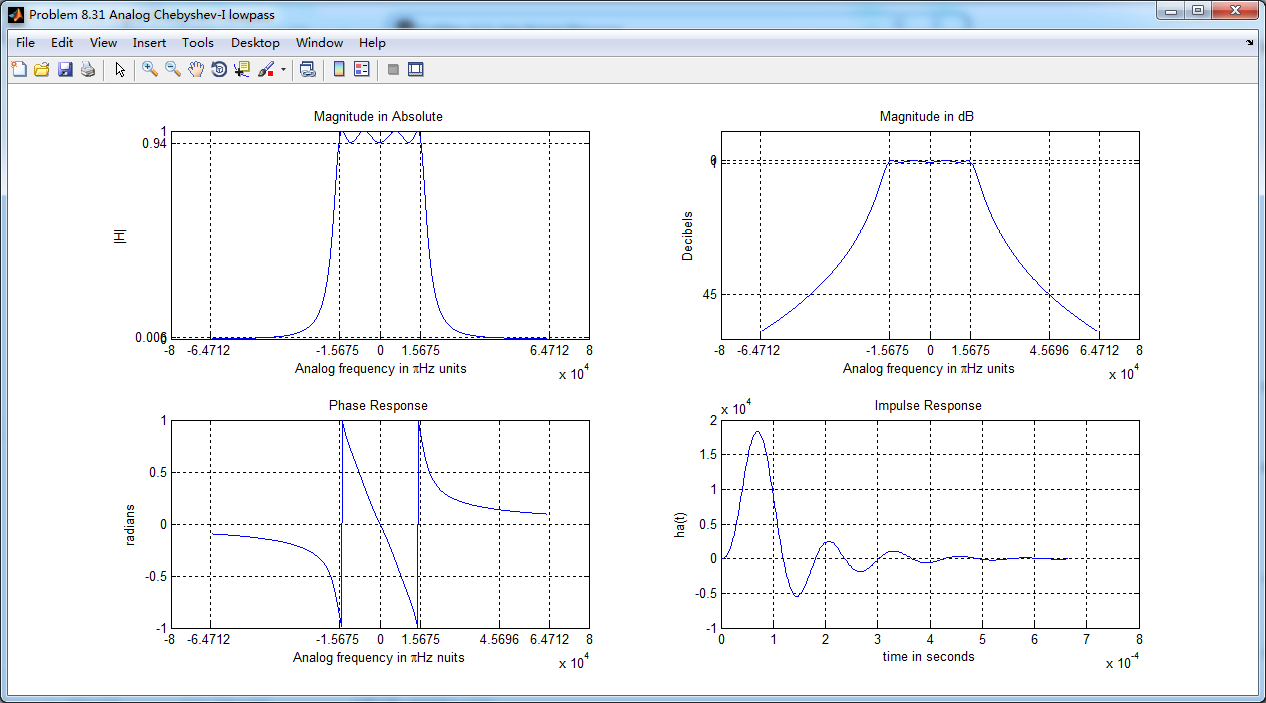
采用双线性变换法,得到数字chebyshev-1型低通滤波器,幅度谱、相位谱和群延迟响应
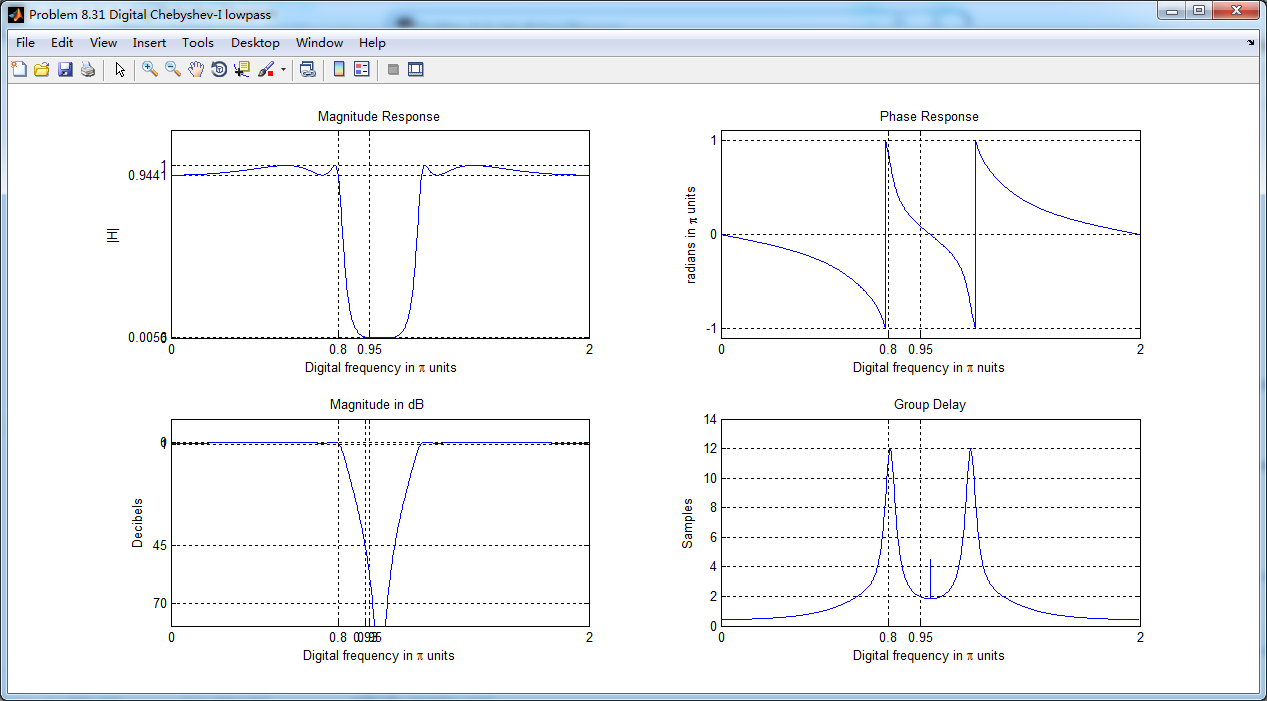
采用MATLAB自带cheby1函数得到的数字低通,其幅度谱、相位谱和群延迟

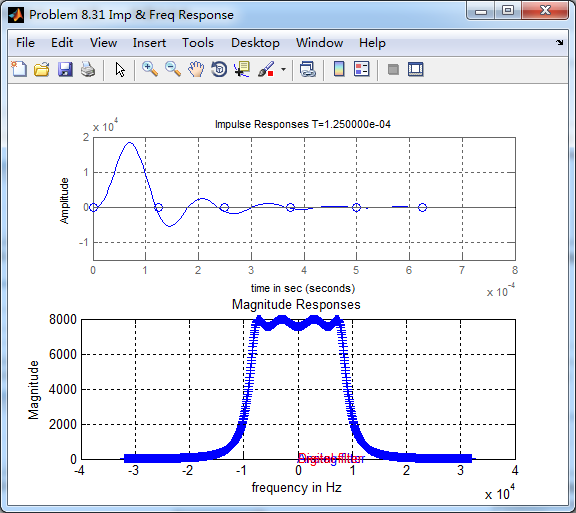
cheby1函数得到的数字低通,和相应的模拟原型的脉冲响应,二者形态不同。
《DSP using MATLAB》Problem 8.31的更多相关文章
- 《DSP using MATLAB》Problem 5.31
第3小题: 代码: %% ++++++++++++++++++++++++++++++++++++++++++++++++++++++++++++++++++++++++++++++++ %% Out ...
- 《DSP using MATLAB》Problem 7.31
参照Example7.27,因为0.1π=2πf1 f1=0.05,0.9π=2πf2 f2=0.45 所以0.1π≤ω≤0.9π,0.05≤|H|≤0.45 代码: %% +++++++++ ...
- 《DSP using MATLAB》Problem 7.26
注意:高通的线性相位FIR滤波器,不能是第2类,所以其长度必须为奇数.这里取M=31,过渡带里采样值抄书上的. 代码: %% +++++++++++++++++++++++++++++++++++++ ...
- 《DSP using MATLAB》Problem 7.25
代码: %% ++++++++++++++++++++++++++++++++++++++++++++++++++++++++++++++++++++++++++++++++ %% Output In ...
- 《DSP using MATLAB》Problem 7.24
又到清明时节,…… 注意:带阻滤波器不能用第2类线性相位滤波器实现,我们采用第1类,长度为基数,选M=61 代码: %% +++++++++++++++++++++++++++++++++++++++ ...
- 《DSP using MATLAB》Problem 6.12
代码: %% ++++++++++++++++++++++++++++++++++++++++++++++++++++++++++++++++++++++++++++++++ %% Output In ...
- 《DSP using MATLAB》Problem 6.10
代码: %% ++++++++++++++++++++++++++++++++++++++++++++++++++++++++++++++++++++++++++++++++ %% Output In ...
- 《DSP using MATLAB》Problem 2.7
1.代码: function [xe,xo,m] = evenodd_cv(x,n) % % Complex signal decomposition into even and odd parts ...
- 《DSP using MATLAB》Problem 2.6
1.代码 %% ------------------------------------------------------------------------ %% Output Info abou ...
随机推荐
- window下apache2.2配置多个tomcat使用不同二级域名,共用80端口
思路:分3步, 1,安装apache服务器httpd-2.2.25-win32-x86-no_ssl.msi,安装tomcat 2,配置tomcat默认访问的项目,配置apache服务器 3,测试 第 ...
- lds 文件说明
主要符号说明 OUTPUT_FORMAT(bfdname) 指定输出可执行文件格式. OUTPUT_ARCH(bfdname) 指定输出可执行文件所运行 CPU 平台 ENTRY(symbol) 指定 ...
- 【noi.ac-CSP-S全国模拟赛第三场】#705. mmt
给定数组a[],b[] 求$$c_i=\sum_{j=1}^{i} a_{\left \lfloor \frac{n}{j} \right \rfloor}·b_{i \bmod j}$$ 大概就是对 ...
- Java中的常量池
JVM中有: Class文件常量池.运行时常量池.全局字符串常量池.基本类型包装类对象 常量池 Class文件常量池: class文件是一组以字节为单位的二进制数据流,在java代码的编译期间,编写的 ...
- String--->Double 不依赖地域性的转换
double.TryParse(icStr, System.Globalization.NumberStyles.Any, System.Globalization.CultureInfo.Invar ...
- 阿里云应用上边缘云解决方案助力互联网All in Cloud
九月末的杭州因为一场云栖大会变得格外火热. 9月25日,吸引全球目光的2019杭州云栖大会如期开幕.20000平米的展区集结数百家企业,为数万名开发者带来了一场前沿科技的饕餮盛宴. 如同往年一样,位于 ...
- Delphi编写后台监控软件
Delphi编写后台监控软件 文章来源:Delphi程序员之家 后台监控软件,为了达到隐蔽监控的目的,应该满足正常运行时,不显示在任务栏上,在按Ctrl+Alt+Del出现的任 ...
- day22_4-pickle模块
# 参考资料:# python模块(转自Yuan先生) - 狂奔__蜗牛 - 博客园# https://www.cnblogs.com/guojintao/articles/9070485.html ...
- PHP面向对象魔术方法之__clone函数
l 基本介绍 : 当我们需要将一个对象完全的赋值一份, 保证两个对象的属性和属性值一样,但是他们的数据库空间独立,则可以使用对象克隆. <?php header('content-type:te ...
- OdDbAttribute和OdDbAttributeDefinition是什么关系
OdDbAttributeDefinition是定义,比如说是英文,是一个占位符: OdDbAttribute就是具体的东西,比如是abc