
《DSP using MATLAB》Problem 7.31
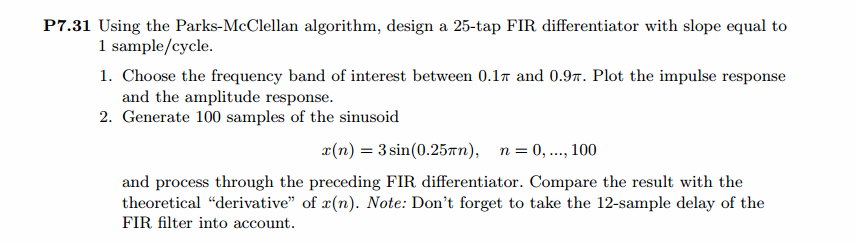
参照Example7.27,因为0.1π=2πf1 f1=0.05,0.9π=2πf2 f2=0.45
所以0.1π≤ω≤0.9π,0.05≤|H|≤0.45
代码:
%% ++++++++++++++++++++++++++++++++++++++++++++++++++++++++++++++++++++++++++++++++

%%            Output Info about this m-file

fprintf('\n***********************************************************\n');

fprintf('        <DSP using MATLAB> Problem 7.31 \n\n');

banner();

%% ++++++++++++++++++++++++++++++++++++++++++++++++++++++++++++++++++++++++++++++++

f = [0  0.1  0.9   1];                          % in w/pi units

m = [0  0.05 0.45  0];                          % Magnitude values

M = 25;               % length of filter

N = M - 1;            % Nth-order

h = firpm(N, f, m, 'differentiator');

%h

[db, mag, pha, grd, w] = freqz_m(h, [1]);

[Hr, ww, c, L] = Hr_Type3(h);

%[Hr,omega,P,L] = ampl_res(h);

l = 0:M-1;

%% -------------------------------------------------

%%                    Plot

%% -------------------------------------------------

figure('NumberTitle', 'off', 'Name', 'Problem 7.31')

set(gcf,'Color','white');

subplot(2,2,1); plot(w/pi, db); grid on; axis([0 2 -90 10]);

set(gca,'YTickMode','manual','YTick',[-60,-40,-20,0])

set(gca,'YTickLabelMode','manual','YTickLabel',['60';'40';'20';' 0']);

set(gca,'XTickMode','manual','XTick',[0,0.1,0.9,1,1.1,1.9,2]);

xlabel('frequency in \pi units'); ylabel('Decibels'); title('Magnitude Response in dB');

subplot(2,2,3); plot(w/pi, mag); grid on; %axis([0 1 -100 10]);

xlabel('frequency in \pi units'); ylabel('Absolute'); title('Magnitude Response in absolute');

set(gca,'XTickMode','manual','XTick',[0,0.1,0.9,1,1.1,1.9,2]);

set(gca,'YTickMode','manual','YTick',[0,1.0,2.0]);

subplot(2,2,2); plot(w/pi, pha); grid on; %axis([0 1 -100 10]);

xlabel('frequency in \pi units'); ylabel('Rad'); title('Phase Response in Radians');

subplot(2,2,4); plot(w/pi, grd*pi/180);  grid on; %axis([0 1 -100 10]);

xlabel('frequency in \pi units'); ylabel('Rad'); title('Group Delay');

figure('NumberTitle', 'off', 'Name', 'Problem 7.31')

set(gcf,'Color','white');

subplot(2,2,1); stem(l, h); axis([-1, M, -0.6, 0.5]); grid on;

xlabel('n'); ylabel('h(n)'); title('Actual Impulse Response, M=25');

set(gca, 'XTickMode', 'manual', 'XTick', [0,12,25]);

set(gca, 'YTickMode', 'manual', 'YTick', [-0.6:0.2:0.6]);

subplot(2,2,3); plot(w/pi, db); axis([0, 1, -80, 10]); grid on;

xlabel('frequency in \pi units'); ylabel('Decibels'); title('Magnitude Response in dB ');

set(gca,'XTickMode','manual','XTick',f)

set(gca,'YTickMode','manual','YTick',[-60,-40,-20,0]);

set(gca,'YTickLabelMode','manual','YTickLabel',['60';'40';'20';' 0']);

subplot(2,2,4); plot(ww/pi, Hr); axis([0, 1, -0.2, 1.5]); grid on;

xlabel('frequency in \pi nuits'); ylabel('Hr(w)'); title('Amplitude Response');

n = [0:1:100];

x = 3*sin(0.25*pi*n);

y = filter(h,1,x);

y_chk = 0.75*cos(0.25*pi*n);

figure('NumberTitle', 'off', 'Name', 'Problem 7.31 x(n)')

set(gcf,'Color','white');

subplot(2,1,1); stem([0:M-1], h); axis([0 M-1 -0.5 0.5]); grid on;

xlabel('n'); ylabel('h(n)'); title('Actual Impulse Response, M=25');

subplot(2,1,2); stem(n, x); axis([0 100 0 3]); grid on;

xlabel('n'); ylabel('x(n)'); title('Input sequence');

figure('NumberTitle', 'off', 'Name', 'Problem 7.31 y(n) and y_chk(n)')

set(gcf,'Color','white');

subplot(2,1,1); stem(n, y); axis([0 100 -1 1]); grid on;

xlabel('n'); ylabel('y(n)'); title('Output sequence');

subplot(2,1,2); stem(n, y_chk); axis([0 100 -1 1]); grid on;

xlabel('n'); ylabel('y\_chk(n)'); title('Output sequence');

% ---------------------------

%    DTFT of x

% ---------------------------

MM = 500;

[X, w1] = dtft1(x, n, MM);

[Y, w1] = dtft1(y, n, MM);

magX = abs(X); angX = angle(X); realX = real(X); imagX = imag(X);

magY = abs(Y); angY = angle(Y); realY = real(Y); imagY = imag(Y);

figure('NumberTitle', 'off', 'Name', 'Problem 7.31 DTFT of x(n)')

set(gcf,'Color','white');

subplot(2,2,1); plot(w1/pi,magX); grid on; %axis([0,2,0,15]);

title('Magnitude Part');

xlabel('frequency in \pi units'); ylabel('Magnitude  |X|');

subplot(2,2,3); plot(w1/pi, angX/pi); grid on; axis([0,2,-1,1]);

title('Angle Part');

xlabel('frequency in \pi units'); ylabel('Radians/\pi');

subplot('2,2,2'); plot(w1/pi, realX); grid on;

title('Real Part');

xlabel('frequency in \pi units'); ylabel('Real');

subplot('2,2,4'); plot(w1/pi, imagX); grid on;

title('Imaginary Part');

xlabel('frequency in \pi units'); ylabel('Imaginary');

figure('NumberTitle', 'off', 'Name', 'Problem 7.31 DTFT of y(n)')

set(gcf,'Color','white');

subplot(2,2,1); plot(w1/pi,magY); grid on; %axis([0,2,0,15]);

title('Magnitude Part');

xlabel('frequency in \pi units'); ylabel('Magnitude  |Y|');

subplot(2,2,3); plot(w1/pi, angY/pi); grid on; axis([0,2,-1,1]);

title('Angle Part');

xlabel('frequency in \pi units'); ylabel('Radians/\pi');

subplot('2,2,2'); plot(w1/pi, realY); grid on;

title('Real Part');

xlabel('frequency in \pi units'); ylabel('Real');

subplot('2,2,4'); plot(w1/pi, imagY); grid on;

title('Imaginary Part');

xlabel('frequency in \pi units'); ylabel('Imaginary');

figure('NumberTitle', 'off', 'Name', 'Problem 7.31 Magnitude Response')

set(gcf,'Color','white');

subplot(1,2,1); plot(w1/pi,magX); grid on; %axis([0,2,0,15]);

title('Magnitude Part of Input');

xlabel('frequency in \pi units'); ylabel('Magnitude  |X|');

subplot(1,2,2); plot(w1/pi,magY); grid on; %axis([0,2,0,15]);

title('Magnitude Part of Output');

xlabel('frequency in \pi units'); ylabel('Magnitude  |Y|');
运行结果:
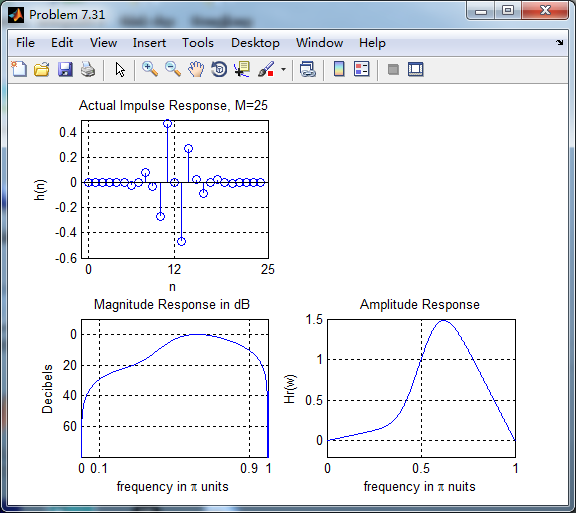
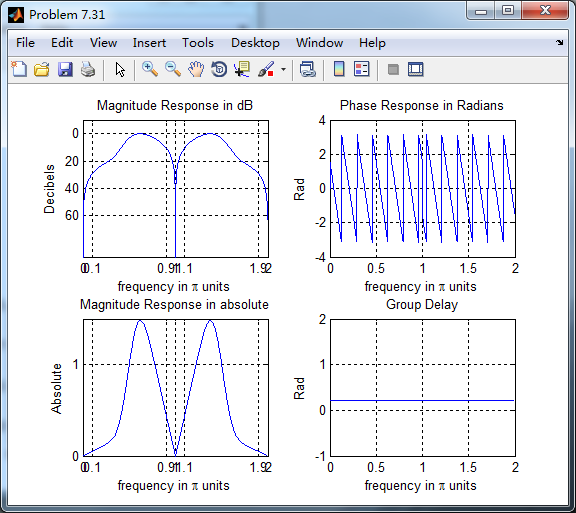
根据线性相位FIR性质,differentiator为第3类线性相位FIR,下图为脉冲响应、幅度谱和振幅谱。
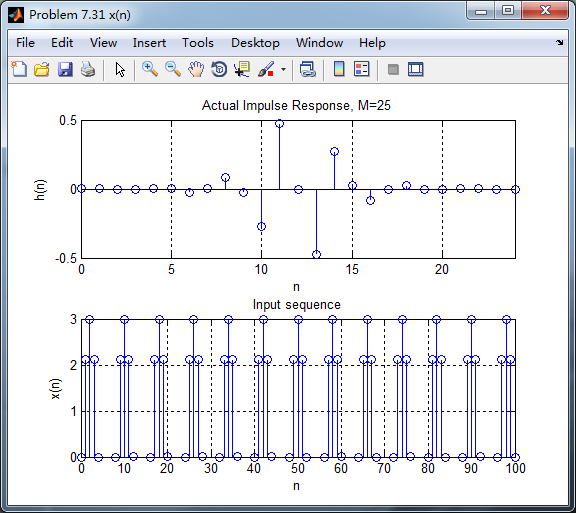
脉冲响应和输入序列
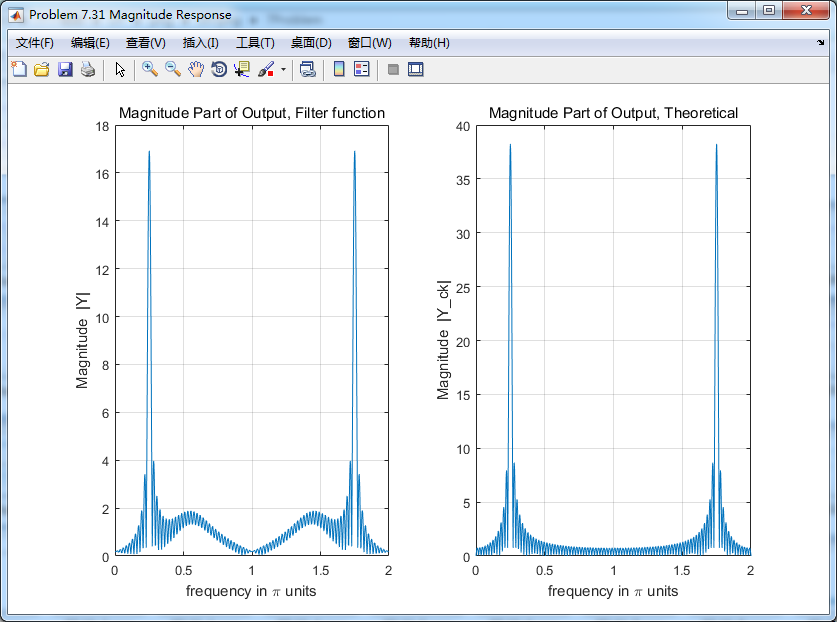
下图分别用卷积法和数学求导数方法得到的输出,
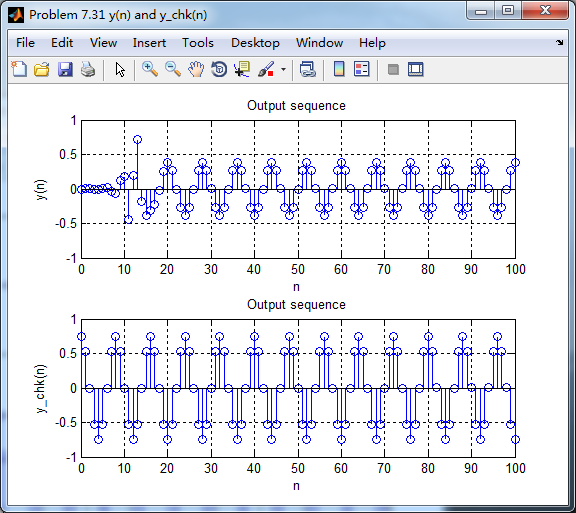
各自求其离散时间傅氏变换DTFT,得
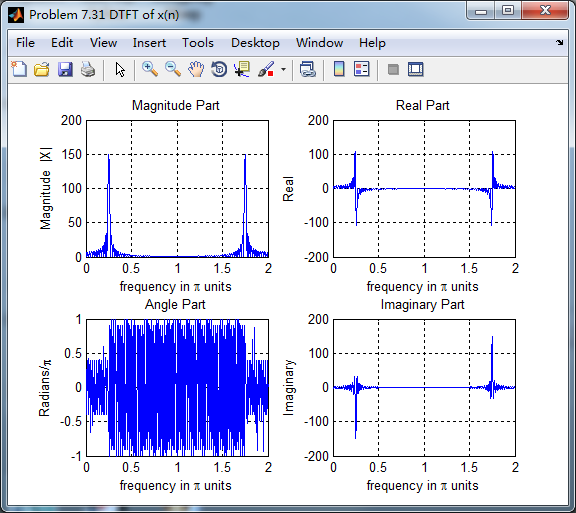
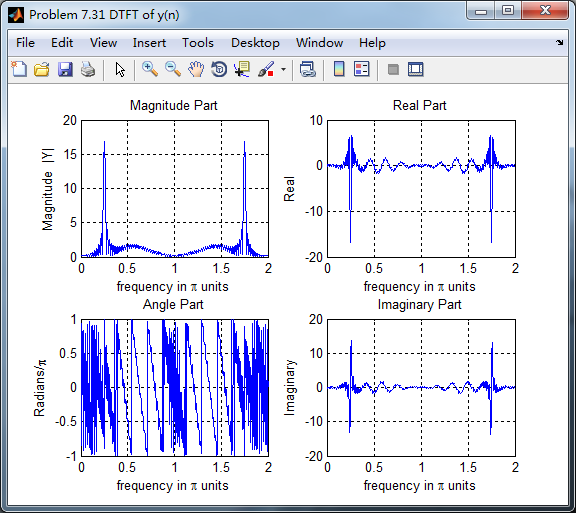
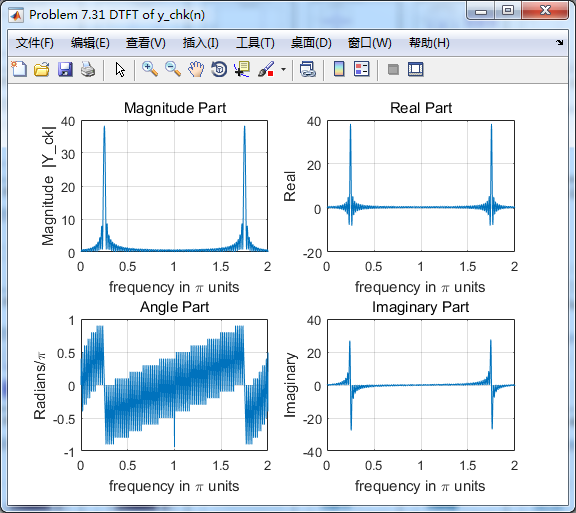
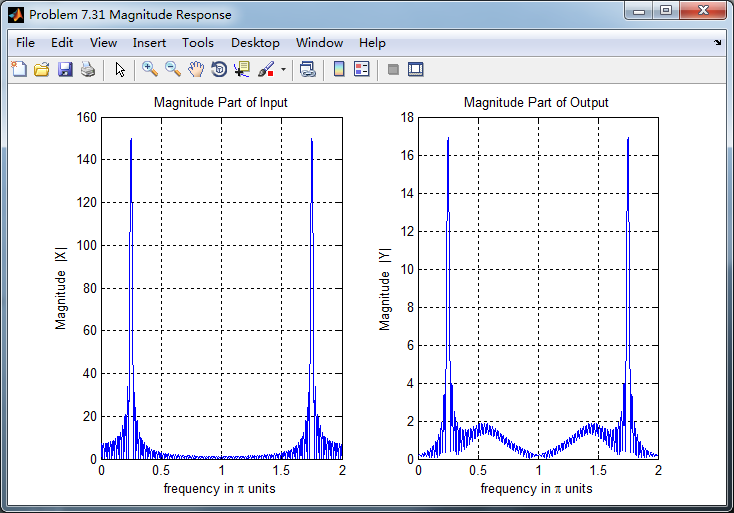
两种求微分结果幅度谱对比,可以看出:
1、设计滤波器卷积输入,输出的0.5π频率附近出现能量,数学求法没有;
2、设计滤波器卷积输入,幅度较数学求法小(能量有损失?);
《DSP using MATLAB》Problem 7.31的更多相关文章
- 《DSP using MATLAB》Problem 5.31
第3小题: 代码: %% ++++++++++++++++++++++++++++++++++++++++++++++++++++++++++++++++++++++++++++++++ %% Out ...
- 《DSP using MATLAB》Problem 8.31
代码: %% ------------------------------------------------------------------------ %% Output Info about ...
- 《DSP using MATLAB》Problem 7.26
注意:高通的线性相位FIR滤波器,不能是第2类,所以其长度必须为奇数.这里取M=31,过渡带里采样值抄书上的. 代码: %% +++++++++++++++++++++++++++++++++++++ ...
- 《DSP using MATLAB》Problem 7.25
代码: %% ++++++++++++++++++++++++++++++++++++++++++++++++++++++++++++++++++++++++++++++++ %% Output In ...
- 《DSP using MATLAB》Problem 7.24
又到清明时节,…… 注意:带阻滤波器不能用第2类线性相位滤波器实现,我们采用第1类,长度为基数,选M=61 代码: %% +++++++++++++++++++++++++++++++++++++++ ...
- 《DSP using MATLAB》Problem 6.12
代码: %% ++++++++++++++++++++++++++++++++++++++++++++++++++++++++++++++++++++++++++++++++ %% Output In ...
- 《DSP using MATLAB》Problem 6.10
代码: %% ++++++++++++++++++++++++++++++++++++++++++++++++++++++++++++++++++++++++++++++++ %% Output In ...
- 《DSP using MATLAB》Problem 2.7
1.代码: function [xe,xo,m] = evenodd_cv(x,n) % % Complex signal decomposition into even and odd parts ...
- 《DSP using MATLAB》Problem 2.6
1.代码 %% ------------------------------------------------------------------------ %% Output Info abou ...
随机推荐
- 阿里P8架构师谈:数据库分库分表、读写分离的原理实现,使用场景
本文转载自:阿里P8架构师谈:数据库分库分表.读写分离的原理实现,使用场景 为什么要分库分表和读写分离? 类似淘宝网这样的网站,海量数据的存储和访问成为了系统设计的瓶颈问题,日益增长的业务数据,无疑对 ...
- JAVA 设计的七大原则
一.开闭原则 开闭原则(Open-Closed Principle, OCP)是指一个软件实体如类.模块和函数应该对 扩展开放,对修改关闭. 所谓的开闭,也正是对扩展和修改两个行为的一个原则.强调 的 ...
- MDK(KEIL)使用Astyle格式化代码
关于Astyle Astyle 的全称是Artistic Style的简称,是一个开源的源代码格式化工具,可以对C,C++,C#以及Java等编程语言的源代码进行缩进.格式化.美化. Home Pag ...
- Spring - JUnit整合测试
1.导包:test.jar - (依赖 aop.jar) 2.使用@RunWith注解创建spring容器 - @RunWith(SpringJUnit4ClassRunner.class) 3.使用 ...
- Redis Cluste部署
一.原生搭建篇Cluster了解cluster的架构 Redis-cluster是使用的是一致性哈希算法来切分数据存储,总计16383个槽,分成16383/N(redis节点)个分区,存取时将key转 ...
- 2019-11-12-浅谈-Windows-桌面端触摸架构演进
title author date CreateTime categories 浅谈 Windows 桌面端触摸架构演进 lindexi 2019-11-12 14:37:31 +0800 2019- ...
- 第三方下载控件 用起来还是不错的偶!Aria
本文主要介绍开源项目Aria的使用. 先在项目里的build 中配置compile 'com.arialyy.aria:Aria:3.1.1' //下载 开始下载 Aria.download(this ...
- 网站PC端和移动端,用户通过设备识别
<!DOCTYPE html> <html> <head> <meta charset="utf-8"> <!--<me ...
- Linux 运维日常排错
硬盘与IO df -Th #查看挂载和文件系统类型.检查是否有空间用满,是否有业务数据未使用独立分区? iostat -x 1 1. 检查iowait是否持续在15%以上,说明硬盘负载高. 2. ...
- Serverless Kubernetes全面升级2.0架构:支持多命名空间、RBAC、CRD、PV/PVC等功能
Serverless Kubernetes概述: 阿里云Serverless Kubernetes容器服务最新开放香港.新加坡.悉尼区域,同时全面开放2.0架构,帮助用户更加便捷.轻松地步入“以应用为 ...