
一起来学Spring Cloud | 第二章:服务注册和发现组件 (Eureka)
本篇文章,我们来讲解springcloud的服务注册和发现组件,上一章节我们讲解了如何搭建springcloud的多模块项目,已经新建了springcloud-eureka-server,springcloud-eureka-client两个模块,本章节就在这基础上直接使用。
想要了解的请参考:一起来学Spring Cloud | 第一章 :如何搭建一个多模块的springcloud项目
一、 Eureka简介:
1.1 什么是eureka
Eureka是一个基于REST的服务,主要用于AWS云中的定位服务,以实现中间层服务器的负载平衡和故障转移,在 Spring Cloud 微服务架构中通常用作注册中心,我们称这个服务为 Eureka Server,还有一个与之交互的客户端称之为 Eureka Client。
1.2 eureka的功能
Eureka 、Consul 、Zookeepe,是Springcloud支持很轻松地实现服务的注册和发现功能的组件。看过我上一章博客的同学一定知道Eureka,Hystrix ,Ribbon,Zuul,都是 Netflix 公司开源的,一起被称为 Spring Cloud Netflix,所以Eureka 是Spring Cloud 首选推荐的服务注册与发现组件。
ps : 但是Eureka 2.0 开源工作宣告停止,所以不管后期Eureka 如何发展,但是对springcloud的影响都不是很大,毕竟还有Consul 、Zookeepe可以选择。
1.3 eureka服务注册与服务发现
服务发现有两种模式:一种是客户端发现模式,一种是服务端发现模式。Eureka采用的是客户端发现模式。Eureka Client需要每30秒给Eureka Server发一次心跳,同时更新Server上最新的注册信息到本地,如果Server多次没有收到来自客户端的心跳,那么在90秒内会被Server上剔除。
二、 springcloud-eureka-server配置
我们首先回顾一下上一章节的项目目录结构:
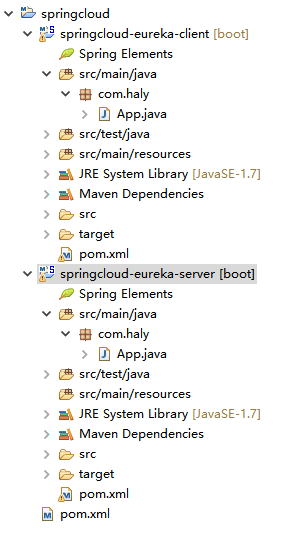
修改springcloud-eureka-server模块中的pom.xml文件如下:
<parent>标签就是引入我们第一章节新建的父工程的pom.xml文件,具体可参考:一起来学Spring Cloud | 第一章 :如何搭建一个多模块的springcloud项目
<?xml version="1.0" encoding="UTF-8"?>

<project xmlns="http://maven.apache.org/POM/4.0.0" xmlns:xsi="http://www.w3.org/2001/XMLSchema-instance"

	xsi:schemaLocation="http://maven.apache.org/POM/4.0.0 http://maven.apache.org/xsd/maven-4.0.0.xsd">

	<modelVersion>4.0.0</modelVersion>

	<parent>

		<groupId>com.haly</groupId>

  		<artifactId>springcloud</artifactId>

 		<version>0.0.1-SNAPSHOT</version>

	</parent>

	<groupId>com.haly</groupId>

	<artifactId>springcloud-eureka-server</artifactId>

	<version>0.0.1-SNAPSHOT</version>

	<name>springcloud-eureka-server</name>

	<description>新建一个springcloud项目</description>

	<properties>

		<java.version>1.8</java.version>

		<spring-cloud.version>Greenwich.SR1</spring-cloud.version>

	</properties>

	<dependencies>

		<dependency>

			<groupId>org.springframework.cloud</groupId>

			<artifactId>spring-cloud-starter-netflix-eureka-server</artifactId>

		</dependency>

		<dependency>

			<groupId>org.springframework.boot</groupId>

			<artifactId>spring-boot-starter-test</artifactId>

			<scope>test</scope>

		</dependency>

	</dependencies>

	<dependencyManagement>

		<dependencies>

			<dependency>

				<groupId>org.springframework.cloud</groupId>

				<artifactId>spring-cloud-dependencies</artifactId>

				<version>${spring-cloud.version}</version>

				<type>pom</type>

				<scope>import</scope>

			</dependency>

		</dependencies>

	</dependencyManagement>

	<build>

		<plugins>

			<plugin>

				<groupId>org.springframework.boot</groupId>

				<artifactId>spring-boot-maven-plugin</artifactId>

			</plugin>

		</plugins>

	</build>

</project>
新增springcloud-eureka-server模块的application.properties 配置文件
在application.properties文件中加入eureka的配置项,现在我们使用的是.properties格式,其实工作中我们更加喜欢用.yml格式,只是语法不一样,有兴趣的同学可以去了解yml格式配置。
# 设置的eureka端口号

server.port=8761

# 设置eureka的主机地址

eureka.instance.hostname=localhost

#表示是否将自己注册到Eureka Server,默认为true。由于当前应用就是Eureka Server,故而设置为false

eureka.client.registerWithEureka=false

#表示是否从Eureka Server获取注册信息,默认为true。因为这是一个单点的Eureka Server,不需要同步其他的Eureka Server节点的数据,故而设置为false

eureka.client.fetchRegistry=false

#Eureka server地址,查询服务和注册服务都需要依赖这个地址,多个地址可用逗号(英文的)分割

eureka.client.serviceUrl.defaultZone=http://${eureka.instance.hostname}:${server.port}/eureka/

# 服务模块名称

spring.application.name=springcloud-eureka-server
新增启动类SpringcloudEurekaServerApplication
SpringcloudEurekaServerApplication类上加上@EnableEurekaServer注解,表示这个类为Eureka Server类,虽然注解配置简单,但是这个注解底层原理,还是做了很多事的。
ps :如果 @EnableEurekaServer注解不可用,那可能是SpringCloud版本不对,可尝试去父pom.xml文件中修改下版本version即可
package com.haly;

import org.springframework.boot.SpringApplication;

import org.springframework.boot.autoconfigure.SpringBootApplication;

import org.springframework.cloud.netflix.eureka.server.EnableEurekaServer;

@EnableEurekaServer

@SpringBootApplication

public class SpringcloudEurekaServerApplication {

	public static void main(String[] args) {

		SpringApplication.run(SpringcloudEurekaServerApplication.class, args);

	}

}
启动SpringcloudEurekaServerApplication服务
在SpringcloudEurekaServerApplication类上右键 Run as -> spring boot app,启动项目。
启动项目成功后,在浏览器中输入 http://localhost:8761,我们可以看到如下页面
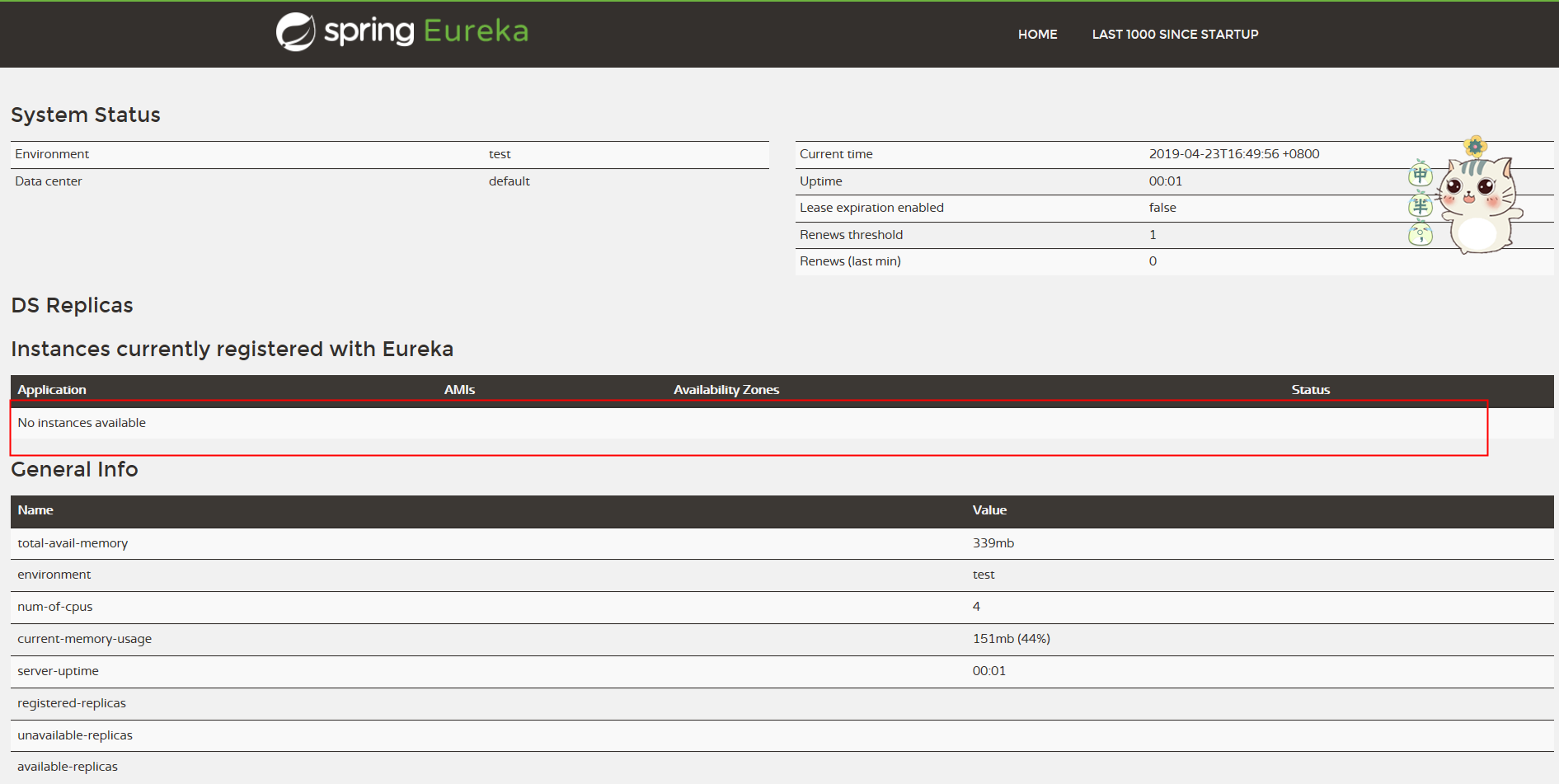
目前上图红框中,没有eureka客户端注册到当前的eureka上,接下来,我们创建一个eureka客户端。
三、springcloud-eureka-client配置
修改springcloud-eureka-client模块中,pom.xml文件如下:
<parent>标签就是引入我们第一章节新建的父工程的pom.xml文件,具体可参考:一起来学Spring Cloud | 第一章 :如何搭建一个多模块的springcloud项目
<?xml version="1.0" encoding="UTF-8"?>

<project xmlns="http://maven.apache.org/POM/4.0.0" xmlns:xsi="http://www.w3.org/2001/XMLSchema-instance"

	xsi:schemaLocation="http://maven.apache.org/POM/4.0.0 http://maven.apache.org/xsd/maven-4.0.0.xsd">

	<modelVersion>4.0.0</modelVersion>

	<parent>

		<groupId>com.haly</groupId>

  		<artifactId>springcloud</artifactId>

 		 <version>0.0.1-SNAPSHOT</version>

	</parent>

	<groupId>com.haly</groupId>

	<artifactId>springcloud-eureka-client</artifactId>

	<version>0.0.1-SNAPSHOT</version>

	<name>springcloud-eureka-client</name>

	<description>新建一个springcloud项目</description>

	<dependencies>

	   	<dependency>

            <groupId>org.springframework.cloud</groupId>

            <artifactId>spring-cloud-starter-netflix-eureka-client</artifactId>

        </dependency>

        <dependency>

            <groupId>org.springframework.boot</groupId>

            <artifactId>spring-boot-starter-web</artifactId>

        </dependency>

	</dependencies>

	<build>

		<plugins>

			<plugin>

				<groupId>org.springframework.boot</groupId>

				<artifactId>spring-boot-maven-plugin</artifactId>

			</plugin>

		</plugins>

	</build>

</project>
修改springcloud-eureka-client模块的application.properties 配置文件
ps: spring.application.name这个配置很重要,eureka可视化窗口上显示的就是这个名字,以后服务与服务之间相互调用一般都是根据这个name
# 服务端口号

server.port=9300

# 服务名称

spring.application.name=springcloud-eureka-client

# 注册到的eureka服务地址

eureka.client.serviceUrl.defaultZone=http://localhost:8761/eureka/
新加启动类SpringcloudEurekaClientApplication
通过注解@EnableEurekaClient 表明自己是一个eurekaclient,可以注入到对应配置的eureka上
package com.haly;

import org.springframework.boot.SpringApplication;

import org.springframework.boot.autoconfigure.SpringBootApplication;

import org.springframework.cloud.netflix.eureka.EnableEurekaClient;

@SpringBootApplication

@EnableEurekaClient

public class SpringcloudEurekaClientApplication {

	public static void main(String[] args) {

		SpringApplication.run(SpringcloudEurekaClientApplication.class, args);

	}

}
在SpringcloudEurekaClientApplication类上右键 Run as -> spring boot app,启动项目。
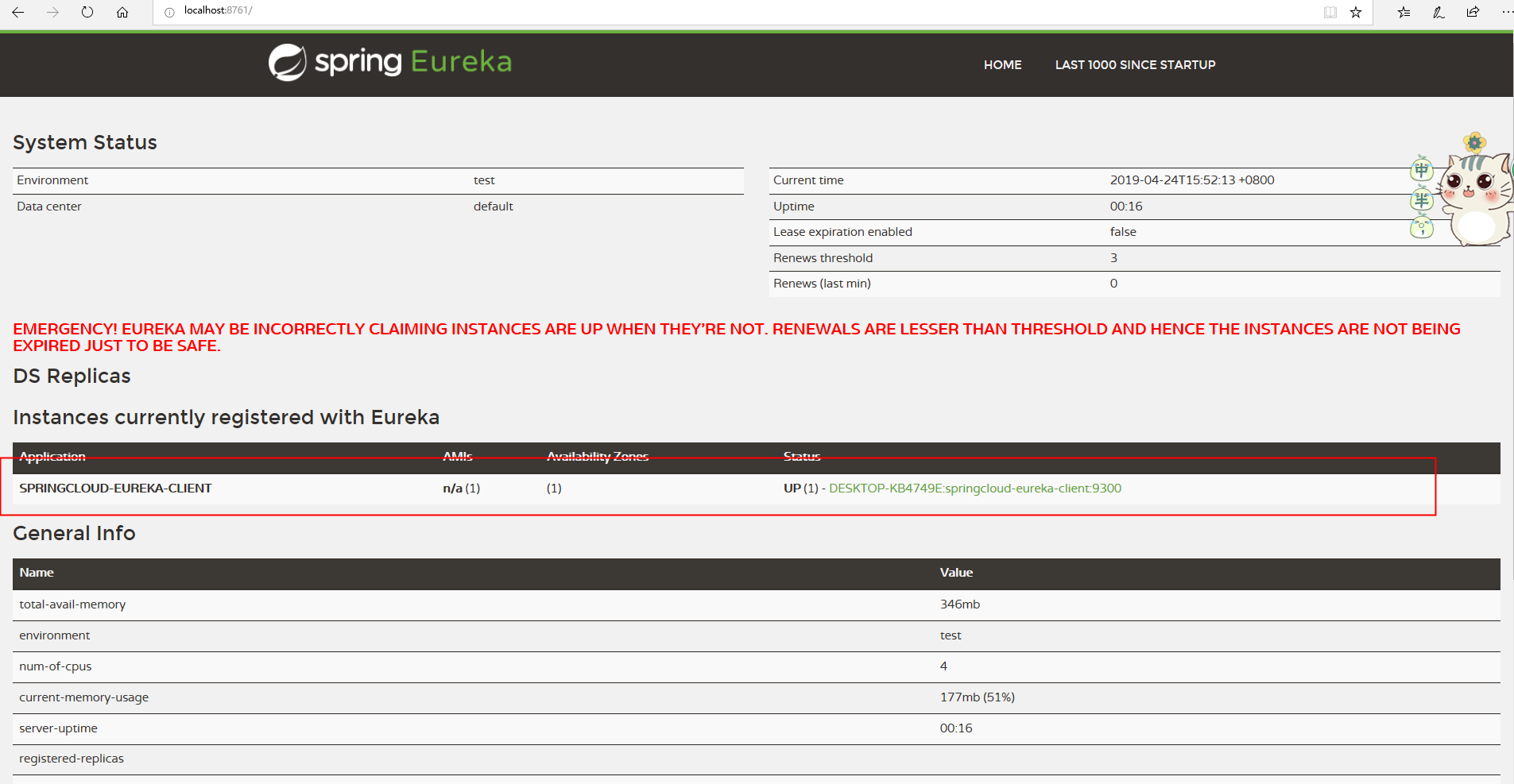
启动项目成功后,在浏览器中输入 http://localhost:8761,我们可以看到如下页面 ,红色框标记的地方,出现了Eureka Client的服务名称(我们在application.properties中配置的名字)
测试springcloud-eureka-client中是否可以正常使用
新建一个业务类ClientTest,类上使用注解@RestController
@RestController注解相当于@ResponseBody + @Controller合在一起的作用。
package com.haly;

import org.springframework.web.bind.annotation.RequestMapping;

import org.springframework.web.bind.annotation.RequestParam;

import org.springframework.web.bind.annotation.RestController;

@RestController

public class ClientTest {


    @Value("${server.port}")
    String port;


    @RequestMapping("/hello")
    public String hello(@RequestParam(value = "name", defaultValue = "young码农") String name) {
        return name + ",welcome to springcloud! server port:" + port;
    }

}
这时打开 浏览器,输入http://localhost:9300/hello?name=young码农,页面结果如下,证明我们的项目搭建成功了,可以正常写业务逻辑了。

四、总结:
完成所有功能后,项目目录结构如下:

喜欢我文章的同学,可以继续关注我后面的文章,谢谢~~~
一起来学Spring Cloud | 第二章:服务注册和发现组件 (Eureka)的更多相关文章
- Spring Cloud Alibaba | Nacos服务注册与发现
目录 Spring Cloud Alibaba | Nacos服务注册与发现 1. 服务提供者 1.1 pom.xml项目依赖 1.2 配置文件application.yml 1.3 启动类Produ ...
- Spring Cloud Consul 实现服务注册和发现
Spring Cloud 是一个基于 Spring Boot 实现的云应用开发工具,它为基于 JVM 的云应用开发中涉及的配置管理.服务发现.断路器.智能路由.微代理.控制总线.全局锁.决策竞选.分布 ...
- spring cloud 学习之 服务注册和发现(Eureka)
一:服务注册和发现(Eureka) 1:采用Eureka作为服务注册和发现组件 2:Eureka 项目中 主要在启动类加上 注解@EnableEurekaServer @SpringBootAppli ...
- Spring Cloud Consul使用——服务注册与发现(注册中心)
整理自该文章 一.Consul 服务端接下来我们开发 Consul 的服务端,创建一个 spring-cloud-consul-producer 项目 1.添加依赖包 <dependencies ...
- spring boot 2.0.3+spring cloud (Finchley)1、搭建服务注册和发现组件Eureka 以及构建高可用Eureka Server集群
一 .搭建Eureka 编写Eureka Server 由于有多个spring boot项目,采用maven多module的结构,项目结构如下: 新建一个maven主工程,在主maven的pom文件中 ...
- Spring Cloud实践之服务注册与发现Eureka
一.简述: 服务提供者producer与服务消费者consumer都注册到eureka server,然后服务consumer在其应用内直接调用producer的服务名来调用服务,而不是像之前一样调用 ...
- Spring Cloud(一):服务注册与发现
Spring Cloud是什么 Spring Cloud是一系列框架的有序集合.它利用Spring Boot的开发便利性巧妙地简化了分布式系统基础设施的开发,如服务发现注册.配置中心.消息总线.负载均 ...
- Spring Cloud Alibaba 的服务注册与发现
Spring Cloud Alibaba 服务发现例子 一.需求 1.提供者完成的功能 2.消费者完成的功能 3.可以附加的额外配置 二.实现步骤 1.总的依赖引入 2.服务提供者和发现者,引入服务发 ...
- Spring Cloud Alibaba Nacos 服务注册与发现功能实现!
Nacos 是 Spring Cloud Alibaba 中一个重要的组成部分,它提供了两个重要的功能:服务注册与发现和统一的配置中心功能. 服务注册与发现功能解决了微服务集群中,调用者和服务提供者连 ...
随机推荐
- Kali Linux 工具使用中文说明书
From: https://www.hackfun.org/kali-tools/kali-tools-zh.html 英文版地址:http://tools.kali.org/ 信息收集 accche ...
- scala函数
1.probablePrime(6,Random) Random是scala.util._中的包 probablePrime是scala.math.BigInt._伴生对象中的方法: probable ...
- 代码审计之SQL注入:BlueCMSv1.6 sp1
Preface 这是一篇纪录关于BlueCMSv1.6 sp1两个SQL注入的审计过程,原文来自代码审计之SQL注入:BlueCMSv1.6 sp1 ,主要纪录一下个人在参考博文复现这两个漏洞经过. ...
- JBOSSAS 5.x/6.x 反序列化命令执行漏洞(CVE-2017-12149)
本文主要记录一下JBOSSAS 5.x/6.x 反序列化命令执行漏洞的测试过程 仅供学习 文中利用到漏洞环境由phith0n维护: JBoss 5.x/6.x 反序列化漏洞(CVE-2017-1214 ...
- Oracle12c中数据泵新特性之功能增强(expdp, impdp)
Oracle的数据泵功能在10g中被引进.本文对数据泵在12c中的增强做一个概览. 1. 禁用日志选项(DISABLE_ARCHIVE_LOGGING) Impdp的TRANSFORM参数已经扩展 ...
- AndroidStudio 快捷键 Ctrl+Q查询过慢的问题
Ctrl+Q快捷键的作用是快速查找文档注释 但是有时候会一直fetching 需要等很长时间这时候 打开本地文件 C:\Users\Adminastration\.AndroidStudi ...
- 可能是史上最全的机器学习和Python(包括数学)速查表
新手学习机器学习很难,就是收集资料也很费劲.所幸Robbie Allen从不同来源收集了目前最全的有关机器学习.Python和相关数学知识的速查表大全.强烈建议收藏! 机器学习有很多方面. 当我开始刷 ...
- 队列Queue和栈
1.队列Queue是常用的数据结构,可以将队列看成特殊的线性表,队列限制了对线性表的访问方式,只能从线性表的一段添加(offer)元素, 从另一段取出(poll)元素,队列遵循先进先出的原则. 2.J ...
- MyBatis缓存详解
MyBatis缓存分为一级缓存和二级缓存 http://www.cnblogs.com/zemliu/archive/2013/08/05/3239014.html mybatis 二级cache h ...
- OOP编程七大原则
OCP(Open-Closed Principle),开放封闭原则:软件实体应该扩展开放.修改封闭.实现:合理划分构件,一种可变性不应当散落在代码的很多角落里,而应当被封装到一个对象里:一种可变性不应 ...