
Android作业 0923
计算器小应用
package com.example.myhomework2;

import androidx.appcompat.app.AppCompatActivity;

import android.app.ProgressDialog;

import android.os.Bundle;

import android.view.View;

import android.widget.EditText;

import android.widget.TextView;

public class MainActivity extends AppCompatActivity{

    double num1 = 0 , num2 = 0 , result = 0;

    @Override

    protected void onCreate(Bundle savedInstanceState) {

        super.onCreate(savedInstanceState);

        setContentView(R.layout.activity_main);

    }

    public void click(View v){

        EditText et1 = findViewById(R.id.et1);

        EditText et2 = findViewById(R.id.et2);

        num1 = Double.parseDouble(et1.getText().toString());

        num2 = Double.parseDouble(et2.getText().toString());

        switch (v.getId())

        {

            case R.id.btn1:

                result = num1 + num2;

                break;

            case R.id.btn2:

                result = num1 - num2;

                break;

            case R.id.btn3:

                result = num1 * num2;

                break;

            case R.id.btn4:

                result = num1 / num2;

                break;

        }

    }

    public void click1(View v){

        TextView tv1 = findViewById(R.id.tv);

            /* @setProgress 设置初始进度

             * @setProgressStyle 设置样式(水平进度条)

             * @setMax 设置进度最大值

             */

            final int Max = 100;

            final ProgressDialog progressDialog = new ProgressDialog(MainActivity.this);

            progressDialog.setProgress(0);

            progressDialog.setTitle("正在计算,请稍等...");

            progressDialog.setProgressStyle(ProgressDialog.STYLE_HORIZONTAL);

            progressDialog.setMax(Max);

            progressDialog.show();

            /**

             * 开个线程

             */

            new Thread(new Runnable() {

                @Override

                public void run() {

                    int p = 0;

                    while (p <= Max){

                        try {

                            Thread.sleep(10);

                            p++;

                            progressDialog.setProgress(p);

                        }catch (Exception e){

                            e.printStackTrace();

                        }

                    }

                    progressDialog.cancel();//达到最大就消失

                }

            }).start();

        tv1.setText("计算结果:" + result + "");

    }

    public void click2(View v){

        EditText et1 = findViewById(R.id.et1);

        EditText et2 = findViewById(R.id.et2);

        TextView tv = findViewById(R.id.tv);

        et1.setText("");

        et2.setText("");

        tv.setText("");

    }

}
<?xml version="1.0" encoding="utf-8"?>

<RelativeLayout xmlns:android="http://schemas.android.com/apk/res/android"

    android:layout_width="match_parent"

    android:layout_height="match_parent"

    android:background="#789878">

    <EditText

        android:id="@+id/et1"

        android:layout_width="match_parent"

        android:layout_height="wrap_content" />

    <EditText

        android:id="@+id/et2"

        android:layout_width="match_parent"

        android:layout_height="wrap_content"

        android:layout_below="@id/et1" />

    <Button

        android:id="@+id/btn1"

        android:layout_width="wrap_content"

        android:layout_height="wrap_content"

        android:layout_below="@id/et2"

        android:onClick="click"

        android:text="+" />

    <Button

        android:id="@+id/btn2"

        android:layout_width="wrap_content"

        android:layout_height="wrap_content"

        android:layout_below="@id/et2"

        android:layout_toRightOf="@id/btn1"

        android:onClick="click"

        android:text="-" />

    <Button

        android:id="@+id/btn3"

        android:layout_width="wrap_content"

        android:layout_height="wrap_content"

        android:layout_below="@id/et2"

        android:layout_toRightOf="@id/btn2"

        android:onClick="click"

        android:text="*" />

    <Button

        android:id="@+id/btn4"

        android:layout_width="wrap_content"

        android:layout_height="wrap_content"

        android:layout_below="@id/et2"

        android:layout_toRightOf="@id/btn3"

        android:onClick="click"

        android:text="/" />

    <Button

        android:id="@+id/btn5"

        android:layout_width="wrap_content"

        android:layout_height="wrap_content"

        android:text="计算"

        android:textColor="#025588"

        android:background="#895865"

        android:layout_below="@id/btn1"

        android:layout_marginLeft="20dp"

        android:onClick="click1"

        />

    <Button

        android:id="@+id/btn6"

        android:layout_width="wrap_content"

        android:layout_height="wrap_content"

        android:text="清空"

        android:textColor="#025588"

        android:background="#895865"

        android:layout_below="@id/btn4"

        android:layout_toRightOf="@id/btn5"

        android:layout_marginLeft="135dp"

        android:onClick="click2"

        />

    <TextView

        android:id="@+id/tv"

        android:layout_width="wrap_content"

        android:layout_height="wrap_content"

        android:layout_below="@id/btn5"

        android:layout_marginTop="20dp"

        android:layout_marginLeft="20dp"

        android:text="计算结果:"

    />

</RelativeLayout>
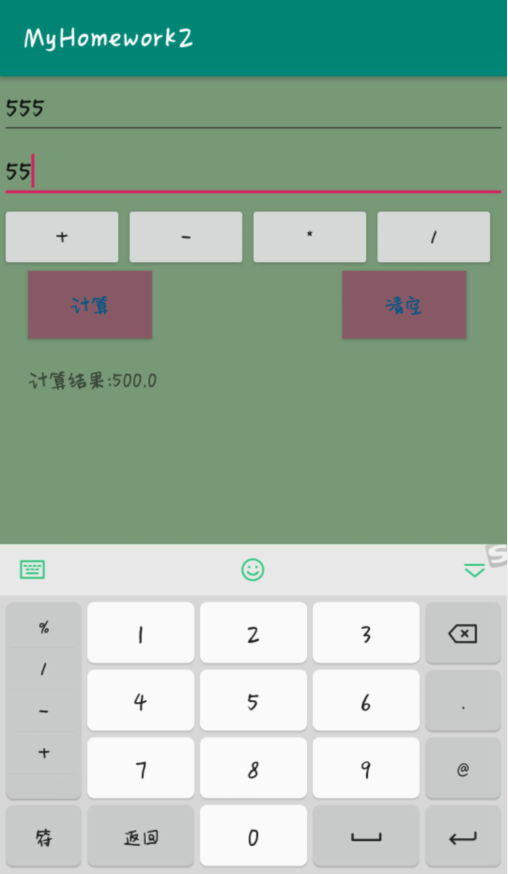


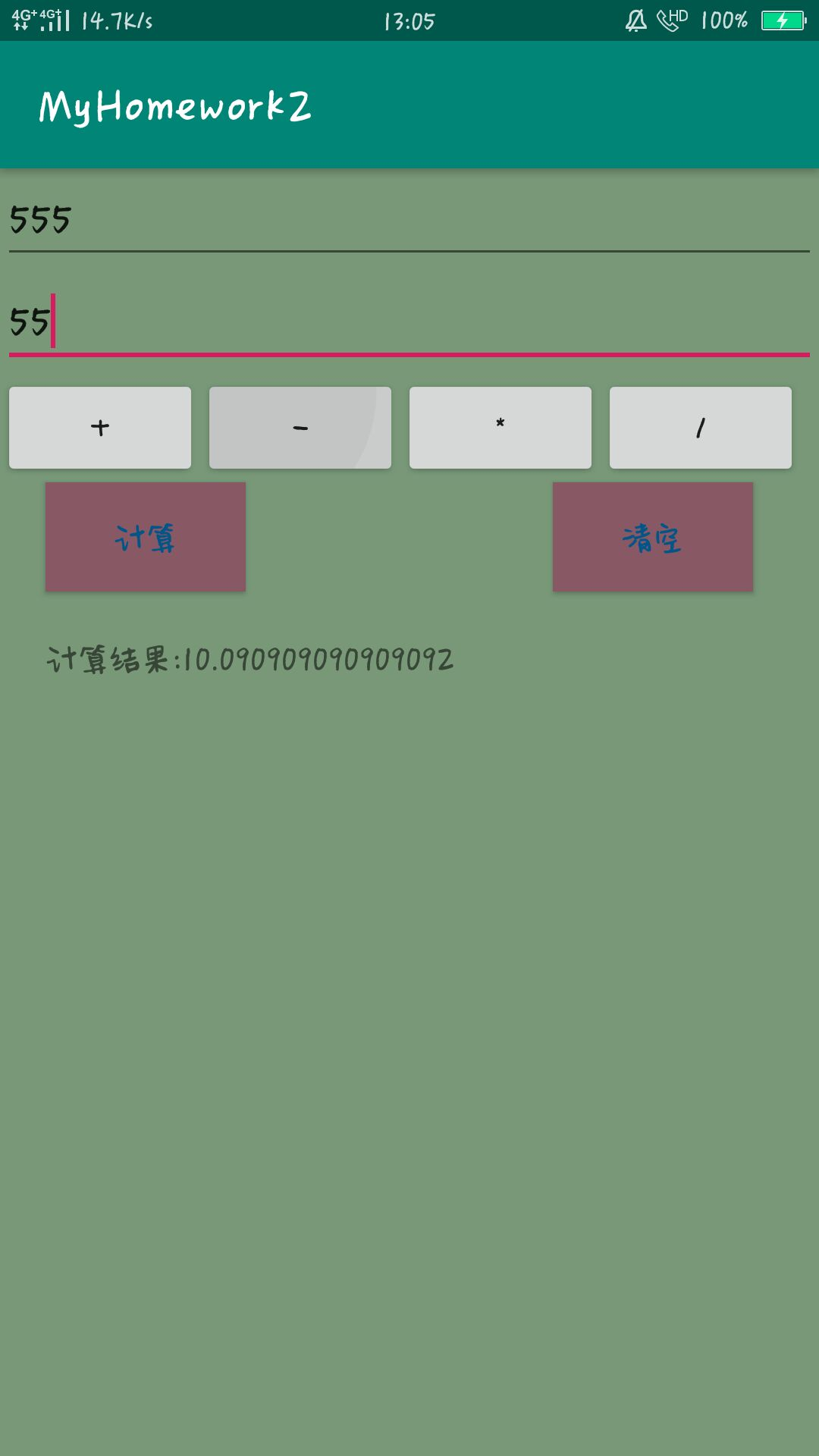
Android作业 0923的更多相关文章
- Android作业分组与选题
期末大作业 序号 题目 组员分工 完成度 1 基于安卓系统的游戏开发 2 设计一个安卓手机小游戏 3 Android平台应用——音乐播放器设计 4 基于Android技术的个人博客 5 电子阅读器 6 ...
- 简单计算器 安卓 Android 作业
Android老师布置的课程作业——简单计算器 功能要求实现四则运算,参考界面见下图: 首先给各位老铁提供apk安装包以及项目压缩包,略表诚意~ github地址:https://github.com ...
- Android作业list
作业1. 请在自己的电脑上完成Android的安装与配置,并完成Hello Android项目.上交自己与项目的合照,将照片传至QQ群中. ------------------------------ ...
- Android作业
一.设置跑马灯功能 使用滚动字幕显示标题“请选择你喜欢哪种花” <?xml version="1.0" encoding="utf-8"?>&l ...
- Android作业0930
1.使用ListView和Adapter实现购物商城 Android 布局文件 <?xml version="1.0" encoding="utf-8"? ...
- Android作业10/07
1.多个Activity界面实现数据的传递 <?xml version="1.0" encoding="utf-8"?> <androidx. ...
- 错误提示”void is an invalid type for the variable“
今晚做android作业,出现错误提示:void is an invalid type for the variable, invalid:无效的 variable:变量,在网上找了一下后知道是 方 ...
- Android——手机内部文件存储(作业)
作业:把用户的注册信息存储到文件里,登录成功后读出并显示出来 activity_practice2的layout文件: <?xml version="1.0" encodin ...
- Android——SharedPreferences存储(作业)
作业:制作一个登录界面,以SP方式存储用户名.用户下次登录时自动显示上次填写的用户名 layout文件: <?xml version="1.0" encoding=" ...
随机推荐
- pandas电子表格的读取(pandas中的read_excel)
上面那篇文章中,初步介绍了一个文本文件的读取:接下来介绍另外一种常见的本地数据格式,那就是Excel电子表格,如果读者在学习或者工作中需要使用Python分析某个Excel表格数据,改如何完成第一个的 ...
- 表单和 v-model
思维导图 form 做表单一定要用 form+button组合 <template> <div id="app"> 登录 <form @submit. ...
- Istio的流量管理(实操三)
Istio的流量管理(实操三) 涵盖官方文档Traffic Management章节中的egress部分.其中有一小部分问题(已在下文标注)待官方解决. 目录 Istio的流量管理(实操三) 访问外部 ...
- Git使用感悟
前言 分支介绍 我们现在开发的分支一般是这样的(基于上面那张图片的): master:上线用的 dev:开发用的 featature_xxx:开发用的 test:测试用的 hotfix:修复bug的 ...
- sha1sum校验方法
sha1sum校验方法,我们可以保存到一个文件中.还可以根据已经得到的hash来确认文件.MD5类似. [root@ffcs211 test_dir]# sha1sum New.EXE 3fe44e8 ...
- Elasticsearch7.6 集群部署、集群认证及使用、数据备份
window 环境部署集群 注意:window下载解压elasticsearch一定需要解压多次.例如搭建的3节点的,需要解压3次,防止生成 cluster UUID 一致导致只能看到一个节点 1.e ...
- Android开发之数组类的面试题目,android工程师java程序员必备
1,定义一个长度为5的数组 int [] arr=new int[5]; 2,写出静态初始化一个数组的方法 int [] arr={1,2,3,4}; 3,写出可变参数的使用规则 1,只能做为方 ...
- 英文ubuntu中的乱码,输入法问题 、mint字体发虚
英文ubuntu文本文件默认编码是utf-8,windows下是gbk,所以产生乱码问题. 1.前言 运行命令查看系统编码 $locale 结果如下: LANG=en_US.UTF-8 LANGUAG ...
- 【转】Mac下Eclipse快捷键
http://blog.sina.com.cn/s/blog_677089db01019jgh.html Command + O:显示大纲Command + 1:快速修复Command + D:删除当 ...
- Mybatis 枚举类处理
目录 类型处理器(TypeHandler) 内置的枚举处理器 EnumTypeHandler源码 自定义枚举类处理 通用枚举处理器 Git 类型处理器(TypeHandler) 无论是 MyBatis ...