
IdnentiyServer-使用客户端凭据访问API
情景如下:一个客户端要访问一个api,不需要用户登录,但是又不想直接暴露api给外部使用,这时可以使用identityserver添加访问权限。
客户端通过clientid和secrect访问identitserver的Token Endpoint,获取accesstoken;
接着客户端再使用accesstoken作为头部验证访问webapi。(webapi已经添加了identityserver的相关验证)。
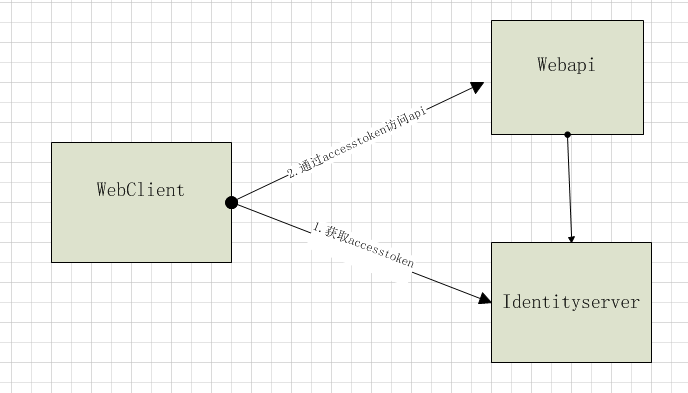
代码实现:其中 "http://localhost:5000"是identityserver地址,"http://localhost:5001"是api地址
identityserver:在identityserver添加api和客户端,如下所示:定义了一个api1资源,client客户端。client客户端指定为ClientCredentials(客户端凭据)模式,并允许其访问api1。
 public class Config

    {

        // scopes define the API resources in your system

        public static IEnumerable<ApiResource> GetApiResources()

        {

            return new List<ApiResource>

            {

                new ApiResource("api1", "My API")

            };

        }

        // clients want to access resources (aka scopes)

        public static IEnumerable<Client> GetClients()

        {

            // client credentials client

            return new List<Client>

            {

                new Client

                {

                    ClientId = "client",

                    AllowedGrantTypes = GrantTypes.ClientCredentials,

                    ClientSecrets =

                    {

                        new Secret("secret".Sha256())

                    },

                    AllowedScopes = { "api1" }

                }

            };

        }

    }
在startup配置identityserver如下:
public class Startup

    {

        public void ConfigureServices(IServiceCollection services)

        {

            // configure identity server with in-memory stores, keys, clients and scopes

            services.AddIdentityServer()

                .AddDeveloperSigningCredential()

                .AddInMemoryApiResources(Config.GetApiResources())

                .AddInMemoryClients(Config.GetClients());

        }

        public void Configure(IApplicationBuilder app, IHostingEnvironment env)

        {

            if (env.IsDevelopment())

            {

                app.UseDeveloperExceptionPage();

            }

            app.UseIdentityServer();

        }

    }
WebApi:在api添加identityserver的验证,代码如下,其中定义了同样的api名称,"http://localhost:5000"是identityserver的地址。
 public class Startup

    {

        public void ConfigureServices(IServiceCollection services)

        {

            services.AddMvcCore()

                .AddAuthorization()

                .AddJsonFormatters();

            services.AddAuthentication("Bearer")

                .AddIdentityServerAuthentication(options =>

                {

                    options.Authority = "http://localhost:5000";

                    options.RequireHttpsMetadata = false;

                    options.ApiName = "api1";

                });

        }

        public void Configure(IApplicationBuilder app)

        {

            app.UseAuthentication();

            app.UseMvc();

        }

    }
添加一个需要验证的控制器:
 [Route("[controller]")]

    [Authorize]

    public class IdentityController : ControllerBase

    {

        [HttpGet]

        public IActionResult Get()

        {

            return new JsonResult(from c in User.Claims select new { c.Type, c.Value });

        }

    }
客户端:
这里使用里IdentityModel类库
实际请求如下:
1.获取accesstoken:http://localhost:5000/connect/token?client_id=client&client_secret=secret&grant_type=client_credentials&scope=api1
2.请求api1
http://localhost:5001/identity
Headers
Authorization:accesstoken
public class Program

    {

        public static void Main(string[] args) => MainAsync().GetAwaiter().GetResult();

        private static async Task MainAsync()

        {
             //获取identitserver的各个端点地址

            var disco = await DiscoveryClient.GetAsync("http://localhost:5000");

            if (disco.IsError)

            {

                Console.WriteLine(disco.Error);

                return;

            }


            //获取具有api1访问权限的accesstoken

            var tokenClient = new TokenClient(disco.TokenEndpoint, "client", "secret");

            var tokenResponse = await tokenClient.RequestClientCredentialsAsync("api1");

            if (tokenResponse.IsError)

            {

                Console.WriteLine(tokenResponse.Error);

                return;

            }

            Console.WriteLine(tokenResponse.Json);

            Console.WriteLine("\n\n");


            //设置accesstoken为http请求头,并访问api1

            var client = new HttpClient();

            client.SetBearerToken(tokenResponse.AccessToken);

            var response = await client.GetAsync("http://localhost:5001/identity");

            if (!response.IsSuccessStatusCode)

            {

                Console.WriteLine(response.StatusCode);

            }

            else

            {

                var content = await response.Content.ReadAsStringAsync();

                Console.WriteLine(JArray.Parse(content));

            }

        }

    }
ps:
1.这里默认的accesstoken为jwt格式,客户端访问api时,api只需要在启动的时候访问identity获取秘钥即可。若为referencetoken,客户端访问api时,api需要授权访问的都会再请求一次identityserver,,而且api必须设置秘钥,client设置AccessTokenType属性为Reference。
2.可自定义AccessTokenLifetime(token存活时间),默认是3600秒,即一小时
IdnentiyServer-使用客户端凭据访问API的更多相关文章
- asp.net core系列 54 IS4用客户端凭据保护API
一. 概述 本篇开始进入IS4实战学习,从第一个示例开始,该示例是 “使用客户端凭据保护API”,这是使用IdentityServer保护api的最基本场景.该示例涉及到三个项目包括:Identity ...
- 【IdentityServer4文档】- 使用客户端凭据保护 API
使用客户端凭据保护 API quickstart 介绍了使用 IdentityServer 保护 API 的最基本场景. 接下来的场景,我们将定义一个 API 和一个想要访问它的客户端. 客户端将在 ...
- 第9章 使用客户端凭据保护API - Identity Server 4 中文文档(v1.0.0)
快速入门介绍了使用IdentityServer保护API的最基本方案. 我们将定义一个API和一个想要访问它的客户端. 客户端将通过提供ClientCredentials在IdentityServer ...
- ASP.NET Core的身份认证框架IdentityServer4(7)- 使用客户端证书控制API访问
前言 今天(2017-9-8,写于9.8,今天才发布)一口气连续把最后几篇IdentityServer4相关理论全部翻译完了,终于可以进入写代码的过程了,比较累.目前官方的文档和Demo以及一些相关组 ...
- IdentityServer4(7)- 使用客户端认证控制API访问(客户端授权模式)
一.前言 本文已更新到 .NET Core 2.2 本文包括后续的Demo都会放在github:https://github.com/stulzq/IdentityServer4.Samples (Q ...
- .NET Core IdentityServer4实战 第一章-入门与API添加客户端凭据
内容:本文带大家使用IdentityServer4进行对API授权保护的基本策略 作者:zara(张子浩) 欢迎分享,但需在文章鲜明处留下原文地址. 本文将要讲述如何使用IdentityServer4 ...
- IdentityServer4[3]:使用客户端认证控制API访问(客户端授权模式)
使用客户端认证控制API访问(客户端授权模式) 场景描述 使用IdentityServer保护API的最基本场景. 我们定义一个API和要访问API的客户端.客户端从IdentityServer请求A ...
- Identity Server 4客户端认证控制访问API
项目源码: 链接:https://pan.baidu.com/s/1H3Y0ct8xgfVkgq4XsniqFA 提取码:nzl3 一.说明 我们将定义一个api和要访问它的客户端,客户端将在iden ...
- IdentityServer4之Client Credentials(客户端凭据许可)
IdentityServer4之Client Credentials(客户端凭据许可) 参考 项目创建:0_overview,1_client_credentials 概念:客户端凭据许可 认证服务端 ...
随机推荐
- 使用python访问网络上的数据
这两天看完了Course上面的: 使用 Python 访问网络数据 https://www.coursera.org/learn/python-network-data/ 写了一些作业,完成了一些作业 ...
- 英语演讲稿——Get Along with Fear
Hi. My name is Zhang Meng. I’m an engineer at Keysight. Today I’m not going to introduce my birthpla ...
- Web browser的发展演变
我们每天都在使用着浏览器,每个人使用的浏览器各不一样.在这个科技飞速发展的时代,一个游览器能否站住脚跟取决于使用者的数量,看用户是否喜欢这个产品,听取用户们的意见来改善. 我们这个年龄的人最初用到的浏 ...
- Spark 介绍
MapReduce给用户提供了简单的编程接口,用户只需要按照接口编写串行版本的代码,Hadoop框架会自动把程序运行到很多机器组成的集群上,并能处理某些机器在运行过程中出现故障的情况.然而,在MapR ...
- Gephi安装过程中出现错误:can’t find java 1.8 or higher
Gephi具体的安装过程我就不多说了,一直点击下一步就OK了,我想说的是出现如下图这种或者类似的错误怎么解决. 在百度的过程中发现很多的博文等等出现这个错误的解决方法都是安装对应版本的JDK啊,配置对 ...
- 前端“黑话”polyfill
前言 在Web前端开发这个日新月异的时代,总是需要阅读一些最新的英文技术博客来跟上技术的发展的潮流.而有时候会遇到一些比较高频的“黑话”,在社区里面可能已经是人人皆知的“共同语言”,而你接触的少就偏偏 ...
- Player 播放器开源项目总结
Android开发中,我们不免会遇到播放器相关开发的需求,以下是本人之前star的开源项目,供大家参考: 一.NBPlayer 项目地址:https://github.com/renhui/NBPla ...
- wordpress使用阿里云邮件推送服务实现发送邮件
之前用腾迅云时,配置了wordpress是可以使用邮件服务的,然而到了阿里云,却无法使用了,有人说是因为阿里云关了25端口,但腾迅好像也关了. 百度看看有没有其他方法,最终让我找到个方法,可惜不是很完 ...
- JS创建对象,数组,函数的三种方式
害怕自己忘记,简单总结一下 创建对象的3种方法 ①:创建一个空对象 var obj = {}; ②:对象字面量 var obj = { name: "Tom", age: 27 ...
- 第八篇: 服务链路追踪(Spring Cloud Sleuth)
一.简介 一个分布式系统由若干分布式服务构成,每一个请求会经过多个业务系统并留下足迹,但是这些分散的数据对于问题排查,或是流程优化都很有限. 要能做到追踪每个请求的完整链路调用,收集链路调用上每个 ...