
IdentityServer4之Client Credentials(客户端凭据许可)
IdentityServer4之Client Credentials(客户端凭据许可)
参考
项目创建:0_overview,1_client_credentials
概念:客户端凭据许可
认证服务端配置
认证服务ApiResource配置
new ApiResource("api1", "api项目 一")

{

    ApiSecrets = { new Secret("api1pwd".Sha256()) }

},
认证服务Client配置
//client credentials client

new Client

{

    ClientId = "client",

    // no interactive user, use the clientid/secret for authentication

    AllowedGrantTypes = GrantTypes.ClientCredentials,
    //Jwt = 0;Reference = 1支持撤销;

    AccessTokenType = AccessTokenType.Reference,

    // secret for authentication

    ClientSecrets =

    {

        new Secret("secret".Sha256()),

        new Secret("abc".Sha256())

    },

    // scopes that client has access to

    AllowedScopes = { "api1" }

},
认证服务Startup配置
// configure identity server with in-memory stores, keys, clients and scopes

services.AddIdentityServer()

    .AddDeveloperSigningCredential()

    .AddInMemoryApiResources(Config.GetApiResources())

    .AddInMemoryClients(Config.GetClients());
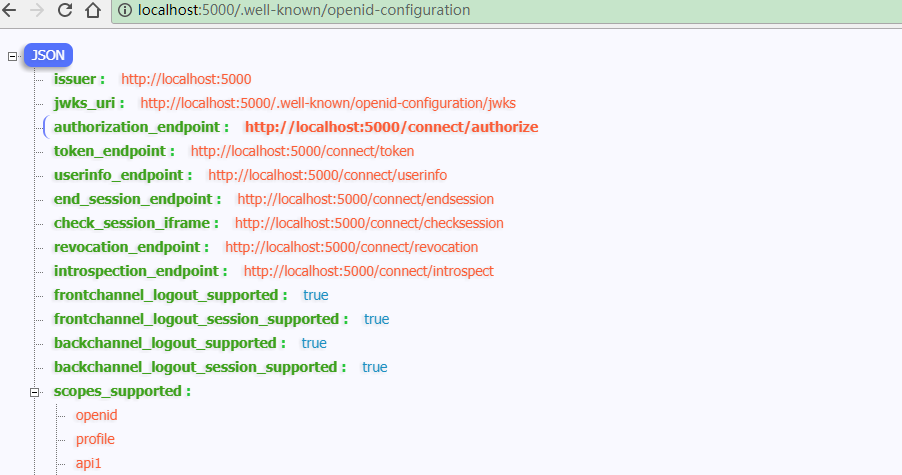
配置完成启动访问http://localhost:5000/.well-known/openid-configuration
资源服务Api配置
资源服务器Startup配置
services.AddMvcCore()

    .AddAuthorization()

    .AddJsonFormatters();

services.AddAuthentication("Bearer")

    .AddIdentityServerAuthentication(options =>

    {

        options.Authority = "http://localhost:5000";

        options.RequireHttpsMetadata = false;

        options.ApiName = "api1";

        options.ApiSecret = "api1pwd";  //对应ApiResources中的密钥

    });
添加接口
[Route("[controller]")]

[Authorize]

public class IdentityController : ControllerBase

{

    [HttpGet]

    public IActionResult Get()

    {

        var info = from c in User.Claims select new { c.Type, c.Value };

        var list = info.ToList();

        list.Add(new { Type = "api1返回", Value = DateTime.Now.ToString("yyyy-MM-dd HH:mm:ss") });

        return new JsonResult(list);

    }

}
Client客户端
客户端与授权服务器进行身份验证并向令牌端点请求访问令牌。
授权服务器对客户端进行身份验证,如果有效,颁发访问令牌。
//credentials client

private void btnAuth_Click(object sender, EventArgs e)

{

    // discover endpoints from metadata

    Task<DiscoveryResponse> discoTask = DiscoveryClient.GetAsync(txtCCAuthSer.Text);

    discoTask.Wait();

    var disco = discoTask.Result;

    if (disco.IsError)

    {

        MessageBox.Show(disco.Error, "提示信息", MessageBoxButtons.OK, MessageBoxIcon.Information);

        txtCCResult.Text = string.Empty;

        txtAccessToken.Text = string.Empty;

        return;

    }

    // request token

    var tokenClient = new TokenClient(disco.TokenEndpoint, txtCCClient.Text, txtCCSecret.Text);

    Task<TokenResponse> tokenTask = tokenClient.RequestClientCredentialsAsync(txtCCScopes.Text);

    tokenTask.Wait();

    var tokenResponse = tokenTask.Result;

    if (tokenResponse.IsError)

    {

        MessageBox.Show(tokenResponse.Error, "提示信息", MessageBoxButtons.OK, MessageBoxIcon.Information);

        txtCCResult.Text = string.Empty;

        txtAccessToken.Text = string.Empty;

        return;

    }

    txtCCResult.Text = tokenResponse.Json.ToString();

    txtAccessToken.Text = tokenResponse.AccessToken;

}
调用Api
private void btnCallApi_Click(object sender, EventArgs e)

{

    // call api

    var client = new HttpClient();

    client.SetBearerToken(txtAccessToken.Text);

    var responseTask = client.GetAsync(txtCCApiUrl.Text);

    responseTask.Wait();

    var response = responseTask.Result;

    if (!response.IsSuccessStatusCode)

    {

        MessageBox.Show(response.StatusCode.ToString(), "提示信息", MessageBoxButtons.OK, MessageBoxIcon.Information);

        txtApiResult.Text = string.Empty;

    }

    else

    {

        var contentTask = response.Content.ReadAsStringAsync();

        contentTask.Wait();

        var content = contentTask.Result;

        txtApiResult.Text = JArray.Parse(content).ToString();

    }

}
获取token过程解析
Jwt形式获取access_token
通过IdentityModel发送请求

监听请求数据

客户端身份验证两种方式
1、Authorization: Basic czZCaGRSa3F0Mzo3RmpmcDBaQnIxS3REUmJuZlZkbUl3。
POST /connect/token HTTP/1.1

Connection: Keep-Alive

Content-Type: application/x-www-form-urlencoded

Accept: application/json

Authorization: Basic Y2xpZW50OnNlY3JldA==

Expect: -continue

Host: localhost:

MS-ASPNETCORE-TOKEN: 08de58f6-58ee-4f05-8d95-3829dde6ae09

X-Forwarded-For: [::]:

X-Forwarded-Proto: http

Content-Length:

grant_type=client_credentials&scope=api1
2、client_id(客户端标识),client_secret(客户端秘钥)。

Reference形式获取access_token
将client的AccessTokenType设置为1
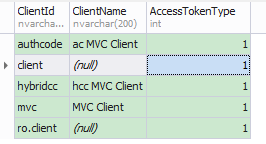
再次获取的access_token不包含Claim信息。
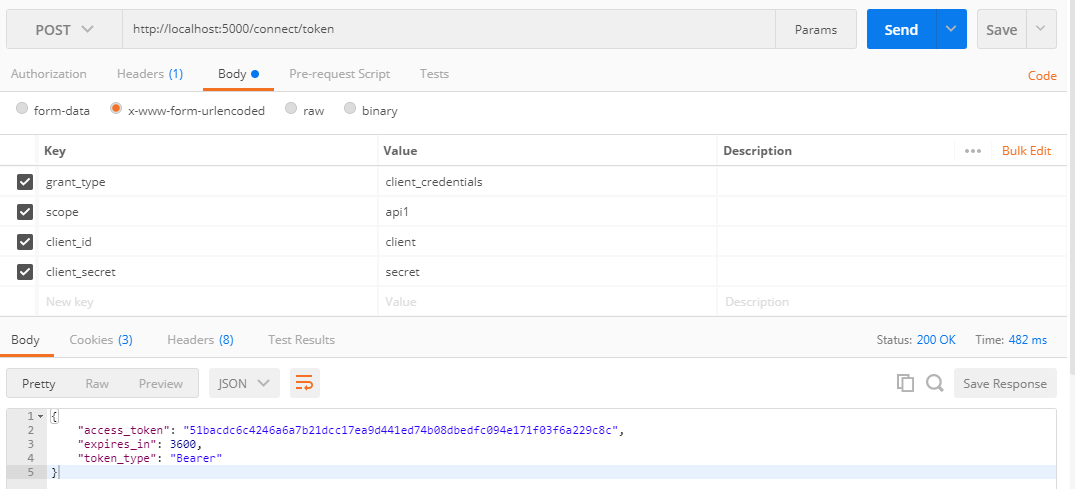
此时获取的access_token(加密后)对应PersistedGrants表中的key

调用Api资源服务过程解析
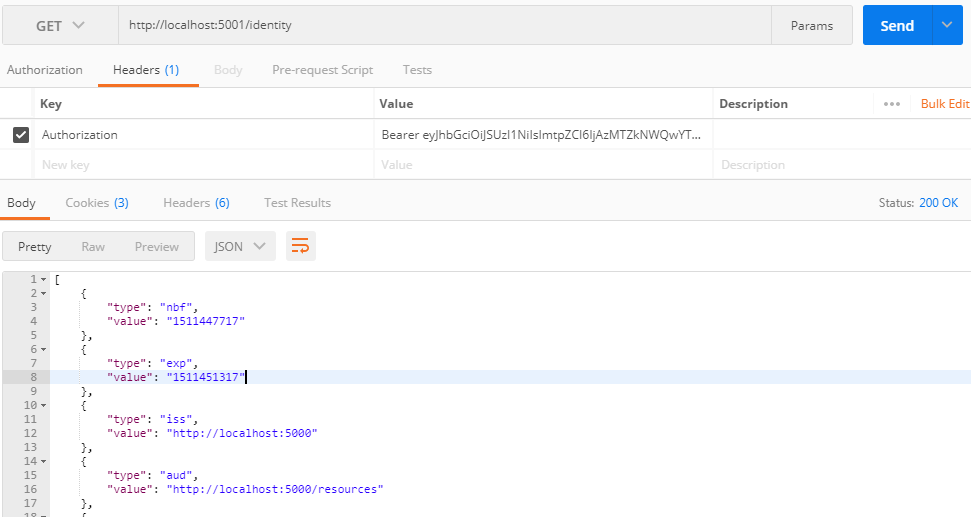
Jwt形式获取access_token调用Api
监听请求数据

api资源服务验证Jwt形式token会去认证服务器获取一次配置信息。


Reference形式获取access_token调用Api
监听请求数据

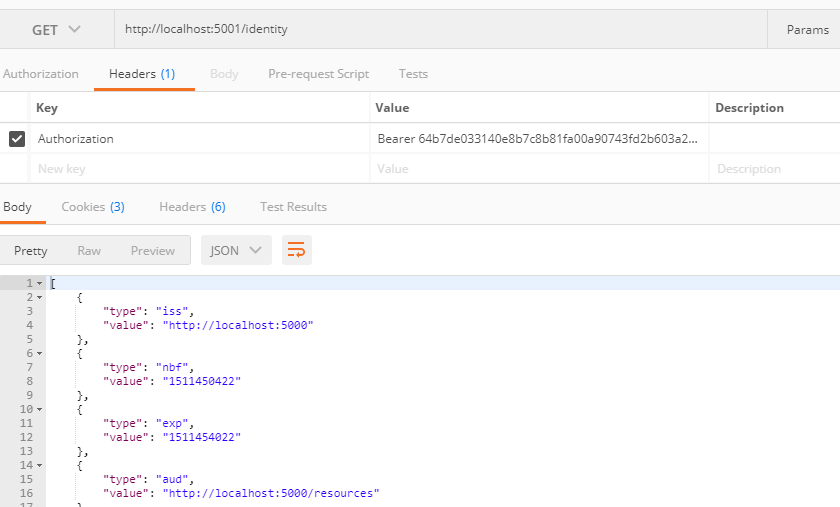
api资源服务验证Reference形式token每次(可配置缓存)会去认证服务器获取信息。参考


IdentityServer4之Client Credentials(客户端凭据许可)的更多相关文章
- asp.net core IdentityServer4 实现 Client credentials(客户端凭证)
前言 OAuth 2.0默认四种授权模式(GrantType) 授权码模式(authorization_code) 简化模式(implicit) 密码模式(resource owner passwor ...
- IdentityServer4 之Client Credentials走起来
前言 API裸奔是绝对不允许滴,之前专门针对这块分享了jwt的解决方案(WebApi接口裸奔有风险):那如果是微服务,又怎么解决呢?每一个服务都加认证授权也可以解决问题,只是显得认证授权这块冗余,重复 ...
- IdentityServer4之Resource Owner Password Credentials(资源拥有者密码凭据许可)
IdentityServer4之Resource Owner Password Credentials(资源拥有者密码凭据许可) 参考 官方文档:2_resource_owner_passwords ...
- IdentityServer4 (1) 客户端授权模式(Client Credentials)
写在前面 1.源码(.Net Core 2.2) git地址:https://github.com/yizhaoxian/CoreIdentityServer4Demo.git 2.相关章节 2.1. ...
- 基于 IdentityServer3 实现 OAuth 2.0 授权服务【客户端模式(Client Credentials Grant)】
github:https://github.com/IdentityServer/IdentityServer3/ documentation:https://identityserver.githu ...
- IdentityServer4:IdentityServer4+API+Client实践OAuth2.0客户端模式(1)
一.OAuth2.0 1.OAuth2.0概念 OAuth2.0(Open Authorization)是一个开放授权协议:第三方应用不需要接触到用户的账户信息(如用户名密码),通过用户的授权访问用户 ...
- 【IdentityServer4文档】- 使用客户端凭据保护 API
使用客户端凭据保护 API quickstart 介绍了使用 IdentityServer 保护 API 的最基本场景. 接下来的场景,我们将定义一个 API 和一个想要访问它的客户端. 客户端将在 ...
- (转)基于OWIN WebAPI 使用OAuth授权服务【客户端模式(Client Credentials Grant)】
适应范围 采用Client Credentials方式,即应用公钥.密钥方式获取Access Token,适用于任何类型应用,但通过它所获取的Access Token只能用于访问与用户无关的Open ...
- 基于OWIN WebAPI 使用OAuth授权服务【客户端模式(Client Credentials Grant)】
适应范围 采用Client Credentials方式,即应用公钥.密钥方式获取Access Token,适用于任何类型应用,但通过它所获取的Access Token只能用于访问与用户无关的Open ...
随机推荐
- python_str的应用
name = "fsafalk" #nam是个变量名 fsafalk是变量 也是字符串 name.startswith('fs')#判断是否是fs开头 name.endswit ...
- django framawork
中文文档: https://q1mi.github.io/Django-REST-framework-documentation/ 神奇的generics from snippets.models i ...
- Spring Cloud项目MVN编译 -- Non-resolvable import POM
最近利用闲余时间,打算搭建一套基于Spring Cloud G版的微服务架构(Spring boot 2.1.0),一顿操作之后,IDEA也没有提示什么错误,自认为微服务搭建完毕.启动项目前,习惯性的 ...
- vue中使用stylus
1.创建完成一个初始项目后,通过 npm install stylus -D命令,在项目内安装stylus.(注意:命令结尾 -D 即是 --save-dev 的简写形式) 2.需要安装loader, ...
- C# 后台通过网络地址访问百度地图取回当前在地图上的经纬度,并将取回的复杂Json格式字符串反序列化(Newtonsoft.Json)
直接上代码:解释都在代码中 ak 要自己去百度地图申请. 其中申请ak的时候,有个属性render直接填*就行. namespace HampWebControl 是我的空间命名! namespace ...
- CSS、常用标签属性
div的样式:[width:宽度 :100像素.height:高度100px.background:背景颜色红色] 内嵌的形式:用<style type="text/css>&l ...
- springboot增删改查
改https://blog.csdn.net/weixin_42338186/article/details/81561592 添加https://blog.csdn.net/weixin_42338 ...
- ES6-个人学习大纲
1,let const学习补充 1.1,let的知识点: 01-作用域只限制在当前代码块内,代码块形式如下: { var str = '张三'; console.log(str); let str ...
- 如何实现文件上传 - JavaWeb
直接上代码 ( idea 开发,SpringBoot 框架 ): 首先是Controller的写法: package com.xxx.Controller; import com.xxx.Tools. ...
- 如何用VSCode调试Vue.js
VS Code相关插件:Chinese (Simplified) Language Pack for Visual Studio Code Debugger for Chrome ESLint Vet ...