
How To Install Nginx on CentOS 7(转)
About Nginx
Nginx is a high performance web server software. It is a much more flexible and lightweight program than Apache HTTP Server.
This tutorial will teach you how to install and start Nginx on your CentOS 7 server.
Prerequisites
The steps in this tutorial require the user to have root privileges. You can see how to set that up by following steps 3 and 4 in the Initial Server Setup with CentOS 7 tutorial.
Step One—Add Nginx Repository
To add the CentOS 7 EPEL repository, open terminal and use the following command:
sudo yum install epel-release
Step Two—Install Nginx
Now that the Nginx repository is installed on your server, install Nginx using the following yum command:
sudo yum install nginx
After you answer yes to the prompt, Nginx will finish installing on your virtual private server (VPS).
Step Three—Start Nginx
Nginx does not start on its own. To get Nginx running, type:
sudo systemctl start nginx
If you are running a firewall, run the following commands to allow HTTP and HTTPS traffic:
sudo firewall-cmd --permanent --zone=public --add-service=http

sudo firewall-cmd --permanent --zone=public --add-service=https

sudo firewall-cmd --reload
You can do a spot check right away to verify that everything went as planned by visiting your server's public IP address in your web browser (see the note under the next heading to find out what your public IP address is if you do not have this information already):
http://server_domain_name_or_IP/
You will see the default CentOS 7 Nginx web page, which is there for informational and testing purposes. It should look something like this:
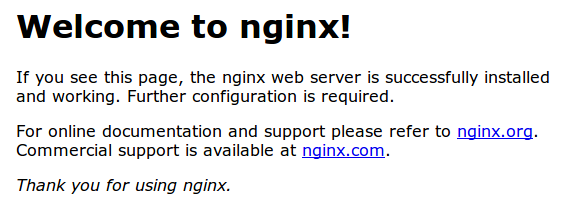
If you see this page, then your web server is now correctly installed.
Before continuing, you will probably want to enable Nginx to start when your system boots. To do so, enter the following command:
sudo systemctl enable nginx
Congratulations! Nginx is now installed and running!
How To Find Your Server's Public IP Address
To find your server's public IP address, find the network interfaces on your machine by typing:
ip addr
1. lo: <LOOPBACK,UP,LOWER_UP> mtu 65536 qdisc noqueue state UNKNOWN

. . .

2: eth0: <BROADCAST,MULTICAST,UP,LOWER_UP> mtu 1500 qdisc pfifo_fast state UP qlen 1000

. . .
You may see a number of interfaces here depending on the hardware available on your server. The lointerface is the local loopback interface, which is not the one we want. In our example above, the eth0interface is what we want.
Once you have the interface name, you can run the following command to reveal your server’s public IP address. Substitute the interface name you found above:
ip addr show eth0 | grep inet | awk '{ print $2; }' | sed 's/\/.*$//'
Server Root and Configuration
If you want to start serving your own pages or application through Nginx, you will want to know the locations of the Nginx configuration files and default server root directory.
Default Server Root
The default server root directory is /usr/share/nginx/html. Files that are placed in there will be served on your web server. This location is specified in the default server block configuration file that ships with Nginx, which is located at /etc/nginx/conf.d/default.conf.
Server Block Configuration
Any additional server blocks, known as Virtual Hosts in Apache, can be added by creating new configuration files in /etc/nginx/conf.d. Files that end with .conf in that directory will be loaded when Nginx is started.
Nginx Global Configuration
The main Nginx configuration file is located at /etc/nginx/nginx.conf. This is where you can change settings like the user that runs the Nginx daemon processes, and the number of worker processes that get spawned when Nginx is running, among other things.
See More
Once you have Nginx installed on your cloud server, you can go on to install a LEMP Stack.
How To Install Nginx on CentOS 7(转)的更多相关文章
- Install Nginx on CentOS 7
To set up the yum repository for RHEL/CentOS, create the file named /etc/yum.repos.d/nginx.repo with ...
- Install nginx on centos
1. 安装wget. sudo yum -y install wget 2. 下载nginx发布代码. sudo wget http://nginx.org/download/nginx-1.8.0. ...
- [转载]How To Install Nginx And PHP-FPM On CentOS 6 Via Yum
http://www.lifelinux.com/how-to-install-nginx-and-php-fpm-on-centos-6-via-yum/ http://blog.csdn.net/ ...
- Install NGINX, PHP-FPM (5.6) on CentOS 6
Installing NGINX with PHP on CentOS 6 can be a hassle depending on the install and packages you use. ...
- Centos 7下安装nginx,使用yum install nginx,提示没有可用的软件包
Centos 7下安装nginx,使用yum install nginx,提示没有可用的软件包. 18 (flaskApi) [root@67 flaskDemo]# yum -y install n ...
- yum install nginx
先安装nginx的yum源 http://nginx.org/en/linux_packages.html#stable 找到链接,安装: rpm -ivh http://nginx.org/pack ...
- Docker 实战(二)——centos7镜像安装nginx,将安装nginx的centos容器生成新的镜像,并导出
Docker centos7镜像安装nginx 1.安装docker 使用yum安装docker不再重复:见 Linux常用命令 2.pull centos 1)在docker仓库中搜索centos ...
- ASP.NET Core Docker jexus nginx部署-CentOS实践版
本文用图文的方式记录了我自己搭建centos+asp.net core + docker + jexus + nginx的整个过程,希望对有同样需求的朋友有一定的参考作用. 本文主要内容如下: cen ...
- nginx在centos & ubuntu上的安装
安装Centos 添加当前账号加入sudoers,具备sudo功能 安装编辑器vim Yum install vim Su root Cd cp /etc/sudoers /etc/sudoers[d ...
随机推荐
- Python全栈开发:socket
Socket socket通常也称作"套接字",用于描述IP地址和端口,是一个通信链的句柄,应用程序通常通过"套接字"向网络发出请求或者应答网络请求. sock ...
- https://webpack.js.org/plugins/
有问题还是看源码 ,看官方文档吧,整一晚上终于整明白了
- 转载别人的ftp,觉得目录结构不错,学习
开发简单的FTP:1. 用户登陆2. 上传/下载文件3. 不同用户家目录不同4. 查看当前目录下文件5. 充分使用面向对象知识 REDMAE 1 用户登陆 2 3 1.查看用户目录文件 4 2.上传文 ...
- linux 系统优化初始化配置
一.系统优化配置 1.修改yum源 配置国内yum源 阿里云yum源地址 #CentOS 5.x wget -O /etc/yum.repos.d/CentOS-Base.repo http://m ...
- Java系列笔记(4) - JVM监控与调优【转】
Java系列笔记(4) - JVM监控与调优[转] 目录 参数设置收集器搭配启动内存分配监控工具和方法调优方法调优实例 光说不练假把式,学习Java GC机制的目的是为了实用,也就是为了在 ...
- scoreboarding
Reference docs: https://en.wikipedia.org/wiki/Scoreboarding SSC_course_5_Scoreboard_ex.pdf 1, what i ...
- 【五校联考5day1】登山
题目 描述 题目大意 给你一个n∗nn*nn∗n的网格图.从(0,0)(0,0)(0,0)开始,每次只可以向右或向上移动一格,并且不能越过对角线(即不能为x<yx<yx<y). 网格 ...
- 异或前缀和,组合数学——cf1054D
/* 每个异或前缀和sum[i]只有两个值 区间异或和不为0,即两个不相等的前缀和 sum[i]的两个前缀和只要标记一个就可以了,为了去重只用map保存最小的那个来计数 最后统计相同的前缀和时,为了使 ...
- dijkstra (模板)
突然意识到以前写的都是假的dij,感谢GhostCai神犇. #include<iostream> #include<cstdio> #include<cstring&g ...
- git 命令行(三)-删除文件
在Git中,删除也是一个修改操作,我们实战一下,有一个多余的文件:src/common/Util2.js 我们需要删除这个文件, 一般情况下,你通常直接在文件管理器中把没用的文件删了,或者用 rm命令 ...