
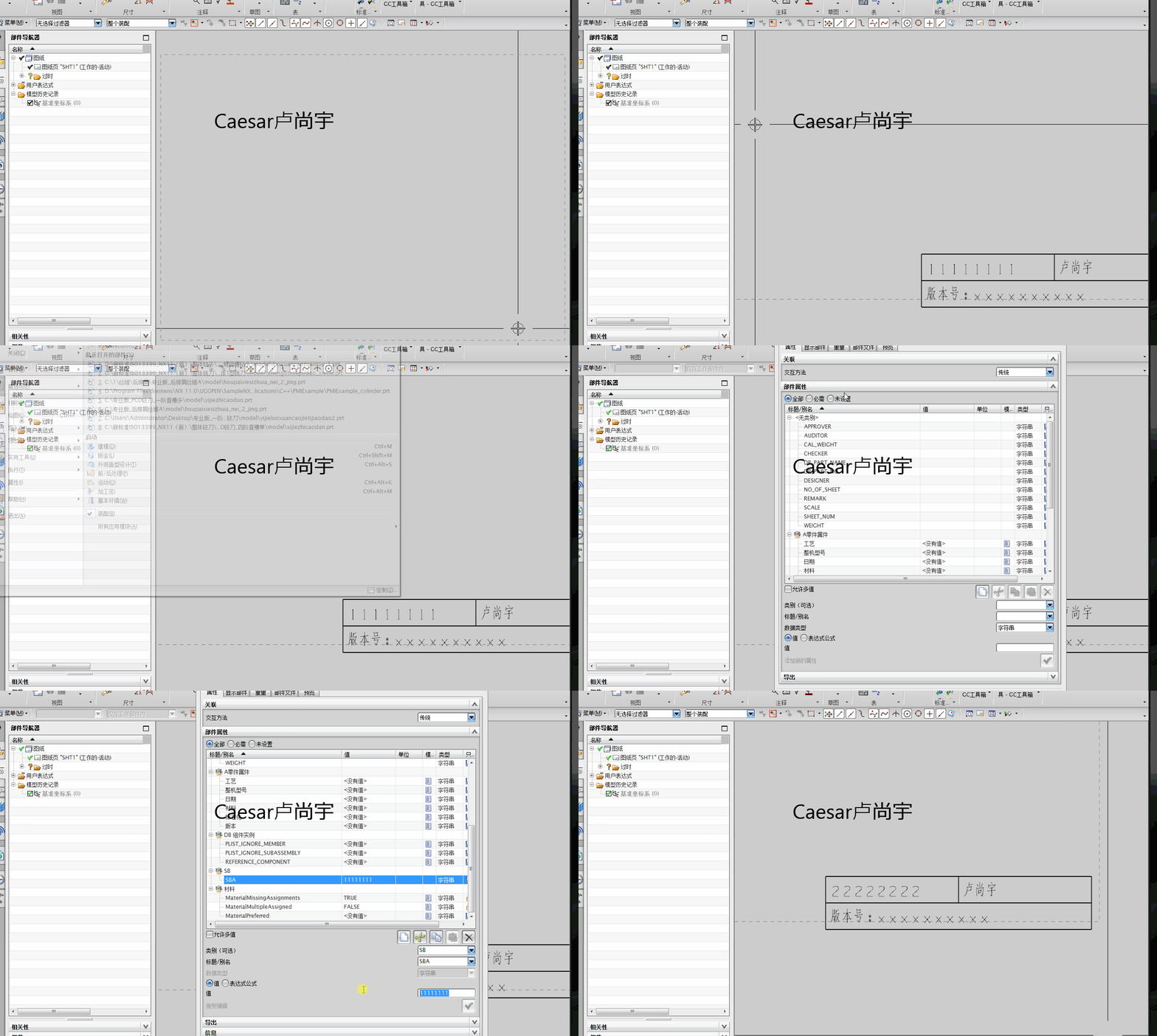
NX二次开发-读取图纸表格注释与部件属性关联的名字
 NX11+VS2013

 #include <uf.h>

 #include <uf_ui.h>

 #include <uf_tabnot.h>

 #include <NXOpen/Part.hxx>

 #include <NXOpen/PartCollection.hxx>

 #include <NXOpen/Session.hxx>

 #include <NXOpen/Annotations_TableSectionCollection.hxx>

 #include <NXOpen/Annotations_AnnotationManager.hxx>

 #include <NXOpen/FontCollection.hxx>

 UF_initialize();

 //创建表格注释

 Annotations::TableSection *nullAnnotations_TableSection(NULL);

 Annotations::TableSectionBuilder *tableSectionBuilder1;

 tableSectionBuilder1 = workPart->Annotations()->TableSections()->CreateTableSectionBuilder(nullAnnotations_TableSection);

 NXOpen::Point3d TablePoint(194.0, 17.0, 0.0);

 tableSectionBuilder1->Origin()->SetOriginPoint(TablePoint);

 tableSectionBuilder1->SetNumberOfColumns();

 tableSectionBuilder1->SetNumberOfRows();

 tableSectionBuilder1->SetRowHeight(20.0);

 tableSectionBuilder1->SetColumnWidth();

 tableSectionBuilder1->Commit();

 NXObject *nXObject1;

 nXObject1 = tableSectionBuilder1->Commit();

 tableSectionBuilder1->Destroy();

 //section转tag

 tag_t TabularNote = NULL_TAG;

 UF_TABNOT_ask_tabular_note_of_section(nXObject1->Tag(), &TabularNote);

 //获取第一行的Tag

 tag_t Row0Tag = NULL_TAG;

 UF_TABNOT_ask_nth_row(TabularNote, , &Row0Tag);

 //获取第二行的Tag

 tag_t Row1Tag = NULL_TAG;

 UF_TABNOT_ask_nth_row(TabularNote, , &Row1Tag);

 //获取第一列的Tag

 tag_t Column0Tag = NULL_TAG;

 UF_TABNOT_ask_nth_column(TabularNote, , &Column0Tag);

 //获取第二列的Tag

 tag_t Column1Tag = NULL_TAG;

 UF_TABNOT_ask_nth_column(TabularNote, , &Column1Tag);

 //得到第一行第一列单元格的Tag

 tag_t Cell0Tag = NULL_TAG;

 UF_TABNOT_ask_cell_at_row_col(Row0Tag, Column0Tag, &Cell0Tag);

 //得到第一行第二列单元格的Tag

 tag_t Cell1Tag = NULL_TAG;

 UF_TABNOT_ask_cell_at_row_col(Row0Tag, Column1Tag, &Cell1Tag);

 //得到第二行第一列单元格的Tag

 tag_t Cell2Tag = NULL_TAG;

 UF_TABNOT_ask_cell_at_row_col(Row1Tag, Column0Tag, &Cell2Tag);

 //得到第二行第二列单元格的Tag

 tag_t Cell3Tag = NULL_TAG;

 UF_TABNOT_ask_cell_at_row_col(Row1Tag, Column1Tag, &Cell3Tag);

 //写文本

 UF_TABNOT_set_cell_text(Cell0Tag, "<WRef2*0@SBA>");

 UF_TABNOT_set_cell_text(Cell1Tag, "卢尚宇");

 //合并最底下的单元格

 UF_TABNOT_merge_cells(Cell2Tag, Cell3Tag);

 //获取合并单元格的行Tag

 tag_t MergeRowTag = NULL_TAG;

 UF_TABNOT_ask_nth_row(TabularNote, , &MergeRowTag);

 //获取合并单元格的列Tag

 tag_t MergeColumnTag = NULL_TAG;

 UF_TABNOT_ask_nth_column(TabularNote, , &MergeColumnTag);

 tag_t MergeCellTag = NULL_TAG;

 UF_TABNOT_ask_cell_at_row_col(MergeRowTag, MergeColumnTag, &MergeCellTag);

 //写文本

 UF_TABNOT_set_cell_text(MergeCellTag, "版本号:xxxxxxxxxx");

 //检索默认单元格首选项

 UF_TABNOT_cell_prefs_t  cell_prefs;

 UF_TABNOT_ask_default_cell_prefs(&cell_prefs);

 //设置单元格首选项

 int fontIndex1 = workPart->Fonts()->AddFont("chinesef_fs", NXOpen::FontCollection::TypeNx);//更改字体

 cell_prefs.text_font = fontIndex1; //字体

 UF_TABNOT_set_cell_prefs(Cell0Tag, &cell_prefs);

 UF_TABNOT_set_cell_prefs(Cell1Tag, &cell_prefs);

 UF_TABNOT_set_cell_prefs(MergeCellTag, &cell_prefs);

 //读取单元格内容

 char* cell_text;

 UF_TABNOT_ask_cell_text(Cell0Tag, &cell_text);

 //分割字符串

 string strCellText = cell_text;

 string strRight = (strCellText.substr(strCellText.find("@") + , strCellText.find(" ")));//提取右值

 string strLift = (strRight.substr(, strRight.find(">")));//提取左值

 //打印

 char msg[];

 sprintf_s(msg, "此单元格关联的部件属性为:%s", strLift);

 uc1601(msg, );

 UF_terminate();

 Caesar卢尚宇

 2019年12月15日
NX二次开发-读取图纸表格注释与部件属性关联的名字的更多相关文章
- NX二次开发-UFUN工程图表格注释section转tag函数UF_TABNOT_ask_tabular_note_of_section
NX9+VS2012 #include <uf.h> #include <uf_tabnot.h> #include <NXOpen/Part.hxx> #incl ...
- NX二次开发-UFUN工程图表格注释获取某一行的tag函数UF_TABNOT_ask_nth_row
NX9+VS2012 #include <uf.h> #include <uf_tabnot.h> #include <NXOpen/Part.hxx> #incl ...
- NX二次开发-UFUN工程图表格注释获取某一列的tag函数UF_TABNOT_ask_nth_column
NX9+VS2012 #include <uf.h> #include <uf_tabnot.h> #include <NXOpen/Part.hxx> #incl ...
- NX二次开发-UFUN工程图表格注释获取某一行某一列的tag函数UF_TABNOT_ask_cell_at_row_col
NX9+VS2012 #include <uf.h> #include <uf_tabnot.h> #include <NXOpen/Part.hxx> #incl ...
- NX二次开发-UFUN工程图表格注释写入文本内容UF_TABNOT_set_cell_text
NX9+VS2012 #include <uf.h> #include <uf_tabnot.h> #include <NXOpen/Part.hxx> #incl ...
- NX二次开发-UFUN工程图表格注释检索默认单元格首选项UF_TABNOT_ask_default_cell_prefs
NX9+VS2012 #include <uf.h> #include <uf_tabnot.h> #include <NXOpen/Part.hxx> #incl ...
- NX二次开发-UFUN工程图表格注释设置单元格首选项UF_TABNOT_set_cell_prefs
NX9+VS2012 #include <uf.h> #include <uf_tabnot.h> #include <NXOpen/Part.hxx> #incl ...
- 【NX二次开发】按层查找工作部件中的对象 UF_LAYER_cycle_by_layer
第一次调用 :返回第一个启用层中的第一个对象. 第二次调用 :返回下一个已启用层中的下一个对象. 最后一次调用:当所有对象都被耗尽时,将返回object_tag = NULL_TAG. 在循环数据库时 ...
- NX二次开发-UFUN创建工程图注释UF_DRF_create_note
NX9+VS2012 #include <uf.h> #include <uf_drf.h> #include <NXOpen/Annotations_Note.hxx& ...
随机推荐
- SP6779 GSS7 - Can you answer these queries VII
纯数据结构题,没有思维难度.直接用线段树求最大子段和的方法完成树上路径的合并.注意链上合并顺序要符合序列的前后顺序. #include <cstdio> #include <cstr ...
- Thymeleaf 模板布局三种区别
- mac os 下安装mysql
在 http://dev.mysql.com/downloads/mysql/ 选择下载mysql 注册并选择相应的版本后,得到下载链接:: wget http://dev.mysql.com/get ...
- 训练集(train set) 验证集(validation set) 测试集(test set)。
训练集(train set) 验证集(validation set) 测试集(test set). http://blog.sina.com.cn/s/blog_4d2f6cf201000cjx.ht ...
- DGIM算法
/***************************************************** copyright (C), 2014-2015, Lighting Studio. Co ...
- Python 操作excel常见异常
一.使用xlrd模块读取excel: 1.报错:IndexError: list index out of range,如下图 解决方法:reading_sheet.cell(1,0).value中c ...
- vmvare下centos7配置静态ip
首先,将网络适配设置成为桥接模式 查看本机IP地址,ipconfig,记住ipv4地址和默认网关地址,等会配置的时候要用 启动Centos,进入终端模式,设置IP地址, 切换到这个目录下,cd /et ...
- Pandas之read_excel()和to_excel()函数解析
read_excel() 加载函数为read_excel(),其具体参数如下. read_excel(io, sheetname=0, header=0, skiprows=None, skip_fo ...
- JSON数组对象和JSON字符串的转化,map和JSON对象之间的转化
这种用法包括前端和后端: 前端: 1. 转化为JSON对象方便操作 var jsonObj = JSON.parse(str); 得到的是一个json数组对象,可以通过 for (var p in j ...
- 关于版本管理工具SVN
曾经使用过Git,但是目前使用的是相对简单的svn. 刚使用的时候,如果不出意外.会有同学配好环境与权限. 前端只需要将代码下载,修改,更新,与上传. 一 .下载 1.本地新建文件夹,作为本地仓库 命 ...