
Vue小案例 之 商品管理------学习过滤器 使用过滤器处理日期的格式
代码学习过滤器
过滤器介绍:过滤模型数据,在数据显示前做预处理操作;
内置过滤器:在1.x中,Vue提供了内置过滤器,但是在2.x中已经完全废除;
解决办法:
(1)使用第三方库来替代1.x中的内置过滤器;
(2)使用自定义过滤器;
自定义过滤器:
a.全局配置:Vue.filter( id, [definition] )
b. 局部配置:在Vue实例中配置filters
详细介绍网址:https://cn.vuejs.org/v2/api/#Vue-filter
过滤器语法:
- 无参:{{msg | filter}}
示例:

vue代码:
<script>

            window .onload= () =>{

                new Vue({

                el:"#one",

                data:{

                    msg:''

                },

                methods:{

                },

                filters:{

                    UpperCase(value){

                        if(!value){

                            return '';

                        }

                        return value.toString().toUpperCase();

                    }

                }

            });

            }

        </script>
过滤器默认参数:会将msg中的属性传入
html:
<div id="one">

            <input type="text"  v-model="msg" /><br />

            小写转大写:{{msg|UpperCase}}

        </div>
2、 带参:{{msg | filter(param)}}
示例:
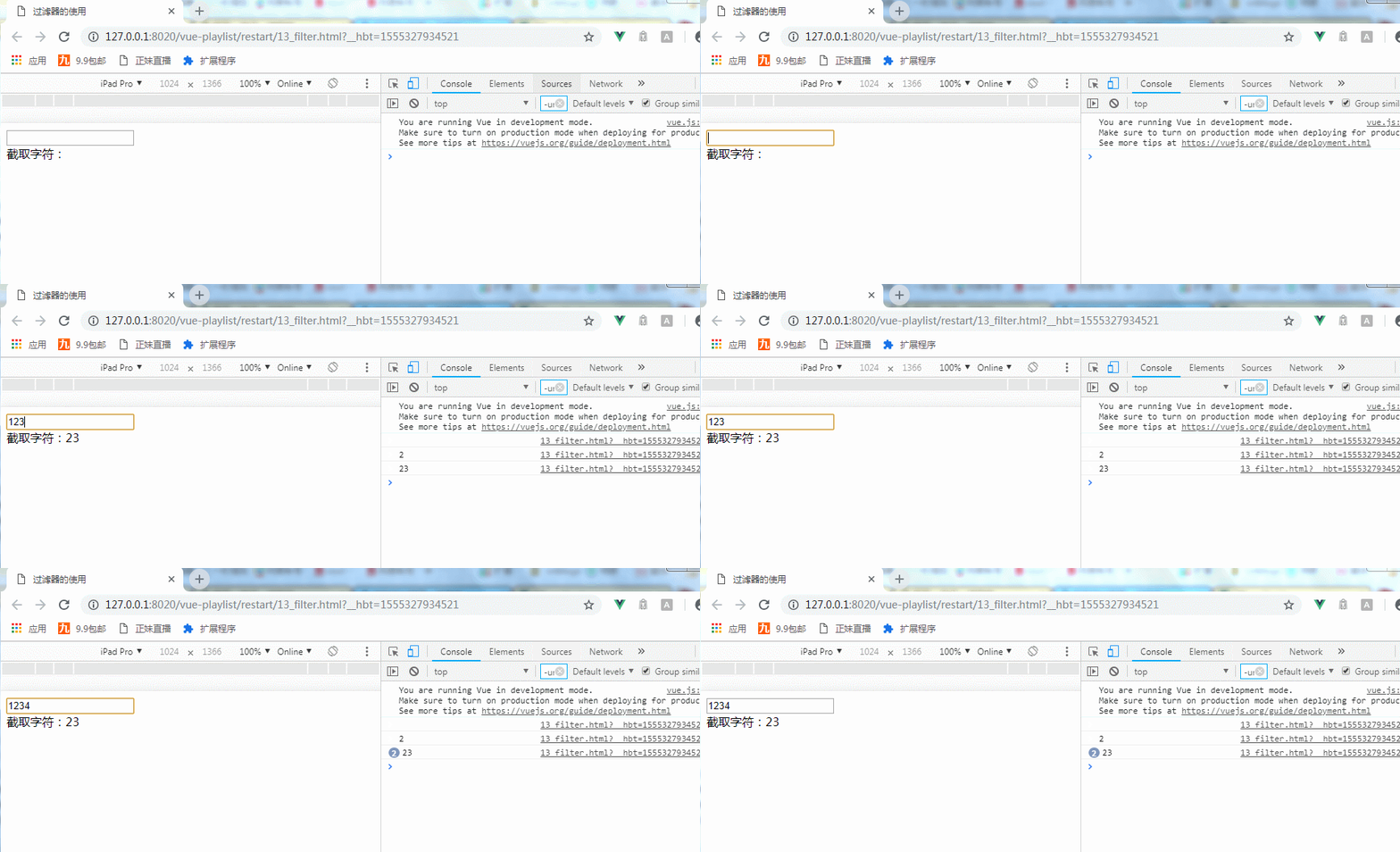
使用了全局的配置过滤器:
Vue.filter('strSplit',function(value,start,end){

                if(!value){

                    return '';

                }

                console.log(value.toString().slice(start,end));

                return value.toString().slice(start,end);

            });
在data中定义变量msg1=‘ ’
HTML:
<input type="text"  v-model="msg1" /><br />

            截取字符:{{msg1|strSplit(,)}}
带了两个参数
使用过滤器处理商品管理中日期的格式
定义了一个全局的过滤器之后得到效果: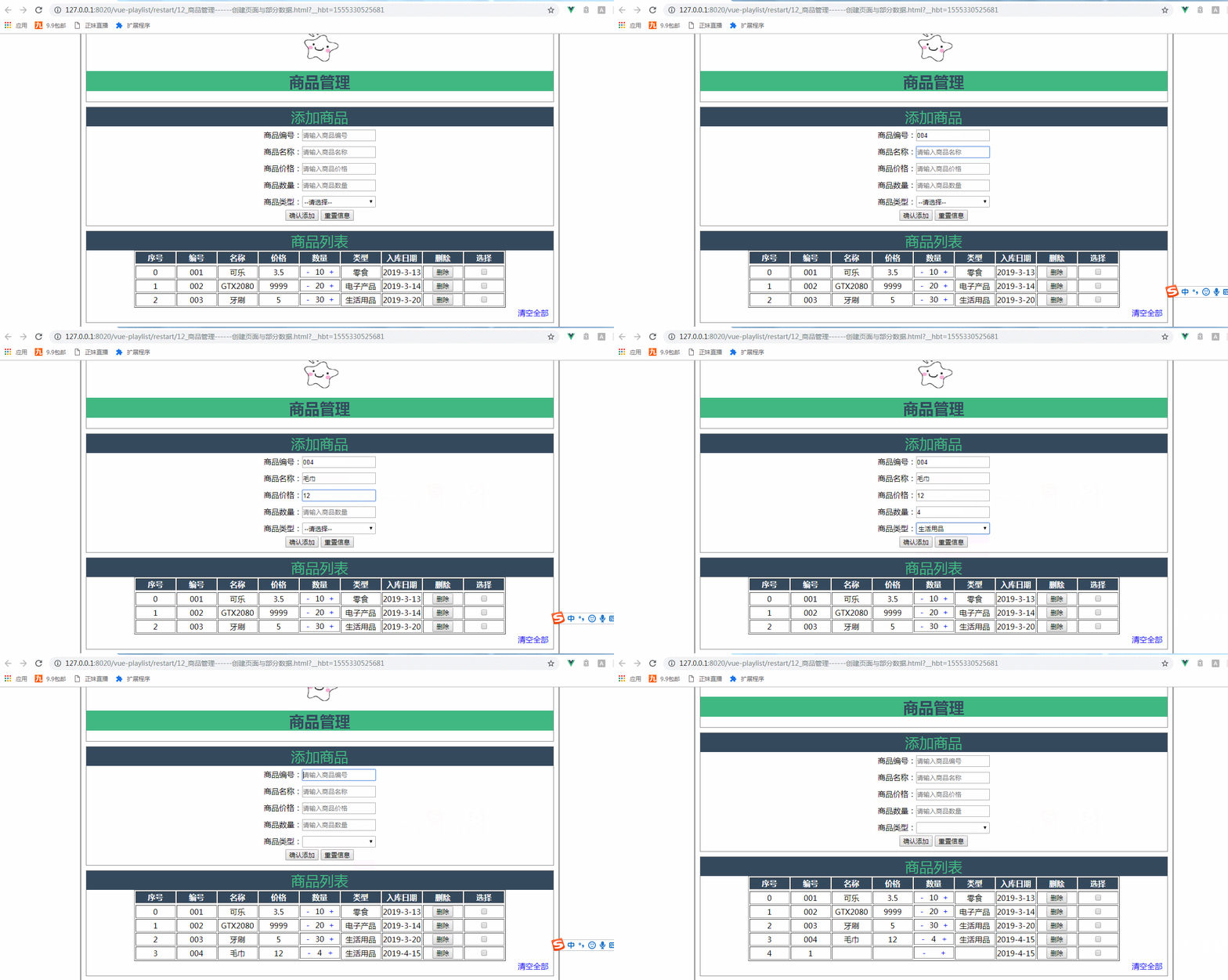
定义的全局过滤器:
Vue.filter('formatDate',function(value){

                if(!value)

                    return '';

                if(value instanceof Date){

                            var d = value;

                            var y = d.getFullYear();

                            var m = d.getMonth()+;

                            var day =d.getDate()<?''+d.getDate() : d.getDate();

                            var myDate = y+ '-' + m +'-'+day;

                            return myDate;

                }

                else {

                    return value;

                }

            });
addGoods()方法也需要做出相应的改变:
addGoods(){

                            this.goods.addDate = new Date ;

                        this.goodsArry.push(this.goods);

                        this.goods={};

                    },
HTML:
<td>{{item.addDate|formatDate}}</td>
当没有使用过滤器时的效果,其效果就没有日期格式的优化了,如图所示:
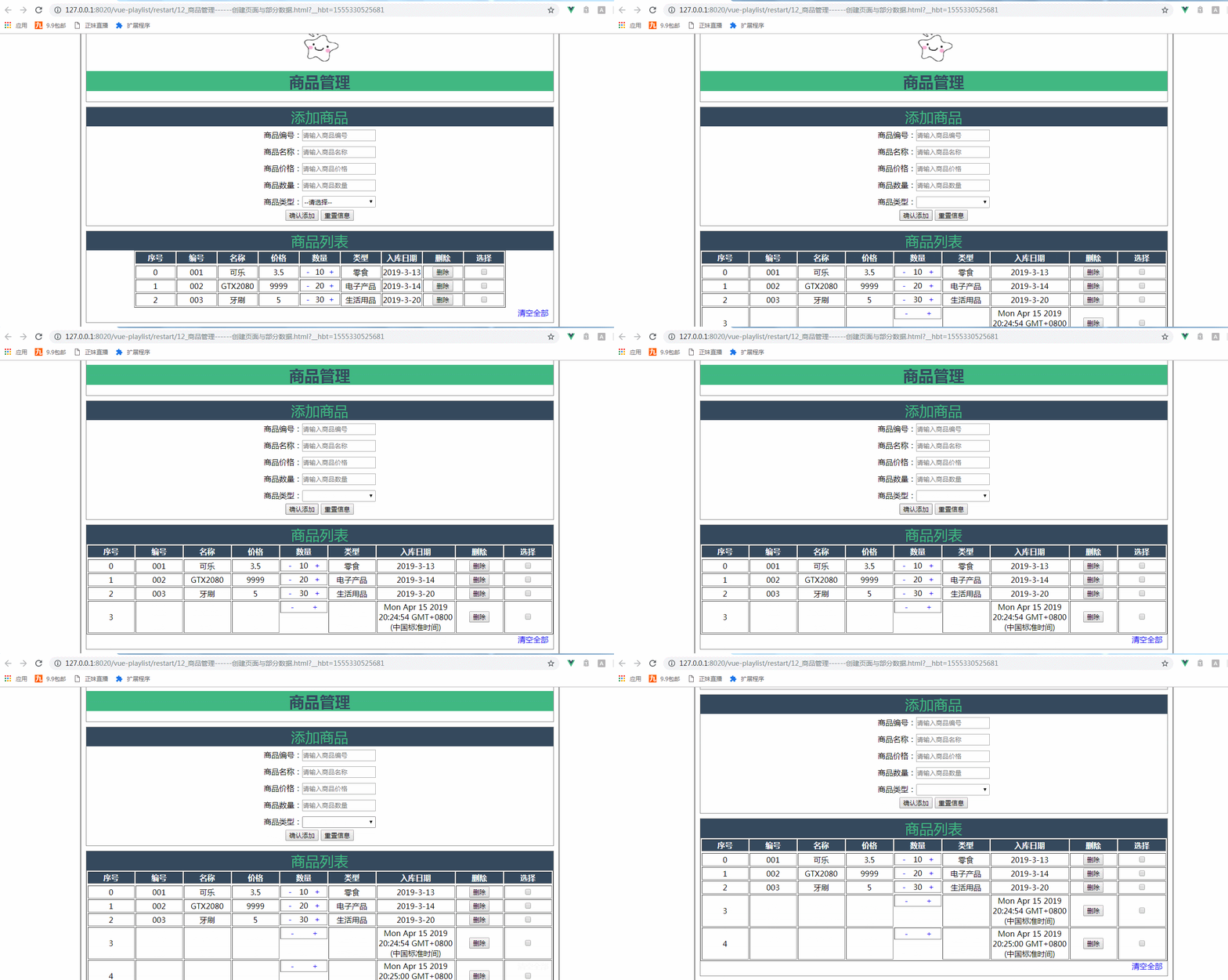
没有使用过滤器的HTML代码:
<td>{{item.addDate}}</td>
整个商品管理案例总的demo:
 <!DOCTYPE html>

 <html>

     <head>

         <meta charset="UTF-8">

         <title>商品管理------创建页面与部分数据</title>

         <script src="../js/vue.js"></script>

         <script>

             Vue.filter('formatDate',function(value){

                 if(!value)

                     return '';

                 if(value instanceof Date){

                             var d = value;

                             var y = d.getFullYear();

                             var m = d.getMonth()+;

                             var day =d.getDate()<?''+d.getDate() : d.getDate();

                             var myDate = y+ '-' + m +'-'+day;

                             return myDate;

                 }

                 else {

                     return value;

                 }

             });

             window .onload= () =>{

                 new Vue({

                 el:"#container",

                 data:{

                     imgUrl:'../res/images/',

                     imgName:'lovely.ico',

                     goods:{

                         id:'',

                         name:'',

                         price:'',

                         num:'',

                         type:''

                     },

                     goodsType:['零食','电子产品','生活用品'],

                     goodsArry:[

                     {id:'',name:'可乐',price:3.5,num:,type:'零食',addDate:'2019-3-13'},

                     {id:'',name:'GTX2080',price:,num:,type:'电子产品',addDate:'2019-3-14'},

                     {id:'',name:'牙刷',price:,num:,type:'生活用品',addDate:'2019-3-20'}

                     ],

                     colNum:,

                     delArray:[]//删除选中的索引

                 },

                 methods:{

                     addGoods(){

                             this.goods.addDate = new Date ;

                         this.goodsArry.push(this.goods);

                         this.goods={};

                     },

                     delGoods(index){

                         this.goodsArry.splice(index,);

                     },

                     clearGoodsArry(){

                      this.goodsArry=[];

                      },

                      delSelected(){

                          this.delArray.sort((a,b)=>{

                              return a-b;

                          });

                          console.log(this.delArray);

                          for(var i=;i<this.delArray.length;i++)

                          {

                              this.goodsArry.splice(this.delArray[i]-i,);

                          }

                          this.delArray=[];

                      }

                 }

             });

             }

         </script>

         <style>

             #container{

                 margin:  auto;

                 text-align: center;

                 width: 1000px;

                 border:2px solid gray;

             }

           .header{

          margin: 10px;

          border: 1px solid gray;

           }

       .header .title{

       color: rgb(,,);

     background: rgb(,,);

        }

      .sub_title{

       background:rgb(,,);

      color: rgb(,,);

      font-size: 30px;

      }

 .form-warp{

    margin: 10px;

    padding-bottom: 10px;

   border: 1px solid gray;

 }

 .form-warp .content{

   line-height: 35px;

 }

 .form-warp input{

   width: 150px;

   height: 18px;

 }

         .form-warp select{

     width: 154px;

     height: 24px;

 }

    .table-warp{

     padding-bottom: 10px;

     margin: 10px;

      border: 1px solid gray;

 }

  .table-warp a{

  text-decoration: none;

 }

 .table-warp th{

   width: 80px;

   color: #ffff;

   background: rgb(,,);

 }

 .logo

 {

   position: relative;

   top: 12px;

 }

 .fontColor{

     color: gray;

     text-align: center;

 }

 .clear-btn{

   text-align: right;

   padding-right: 10px;

 }

         </style>

     </head>

     <body>

         <div id="container">

             <!--logo title-->

             <div class="header">

                 <img :src="imgUrl+imgName" class="logo"  height="80px"  width="100px"   />

                 <h1 class="title">商品管理</h1>

             </div>

             <!--输入部分input-->

             <div  class="form-warp">

                 <div class="sub_title">添加商品</div>

                 <div class="content">

                     商品编号:<input type="text" placeholder="请输入商品编号"  v-model="goods.id"/><br />

                     商品名称:<input type="text" placeholder="请输入商品名称"  v-model="goods.name"/><br />

                     商品价格:<input type="text" placeholder="请输入商品价格"  v-model="goods.price"/><br />

                     商品数量:<input type="text" placeholder="请输入商品数量" v-model="goods.num"/><br />

                     商品类型:<select v-model="goods.type">

                         <option value="" disabled="disabled">--请选择--</option>

                         <option v-for="type in goodsType">{{type}}</option>

                     </select>

             </div>

             <div class="form-btn">

                 <button @click="addGoods">确认添加</button>

                 <button @click="goods= { } ">重置信息</button>

             </div>

     </div>

     <!--显示表格-->

     <div class="table-warp">

         <div :class="{fontColor:goodsArry.length<=0}"   class="sub_title">商品列表</div>

         <table border="" align="center">

             <tr>

                 <th>序号</th>

                 <th>编号</th>

                 <th>名称</th>

                 <th>价格</th>

                 <th>数量</th>

                 <th>类型</th>

                 <th width="100px">入库日期</th>

                 <th>删除</th>

                 <th>选择</th>

             </tr>

             <td :colspan="colNum" height="150px" v-show="goodsArry.length<=0">

                 暂无商品

             </td>

             <tr v-for="(item,index) in goodsArry" :key="item.id">

                 <td>{{index}}</td>

                 <td>{{item.id}}</td>

                 <td>{{item.name}}</td>

                 <td>{{item.price}}</td>

                 <td style="display: flex;">

                     <a style="flex: 0.5;"  href="#" @click.prevent="item.num=item.num--<=0?0:item.num--">-</a><!--style中的flex为了使其点击的范围扩大-->

                     {{item.num}}

                     <a style="flex: 0.5;"  href="#" @click.prevent="item.num++">+</a>

                 </td>

                 <td>{{item.type}}</td>

                 <td>{{item.addDate|formatDate}}</td>

                 <td>

                     <button  @click="delGoods(index)">删除</button>

                 </td>

                 <td>

                     <input type="checkbox" :value="index" v-model="delArray"/>

                 </td>

             </tr>

     <!--    {{delArray}}-->

         </table>

         <div class="clear-btn">

           <a href="#" @click="delSelected" v-show="delArray.length>0" >删除选中</a>

           <a href="#" @click="clearGoodsArry" v-show="goodsArry.length>0" >清空全部</a>

       </div>

       </div>

             </div>

     </body>

 </html>
商品管理小案例
Vue小案例 之 商品管理------学习过滤器 使用过滤器处理日期的格式的更多相关文章
- Vue小案例 之 商品管理------修改商品数量以及增加入库日期属性
实现修改商品的数量: 加入的代码: css: .clear-btn{ text-align: right; padding-right: 10px; } .table-warp a{ text-dec ...
- Vue小案例 之 商品管理------批量删除与商品数量的调整
通过索引进行删除,进行测试,是否获取其索引: 测试效果: 测试代码,在vue中定义一个空的数组,以便后面进行数据的绑定: data:{ imgUrl:'../res/images/', imgName ...
- Vue小案例 之 商品管理------删除商品与提示
实现删除商品功能 根据索引来进行删除商品: 实现删除商品的HTML: <!--显示表格--> <div class="table-warp"> <di ...
- Vue小案例 之 商品管理------为之前的页面修改样式
最终修改的页面效果: 修改的css: <style> #container{ margin: auto; text-align: center; width: 1000px; border ...
- Vue小案例 之 商品管理------添加商品
进行添加button,以及商品列表的创建 html: <div class="form-btn"> <button>确认添加</button> ...
- Vue小案例 之 商品管理------创建页面与部分数据
logo的路径: 页面的初始布局: 初始的HTML: <div id="container"> <!--logo title--> <div clas ...
- Vue小案例(一)
案例需求: 创建一个品牌展示表格,表头有编号(id),品牌名称(name),创建时间(time)和操作,需要实现的功能是对数据的增删操作,和时间的格式化. 思路分析:在开发之前需要想清楚要用到Vue中 ...
- vue小案例--简易评论区
一.小案例(评论区) 1.流程 (1)分析静态页面.(vue项目创建参考https://www.cnblogs.com/l-y-h/p/11241503.html)(2)拆分静态页面,变成一个个组件. ...
- VUE小案例--简易计算器
这个小案例主要时练习v-model的使用,功能并不完善 <!DOCTYPE html> <html lang="zh-CN"> <head> & ...
随机推荐
- JMeter登录总是提示用户名不能为空的解决
已传入参数了呀,还是提示用户名不能为空 解决: 将url拼接上参数 --
- mysql 延迟添加唯一索引
MySQL [test]> create table tbl_keyword ( -> id int not null auto_increment primary key, -> ...
- RF基础(一) RF内建函数库BuiltIn
Robot framework做为一个测试框架,并不是只能做selenium测试,是支持扩展的, 比如说,你引用requests库就可以做接口测试, 那么无论你用什么库 首先要了解, RF本身提供的内 ...
- Selenium基础知识(八)文本域处理textarea
textarea文本域selenium有时处理不了,但是我们可以采用迂回,解决这个问题 那么,我们用到了execute_script()方法来调用javascript来解决这个问题 这其中涉及DOM, ...
- vue搭建环境并创建项目
1.>npm install @vue/cli -g 2.创建项目A a.>vue ui b.在弹出的管理界面创建项目 或 a.npm install -g @vue/cli-init b ...
- Installing IIS 8 on Windows Server 2012微软官方安装指导
from: https://www.iis.net/learn/get-started/whats-new-in-iis-8/installing-iis-8-on-windows-server-20 ...
- c# Mongodb批量更新
public void Put(List<OnlineItem> datas) { try { ...
- quartz demo01
1,Pom.xml 加入:quartz-2.1.7.jar <dependency> <groupId>org.quartz-scheduler</groupId&g ...
- Message对象
一)描述 1: 每一个Message对象都包含两个对象: (1)google::protobuf::Descriptor 描述对象,是Message所有Filed的一个集合,它又包含了FieldDes ...
- SNMP 安装及使用
一.SNMP的安装 1.安装 snmp服务,python扩展等 参考:http://lihuipeng.blog.51cto.com/3064864/915965 [root@localhost] y ...