
DEVOPS技术实践_08:声明式管道语法
简介
前面简单的做了管道的实验,看了一下的它的效果
声明式管道是Groovy语法中的一个更简单和结构化的语法。下面主要学习明式管道语法。
一 声明式管道的基本结构
以上节的代码为例
node {

   def mvnHome

   stage('Preparation') { // for display purposes

      // Get some code from a GitHub repository

      git 'https://github.com/jglick/simple-maven-project-with-tests.git'

      // Get the Maven tool.

      // ** NOTE: This 'M3' Maven tool must be configured

      // **       in the global configuration.

      mvnHome = tool 'M3'

   }

   stage('Build') {

      // Run the maven build

      withEnv(["MVN_HOME=$mvnHome"]) {

         if (isUnix()) {

            sh '"$MVN_HOME/bin/mvn" -Dmaven.test.failure.ignore clean package'

         } else {

            bat(/"%MVN_HOME%\bin\mvn" -Dmaven.test.failure.ignore clean package/)

         }

      }

   }

   stage('Results') {

      junit '**/target/surefire-reports/TEST-*.xml'

      archiveArtifacts 'target/*.jar'

   }

}
1.1 node块
node块定义Jenkins agent,在node中定义了stage blocks, directives和steps.
node块的结构看起来如下所示:
node (‘‘) {}
下面给关于node块更详细的信息:
- – Defines: stge,directives或者steps应该运行的节点。
- – Constituents: 多个stage块、directives或steps.
- – Required: Yes
- – Parameters: Any, label
node (‘master’) { 这里的字符串master是一个参数,是告诉Jenkins去使用Jenkins master运行node里面的块内容。
如果是any的话,那就是所有的agnet的都可以去运行。
1.2 Stage块
stage块是一群相关对象的steps和directives的集合。stage块结构看起来如下所示:
stage (‘‘) {}
下面给出关于stage块的更详细信息。
- Defines: 一组steps和directives.
- Constituents: 多个node块、directives或者steps.
- Required: Yes
- Parameters: A string that is the name of the stage(mandatory)
1.3 Directives
指令的主要目标是给node block,stage block和 stage block提供以下元素:环境变量、选项、参数、触发器、工具。
下面给出了关于stage 块的更详细信息。
- Defines: 这个阶段应该运行的节点位置(就是在哪个节点上运行)。
- Constituents: Environments, options, parameters, triggers, tools
- Required: No, but every CI/CD pipeline has it.
- Parameters: None
1.4 Step
阶段是组成声明管道的基本元素。step可以是batch脚本或者shell脚本,或者其它任何可以执行的命令。 steps有多种多样的用处,比如刻隆代码,构建代码,运行测试,上传软件到repository server,执行静态代码分析等。 在上一章节,也看到了如何使用Jenkins管道语法工具。
下面给出了关于step块的更详细信息:
- Defines: 它告诉Jenkins干什么
- Constituents: 命令,脚本等。它也是管道的基本块。
- Required: No, 但每个CI/CD管道都有它。
- Parameters: None
二 jenkins语法管道工具
Jenkins pipeline syntax utility是快速简单的创建pipeline代码的方式。
下面学习使用pipeline syntax utility重新创建pipeline
2.1准备工作
安装一个插件

- 在Global Tool Configuration页面中配置Maven tool.
- 安装Pipleline Maven Integration Plugin.
- 构建Maven项目时需要Java工具,因此此处构建时使用Jenkins master.
2.2 使用pipeline syntax utility 创建Jenkins pipeline.
新建任务,取名jenkins_pineline_demo_utility,使用流水线

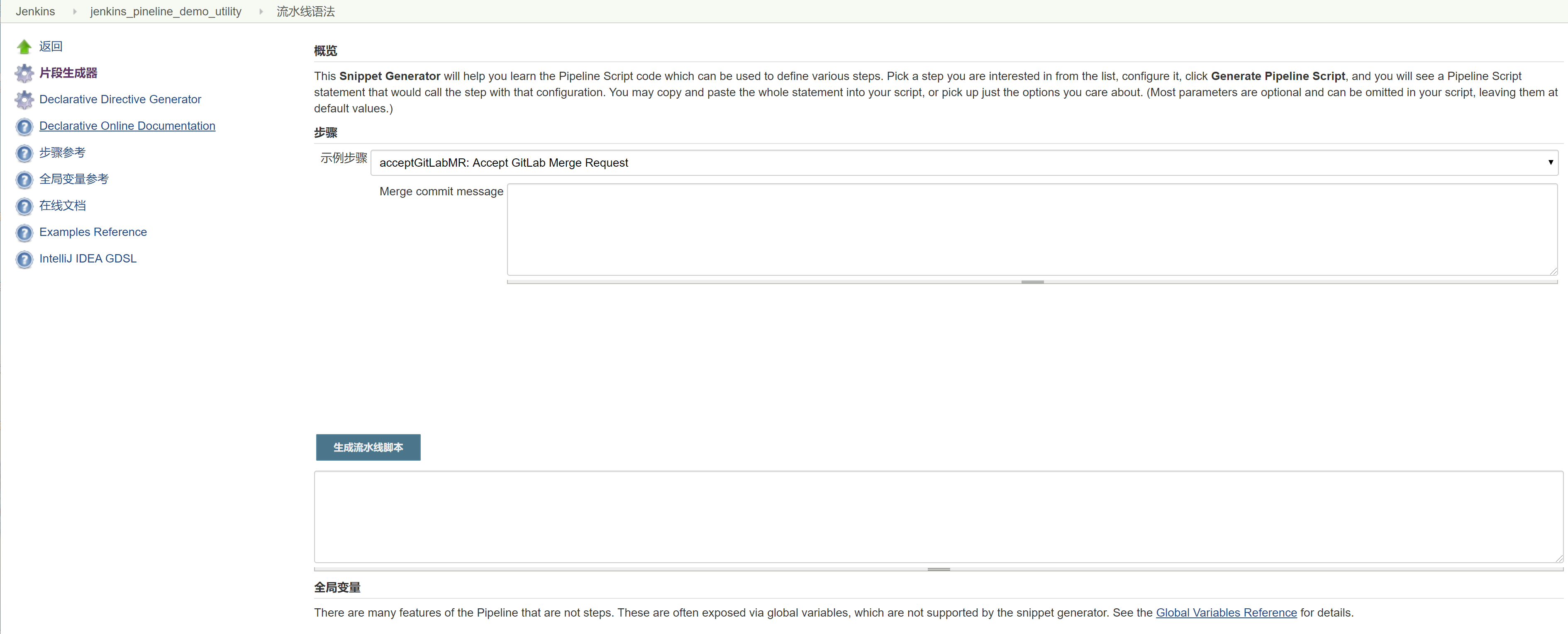
点击流水线的流水线语法

界面显示
2.3 连接一个node
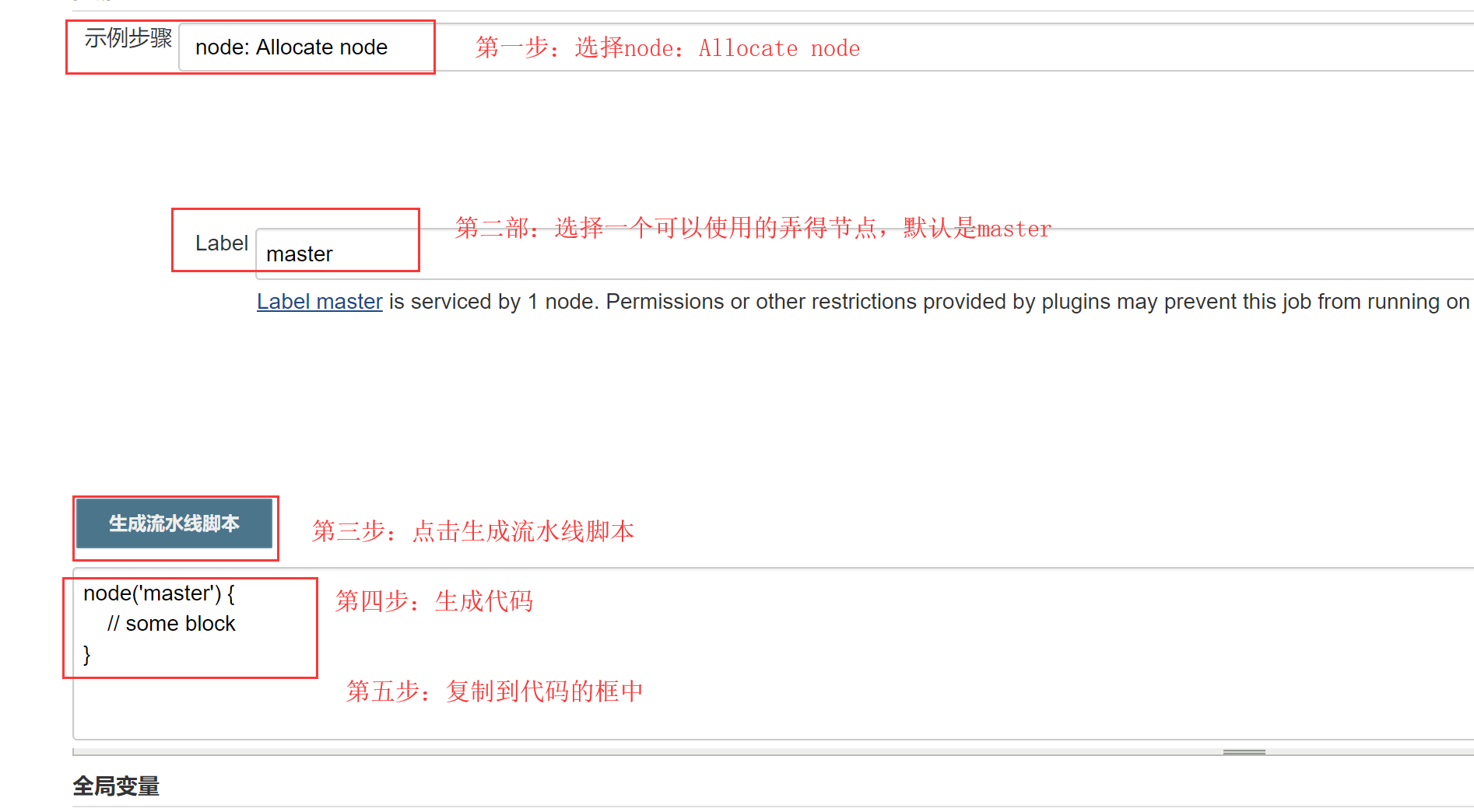
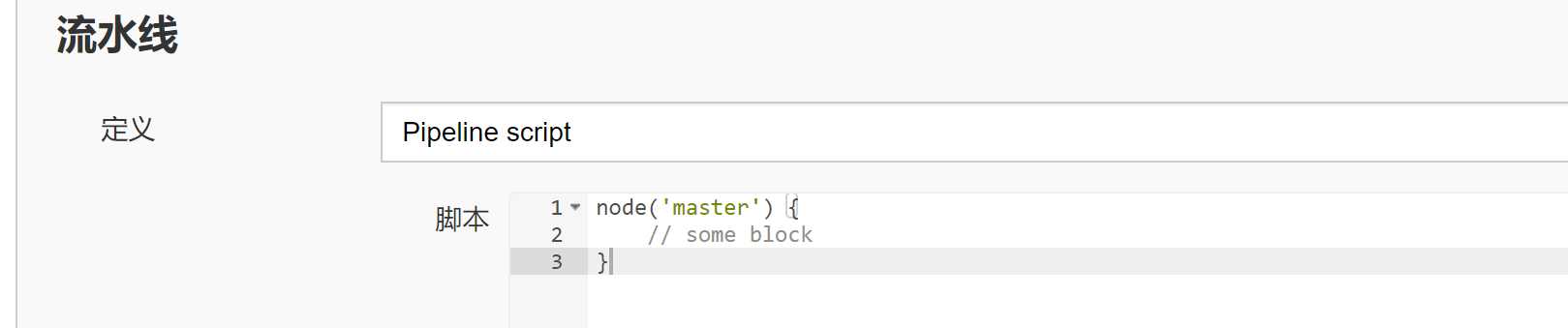
复制过来
2.4 创建两个stage块,名字分别为Preparation和Build,并复制脚本到第(3)步的编辑器中
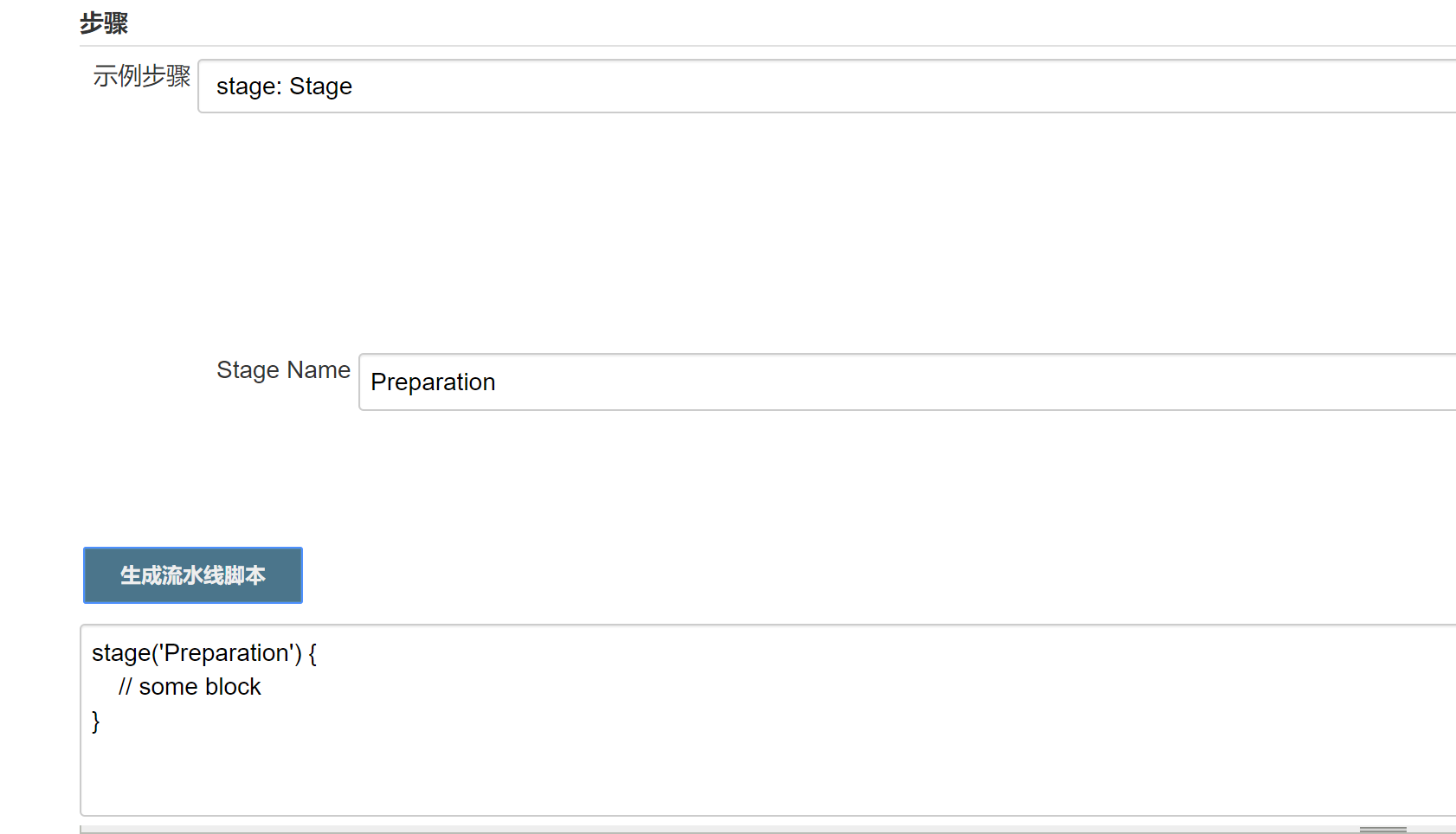
复制过来
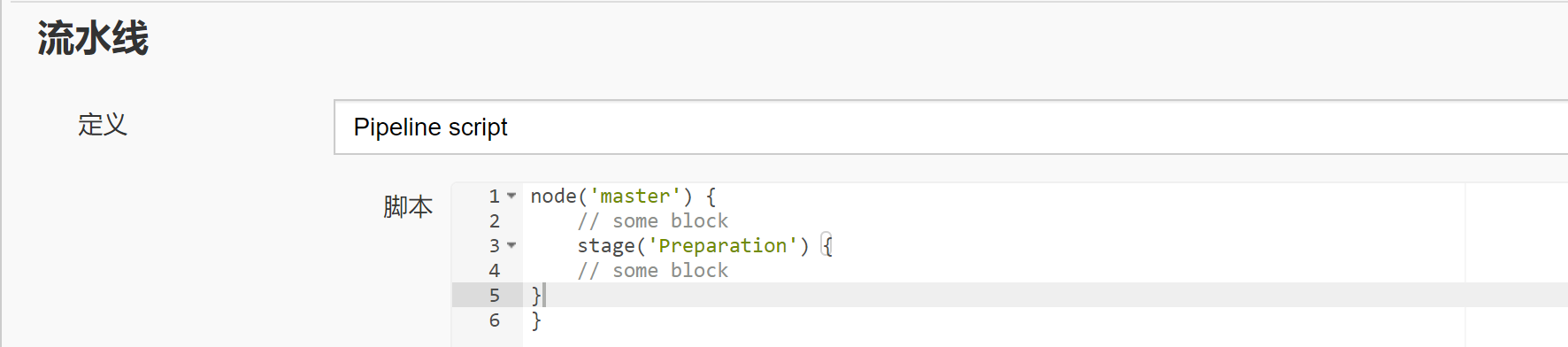
2.5 Build操作
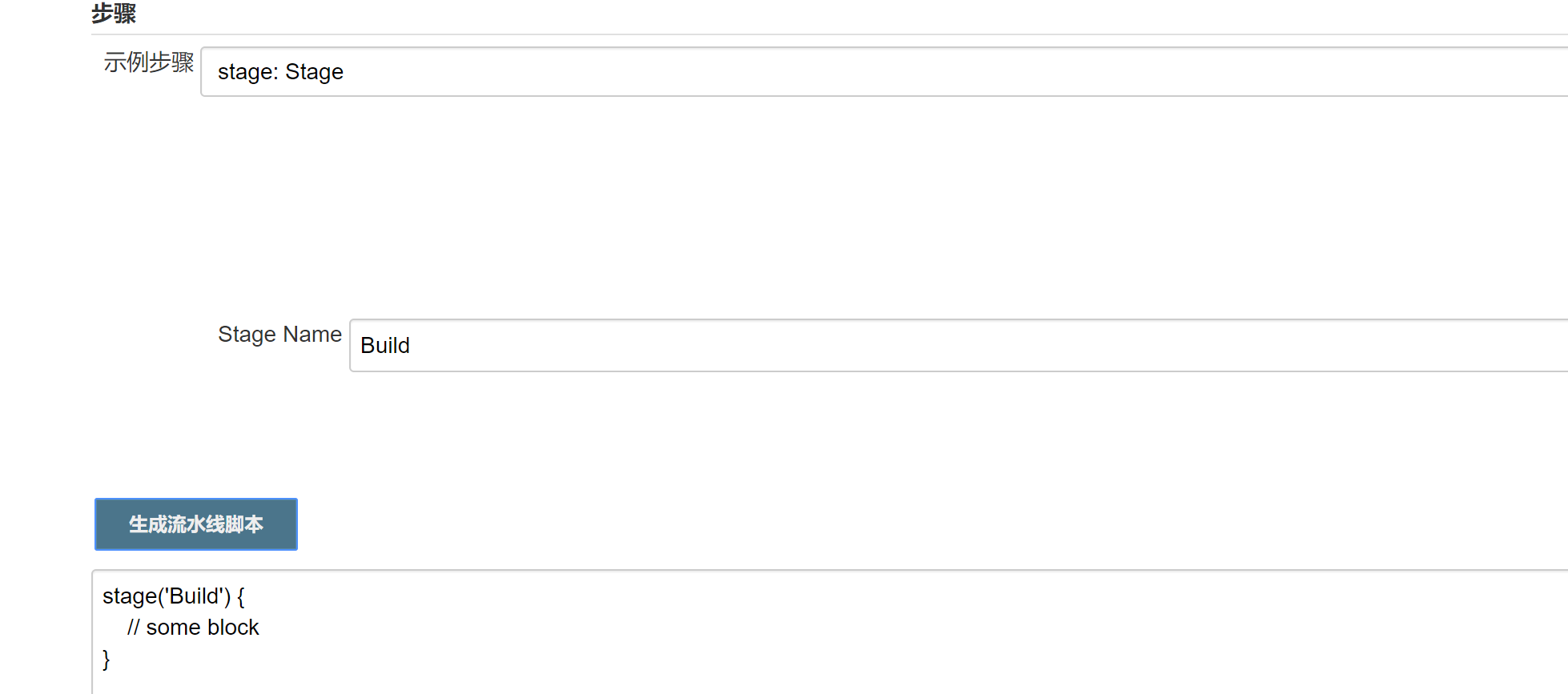
复制过来

2.6 创建一个step去从GitHub服务器下载源码。并把产生的代码复制,放到Preparation 的stage块中
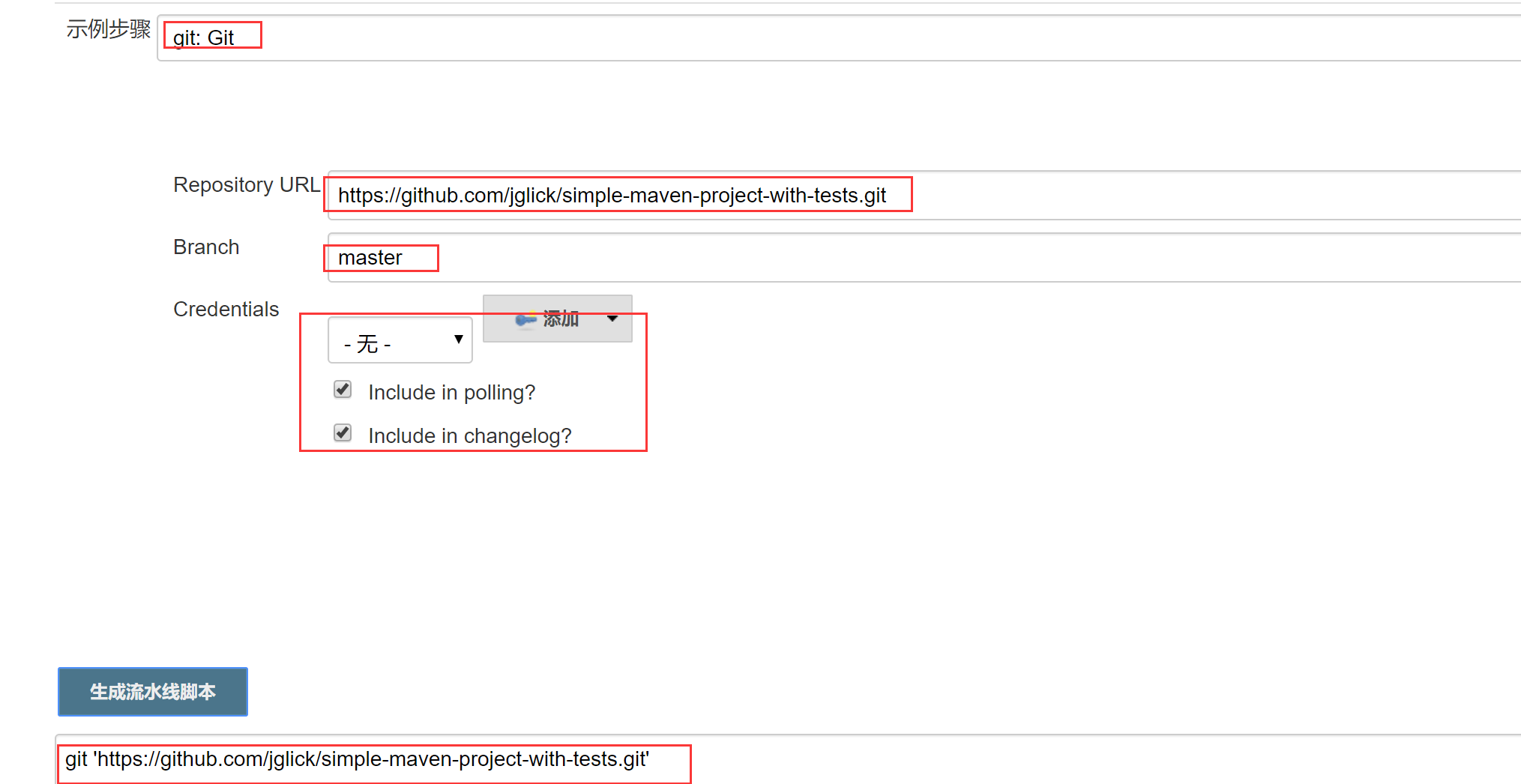
复制过来
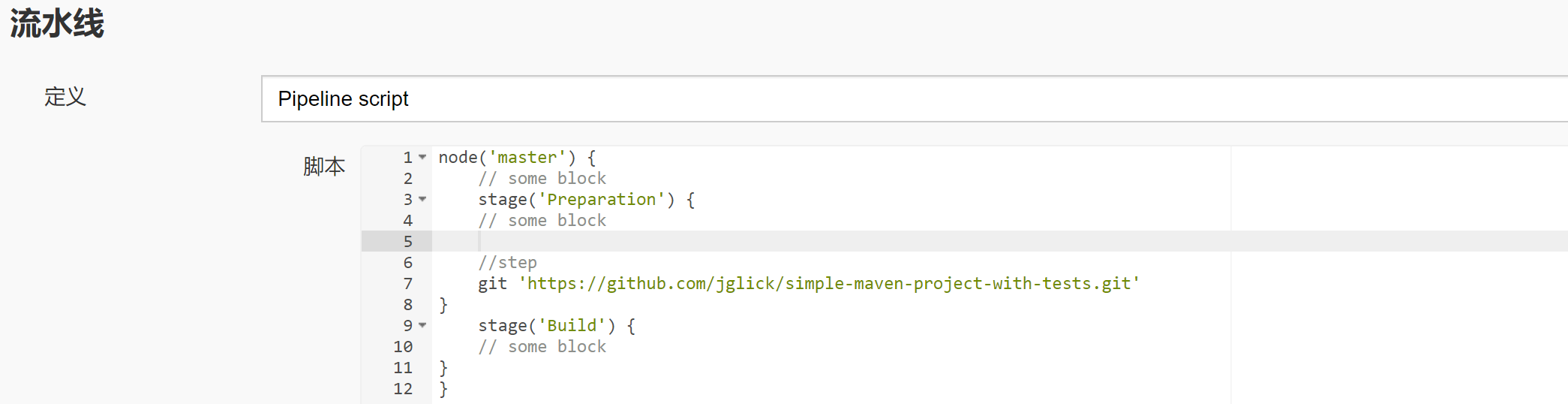
2.7 产生指令告诉jenkins去使用我们先前在【全局工具配置】的M3 maven工具。,然后把代码复制到Build的stage块中
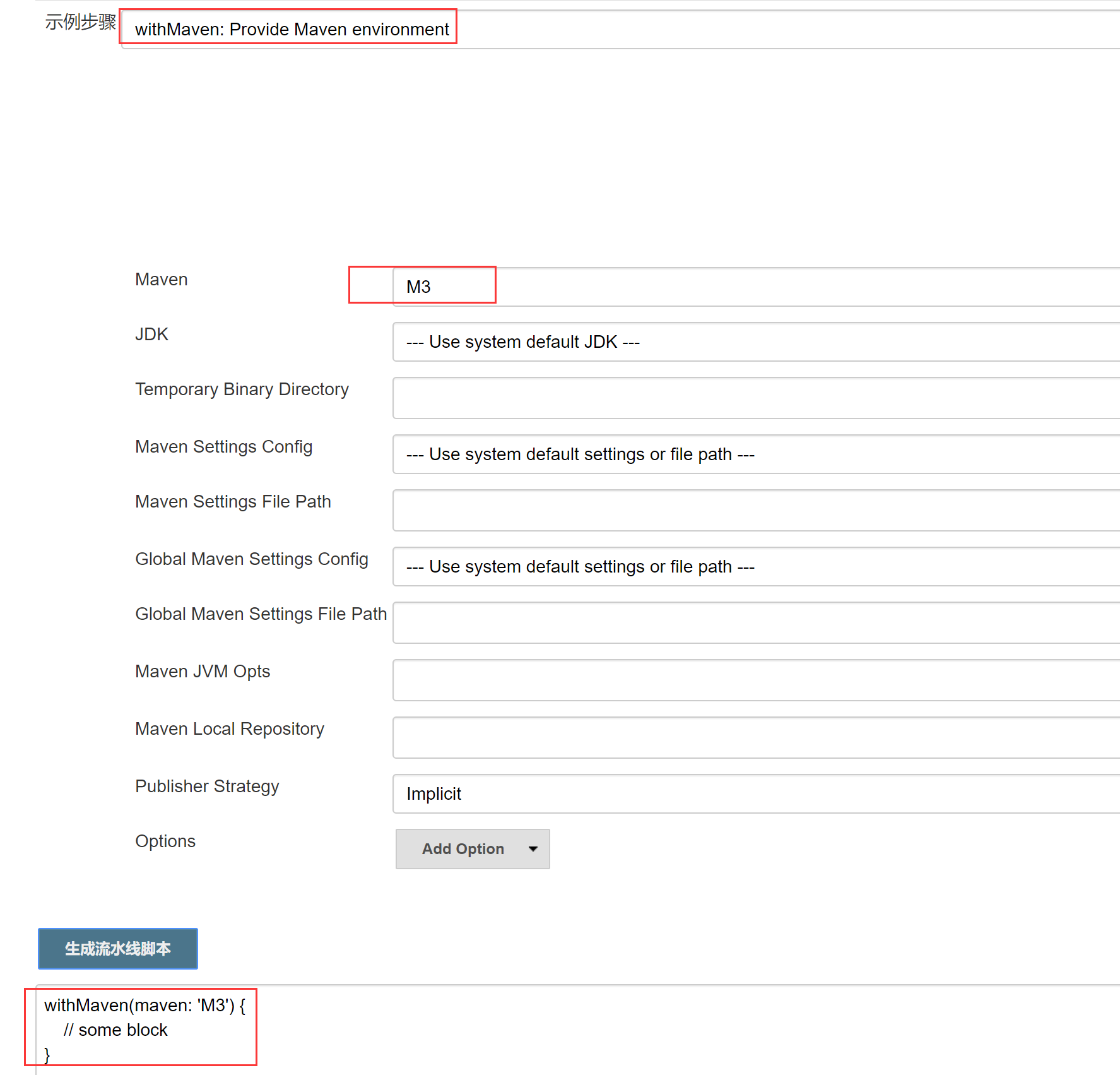
复制代码过来
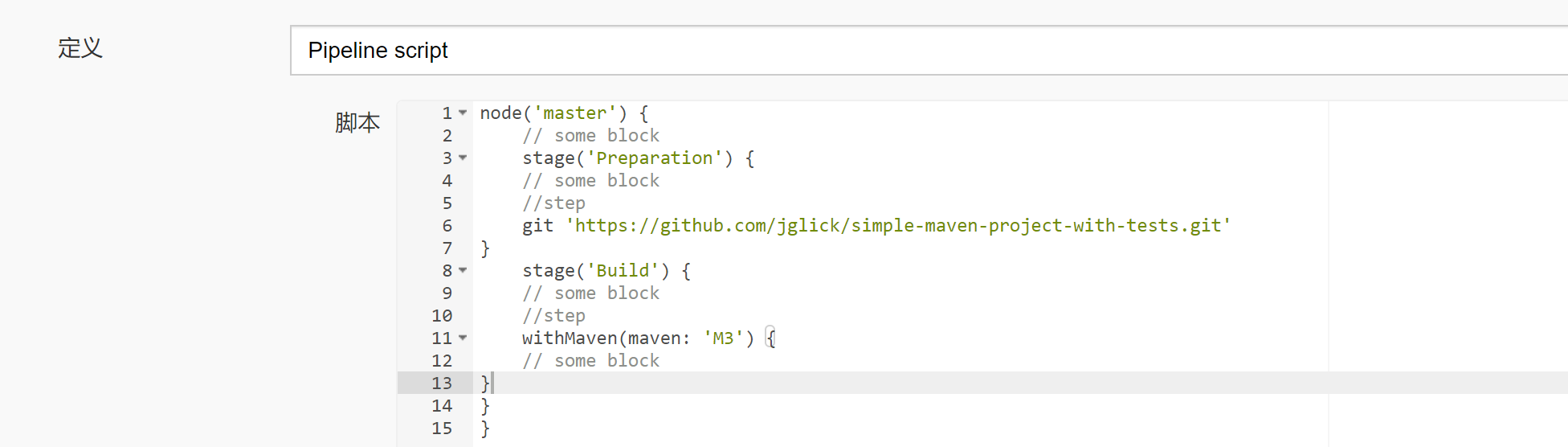
2.8 针对Maven 构建命令产生一个pipeline的代码。然后把脚本内容复制到withMaven指令中去
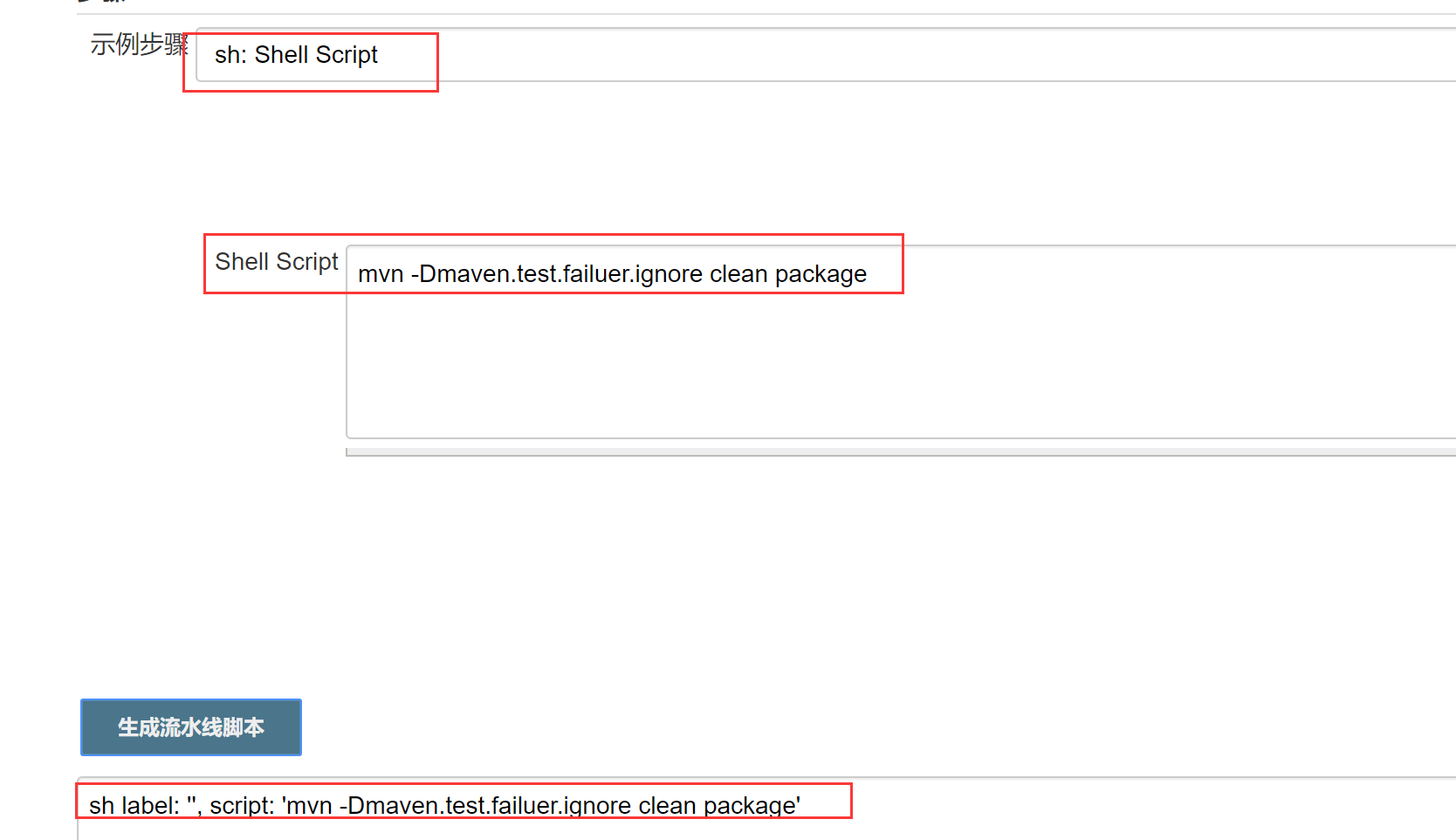
复制代码
最终代码如下
node('master') {

    // some block

    stage('Preparation') {

    // some block

    //step

    git 'https://github.com/jglick/simple-maven-project-with-tests.git'

}

    stage('Build') {

    // some block

    //step

    withMaven(maven: 'M3') {

    // some block

    sh label: '', script: 'mvn -Dmaven.test.failuer.ignore clean package'

}

}

}
保存,并构建
2.9 构建
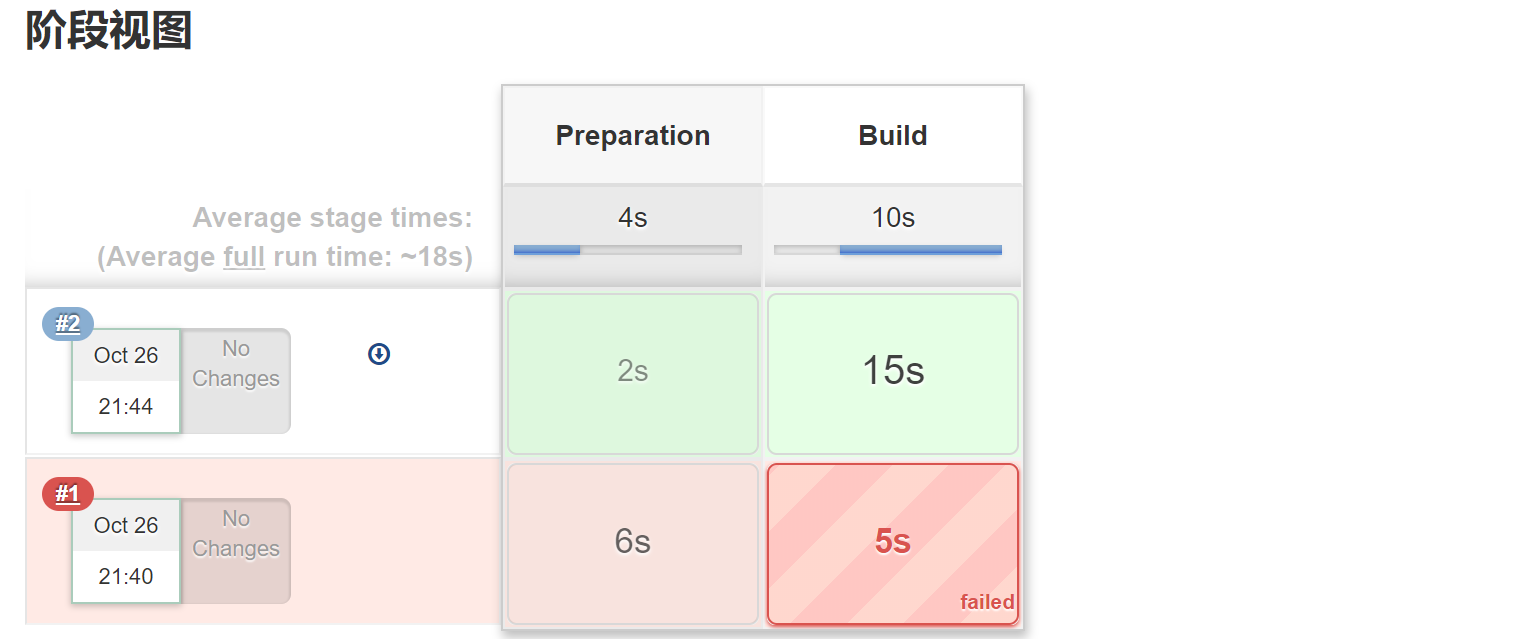
构建失败
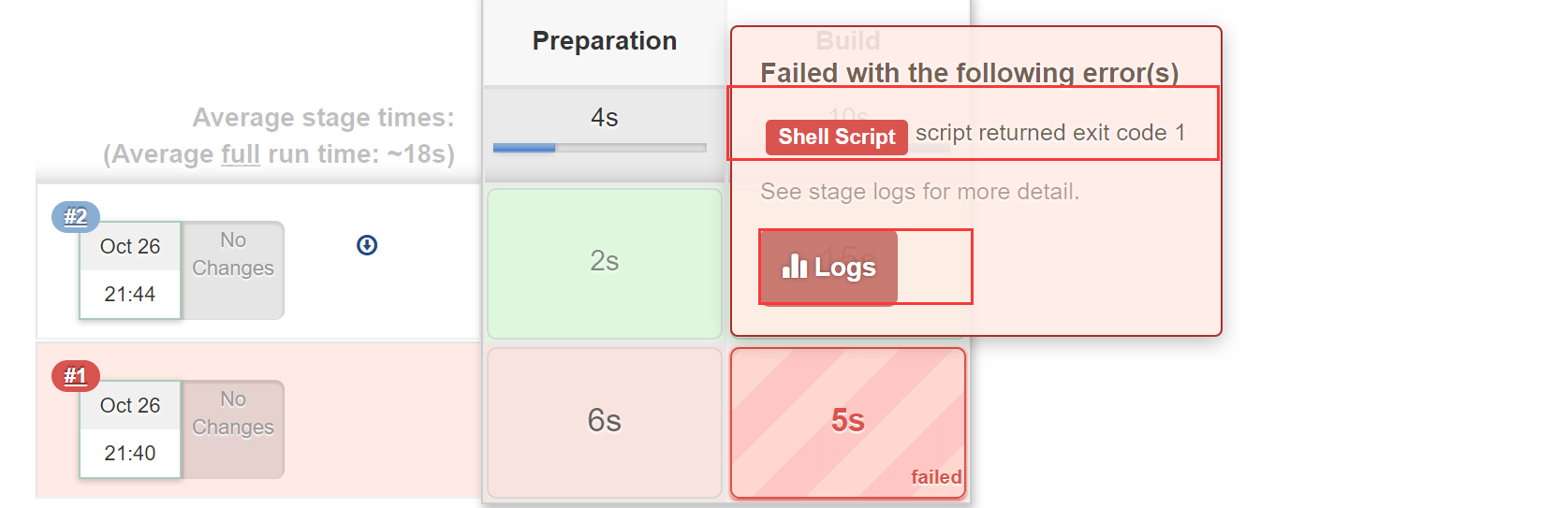
修改代码
node('master') {

    // some block

    stage('Preparation') {

    // some block

    //step

    git 'https://github.com/jglick/simple-maven-project-with-tests.git'

}

    stage('Build') {

    // some block

    //step

    withMaven(maven: 'M3') {

    // some block

    sh label: '', script: 'mvn -Dmaven.test.failuer.ignore clean install package'

}

}

}
再次构建成功
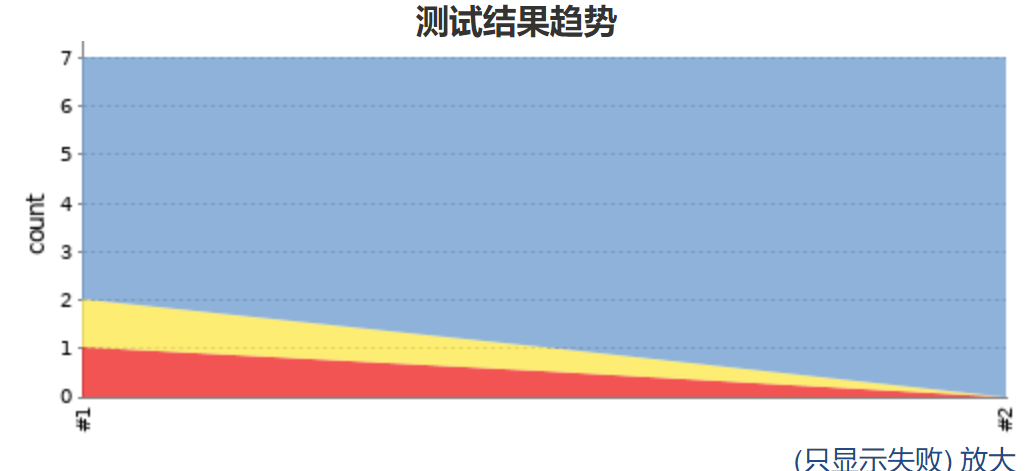
2.10 构建结果
阶段视图
趋势图
控制台输出
Started by user darren ning

Running in Durability level: MAX_SURVIVABILITY

[Pipeline] Start of Pipeline

[Pipeline] node

Running on Jenkins in /root/.jenkins/workspace/jenkins_pineline_demo_utility

[Pipeline] {

[Pipeline] stage

[Pipeline] { (Preparation)

[Pipeline] git

No credentials specified

 > git rev-parse --is-inside-work-tree # timeout=

Fetching changes from the remote Git repository

 > git config remote.origin.url https://github.com/jglick/simple-maven-project-with-tests.git # timeout=10

Fetching upstream changes from https://github.com/jglick/simple-maven-project-with-tests.git

 > git --version # timeout=

 > git fetch --tags --progress https://github.com/jglick/simple-maven-project-with-tests.git +refs/heads/*:refs/remotes/origin/*

 > git rev-parse refs/remotes/origin/master^{commit} # timeout=

 > git rev-parse refs/remotes/origin/origin/master^{commit} # timeout=

Checking out Revision b3a39b21ac048d9298986e0d4a1d9f4dd185df8f (refs/remotes/origin/master)

 > git config core.sparsecheckout # timeout=

 > git checkout -f b3a39b21ac048d9298986e0d4a1d9f4dd185df8f

 > git branch -a -v --no-abbrev # timeout=

 > git branch -D master # timeout=

 > git checkout -b master b3a39b21ac048d9298986e0d4a1d9f4dd185df8f

Commit message: "Merge pull request #13 from jglick/Jenkinsfile"

 > git rev-list --no-walk b3a39b21ac048d9298986e0d4a1d9f4dd185df8f # timeout=

[Pipeline] }

[Pipeline] // stage

[Pipeline] stage

[Pipeline] { (Build)

[Pipeline] withMaven

[withMaven] Options: []

[withMaven] Available options:

[withMaven] using JDK installation provided by the build agent

[withMaven] using Maven installation 'M3'

[Pipeline] {

[Pipeline] sh

+ mvn -Dmaven.test.failuer.ignore clean install package

----- withMaven Wrapper script -----

Picked up JAVA_TOOL_OPTIONS: -Dmaven.ext.class.path="/root/.jenkins/workspace/jenkins_pineline_demo_utility@tmp/withMaven161c0da4/pipeline-maven-spy.jar" -Dorg.jenkinsci.plugins.pipeline.maven.reportsFolder="/root/.jenkins/workspace/jenkins_pineline_demo_utility@tmp/withMaven161c0da4"

Apache Maven 3.6. (40f52333136460af0dc0d7232c0dc0bcf0d9e117; --27T11::-:)

Maven home: /root/.jenkins/tools/hudson.tasks.Maven_MavenInstallation/M3

Java version: 1.8.0_222, vendor: Oracle Corporation, runtime: /usr/lib/jvm/java-1.8.-openjdk-1.8.0.222.b10-.el7_6.x86_64/jre

Default locale: en_US, platform encoding: UTF-

OS name: "linux", version: "3.10.0-957.27.2.el7.x86_64", arch: "amd64", family: "unix"

[INFO] [jenkins-event-spy] Generate /root/.jenkins/workspace/jenkins_pineline_demo_utility@tmp/withMaven161c0da4/maven-spy---.log.tmp ...

[INFO] Scanning for projects...

[INFO]

[INFO] ----------------< test:simple-maven-project-with-tests >----------------

[INFO] Building simple-maven-project-with-tests 1.0-SNAPSHOT

[INFO] --------------------------------[ jar ]---------------------------------

[INFO] Downloading from central: https://repo.maven.apache.org/maven2/org/apache/maven/plugins/maven-install-plugin/2.4/maven-install-plugin-2.4.pom

[INFO] Downloaded from central: https://repo.maven.apache.org/maven2/org/apache/maven/plugins/maven-install-plugin/2.4/maven-install-plugin-2.4.pom (6.4 kB at 2.3 kB/s)

[INFO] Downloading from central: https://repo.maven.apache.org/maven2/org/apache/maven/plugins/maven-install-plugin/2.4/maven-install-plugin-2.4.jar

[INFO] Downloaded from central: https://repo.maven.apache.org/maven2/org/apache/maven/plugins/maven-install-plugin/2.4/maven-install-plugin-2.4.jar (27 kB at 20 kB/s)

[INFO]

[INFO] --- maven-clean-plugin:2.5:clean (default-clean) @ simple-maven-project-with-tests ---

[INFO] Deleting /root/.jenkins/workspace/jenkins_pineline_demo_utility/target

[INFO]

[INFO] --- maven-resources-plugin:2.6:resources (default-resources) @ simple-maven-project-with-tests ---

[INFO] Using 'UTF-8' encoding to copy filtered resources.

[INFO] skip non existing resourceDirectory /root/.jenkins/workspace/jenkins_pineline_demo_utility/src/main/resources

[INFO]

[INFO] --- maven-compiler-plugin:3.1:compile (default-compile) @ simple-maven-project-with-tests ---

[INFO] No sources to compile

[INFO]

[INFO] --- maven-resources-plugin:2.6:testResources (default-testResources) @ simple-maven-project-with-tests ---

[INFO] Using 'UTF-8' encoding to copy filtered resources.

[INFO] skip non existing resourceDirectory /root/.jenkins/workspace/jenkins_pineline_demo_utility/src/test/resources

[INFO]

[INFO] --- maven-compiler-plugin:3.1:testCompile (default-testCompile) @ simple-maven-project-with-tests ---

[INFO] Changes detected - recompiling the module!

[INFO] Compiling  source files to /root/.jenkins/workspace/jenkins_pineline_demo_utility/target/test-classes

[INFO]

[INFO] --- maven-surefire-plugin:2.18.:test (default-test) @ simple-maven-project-with-tests ---

[INFO] Surefire report directory: /root/.jenkins/workspace/jenkins_pineline_demo_utility/target/surefire-reports

-------------------------------------------------------

 T E S T S

-------------------------------------------------------

Picked up JAVA_TOOL_OPTIONS: -Dmaven.ext.class.path="/root/.jenkins/workspace/jenkins_pineline_demo_utility@tmp/withMaven161c0da4/pipeline-maven-spy.jar" -Dorg.jenkinsci.plugins.pipeline.maven.reportsFolder="/root/.jenkins/workspace/jenkins_pineline_demo_utility@tmp/withMaven161c0da4"

Running test.OtherTest

Tests run: , Failures: , Errors: , Skipped: , Time elapsed: 0.002 sec - in test.OtherTest

Running test.SomeTest

Tests run: , Failures: , Errors: , Skipped: , Time elapsed: 0.001 sec - in test.SomeTest

Results :

Tests run: , Failures: , Errors: , Skipped:

[INFO]

[INFO] --- maven-jar-plugin:2.4:jar (default-jar) @ simple-maven-project-with-tests ---

[WARNING] JAR will be empty - no content was marked for inclusion!

[INFO] Building jar: /root/.jenkins/workspace/jenkins_pineline_demo_utility/target/simple-maven-project-with-tests-1.0-SNAPSHOT.jar

[INFO]

[INFO] --- maven-install-plugin:2.4:install (default-install) @ simple-maven-project-with-tests ---

[INFO] Downloading from central: https://repo.maven.apache.org/maven2/org/codehaus/plexus/plexus-utils/3.0.5/plexus-utils-3.0.5.pom

[INFO] Downloaded from central: https://repo.maven.apache.org/maven2/org/codehaus/plexus/plexus-utils/3.0.5/plexus-utils-3.0.5.pom (2.5 kB at 3.2 kB/s)

[INFO] Downloading from central: https://repo.maven.apache.org/maven2/org/codehaus/plexus/plexus/3.1/plexus-3.1.pom

[INFO] Downloaded from central: https://repo.maven.apache.org/maven2/org/codehaus/plexus/plexus/3.1/plexus-3.1.pom (19 kB at 17 kB/s)

[INFO] Downloading from central: https://repo.maven.apache.org/maven2/org/codehaus/plexus/plexus-digest/1.0/plexus-digest-1.0.pom

[INFO] Downloaded from central: https://repo.maven.apache.org/maven2/org/codehaus/plexus/plexus-digest/1.0/plexus-digest-1.0.pom (1.1 kB at 1.5 kB/s)

[INFO] Downloading from central: https://repo.maven.apache.org/maven2/org/codehaus/plexus/plexus-components/1.1.7/plexus-components-1.1.7.pom

[INFO] Downloaded from central: https://repo.maven.apache.org/maven2/org/codehaus/plexus/plexus-components/1.1.7/plexus-components-1.1.7.pom (5.0 kB at 7.1 kB/s)

[INFO] Downloading from central: https://repo.maven.apache.org/maven2/org/codehaus/plexus/plexus/1.0.8/plexus-1.0.8.pom

[INFO] Downloaded from central: https://repo.maven.apache.org/maven2/org/codehaus/plexus/plexus/1.0.8/plexus-1.0.8.pom (7.2 kB at 9.4 kB/s)

[INFO] Downloading from central: https://repo.maven.apache.org/maven2/org/codehaus/plexus/plexus-container-default/1.0-alpha-8/plexus-container-default-1.0-alpha-8.pom

[INFO] Downloaded from central: https://repo.maven.apache.org/maven2/org/codehaus/plexus/plexus-container-default/1.0-alpha-8/plexus-container-default-1.0-alpha-8.pom (7.3 kB at 11 kB/s)

[INFO] Downloading from central: https://repo.maven.apache.org/maven2/org/codehaus/plexus/plexus-utils/3.0.5/plexus-utils-3.0.5.jar

[INFO] Downloading from central: https://repo.maven.apache.org/maven2/org/codehaus/plexus/plexus-digest/1.0/plexus-digest-1.0.jar

[INFO] Downloaded from central: https://repo.maven.apache.org/maven2/org/codehaus/plexus/plexus-digest/1.0/plexus-digest-1.0.jar (12 kB at 6.6 kB/s)

[INFO] Downloaded from central: https://repo.maven.apache.org/maven2/org/codehaus/plexus/plexus-utils/3.0.5/plexus-utils-3.0.5.jar (230 kB at 83 kB/s)

[INFO] Installing /root/.jenkins/workspace/jenkins_pineline_demo_utility/target/simple-maven-project-with-tests-1.0-SNAPSHOT.jar to /root/.m2/repository/test/simple-maven-project-with-tests/1.0-SNAPSHOT/simple-maven-project-with-tests-1.0-SNAPSHOT.jar

[INFO] Installing /root/.jenkins/workspace/jenkins_pineline_demo_utility/pom.xml to /root/.m2/repository/test/simple-maven-project-with-tests/1.0-SNAPSHOT/simple-maven-project-with-tests-1.0-SNAPSHOT.pom

[INFO]

[INFO] --- maven-resources-plugin:2.6:resources (default-resources) @ simple-maven-project-with-tests ---

[INFO] Using 'UTF-8' encoding to copy filtered resources.

[INFO] skip non existing resourceDirectory /root/.jenkins/workspace/jenkins_pineline_demo_utility/src/main/resources

[INFO]

[INFO] --- maven-compiler-plugin:3.1:compile (default-compile) @ simple-maven-project-with-tests ---

[INFO] No sources to compile

[INFO]

[INFO] --- maven-resources-plugin:2.6:testResources (default-testResources) @ simple-maven-project-with-tests ---

[INFO] Using 'UTF-8' encoding to copy filtered resources.

[INFO] skip non existing resourceDirectory /root/.jenkins/workspace/jenkins_pineline_demo_utility/src/test/resources

[INFO]

[INFO] --- maven-compiler-plugin:3.1:testCompile (default-testCompile) @ simple-maven-project-with-tests ---

[INFO] Nothing to compile - all classes are up to date

[INFO]

[INFO] --- maven-surefire-plugin:2.18.:test (default-test) @ simple-maven-project-with-tests ---

[INFO] Skipping execution of surefire because it has already been run for this configuration

[INFO]

[INFO] --- maven-jar-plugin:2.4:jar (default-jar) @ simple-maven-project-with-tests ---

[WARNING] JAR will be empty - no content was marked for inclusion!

[INFO] ------------------------------------------------------------------------

[INFO] BUILD SUCCESS

[INFO] ------------------------------------------------------------------------

[INFO] Total time:  14.193 s

[INFO] Finished at: --26T09::-:

[INFO] ------------------------------------------------------------------------

[INFO] [jenkins-event-spy] Generated /root/.jenkins/workspace/jenkins_pineline_demo_utility@tmp/withMaven161c0da4/maven-spy---.log

[Pipeline] }

[withMaven] artifactsPublisher - Archive artifact pom.xml under test/simple-maven-project-with-tests/1.0-SNAPSHOT/simple-maven-project-with-tests-1.0-SNAPSHOT.pom

[withMaven] artifactsPublisher - Archive artifact target/simple-maven-project-with-tests-1.0-SNAPSHOT.jar under test/simple-maven-project-with-tests/1.0-SNAPSHOT/simple-maven-project-with-tests-1.0-SNAPSHOT.jar

[withMaven] junitPublisher - Archive test results for Maven artifact test:simple-maven-project-with-tests:jar:1.0-SNAPSHOT generated by maven-surefire-plugin:test (default-test): target/surefire-reports/*.xml

[withMaven] junitPublisher - Archive test results for Maven artifact test:simple-maven-project-with-tests:jar:1.0-SNAPSHOT generated by maven-surefire-plugin:test (default-test): target/surefire-reports/*.xml

[withMaven] junitPublisher - Jenkins JUnit Attachments Plugin not found, can't publish test attachments.Recording test results

[withMaven] Jenkins Task Scanner Plugin not found, don't display results of source code scanning for 'TODO' and 'FIXME' in pipeline screen.

[withMaven] Publishers: Pipeline Graph Publisher: 14 ms, Generated Artifacts Publisher: 23 ms, Junit Publisher: 13 ms, Open Task Scanner Publisher: 1 ms

[Pipeline] // withMaven

[Pipeline] }

[Pipeline] // stage

[Pipeline] }

[Pipeline] // node

[Pipeline] End of Pipeline

Finished: SUCCESS
基本成功
DEVOPS技术实践_08:声明式管道语法的更多相关文章
- DEVOPS技术实践_07:Jenkins 管道工作
一 简介 由于在公司构建很多工作,都是使用的maven工作构建的,这种构建方式很大缺点就是所有的工作都需要一步一步的配置,当项目较多,需求变动时,需要很大的精力去修改配置,很费劲 Pipeline即为 ...
- DEVOPS技术实践_18:Jenkins的Pinpeline对于参数的使用
因为最近使用Pipeline声明式语法构建项目,但是最近项目的参数设置较多,特地的来学习一下关于参数的调用和测试,主要式从一个大神那里学习的,结尾回贴上大神的博客链接 1 构建一个pipeline项目 ...
- DEVOPS技术实践_17:Jenkins使用扩展邮件功能发送邮件
一 环境准备 1.1 安装插件Email Extension 系统管理-管理插件-安装Email Extension插件 1.2 配置 配置jenkins邮箱的全局配置:系统管理-系统设置-完成邮箱配 ...
- DEVOPS技术实践_12:创建持续集成的管道
持续集成不仅包含了Jenkins或者相关其它的CI工具,也包含了包含代码如何控制,采用的什么分支策略等.不同的组织可能采用不同的类型的策略来完成CI,策略类型和项目的类型的有很大的关系. 一 分支策略 ...
- DEVOPS技术实践_09:Jenkins多分支管道
简介 多分支的管道是在jenkins2.x中新增的功能 . 多分支管道允许你针对分布式的控制器的每个分支创建一个管道. 下图是对它的一个描述.使用jenkinsfile去创建多分支的管道,jenkin ...
- DEVOPS技术实践_06:sonar与Jenksin集成
代码质量管理平台 一.checkout和打包功能 1.1 gitlab在新建一个文件 后续在写入内容 1.2 Jenkins新建一个任务 两个参数 1.3 流水线配置 copy仓库地址: http:/ ...
- DEVOPS技术实践_21:Pipeline的嵌套以及流程控制的if和case语句
1 if控制语句 使用一个简单的If控制语句 pipeline { agent any stages { stage('flow control') { steps { script { == ) { ...
- DEVOPS技术实践_19:Pipeline的多参数json调用
在上一篇学习了把参数写进Json文件,然后通过去Json文件,调用参数的方法 1. 三元运算符介绍 调用的方法是通过一个三元运算符实现的 gender = prop.GENDER? prop.GEND ...
- DEVOPS技术实践_15:使用Docker作为Jenkins的slave
前面实验了使用docker搭建一个jenkins,下面实验使用docker作为jenkins的slave节点 1. 环境准备 一个运行Docker的主机或者群集 Jenkins应该能访问互联网,方便安 ...
随机推荐
- 修改eclipse默认注释
windows-->preference-->Java-->Code Style-->Code Templates -->Comments :注释--> ... 关 ...
- Unity3D游戏开发之在Unity3D中视频播放功能的实现
版权声明:欢迎订阅公众号[5厘米的理想],愿生命里的每个小理想,都能成为生命里的小确幸.本文地址为: https://blog.csdn.net/qinyuanpei/article/details/ ...
- Python基础:21包装
“包装”在Python 编程中经常会被提到的一个术语.意思是对一个已存在的对象进行包装,可以是对一个已存在的对象,增加,删除,或者修改功能. 可以包装任何类型(type)作为一个类(class)的核心 ...
- 【HAOI2015】树上染色
[HAOI2015]树上染色 这题思路好神仙啊,首先显然是树形dp,f[i][j]表示在以i为根的子树中选j个黑点对答案的贡献(并不是当前子树最大值),dp时只考虑i与儿子连边的贡献.此时(i,son ...
- 理解虚拟主机与VPS,云服务器CVM与云服务器ECS的区别
1.理解虚拟主机与VPS的区别:VPS与虚拟主机的区别 2.理解云服务器CVM与云服务器ECS的区别:云服务器CVM与云服务器ECS的区别 3.锐速安装一键包
- 学习微信小程序
1.从小程序指南文档开始看起:小程序指南 2.开发者工具下载:小程序开发工具
- 基于jquery读取input上传的文件内容
<script src="/static/js/jquery.js"></script> // 前端页面实现头像预览 // 当用户选中文件之后,也就是头像的 ...
- window10+python3.7安装tensorflow--gpu tensorflow 安装
能安装GPU的前提是:1.显卡支持CUDA (1)右击我的电脑–属性 (2)打开设备管理器 (3)显示适配器 我的电脑是支持CUDA的 2.pip 版本 >= 8.1查看pip版本 :pip ...
- pip安装指定版本的应用
可以在pip后使用 == 运算符指定版本号 pip install applicationName==version
- 2013-10-6 datagridview实现换行并自动设置行高
datagridview设置换行,如下,文本设置\r\n即可换行 dv4.DefaultCellStyle.WrapMode = DataGridViewTriState.True; dv4.Auto ...