
抓取百万知乎用户信息之HttpHelper的迭代之路
 点击我前往Github查看源代码
本项目github地址:https://github.com/wangqifan/ZhiHu
什么是Httphelper?
httpelpers是一个封装好拿来获取网络上资源的工具类。因为是用http协议,故取名httphelper。
httphelper出现的背景
使用WebClient可以很方便获取网络上的资源,例如
              WebClient client = new WebClient();

            string html=   client.DownloadString("https://www.baidu.com/");
这样就可以拿到百度首页的的源代码,由于WebClient封装性太强,有时候不大灵活,需要对底层有更细致的把控,这个时候就需要打造自己的网络资源获取工具了;
HttpHelper初级
现在着手打造自己的下载工具,刚开始时候长这样
public class HttpHelp

  {

        public static string DownLoadString(string url)

        {
string Source = string.Empty;
         HttpWebRequest request= (HttpWebRequest)WebRequest.Create(url);
         using (HttpWebResponse response = (HttpWebResponse)request.GetResponse())
        {
            using (Stream stream = response.GetResponseStream())
            {
                using (StreamReader reader = new StreamReader(stream, Encoding.UTF8))
                       {
                          Source = reader.ReadToEnd();
                        }
             }
        }
        return  Source;
      }
 }
程序总会出现各种异常的,这个时候加个Try catch语句
public class HttpHelp

  {

        public static string DownLoadString(string url)

        {

           string Source = string.Empty;

           try{

                HttpWebRequest request= (HttpWebRequest)WebRequest.Create(url);

                using (HttpWebResponse response = (HttpWebResponse)request.GetResponse())

                {

                    using (Stream stream = response.GetResponseStream())

                     {

                        using (StreamReader reader = new StreamReader(stream, Encoding.UTF8))

                       {

                          Source = reader.ReadToEnd();

                       }

                    }

                }

           }

          catch
          {

              Console.WriteLine("出错了,请求的URL为{0}", url);

          }

        return  Source;

      }

 }
请求资源是I/O密集型,特别耗时,这个时候需要异步
 public static async Task<string> DownLoadString(string url)

        {

            return await Task<string>.Run(() =>

            {

                string Source = string.Empty;

                try

                {

                    HttpWebRequest request = (HttpWebRequest)WebRequest.Create(url);

                    using (HttpWebResponse response = (HttpWebResponse)request.GetResponse())

                    {

                        using (Stream stream = response.GetResponseStream())

                        {

                            using (StreamReader reader = new StreamReader(stream, Encoding.UTF8))

                            {

                                Source = reader.ReadToEnd();

                            }

                        }

                    }

                }

                catch

                {

                    Console.WriteLine("出错了,请求的URL为{0}", url);

                }

                return Source;

            });

        }
HttpHelper完善
为了欺骗服务器,让服务器认为这个请求是浏览器发出的
request.UserAgent = "Mozilla/5.0 (Windows NT 10.0; WOW64; rv:49.0) Gecko/20100101 Firefox/49.0";
有些资源是需要权限的,这个时候要伪装成某个用户,http协议是无状态的,标记信息都在cookie上面,给请求加上cookie
request.Headers.Add("Cookie", "这里填cookie,从浏览器上面拷贝")
再完善下,设定个超时吧
request.Timeout = 5;
有些网站提供资源是GZIP压缩,这样可以节省带宽,所以请求头再加个
           public static string DownLoadString(string url)
            {
                 string Source = string.Empty;
                 try{
                 HttpWebRequest request = (HttpWebRequest)WebRequest.Create(url);

                request.UserAgent = "Mozilla/5.0 (Windows NT 10.0; WOW64; rv:49.0) Gecko/20100101 Firefox/49.0";

                request.Headers.Add("Cookie", "这里是Cookie");

                request.Headers.Add("Accept-Encoding", " gzip, deflate, br");

                request.KeepAlive = true;//启用长连接

                using (HttpWebResponse response = (HttpWebResponse)request.GetResponse())

                {

                    using (Stream dataStream = response.GetResponseStream())

                    {

                        if (response.ContentEncoding.ToLower().Contains("gzip"))//解压

                        {

                            using (GZipStream stream = new GZipStream(response.GetResponseStream(), CompressionMode.Decompress))

                            {

                                using (StreamReader reader = new StreamReader(stream, Encoding.UTF8))

                                {

                                    Source = reader.ReadToEnd();

                                }

                            }

                        }

                        else if (response.ContentEncoding.ToLower().Contains("deflate"))//解压

                        {

                            using (DeflateStream stream = new DeflateStream(response.GetResponseStream(), CompressionMode.Decompress))

                            {

                                using (StreamReader reader = new StreamReader(stream, Encoding.UTF8))

                                {

                                    Source = reader.ReadToEnd();

                                }

                            }

                        }

                        else

                        {

                            using (Stream stream = response.GetResponseStream())//原始

                            {

                                using (StreamReader reader = new StreamReader(stream, Encoding.UTF8))

                                {

                                    Source = reader.ReadToEnd();

                                }

                            }

                        }

                    }

                }

                request.Abort();

            }

            catch

            {

                Console.WriteLine("出错了,请求的URL为{0}", url);

            }

            return Source;
}

请求态度会被服务器拒绝,返回429。这个时候需要设置代理,我们的请求会提交到代理服务器,代理服务器会向目标服务器请求,得到的响应由代理服务器返回给我们。只要不断切换代理,服务器不会因为请求太频繁而拒绝掉程序的请求
   var proxy = new WebProxy(“Adress”,);//后面是端口号

   request.Proxy = proxy;//为httpwebrequest设置代理
原理是
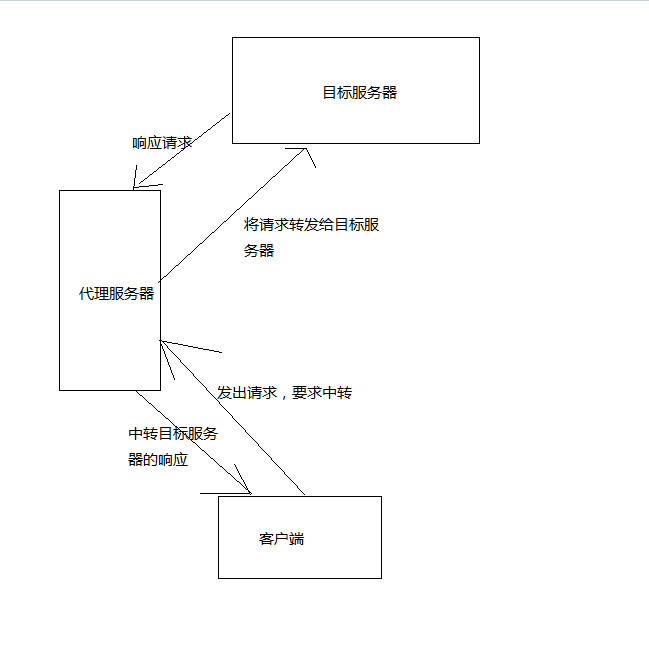
我使用的是一家叫阿布云的服务商,提供的服务比较稳定优质,就是有点贵,根据阿布云官网的示例代理,我将httphelp修改成了
   public static string DownLoadString(string url)

        {

            string Source = string.Empty;

            try

            {

                  string proxyHost = "http://proxy.abuyun.com";

                      string proxyPort = "";

            // 代理隧道验证信息

                       string proxyUser = "H71T6AMK7GREN0JD";

                        string proxyPass = "D3F01F3AEFE4E45A";

            var proxy = new WebProxy();

            proxy.Address = new Uri(string.Format("{0}:{1}", proxyHost, proxyPort));

            proxy.Credentials = new NetworkCredential(proxyUser, proxyPass);

            ServicePointManager.Expect100Continue = false;

                Stopwatch watch = new Stopwatch();

                watch.Start();

                HttpWebRequest request = (HttpWebRequest)WebRequest.Create(url);

                request.UserAgent = "Mozilla/5.0 (Windows NT 10.0; WOW64; rv:49.0) Gecko/20100101 Firefox/49.0";

                request.Headers.Add("Cookie", "q_c1=17d0e600b6974387b1bc3a0117d21c50|1483348502000|1483348502000; l_cap_id=\"NjVhNGM1ODhmZWJlNDE4MDk1OTRlMDU0NTRmMmU3NzY=|1483348502|ce7951227c840cde8d8356526547cfeddece44a8\"; cap_id=\"Y2QyODU3MTg0NTViNDIwZTk4YmRhMTk5YWI5MTY1MGQ=|1483348502|892544d61b1d04265cad1ad172a5911eaf47ebe2\"; d_c0=\"AEAC7iaxFwuPToc2DY_goP_H5QnNPxMReuU=|1483348504\"; r_cap_id=\"ODA5ZDI5YTQ1M2E2NDc1OWJlMjk0Nzk1ZWY4ZjQ1NTU=|1483348505|00d0a93219de27de0e9dfa2c2a6cbe0cbf7c0a36\"; _zap=ea616f49-be5d-4f94-98d8-fdec8f7d277b; __utma=51854390.2059985006.1483348508.1483348508.1483416071.2; __utmz=51854390.1483416071.2.2.utmcsr=baidu|utmccn=(organic)|utmcmd=organic; __utmv=51854390.100-1|2=registration_date=20160110=1^3=entry_date=20160110=1; login=\"ZDczZTgyMmUzZjY1NDQ1YTkzMDk2MTk5MTNjMDIxMTM=|1483348523|f1e570e14ceed6b61720c413dd8663527aea78fc\"; z_c0=Mi4wQUJCS0c2ZmVTUWtBUUFMdUpyRVhDeGNBQUFCaEFsVk5LNmVSV0FEc1hkcFV2YUdOaDExVjBTLU1KNVZ6OFRYcC1n|1483416083|3e5d60bef695bd722a95aea50f066c394cfcba9d; _xsrf=87b1049f227fe734a9577ec9f76342b3; __utmb=51854390.0.10.1483416071; __utmc=51854390");

                request.Headers.Add("Upgrade-Insecure-Requests", "");

                request.Headers.Add("Cache-Control", "no-cach");

                request.Accept = "*/*";

                request.Method = "GET";

                request.Referer = "https://www.zhihu.com/";

                request.Headers.Add("Accept-Encoding", " gzip, deflate, br");

                request.KeepAlive = true;//启用长连接

                request.Proxy = proxy;

                using (HttpWebResponse response = (HttpWebResponse)request.GetResponse())

                {

                    using (Stream dataStream = response.GetResponseStream())

                    {

                        if (response.ContentEncoding.ToLower().Contains("gzip"))//解压

                        {

                            using (GZipStream stream = new GZipStream(response.GetResponseStream(), CompressionMode.Decompress))

                            {

                                using (StreamReader reader = new StreamReader(stream, Encoding.UTF8))

                                {

                                    Source = reader.ReadToEnd();

                                }

                            }

                        }

                        else if (response.ContentEncoding.ToLower().Contains("deflate"))//解压

                        {

                            using (DeflateStream stream = new DeflateStream(response.GetResponseStream(), CompressionMode.Decompress))

                            {

                                using (StreamReader reader = new StreamReader(stream, Encoding.UTF8))

                                {

                                    Source = reader.ReadToEnd();

                                }

                            }

                        }

                        else

                        {

                            using (Stream stream = response.GetResponseStream())//原始

                            {

                                using (StreamReader reader = new StreamReader(stream, Encoding.UTF8))

                                {

                                    Source = reader.ReadToEnd();

                                }

                            }

                        }

                    }

                }

                request.Abort();

                watch.Stop();

                Console.WriteLine("请求网页用了{0}毫秒", watch.ElapsedMilliseconds.ToString());

            }

            catch

            {

                Console.WriteLine("出错了,请求的URL为{0}", url);

            }

            return Source;

        }
抓取百万知乎用户信息之HttpHelper的迭代之路的更多相关文章
- scrapy爬取全部知乎用户信息
# -*- coding: utf-8 -*- # scrapy爬取全部知乎用户信息 # 1:是否遵守robbots_txt协议改为False # 2: 加入爬取所需的headers: user-ag ...
- Python爬虫从入门到放弃(十八)之 Scrapy爬取所有知乎用户信息(上)
爬取的思路 首先我们应该找到一个账号,这个账号被关注的人和关注的人都相对比较多的,就是下图中金字塔顶端的人,然后通过爬取这个账号的信息后,再爬取他关注的人和被关注的人的账号信息,然后爬取被关注人的账号 ...
- Python之爬虫(二十) Scrapy爬取所有知乎用户信息(上)
爬取的思路 首先我们应该找到一个账号,这个账号被关注的人和关注的人都相对比较多的,就是下图中金字塔顶端的人,然后通过爬取这个账号的信息后,再爬取他关注的人和被关注的人的账号信息,然后爬取被关注人的账号 ...
- Python爬虫从入门到放弃(十九)之 Scrapy爬取所有知乎用户信息(下)
在上一篇文章中主要写了关于爬虫过程的分析,下面是代码的实现,完整代码在:https://github.com/pythonsite/spider items中的代码主要是我们要爬取的字段的定义 cla ...
- Python之爬虫(二十一) Scrapy爬取所有知乎用户信息(下)
在上一篇文章中主要写了关于爬虫过程的分析,下面是代码的实现,完整代码在:https://github.com/pythonsite/spider items中的代码主要是我们要爬取的字段的定义 cla ...
- 基于webmagic的爬虫小应用--爬取知乎用户信息
听到“爬虫”,是不是第一时间想到Python/php ? 多少想玩爬虫的Java学习者就因为语言不通而止步.Java是真的不能做爬虫吗? 当然不是. 只不过python的3行代码能解决的问题,而Jav ...
- python3编写网络爬虫22-爬取知乎用户信息
思路 选定起始人 选一个关注数或者粉丝数多的大V作为爬虫起始点 获取粉丝和关注列表 通过知乎接口获得该大V的粉丝列表和关注列表 获取列表用户信息 获取列表每个用户的详细信息 获取每个用户的粉丝和关注 ...
- scrapy 知乎用户信息爬虫
zhihu_spider 此项目的功能是爬取知乎用户信息以及人际拓扑关系,爬虫框架使用scrapy,数据存储使用mongo,下载这些数据感觉也没什么用,就当为大家学习scrapy提供一个例子吧.代码地 ...
- 如何有效抓取SQL Server的BLOCKING信息
原文:如何有效抓取SQL Server的BLOCKING信息 转自:微软亚太区数据库技术支持组 官方博客 http://blogs.msdn.com/b/apgcdsd/archive/2011/12 ...
随机推荐
- JAVA NIO Scatter/Gather(矢量IO)
矢量IO=Scatter/Gather: 在多个缓冲区上实现一个简单的IO操作.减少或避免了缓冲区拷贝和系统调用(IO) write:Gather 数据从几个缓冲区顺序抽取并沿着通道发送,就好 ...
- [Hadoop in Action] 第2章 初识Hadoop
Hadoop的结构组成 安装Hadoop及其3种工作模式:单机.伪分布和全分布 用于监控Hadoop安装的Web工具 1.Hadoop的构造模块 (1)NameNode(名字节点) ...
- [转]ASP.NET Core 开发-Logging 使用NLog 写日志文件
本文转自:http://www.cnblogs.com/Leo_wl/p/5561812.html ASP.NET Core 开发-Logging 使用NLog 写日志文件. NLog 可以适用于 . ...
- JS--浏览器兼容之new Date
Js 中有一个Date属性. 我们可以通过new Date(formatString) 来生命日期. 不过生命日期里面有一个坑就是. new Date('2016-05-13'), Chrome 和 ...
- 国际化(Internationalization)
1:什么是国际化? 国际化(internationalization)是设计和制造容易适应不同区域要求的产品的一种方式.它要求从产品中抽离所有的与语言,国家/地区和文化相关的元素.换言之,应用程序的功 ...
- CRM 安全证书到期操作命令
I found a related TechNet Blog that shed some light on the subject:http://blogs.technet.com/b/tune_i ...
- [LeetCode] Word Pattern II 词语模式之二
Given a pattern and a string str, find if str follows the same pattern. Here follow means a full mat ...
- [LeetCode] Isomorphic Strings 同构字符串
Given two strings s and t, determine if they are isomorphic. Two strings are isomorphic if the chara ...
- 一个简单的ASP.NET MVC异常处理模块
一.前言 异常处理是每个系统必不可少的一个重要部分,它可以让我们的程序在发生错误时友好地提示.记录错误信息,更重要的是不破坏正常的数据和影响系统运行.异常处理应该是一个横切点,所谓横切点就是各个部分都 ...
- C/C++头文件区别
在从C迁移到C++时,引用的头文件经常忘记是C的还是C++特有的 1. *.h limits.h ctype.h 2. c* climits cctype [结尾不含.h] 3. 其余的都属于C+ ...