
ELKStack入门篇(三)之logstash收集日志写入redis
1、部署Redis
1.1、下载redis
[root@linux-node2 ~]# wget http://download.redis.io/releases/redis-4.0.6.tar.gz

[root@linux-node2 ~]# tar -zxvf redis-4.0..tar.gz

[root@linux-node2 ~]# mv redis-4.0. /usr/loca/src

[root@linux-node2 ~]# cd /usr/local/src/redis-4.0.

[root@linux-node2 redis-4.0.]# make

[root@linux-node2 redis-4.0.]# ln -sv /usr/local/src/redis-4.0. /usr/local/redis

[root@linux-node2 redis-4.0.]# cd /usr/local/redis
1.2、配置redis
[root@linux-node2 redis]# vim redis.conf

bind 192.168.56.12

daemonize yes

save ""

requirepass     #开启认证

[root@linux-node2 redis]# cp /usr/local/src/redis-4.0./src/redis-server /usr/bin/

[root@linux-node2 redis]# cp /usr/local/src/redis-4.0./src/redis-cli /usr/bin/

[root@linux-node2 redis]# redis-server /usr/local/redis/redis.conf

:C  Jan ::26.801 # oO0OoO0OoO0Oo Redis is starting oO0OoO0OoO0Oo

:C  Jan ::26.801 # Redis version=4.0., bits=, commit=, modified=

:C  Jan ::26.801 # Configuration loaded
1.3、测试redis
[root@linux-node2 ~]# netstat -tulnp |grep

tcp               192.168.56.12:      0.0.0.0:*               LISTEN      /redis-server

[root@linux-node2 redis]# redis-cli -h 192.168.56.12

192.168.56.12:> KEYS *

(error) NOAUTH Authentication required.

192.168.56.12:> auth

OK

192.168.56.12:> KEYS *

(empty list or set)

192.168.56.12:> quit
2、配置logstash将日志写入redis
2.1、配置logstash的system.conf
[root@linux-node1 conf.d]# vim system.conf

input {

  file {

        path => "/var/log/messages"

        type => "systemlog"

        start_position => "beginning"

        stat_interval => ""

  }

}

output {

  if [type] == "systemlog" {

        redis {

                data_type => "list"

                host => "192.168.56.12"

                db => ""

                port => ""

                password => ""

                key => "systemlog"

        }

  }

}
2.2、检测配置语法
[root@linux-node1 conf.d]# /usr/share/logstash/bin/logstash -f /etc/logstash/conf.d/sy

OpenJDK -Bit Server VM warning: If the number of processors is expected to increase CThreads=N

WARNING: Could not find logstash.yml which is typically located in $LS_HOME/config or

Could not find log4j2 configuration at path /usr/share/logstash/config/log4j2.properti

Configuration OK

[root@linux-node1 conf.d]# systemctl restart logstash
2.3、写入messages日志测试
[root@linux-node1 conf.d]# cat /etc/hosts >> /var/log/messages

[root@linux-node1 conf.d]# echo "helloword" >> /var/log/messages
2.4、登陆redis中查看
[root@linux-node2 ~]# redis-cli -h 192.168.56.12

192.168.56.12:> KEYS *

(error) NOAUTH Authentication required.

192.168.56.12:> AUTH

OK

192.168.56.12:>

192.168.56.12:> select

OK

192.168.56.12:[]> KEYS *

) "systemlog"

192.168.56.12:[]> LLEN systemlog      #查看key的长度

(integer)

192.168.56.12:[]> LLEN systemlog

(integer)

192.168.56.12:[]> LPOP systemlog    #展示一条记录会减少一条

"{\"@version\":\"1\",\"host\":\"linux-node1\",\"path\":\"/var/log/messages\",\"@timestamp\":\"2018-01-02T03:04:40.424Z\",\"type\":\"systemlog\",\"tags\":[\"_geoip_lookup_failure\"]}"

192.168.56.12:[]> LLEN systemlog

(integer)
3、配置logstash从reids中取出数据到elasticsearch
3.1、使用linux-node2上的logstash从redis取数据
[root@linux-node2 conf.d]# vim redis-es.conf

input {

    redis {

        data_type => "list"

        host => "192.168.56.12"

        db => ""

        port => ""

        key => "systemlog"

        password => ""

    }

}

output {

    elasticsearch {

        hosts => ["192.168.56.11:9200"]

        index => "redis-systemlog-%{+YYYY.MM.dd}"

    }

}

[root@linux-node2 conf.d]# /usr/share/logstash/bin/logstash -f /etc/logstash/conf.d/redis-es.conf -t

OpenJDK -Bit Server VM warning: If the number of processors is expected to increase from one, then you should configure the number of parallel GC threads appropriately using -XX:ParallelGCThreads=N

WARNING: Could not find logstash.yml which is typically located in $LS_HOME/config or /etc/logstash. You can specify the path using --path.settings. Continuing using the defaults

Could not find log4j2 configuration at path /usr/share/logstash/config/log4j2.properties. Using default config which logs errors to the console

Configuration OK

[root@linux-node2 conf.d]# systemctl restart logstash
3.2、从linux-node1上写入数据查看
[root@linux-node1 conf.d]# cat /etc/passwd >> /var/log/messages

[root@linux-node2 ~]# redis-cli -h 192.168.56.12

192.168.56.12:> KEYS *

(error) NOAUTH Authentication required.

192.168.56.12:> AUTH

OK

192.168.56.12:> select

OK

192.168.56.12:[]> KEYS *

) "systemlog"

192.168.56.12:[]> LLEN systemlog      #查看数据长度为38

(integer)

192.168.56.12:[]> LLEN systemlog      #配置成功logstash从redis中取完数据,redis长度变成0

(integer)
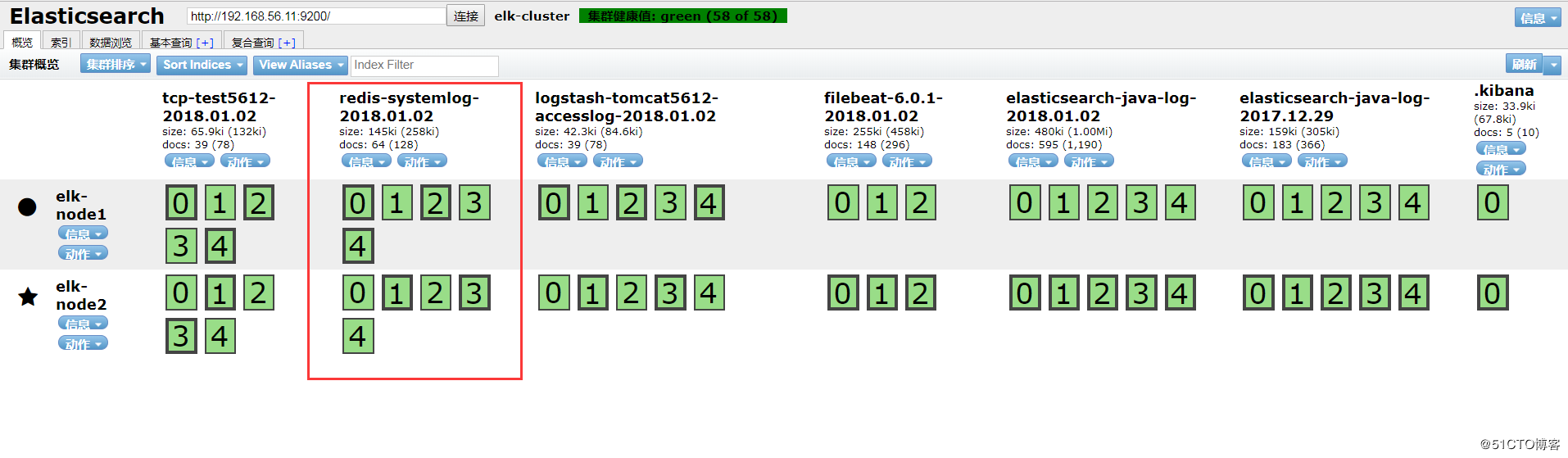
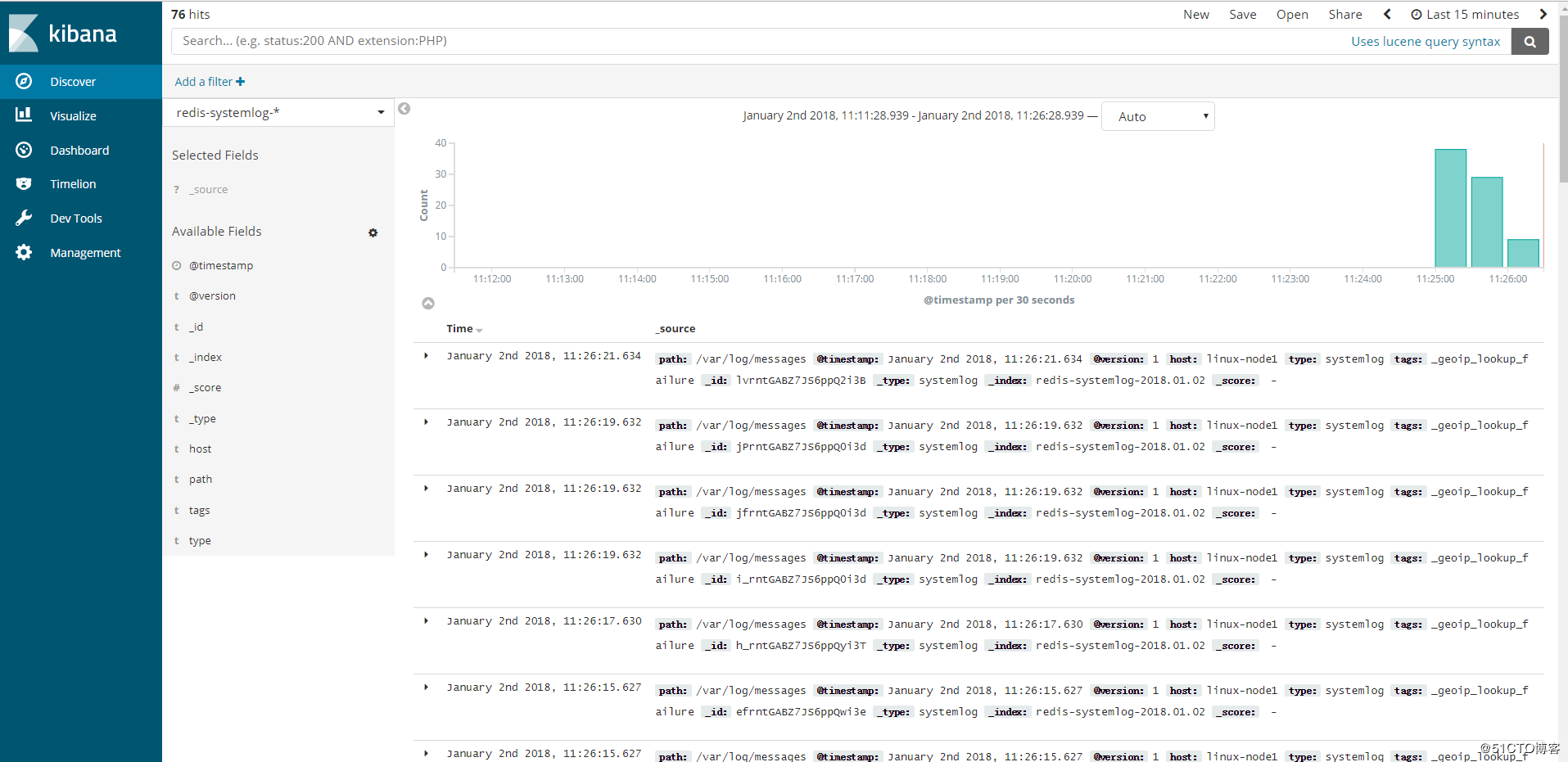
3.3、head插件和Kibana添加索引查看

ELKStack入门篇(三)之logstash收集日志写入redis的更多相关文章
- ELK快速入门(三)logstash收集日志写入redis
ELK快速入门三-logstash收集日志写入redis 用一台服务器部署redis服务,专门用于日志缓存使用,一般用于web服务器产生大量日志的场景. 这里是使用一台专门用于部署redis ,一台专 ...
- ELK之logstash收集日志写入redis及读取redis
logstash->redis->logstash->elasticsearch 1.安装部署redis cd /usr/local/src wget http://download ...
- ELK快速入门(四)filebeat替代logstash收集日志
ELK快速入门四-filebeat替代logstash收集日志 filebeat简介 Filebeat是轻量级单用途的日志收集工具,用于在没有安装java的服务器上专门收集日志,可以将日志转发到log ...
- ELK快速入门(二)通过logstash收集日志
ELK快速入门二-通过logstash收集日志 说明 这里的环境接着上面的ELK快速入门-基本部署文章继续下面的操作. 收集多个日志文件 1)logstash配置文件编写 [root@linux-el ...
- ELKStack入门篇(一)之ELK部署和使用
一.ELKStack简介 1.ELK介绍 中文指南:https://www.gitbook.com/book/chenryn/elk-stack-guide-cn/details ELK Stack包 ...
- 【SSRS】入门篇(三) -- 为报表定义数据集
原文:[SSRS]入门篇(三) -- 为报表定义数据集 通过前两篇文件 [SSRS]入门篇(一) -- 创建SSRS项目 和 [SSRS]入门篇(二) -- 建立数据源 后, 我们建立了一个SSRS项 ...
- ELK之filebeat替代logstash收集日志
filebeat->redis->logstash->elasticsearch 官网下载地址:https://www.elastic.co/downloads/beats/file ...
- ELKStack入门篇(二)之Nginx、Tomcat、Java日志收集以及TCP收集日志使用
1.收集Nginx的json格式日志 1.1.Nginx安装 [root@linux-node1 ~]# yum install nginx -y [root@linux-node1 ~]# vim ...
- ELKStack入门篇(四)之Filebeat
Filebeat是轻量级单用途的日志收集工具,用于在没有安装java的服务器上专门收集日志,可以将日志转发到logstash.elasticsearch或redis等场景中进行下一步处理. 官方文档: ...
随机推荐
- PAT——1049. 数列的片段和
给定一个正数数列,我们可以从中截取任意的连续的几个数,称为片段.例如,给定数列{0.1, 0.2, 0.3, 0.4},我们有(0.1) (0.1, 0.2) (0.1, 0.2, 0.3) (0.1 ...
- PAT——1023. 组个最小数
给定数字0-9各若干个.你可以以任意顺序排列这些数字,但必须全部使用.目标是使得最后得到的数尽可能小(注意0不能做首位).例如:给定两个0,两个1,三个5,一个8,我们得到的最小的数就是1001555 ...
- [LuoguP1438]无聊的数列(差分+线段树/树状数组)
\(Link\) \(\color{red}{\mathcal{Description}}\) 给你一个数列,要求支持单点查询\(and\)区间加等差数列. \(\color{red}{\mathca ...
- Shell笔记-01
打开文本编辑器,新建一个文件,扩展名为sh(sh代表shell),扩展名并不影响脚本执行,见名知意就好,如果你用php写shell 脚本,扩展名就用php好了. 输入一些代码: #!/bin/bash ...
- web测试--数据分层测试
转自:51Testing 测试效率低下?很多时间都在等程序开发功能,直到界面层展现出来数据后,我们才能介入测试,然后忙的焦头烂额,上线前心里还没底.亦或者发现一个Bug,发给程序猿A查,程序猿A说,可 ...
- Boost asio基本概念
asio库基于操作系统提供的异步机制,采用前摄器模式(Proactor)实现可移植的异步(或同步)IO操作,不需要使用多线程和锁,有效避免多线程编程带来的诸多有害副作用(如竞争,死锁). asio封装 ...
- SharePoint2013代码操作权限组的几个Demo
1,清明节闲来无聊,敲代码吧,不知道敲什么,不敲吧,又好像比较颓废,不思进取.遂把以前项目中别的同事负责的权限模块的代码看一看,做俩个Demo. (1)代码创建组 protected void Cre ...
- OpenID Connect Core 1.0(七)使用混合流验证
3.3 使用混合流验证(Authentication using the Hybrid Flow) 本节描述如何使用混合流执行验证.当使用混合流(Hybrid Flow)时一些令牌从授权端点返回,另一 ...
- 纯javascript实现选择框的全选与反选
HTML部分 <div id="wrap_input_box" > <input type="checkbox"><br> ...
- CSS3 过渡、变形和动画
一.我们来给按钮增加一个悬停效果:#content a:hover {border: 1px solid #000000;color: #000000;text-shadow: 0px 1px whi ...