
pdf地址展示成Swiper轮播方式-复制链接
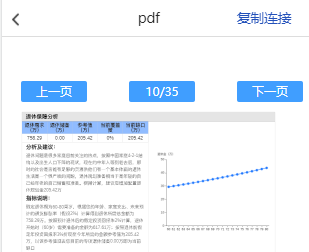
1、安装vue-pdf插件,swiper插件、clipboard
npm install vue-pdf -s
npm install swiper -S
npm install clipborad -S
2、使用,标题头提取的组件,slot占位


<template>
<div class="pagepdf">
<page-title :headerSetting="headerSetting">
<!-- header_left就插槽名,不用默认就用slot -->
<div slot="header_left" class="header_ico">
<img class="goBackIcon" :src="goBackIcon" alt="" />
</div>
<div slot="header_center">pdf</div>
<!-- header_right就插槽名,不用默认就用slot -->
<div slot="header_right" class="header_right copyDom" @click="copy(url)">
复制连接
</div>
</page-title> <div class="tools" v-show="lists.length>0">
<div class="swiper-button-prev mr10">上一页</div>
<div class="page">{{currentId}}/{{pageTotalNum}} </div>
<div class="swiper-button-next mr10">下一页</div>
</div>
<div class="">
<div id="tabApp1" class="swiper-container" style="visibility: hidden;">
<div class="swiper-wrapper" ref="swiperWrapper0">
<div class="swiper-slide" v-for="(item, index) in lists" :class="{ active: currentId == item.id }"
:key="index">
</div>
</div>
</div>
</div>
<div id="tabContain" class="tabContain swiper-container" v-show="lists.length>0">
<div class="swiper-wrapper"> <div class="swiper-slide" v-for="(item, index) in lists" :key="index">
<div>
<pdf :id="'pdfPreview'+index
" :src="pdfSrc" :page="index+1" class="pdf" ref="wrapper1" @progress="loadedRatio = $event"
@num-pages="pageTotalNum=$event" @error="pdfError($event)" @link-clicked="page = $event"> </pdf>
</div>
</div>
</div>
</div>
</div>
</template> <script>
import ClipboardJS from "clipboard";
import "swiper/dist/css/swiper.min.css";
import Swiper from "swiper";
import pdf from "vue-pdf";
export default {
components: {
pdf,
pageTitle: (resolve) => require(["@/components/title"], resolve),
},
data() {
return {
titleName: 'pdf',
url:'https://aaeasy-file.newbanker.cn/pic/testforyuhan/裴士杰的专属报告_2021-11-02_11_17_21.pdf',
vuePdf: null,
numPages: 1, // pdf 文件总页数
pageNum: 1,
pageTotalNum: '',
page: 1,
pageRotate: '',
scale: 100,
// swiper
mySwiper: null, //swiper实例
swiperWidth: 0, //swiper可视宽度
maxTranslate: "", //最大的滑动距离
maxWidth: "",
slide: {
offsetLeft: 0,
clientWidth: 0,
},
slideLeft: 0,
slideWidth: 0,
slideCenter: 0,
nowTlanslate: 0,
pageSwiper: {},
currentId: 1,
lists: [],
isHide: true,
// 头部浮层
headerSetting: {
backgroundColor: "transparent",
},
goBackIcon: require("@/assets/imgs/goback.png"),
pdfSrc:'',
}
},
mounted() {
let that = this;
that.initPdf(that.url);
that.mySwiper = new Swiper("#tabApp1", {
freeMode: true,
freeModeMomentumRatio: 0.5,
slidesPerView: "auto",
resistanceRatio: 0.7,
setWrapperSize: true,
observer: true,
observeParents: true,
loop: true,
on: {
tap: function(swiper) {
// if (this.currentId <= this.pageTotalNum) {
that.swiperWidth = that.$refs.swiperWrapper0.clientWidth;
that.maxTranslate = that.mySwiper.maxTranslate();
that.maxWidth = -that.maxTranslate + that.swiperWidth / 2; if ((that.currentId) == that.lists[this.clickedIndex].id) {
return;
}
that.currentId = that.lists[this.clickedIndex].id;
that.slide = this.slides[this.clickedIndex];
that.slideLeft = that.slide.offsetLeft;
that.slideWidth = that.slide.clientWidth;
that.slideCenter = that.slideLeft + that.slideWidth / 2;
that.mySwiper.setTransition(300);
if (that.slideCenter < that.swiperWidth / 2) {
that.mySwiper.setTranslate(0);
} else if (that.slideCenter > that.maxWidth) {
that.mySwiper.setTranslate(that.maxTranslate);
} else {
var nowTlanslate = that.slideCenter - that.swiperWidth / 2;
that.mySwiper.setTranslate(-nowTlanslate);
}
that.pageSwiper.slideTo(this.clickedIndex, 200, false);
},
},
});
//swiper里边内容
that.pageSwiper = new Swiper("#tabContain", {
autoplay: false,
direction: "horizontal", // 切换选项
resistanceRatio: 0,
paginationClickable: true,
watchSlidesProgress: true,
setWrapperSize: true,
observer: true,
observeParents: true,
loop: true,
navigation: {
nextEl: '.swiper-button-next',
prevEl: '.swiper-button-prev',
},
on: {
slideChangeTransitionEnd: function() {},
slideChange: function() {
that.swiperWidth = that.$refs.swiperWrapper0.clientWidth;
that.maxTranslate = that.mySwiper.maxTranslate();
that.maxWidth = -that.maxTranslate + that.swiperWidth / 2;
that.currentId = this.activeIndex + 1;
that.slide = that.mySwiper.slides[that.currentId];
that.slideLeft = that.slide.offsetLeft;
that.slideWidth = that.slide.clientWidth;
that.slideCenter = that.slideLeft + that.slideWidth / 2;
that.mySwiper.setTransition(300);
if (that.slideCenter < that.swiperWidth / 2) {
that.mySwiper.setTranslate(0);
} else if (that.slideCenter > that.maxWidth) {
that.mySwiper.setTranslate(that.maxTranslate);
} else {
var nowTlanslate = that.slideCenter - that.swiperWidth / 2;
that.mySwiper.setTranslate(-nowTlanslate);
}
},
},
});
},
watch: {
'lists': {
handler(newVal) {
if (newVal) {
this.isHide = false; }
},
deep: true,
},
},
methods: {
initPdf(url) {
this.pdfSrc = pdf.createLoadingTask(url)
this.pdfSrc.then(pdf => {
this.pageTotalNum = pdf.numPages
let arr = [];
if (this.pageTotalNum > 0) {
for (let i = 1; i <= this.pageTotalNum; i++) {
let obj = {}
obj.id = i;
obj.name = 'name' + i;
arr.push(obj)
}
this.lists = arr;
}
})
},
// 页面加载回调函数,其中e为当前页数
pageLoaded(e) {
this.curPageNum = e;
},
// 其他的一些回调函数。
pdfError(error) {
console.error(error);
},
copy(val) {
if (val) {
var clipboard = new ClipboardJS(".copyDom", {
text: (trigger) => {
return val
}
});
clipboard.on("success", e => {
//复制成功
this.$commonJS.toastI('pdf地址复制成功');
console.log(val)
// 释放内存
clipboard.destroy();
});
clipboard.on("error", e => {
// 不支持复制
console.log("该浏览器不支持自动复制");
this.$commonJS.toastI('复制失败');
// 释放内存
clipboard.destroy();
});
}
}, }
}
</script>
<style scoped lang="less">
.mr10,
.page {
width: 1.5rem;
height: .5rem;
background: #409EFF;
border-radius: .05rem;
display: inline-block;
line-height: .5rem;
text-align: center;
position: relative;
color: #fff;
flex: 1;
margin: 0.5rem 0.6rem 0;
&.swiper-button-prev {margin-left:.2rem;}
&.swiper-button-next{margin-right:.2rem;}
} .title {
text-align: center;
margin-bottom: 0.5rem;
} .title {
text-align: center;
margin-bottom: 0.5rem;
} // swiper
.tabContain { .vs {
border: 1px solid #fdd;
margin: 0 0.3rem;
overflow: hidden;
min-height: 2.9rem;
}
} .tab {
overflow: hidden;
position: relative;
margin-left: 0.3rem;
height: 0.7rem; &::after {
position: absolute;
content: "";
left: 0;
bottom: 0;
right: 0;
height: 1px;
background: #e6e6e6;
} #tabApp {
width: 100%;
overflow: hidden; .swiper-slide {
width: auto;
flex-shrink: 0;
font-size: 0.32rem;
font-family: PingFangSC, PingFangSC-Regular;
font-weight: 400;
color: #333333;
line-height: 0.48rem;
padding: 0.1rem 0.15rem; &.active {
font-size: 0.34rem;
font-family: PingFangSC, PingFangSC-Medium;
font-weight: bold;
color: #000000;
} span {
transition: all 0.3s ease;
display: block;
} &:first-child {
padding-left: 0;
}
}
}
} .w100 {
width: 100%;
} .swiper-slide {
.pdf {
width:100%;
}
} .swiper-slide.active {
font-size: 0.34rem;
font-family: PingFangSC, PingFangSC-Medium;
font-weight: bold;
color: #000000;
} .loading {
width: 100%;
height: 100%;
background: rgba(255, 255, 255, 0.1);
top: 0;
left: 0;
position: fixed;
z-index: 100;
} /deep/.pageTitle .pTitle .right {
width: 1.6rem; }
.header_right {
color: #2351ba; }
.tools {
display: flex;
}
.pagepdf {
height: 100vh;
width: 100%;
margin-top:1rem;
}
.header_ico {
width: 0.64rem;
img {
width: 100%;
}
}
</style>
3、title.vue标题头组件
<template>

  <div class="pageTitle">

    <div class="pTitle" :style="{ background: headerSetting.backgroundColor }">

      <div class="left" @click="goBack()">

        <!-- 以插槽形式对外开放,支持自定义。默认右边不展示 -->

        <slot name="header_left"><</slot>

      </div>

      <div class="center"><slot name="header_center"></slot></div>

      <div class="right">

        <!-- 以插槽形式对外开放,支持自定义。默认右边不展示 -->

        <slot name="header_right"></slot>

      </div>

    </div>

  </div>

</template>

<script>

export default {

  props: {

    headerSetting: {

      backgroundColor: "transparent", //背景色

      default: () => {

        return {

          backgroundColor: "transparent",

        };

      },

    },

  },

  methods: {

    goBack() {},

  },

};

</script>

<style scoped lang="less">

/* // 页面顶部header的样式文件 */

.pageTitle {

  z-index: 999;

  padding-top: 0;

  .pTitle {

    position: fixed;

    left: 0;

    top: 1.1rem;

    z-index: 9;

    color: rgb(51, 51, 51);

    font-size: 0.32rem;

    word-break: break-all;

    width: 100%;

    background: transparent;

    height: 0.88rem;

    line-height: 0.88rem;

    border-bottom: 0.5px solid #ddd;

    display: flex;

    &.noBorder {

      border: none;

    }

    .left {

      width: 1.38rem;

      height: 0.88rem;

      line-height: 0.88rem;

      text-align: center;

      & > .icon_fanhui3x {

        font-size: 0.88rem;

        font-weight: 1;

        margin-left: -0.2rem;

        width: 1.38rem;

        display: block;

        text-align: center;

      }

    }

    .center {

      color: #272727;

      text-align: center;

      flex: 1;

    }

    /* //单行省略号 */

    .ellipsis {

      overflow: hidden;

      white-space: nowrap;

      text-overflow: ellipsis;

    }

    .right {

      width: 2rem;

      height: 0.88rem;

      line-height: 0.88rem;

      display: flex;

    }

  }

  .blank {

    width: 100%;

    height: 0.88rem;

  }

  .disableSelection {

    -webkit-touch-callout: none;

    -webkit-user-select: none;

    -khtml-user-select: none;

    -moz-user-select: none;

    -ms-user-select: none;

    user-select: none;

    -o-user-select: none;

    pointer-events: none;

  }

  .doubleLines {

    display: block;

    height: 0.44rem;

    line-height: 0.44rem;

  }

}

</style>
pdf地址展示成Swiper轮播方式-复制链接的更多相关文章
- Swiper轮播隐藏再显示后不动
公告用Swiper轮播方式,在某些不需要显示公告的页面进行隐藏,在需要展示公告的页面进行显示时候,公告不能正常轮播,在条件里加入重新设置轮播方法等网上的一些方法仍然不行,最后解决方法: this.my ...
- 视频swiper轮播
关于本次文章的内容,实际上是咪咕阅读详情页中的一个前端需求要做的效果,不过比起原需求,此次案例已经被删减掉许多部分了.音频部分舍弃,调用客户端接口舍弃,并做一些整理.最后留下的是这个精简版的案例.方便 ...
- swiper轮播在ie浏览器上遇到的显示问题探索
前言: 最近项目有一个需求,想要下图效果,鼠标指向头像图片,图片会放大同时上面的轮播会跟着切换: 鼠标移开头像图片,图片变回原来的大小 注:下图是我根据上面需求已经实现的效果,所以截图方便说明 思考: ...
- 使用Swiper轮播插件引起的探索
提到Swiper轮播插件,小伙伴们应该不会感到陌生.以前我主要在移动端上使用,PC端使用较少. 注:这里需要注意的是,在PC端和移动端使用Swiper是不同的 官方给的版本有三个,分别是Swiper2 ...
- swiper轮播图(逆向自动切换类似于无限循环)
swiper插件轮播图,默认的轮播循序是会从右向左,第一张,第二张,第三张,然后肉眼可见是的从第三张从左到右倒回第一张,这样就会有些视觉体验不高, ,不过还是能够用swiper本身的特性更改成无限循环 ...
- swiper轮播问题之一:轮播图内容为动态数据生成时轮播图无法自动轮播
本人在用H5做移动端项目中使用Swiper遇到的两个问题,因此加深了对Swiper的掌握,分享出来对刚开始接触Swiper的童鞋们或多或少会有帮助. 首先,new Swiper的初始化最 ...
- Swiper轮播图
今天咱们来说一下.Swiper轮播图. 超级简单的: 翠花,上代码: <!DOCTYPE html> <html lang="en"> < ...
- 微信小程序_(组件)swiper轮播图
微信小程序swiper轮播图组件官方文档 传送门 Learn: swiper组件 一.swiper组件 indicator-dots:是否显示面板指示点[默认值false] autoplay:是否自动 ...
- Swiper轮播手动后不动
最近项目首页轮播图用了Swiper轮播,今天突然发现轮播图动画初始正常但是手动换过之后就不动了,解决方法有两种,具体根据采用的情况为准: 1.autoplayDisableOnInteraction: ...
- 一个页面多个bootstrip轮播以及一个页面多个swiper轮播 冲突问题
Bootstript轮播冲突 解决方法: 使用不同的id <div id="myCarousel1" class="carousel slide"> ...
随机推荐
- 【论文解读】NIPS 2021-HSWA: Hierarchical Semantic-Visual Adaption for Zero-Shot Learning.(基于层次适应的零样本学习)
作者:陈使明 华中科技大学
- Safari浏览器对SVG中的<foreignObject>标签支持不友好,渲染容易错位
在 svg 中需要写一个 markdown 编辑器,需要用到 <foreignObject> 绘制来html,编辑器选择了 simplemde.大致html部分结构如下,<markd ...
- vivo 服务端监控体系建设实践
作者:vivo 互联网服务器团队- Chen Ningning 本文根据"2022 vivo开发者大会"现场演讲内容整理而成. 经过几年的平台建设,vivo监控平台产品矩阵日趋完善 ...
- java RSA加密
参考了下面这个博主的文章,很有收获,简单处理后记录一下 RSA加密.解密.签名.验签的原理及方法 - PC君 - 博客园 工具类自带生成秘钥的方法,也可以用第三方工具生成秘钥 package com. ...
- python31 网络并发编程方法
同步与异步 用来表达任务的提交方式 同步 提交完任务之后原地等待任务的返回结果 期间不做任何事 异步 提交完任务之后不原地等待任务的返回结果 直接去做其他事 有结果自动通知 阻塞与非阻塞 用来表达任务 ...
- Java基础篇——多线程
创建线程的三种方式 1.继承Thread类 2.实现Runnable接口 3.实现Callable接口 继承Thread类 public Test extends Thread{ public voi ...
- Spring 和 Spring MVC的区别
Spring 和 Spring MVC的区别 学习Spring MVC也有几天时间了,那么Spring和Spring MVC的区别到底在哪里,二者是什么关系呢?认为二者是一个东西那肯定是不对的,而 ...
- 腾讯微信开源数据库PhxSQL简单部署记录
1.建立文件夹与互信关系 [root@mysql-100 ~]# mkdir -p /app/soft/phxsql [root@mysql-100 phxsql]# ssh-keygen -t rs ...
- C++获取含有中文字符的string长度
:前言 造车轮的时候要用到中文字符串的长度辨别,发现char的识别不准,进行了一番研究. > 开始研究 在Windows下,中文字符在C++中的内存占用为2字节,此时采用字符串长度获取函数得到的 ...
- Quorum NWR
1.强一致性与最终一致性 1.1强一致性 强一致性能保证写操作完成后,任何后续访问都能读到更新后的值:强一致性可以保证从库有与主库一致的数据.如果主库突然宕机,我们仍可以保证数据完整.但如果从库宕机或 ...